

If your current security strategy relies on a single tool to protect your data, are you actually secure or just lucky? Most developers and security teams recognize that APIs are now the primary target for modern data breaches. You likely feel the pressure to scan api for owasp top 10 vulnerabilities but worry that a comprehensive scan might crash your production environment or return a mountain of incomprehensible jargon. This concern is valid because a broken API is often just as costly as a vulnerable one.
This guide provides a clear, disciplined methodology to identify security risks using a multi-engine approach that ensures both depth and safety. You'll learn how to move beyond basic checks to gain a prioritized list of risks backed by a signed record of authorized scanning. We will examine how to integrate industry-standard tools like ZAP and Nuclei into a structured framework. This process produces actionable remediation steps without disrupting your existing workflow or compromising your legal standing. By following this methodical path, you can ensure your digital boundaries remain firm and your compliance records stay transparent.
Key Takeaways
- Identify the specific architectural risks that separate the API Security Top 10 from traditional web application vulnerabilities.
- Learn how to scan api for owasp top 10 using a multi-engine stack that integrates active and passive detection methods.
- Mitigate legal and operational risks by securing signed authorization records before initiating any vulnerability audit.
- Execute a disciplined five-step scanning process to ensure thorough coverage without disrupting your production environment.
- Prioritize your security efforts with structured reports that provide clear remediation guidance for every identified threat.
Understanding the OWASP Top 10 for API Security
The OWASP API Security Top 10 is a specialized framework designed to address the unique logic and architectural vulnerabilities found in modern interfaces. While traditional web application risks often focus on browser-based flaws like cross-site scripting, API risks are frequently rooted in authorization and data handling logic. This distinction is vital for any organization planning to scan api for owasp top 10 threats effectively. You cannot rely on legacy web scanners to find these flaws because they often lack the context needed to understand API calls. API security is the disciplined protection of data endpoints through continuous testing.
Why APIs are the New Primary Attack Vector
Why has the focus of cybersecurity shifted so heavily toward APIs? Modern software architecture has largely moved away from monolithic designs in favor of microservices and headless systems. This transition creates hundreds of individual endpoints that act as direct gateways to sensitive databases. Each exposed endpoint increases the attack surface, making them ideal targets for automated bots and malicious actors. We must also distinguish between traffic types. North-South traffic involves communication between the user and the server; East-West traffic occurs between internal services. Both require rigorous validation. A breach in one internal service can lead to lateral movement across the entire infrastructure if the API layer is not properly secured.
The Core Risks: From BOLA to Mass Assignment
The most prevalent threat in this category is Broken Object Level Authorization, commonly known as BOLA. This occurs when an API fails to verify if a user has permission to access a specific data object. It's a logic flaw that requires a sophisticated, multi-engine approach to detect. Other significant risks include:
- Broken Authentication: Weaknesses in token handling or credential validation that allow unauthorized access.
- Unrestricted Resource Consumption: A lack of rate limiting that leads to service degradation or denial-of-service conditions.
- Mass Assignment: Attackers exploiting unvalidated inputs to modify sensitive data properties they shouldn't reach.
A major hurdle in maintaining a secure posture is improper asset management. This leads to "shadow APIs," which are undocumented or legacy endpoints that remain active without security oversight. These forgotten gateways often lack the latest security patches and become the easiest path for an intrusion. To ensure your team is covering all necessary ground, review our REST API security audit checklist for a deeper dive into discovery and assessment strategies. When you scan api for owasp top 10 vulnerabilities, identifying these hidden endpoints is just as important as testing the known ones.
Mapping Scanning Tools to API Vulnerability Categories
How does Dynamic Application Security Testing (DAST) identify API flaws? Unlike static analysis, DAST interacts with the running application to find vulnerabilities that only appear during execution. When you scan api for owasp top 10 risks, you need to employ both active and passive techniques. Passive scanning observes traffic without modification to identify missing security headers or exposed sensitive metadata. Active scanning goes further by sending manipulated requests to test for injection, broken authorization, or logic failures. This dual approach ensures comprehensive coverage across the entire attack surface. It's not just about finding bugs; it's about validating that your security controls actually work in a live environment.
The Role of ZAP in API Security Testing
ZAP is a cornerstone for many security audits because of its flexibility with modern authentication. It handles complex authorization headers and API tokens with precision, ensuring the scanner can reach protected endpoints. To begin, you can import a Swagger or OpenAPI definition. This allows ZAP to "spider" the API, mapping out every available path, method, and parameter. Once mapped, the tool tests for common injection flaws and authentication weaknesses. It's particularly effective at discovering hidden endpoints that might not be linked elsewhere. This discovery phase is critical for identifying shadow APIs that often bypass standard security protocols. If you want to see how these features stack up against other options, check our comparison of automated security tools for a detailed breakdown.
Leveraging Nuclei for Rapid Vulnerability Detection
While ZAP focuses on discovery and logic, Nuclei excels at template-based detection of known vulnerabilities. It uses community-driven templates to target specific CVEs and misconfigurations that often plague API environments. How does this benefit your security posture? Nuclei can rapidly identify exposed metadata or misconfigured security headers that a manual audit might overlook. For example, it can detect improper CORS policies or exposed environment files that could lead to data leakage. Its lightweight nature allows it to run thousands of checks in seconds without significant performance impact. By combining these different engines, you create a more resilient defense. You can start a vulnerability scan for your API today to see these tools in action. This multi-engine approach ensures that you aren't relying on a single point of failure for your security insights.
The Critical Importance of Authorized Scanning
What separates a professional security audit from a cyberattack? The answer is explicit, written consent. Authorized scanning is the only ethical way to conduct security audits because it establishes clear boundaries between the tester and the target. When you scan api for owasp top 10 vulnerabilities without this permission, you risk being flagged by automated intrusion detection systems as a malicious actor. Unauthorized probing often leads to severe legal liability or unintended service disruption. It's common for aggressive automated tools to trigger rate limits or crash unstable endpoints if they aren't configured according to agreed-upon parameters. A signed authorization record is as important as the scan results themselves.
Avoiding the "Hacker" Label: Ethics in AppSec
Professional application security relies on a disciplined framework known as the Rules of Engagement. This document outlines exactly what will be tested, when the testing will occur, and which methods are strictly prohibited. Malicious probing ignores these constraints, often targeting third-party services or attempting to exfiltrate data. Legitimate platforms require domain ownership verification to ensure you have the legal right to test the infrastructure. This verification step prevents the tool from being weaponized against external targets. It creates a transparent environment where security teams can work without the fear of legal repercussions or ethical ambiguity.
The Value of a Signed Authorization Record
Why do you need a physical record of your scan? These documents are essential for meeting compliance standards and satisfying insurance audit requirements. Most cyber insurance policies require proof that security testing was performed under authorized conditions. Attaching a signed record to every scan report provides a clear audit trail for stakeholders and regulators. It demonstrates that your organization takes a principled approach to digital safety. ReadySECURE includes a signed authorization record with every result, ensuring that your security posture is backed by a legitimate legal framework. This level of transparency builds trust with partners who need to know that your scan api for owasp top 10 efforts are both thorough and lawful.
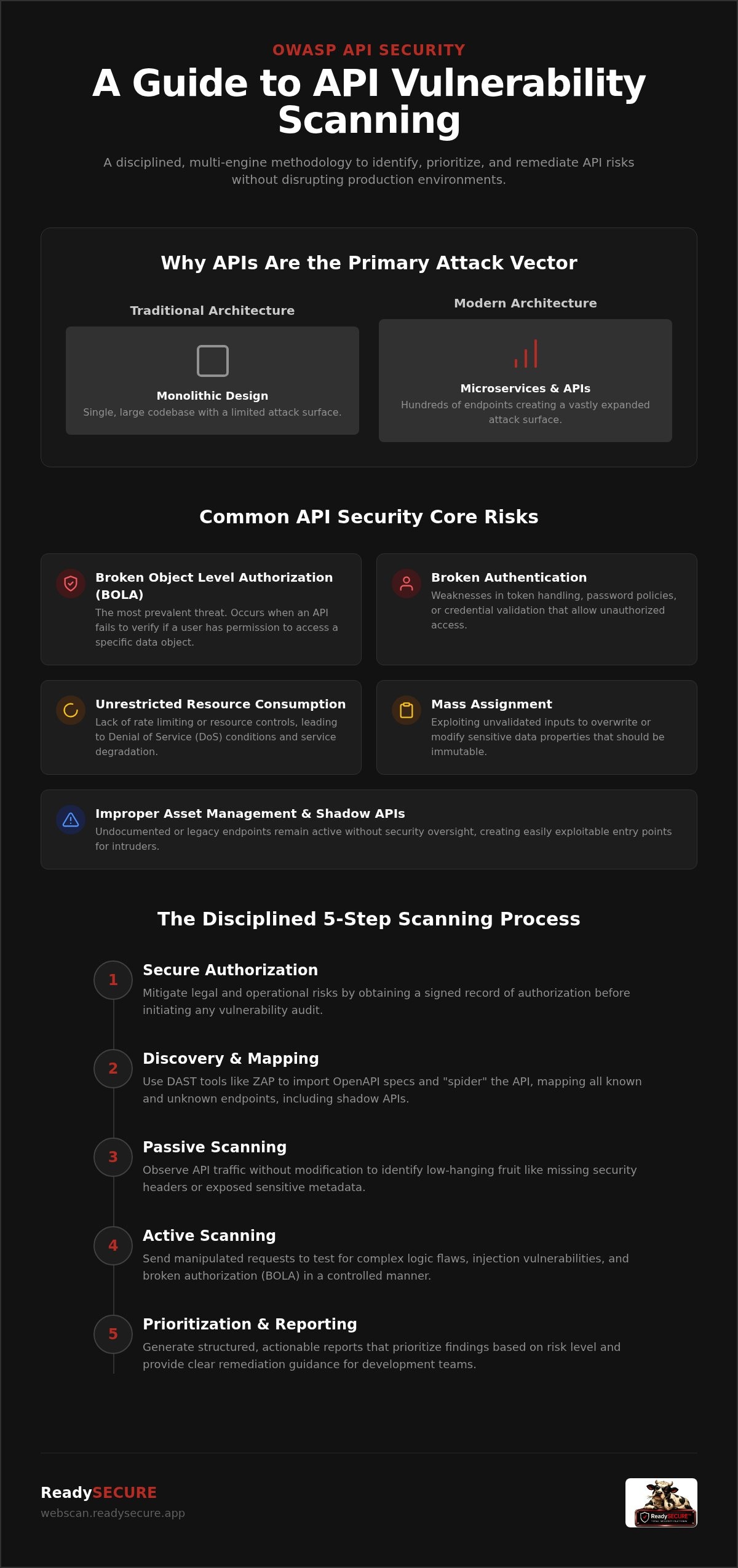
5 Steps to Run an API Security Scan for OWASP Top 10
How do you move from theory to execution? Running a successful scan api for owasp top 10 requires a disciplined, repeatable process. This ensures you catch critical flaws without causing operational downtime. Following a structured sequence allows your team to maintain a clear record of security improvements while avoiding the common pitfalls of automated testing. By breaking the process into these five functional steps, you can establish a reliable security baseline for any API domain.
- Step 1: Define the Scope and Authorize. Clearly identify the endpoints to be tested and secure a signed authorization record for the specific domain.
- Step 2: Authenticate the Scanner. Provide the scanner with valid API keys or OAuth tokens so it can reach protected routes and internal logic.
- Step 3: Execute the Scanning Stack. Run a multi-engine scan using Nmap for discovery, ZAP for active logic testing, and Nuclei for template-based vulnerability detection.
- Step 4: Prioritize Findings. Evaluate the results based on severity and CVSS scores to focus your remediation efforts on the most critical risks.
- Step 5: Remediate and Retest. Apply the necessary security patches and run a follow-up scan to verify that the vulnerabilities are fully resolved.
Preparing Your API for a Security Scan
Providing a Swagger or OpenAPI file is the most efficient way to guide your scanning tools. This documentation acts as a map, telling the scanner exactly where each endpoint is located and what parameters it expects. We recommend setting up a dedicated staging environment for this process. Testing in staging prevents accidental data corruption or service outages in your production environment. You must also ensure the scanner has the necessary permissions to access all relevant routes. Without proper authentication, your scan will only provide a surface-level view and may miss deep-seated authorization flaws like BOLA.
Analyzing and Prioritizing the Scan Report
Your scan report will likely contain a mix of High, Medium, and Informational findings. High-severity issues require immediate attention because they represent direct paths to data breaches. Informational findings often point out minor configuration improvements that don't pose an immediate threat but should still be addressed. It's also important to filter out false positives. These occur when a scanner misinterprets a legitimate response as a vulnerability. This rigorous analysis is a core pillar of a continuous security strategy. By consistently reviewing these results, you build a more resilient infrastructure over time. You can run your authorized API scan now to begin identifying and prioritizing these critical risks.
Implementing Continuous API Security with ReadySECURE
ReadySECURE serves as a disciplined platform for teams that need to scan api for owasp top 10 risks with professional precision. Relying on a single tool often leaves gaps in your defense. Our platform addresses this by running six industry-standard engines simultaneously, including ZAP for active logic testing and Nuclei for template-based detection. This multi-engine approach also integrates OpenVAS, Nmap, and TestSSL to provide a comprehensive view of your infrastructure. By consolidating these results into a single prioritized report, you gain a clear understanding of your security posture without the need to manage multiple complex installations. This methodical consolidation ensures that every functional claim is supported by practical data from various scanning perspectives.
Automated Scheduling and History Tracking
Why are one-off scans insufficient for modern environments? APIs change constantly as developers push new code and update microservices. A vulnerability that didn't exist yesterday could be introduced in this morning's deployment. Scheduled scans allow you to keep pace with these rapid development cycles by identifying regressions as soon as they appear. Through automated history tracking, you can conduct trend analysis to see if your security posture is improving or declining over time. These historical reports are invaluable for board-level updates. They provide a factual, data-driven record of your commitment to digital safety and regulatory compliance. This consistent oversight transforms security from a reactive task into a proactive, disciplined habit.
Getting Started with Your First Authorized Scan
Getting started is a straightforward process designed for transparency and speed. You begin by submitting your API domain and providing the necessary written authorization. This step ensures that every scan is legally documented and ethically sound, protecting both the auditor and the organization. Once the audit is complete, you receive a prioritized report that maps every finding to actionable remediation steps. This report eliminates the confusion of technical jargon by focusing on what needs to be fixed and why it matters. If you are looking for a low-friction entry point, the ReadySECURE Free Scan offers an immediate look at your external attack surface. It's time to move from manual checklists to a continuous, automated framework that respects your time and your production stability. Start your first authorized API scan for free to secure your endpoints against the latest threats.
Securing Your API Infrastructure for 2026 and Beyond
As digital architectures continue to evolve, the necessity for a disciplined security framework becomes undeniable. Protecting your data endpoints requires a move away from manual checklists toward automated, multi-engine testing. By implementing a structured process to scan api for owasp top 10 vulnerabilities, you ensure that logic flaws like BOLA and authentication weaknesses are identified before they can be exploited. This approach doesn't just secure your infrastructure; it also provides the signed authorization records necessary for modern compliance.
Effective protection is built on transparency and technical rigor. You can now leverage a platform that integrates industry-standard engines like ZAP, Nuclei, and OpenVAS to deliver prioritized reports with clear remediation guidance. This ensures your team spends time fixing critical issues rather than sifting through false positives. It's a practical way to maintain a resilient defense without disrupting production stability. Run a ReadySECURE Free Scan on your API today to establish a verifiable security baseline. Taking this proactive step today positions your organization as a trustworthy partner in an increasingly complex digital landscape.
Frequently Asked Questions
Can I scan an API for OWASP Top 10 vulnerabilities for free?
Yes, you can access professional security audits without an initial investment. The ReadySECURE Free Scan allows you to scan api for owasp top 10 risks on a single target that you own. This service provides a prioritized report and a signed authorization record. It is a disciplined way to establish a security baseline before moving to the frequent, scheduled monitoring features found in our paid plans.
Is it legal to scan an API I do not own?
No, scanning an API without explicit, written permission is generally illegal and unethical. Professional security platforms require domain ownership verification to ensure you have the legal right to test the infrastructure. Unauthorized probing can lead to severe legal liability and service disruption. We prioritize ethical clarity by attaching a signed authorization record to every scan, establishing a clear legal boundary for your security audits.
How often should I scan my API for security risks?
You should align your scanning frequency with your development cycle. One-off audits are often insufficient because modern APIs change as new code is deployed. We recommend running scans at least once a month or after every major update. Our paid plans offer automated scheduling and history tracking, which helps you monitor your security posture over time and identify regressions as soon as they appear.
What is the difference between an API scan and a website scan?
While both use DAST techniques, they target different layers of the application. A website scan focuses on the user interface and browser-side risks like cross-site scripting. An API scan focuses on data endpoints and logic-based vulnerabilities such as Broken Object Level Authorization. Because APIs act as direct gateways to databases, the scanning engines must be configured to handle complex authentication tokens and specific endpoint mapping.
Will an automated API scan break my application?
There is always a small risk of service disruption when running active security tests. Automated tools send manipulated requests that can trigger rate limits or crash unstable endpoints. To avoid production downtime, you should always scan a staging or development environment first. This disciplined approach allows you to scan api for owasp top 10 vulnerabilities safely without affecting your live users or disrupting critical business operations.
How do I interpret the severity scores in an API vulnerability report?
Severity scores are typically based on the Common Vulnerability Scoring System (CVSS). These scores help you prioritize your remediation efforts by ranking issues from Informational to Critical. You should always address Critical and High findings first, as these represent the most direct paths to data breaches. Our reports provide clear remediation guidance for every finding, ensuring your development team knows exactly how to fix the identified security issue.
Do I need a manual pentest if I use an automated API scanner?
Automated scanners provide a robust, continuous baseline, but they don't replace the need for deep logic testing in highly sensitive environments. While you can scan for the majority of risks automatically, some complex business logic flaws might require human analysis. Many organizations use automated scanning for frequent, scheduled checks and reserve manual audits for annual compliance requirements or major architectural changes to their core systems.
What tools are included in a ReadySECURE API scan?
Our platform utilizes a multi-engine stack to ensure comprehensive coverage. Every scan leverages six industry-standard tools to provide deep technical insights:
- ZAP for active and passive scanning
- Nuclei for template-based vulnerability detection
- OpenVAS for network-level scanning
- Nmap for port discovery and service mapping
- TestSSL for inspecting encryption protocols
This combined approach provides more accurate results than any single tool could offer alone.


