
The average cost of a data breach has reached $4.5 million, yet many organizations still hesitate to proactively scan a domain for vulnerabilities due to legal uncertainty. You likely recognize that identifying security flaws is the only way to stay ahead of modern attackers. However, the fear of accidentally disrupting services or crossing ethical boundaries often leads to paralysis. Is it possible to conduct deep security inspections without risking your operational stability or legal standing?
We agree that the sheer volume of security jargon can make even simple tasks feel overwhelming. It's frustrating to receive a report full of critical alerts without a clear sense of what to fix first. This guide provides the ethical, legal, and technical framework you need to identify risks using industry-standard methodologies. You'll learn how to transform raw data into a clean, prioritized list of security risks that satisfies both compliance auditors and insurance providers. We'll walk through a five-step workflow to ensure your scanning process is authorized, repeatable, and focused on tangible results. By the end of this guide, you'll have a disciplined approach to maintaining your digital perimeter.
Key Takeaways
- Understand the critical legal distinction between unauthorized probing and ethical scanning to ensure your security audits remain compliant.
- Implement a multi-engine methodology to scan domain for vulnerabilities using industry-standard tools like Nmap, ZAP, and OpenVAS.
- Follow a structured 5-step workflow to accurately define your digital scope and secure documented authorization before any testing.
- Learn to interpret CVE scores and severity levels so you can prioritize remediation efforts and avoid the trap of vulnerability fatigue.
What is a Vulnerability Scan and Why Does Your Domain Need One?
A Vulnerability scanner acts as a proactive, automated health check for your digital perimeter. It's a systematic process designed to identify security weaknesses before they're exploited by external threats. In 2026, the idea of "security through obscurity" is a dangerous myth. Cybercriminals don't target names; they target vulnerabilities. They use automated scripts to crawl the web, making every domain a potential target regardless of its size or industry. If your domain is online, it's being probed. The only question is whether you find the flaws before an attacker does.
How do these tools operate? They typically function through two methods: passive reconnaissance and active probing. Passive reconnaissance gathers data from public records, such as DNS settings and SSL certificates, without touching your server. Active probing is more direct. It sends specific requests to your infrastructure to see how it responds to known exploit patterns. To effectively scan domain for vulnerabilities, you must move beyond passive observation and engage in authorized, active testing that mimics real-world attack vectors.
Compliance is another driving factor for modern businesses. Frameworks like GDPR, SOC2, and PCI DSS v4.0.1 now require documented evidence of regular security testing. For example, PCI DSS mandates external scans at least every 90 days. Additionally, the EU Cyber Resilience Act (CRA) now requires manufacturers to report exploited vulnerabilities within 24 hours of discovery. These regulations ensure that organizations maintain a baseline of digital hygiene to protect consumer data and maintain operational integrity.
The Difference Between a Scan and a Penetration Test
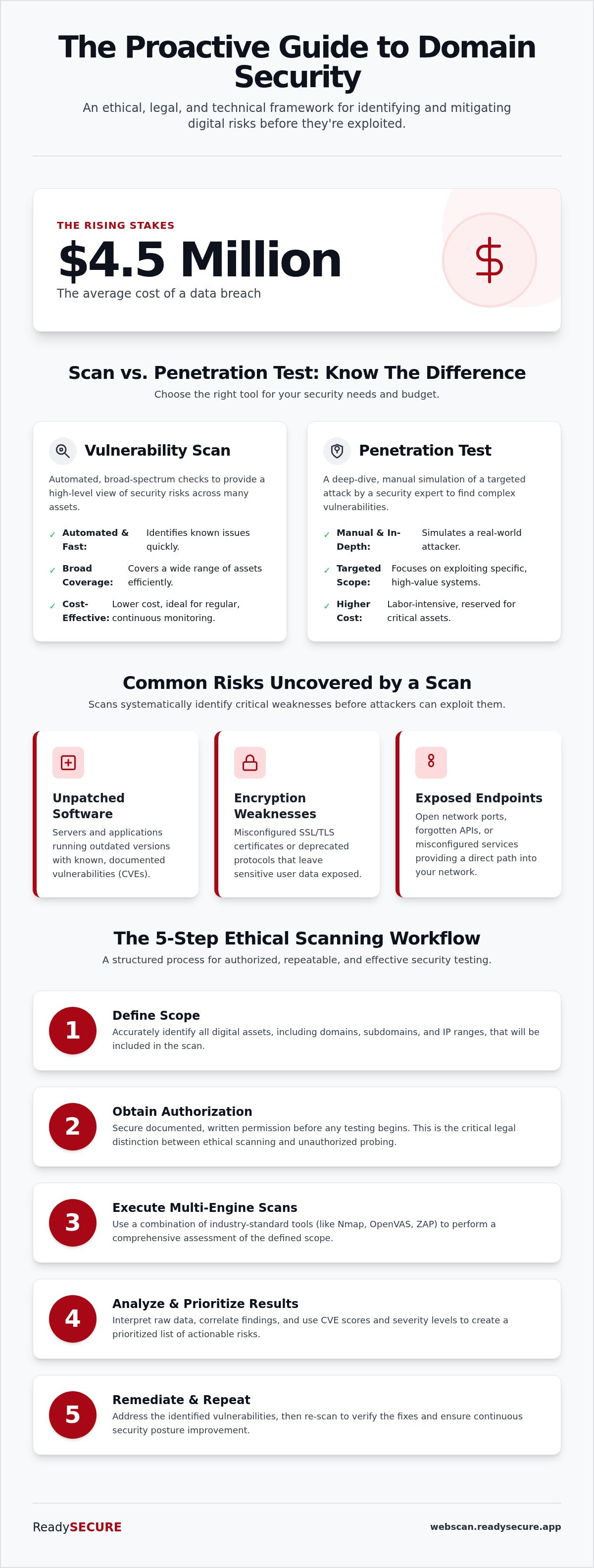
Is a scan the same as a penetration test? Not exactly. Scans are automated, frequent, and cover a broad spectrum of assets. They provide a high-level view of your risks at a fraction of the cost of manual testing. Penetration testing requires deep-dive human intervention to simulate a targeted attack. While both have value, most startups and SMBs should prioritize automated scanning. It's the most efficient way to maintain a continuous security baseline without the high overhead of manual labor.
Common Risks Found During a Domain Scan
What specific flaws do these scans uncover? Most reports highlight three critical areas of concern:
- Unpatched Software: Servers running outdated versions with documented CVEs (Common Vulnerabilities and Exposures).
- Encryption Weaknesses: Misconfigured SSL/TLS certificates or the use of deprecated, weak encryption protocols that expose user data.
- Exposed Endpoints: Open ports or forgotten API endpoints that offer a direct path into your internal network.
By identifying these risks early, you can move from a reactive "firefighting" mode to a disciplined, proactive security posture. This visibility allows you to allocate your limited IT resources to the fixes that matter most.
The Multi-Tool Approach: How Professional Scanners Work
Relying on a single tool to scan domain for vulnerabilities is like trying to inspect a building with only a flashlight. You'll see what's directly in front of you, but you'll miss the structural cracks hidden in the shadows. Professional security relies on a multi-tool approach because different scanners excel at different tasks. Using industry-standard open-source engines ensures transparency. You can verify exactly how the tests are performed without relying on proprietary "black box" logic. This methodology aligns with the technical framework established in NIST SP 800-115, which emphasizes a methodical, multi-layered approach to security assessments.
Why do we use multiple engines? It's the "Swiss Army Knife" vs. "Specialized Tool" debate. A general scanner might catch common issues, but it often lacks the depth required to find sophisticated configuration errors or new exploits. By combining specialized engines, you create a comprehensive safety net that leaves no stone unturned.
Network and Port Discovery (Nmap & OpenVAS)
Nmap is the industry standard for mapping your "attack surface." It identifies which ports are open and which services are listening for connections. However, knowing a port is open isn't enough to secure it. OpenVAS then steps in as the heavy-lifting engine to detect thousands of known system vulnerabilities associated with those identified services. These two work together to find the exact entry points an attacker might exploit to gain unauthorized access.
Web Application and SSL Inspection (ZAP & TestSSL)
Web applications require a different level of scrutiny. OWASP ZAP focuses on web-specific flaws like Cross-Site Scripting (XSS) and SQL Injection (SQLi). It offers both passive scanning, which observes traffic, and active scanning, which interacts with the application to find hidden bugs. Alongside this, TestSSL verifies your certificate health and server identity. It ensures your encryption isn't just present, but actually robust enough to meet modern standards. If you're ready to see how these tools look in action, you can start with a free domain scan to establish your baseline.
Modern Threat Detection (Nuclei)
Modern infrastructure moves fast. Nuclei uses template-based scanning to find specific, newly-released exploits across complex domain structures. Instead of scanning for everything at once, it uses targeted templates that are updated as soon as new zero-day vulnerabilities are discovered. This makes it incredibly efficient for SaaS and API architectures where speed is critical. This approach allows for targeted security checks that adapt to your specific technology stack.
Automated scheduling is the final piece of this workflow. It prevents "security drift," which happens when new code or configuration changes introduce risks between manual audits. Regular, automated checks ensure your perimeter stays secure as your environment evolves. To effectively scan domain for vulnerabilities, you must move from one-off checks to a continuous, multi-tooled monitoring cycle.
Authorized vs. Unauthorized Scanning: Staying Within the Law
The legal distinction between a security audit and a cyberattack often rests on a single factor: permission. Scanning a domain without explicit authorization can be interpreted as an attempted breach under many jurisdictions. It's the digital equivalent of testing the locks on a stranger's house. While your intentions might be to improve security, the law views unauthorized probing as a precursor to a crime. For any legitimate business, authorized scanning is the only ethical way to manage risk. It ensures you remain compliant with the Computer Fraud and Abuse Act (CFAA) and other international privacy regulations.
If your infrastructure resides in a cloud environment like AWS or Azure, you must also adhere to their specific terms of service. Most major providers allow customers to scan domain for vulnerabilities without prior notification for common services, but this only applies to assets you own. Probing a neighboring virtual machine on a shared host is a violation of your service agreement and could lead to account suspension. You must maintain a clear boundary between your authorized assets and the underlying provider infrastructure.
The Signed Authorization Record
Why is a timestamped record of permission so important? It serves as a critical trust signal for third parties. Cyber insurance providers and compliance auditors frequently require evidence that security testing was performed under a legal framework. A signed record provides this proof. It documents who authorized the scan, what assets were included, and when the activity took place. This is a standard part of the ReadySECURE workflow. By generating a signed authorization record for every scan, we provide you with a legal paper trail that protects both the scanner and the domain owner during audits or insurance renewals.
Verifying Domain Ownership
How do you prove you have the right to scan a specific target? Verification is the primary mechanism for preventing bad actors from using professional-grade tools for reconnaissance. We use industry-standard methods to confirm ownership, such as:
- DNS Record Validation: Adding a specific TXT record to your domain's DNS settings.
- File Uploads: Placing a unique validation file in the root directory of your web server.
- Email Verification: Confirming access through a registered administrative email address.
This process ensures that you only scan domain for vulnerabilities on "Internet-facing hosts" that you directly control. It prevents the misuse of scanning engines and ensures your security efforts are focused on your own digital perimeter. By verifying ownership, you can safely identify critical risks, such as those highlighted in the OWASP Top 10, without overstepping your legal boundaries.
5 Steps to Scan a Domain for Vulnerabilities
Conducting a security audit requires a disciplined approach to ensure thoroughness and legal safety. How do you move from a general desire for safety to a concrete list of actionable fixes? Following a structured methodology allows you to scan domain for vulnerabilities without disrupting your business operations. This five-step process ensures every asset is accounted for and every finding is verified.
- Step 1: Define the Scope. Identify all subdomains, staging environments, and APIs associated with your target. Vulnerabilities often hide in forgotten "shadow IT" assets that are no longer actively monitored.
- Step 2: Formalize Authorization. Ensure your legal paperwork is generated and signed. This step creates the necessary paper trail for insurance and compliance, protecting you from legal misunderstandings.
- Step 3: Configure Scan Intensity. Choose between passive discovery and active probing. Passive scans observe public data without direct interaction, while active scans interact with services to find deeper flaws.
- Step 4: Execute and Monitor. Run the multi-scanner engine, including tools like Nmap and ZAP. Monitor your server performance during the process to ensure the testing doesn't impact your user experience.
- Step 5: Review the Unified Report. Aggregate findings into a single, prioritized view. Instead of a raw data dump, focus on the risks that pose the greatest threat to your specific infrastructure.
Preparing Your Domain for a Scan
Before you begin, you must prepare your infrastructure for the incoming traffic. Start by whitelisting the scanner's IP addresses in your Web Application Firewall (WAF) to prevent false positives or blocked requests. It's also best practice to schedule scans during low-traffic periods. This minimizes any potential performance impact on your users. Finally, always ensure your backups are current. While professional tools are designed for safety, maintaining a recent backup is a standard requirement for any active security testing.
Running the ReadySECURE Free Scan
How can you start this process today? The ReadySECURE Free Scan provides a professional-grade entry point for a single target. It uses the same industry-standard engines as our paid plans to deliver a high-level overview of critical risks. You'll receive a clear report that identifies immediate threats, allowing you to verify domain ownership and establish your security baseline. To get started, you can start your free authorized scan here and receive your first prioritized report in minutes.
If you need to move beyond a single check, you can explore our automated scheduling options to ensure continuous monitoring of your entire digital perimeter.
Interpreting Results and Prioritizing Remediation
Receiving a security report can be a daunting experience. You might be presented with hundreds of alerts, ranging from minor configuration tweaks to severe system flaws. This often leads to "vulnerability fatigue," where the sheer volume of data prevents meaningful action. To effectively scan domain for vulnerabilities, you must move beyond the raw data and focus on risk-based prioritization. Fixing everything at once is impossible. Instead, you should aim to address the flaws that pose the highest risk to your specific business operations.
How do you distinguish between a minor annoyance and a major threat? The industry relies on CVE scores (Common Vulnerabilities and Exposures) to provide a standardized severity level. These scores range from 0 to 10. While a "Low" severity alert might simply point to a missing security header, a "Critical" alert (typically 9.0 or higher) indicates a flaw that could lead to full system compromise. Using these scores allows you to provide clear, data-driven remediation guidance to your development teams.
Triaging Your Security Report
The "Critical First" rule is the cornerstone of effective remediation. You must address exploits that allow remote code execution or unauthorized data theft before anything else. These are the "front doors" that attackers look for first. Once the critical threats are neutralized, you can turn your attention to "Quick Wins." These are often simple configuration changes, such as disabling deprecated TLS versions or updating server headers, that offer a high security ROI for minimal effort.
Not every alert in your report will require a code change. Sometimes a scanner misidentifies a software version or flags a risk that is already mitigated by other layers of your infrastructure. These are known as false positives. In a disciplined security workflow, you should document these findings and mark the risk as "Accepted." This keeps your reports clean and ensures your team stays focused on genuine threats rather than chasing ghosts.
Continuous Monitoring and Trend Analysis
Security isn't a destination; it's a continuous process. A one-time scan is only a snapshot of your security posture at a single moment in time. New vulnerabilities are discovered daily, and even a small configuration change in your environment can introduce fresh risks. To maintain a robust defense, you must move from periodic checks to a recurring schedule. Tracking your security posture over time allows you to prove improvement to stakeholders and insurers through tangible trend analysis.
ReadySECURE Paid Plans are designed to automate this lifecycle for growing businesses. While a free scan identifies the "now," our paid tiers provide the "always." By scheduling automated scans, you can detect "security drift" the moment it occurs. This proactive approach ensures your remediation efforts are always aligned with the current threat landscape, turning your security report from a static document into a dynamic roadmap for protection.
If you're ready to establish a permanent security workflow, you can explore our automated scheduling options to maintain a clean, prioritized list of risks year-round.
Securing Your Digital Perimeter with Confidence
Securing your domain is no longer an optional task reserved for enterprise-level IT departments. It's a fundamental requirement for any organization operating in 2026. By following a structured five-step workflow, you can move from reactive troubleshooting to a disciplined security posture. You've learned that legal authorization is the critical first step in protecting your business from liability. You also understand how a multi-tool approach provides the depth necessary to find hidden risks that single scanners often miss.
Now is the time to act on this knowledge. You don't need a massive budget or a team of specialists to begin. You can scan domain for vulnerabilities today using a framework that is authorized by you and verified by us. Our engine combines six industry-standard scanners into one comprehensive report, providing you with a clear, prioritized roadmap for remediation.
Ready to see where you stand? You can Run a Free Authorized Vulnerability Scan on Your Domain right now. There is no credit card required for your first scan. Take this first step toward a more secure, compliant, and resilient digital presence.
Frequently Asked Questions
Is it legal to scan a domain for vulnerabilities?
Yes, provided you have explicit authorization from the domain owner. Scanning without permission is often legally classified as an attempted breach under laws like the CFAA. Professional services require you to verify ownership and sign an authorization record to ensure the activity remains within legal boundaries. This documentation protects you during audits and provides a clear paper trail for insurance providers.
Will a vulnerability scan crash my website or slow it down?
Modern scanners are designed to minimize performance impact, but active probing does generate additional traffic. You can avoid disruptions by scheduling scans during low-traffic periods and whitelisting the scanner's IP addresses in your firewall. While tools like ZAP and Nmap are efficient, it's always a best practice to ensure you have a current backup before initiating any deep-dive testing.
How often should I scan my domain for security risks?
You should scan your domain at least once every 90 days to meet industry standards like PCI DSS. However, continuous monitoring is better for catching new threats. Many businesses choose to scan domain for vulnerabilities monthly or even weekly to account for code changes and newly discovered zero-day exploits. Regular schedules prevent security drift and ensure your digital perimeter stays protected.
What is the difference between an external and internal scan?
An external scan looks at your domain from the internet, mimicking the perspective of an outside attacker. It identifies flaws in your public-facing assets, such as open ports or misconfigured SSL certificates. An internal scan takes place behind your firewall to find vulnerabilities within your private network. For most businesses, starting with an external scan is the priority to secure the most visible entry points.
Can I scan a domain I do not own if I have permission?
Yes, but you must have documented, written authorization from the actual owner before you scan domain for vulnerabilities. Relying on verbal permission is insufficient for compliance and legal protection. Professional platforms require verified proof of ownership to prevent tools from being used for malicious reconnaissance. Always ensure the scope of the scan is clearly defined in the signed authorization record.
What does a "Critical" severity rating actually mean in a report?
A "Critical" rating usually corresponds to a CVE score of 9.0 to 10.0. This indicates a flaw that allows remote code execution or complete data theft without requiring user interaction. These bugs are the most dangerous because they provide attackers with a direct path into your systems. You should treat these findings as immediate priorities that require remediation before any lower-level risks are addressed.
Do I need a vulnerability scan for compliance like PCI DSS?
Yes, most major compliance frameworks require regular vulnerability scanning. PCI DSS v4.0.1 explicitly mandates external scans by an Approved Scanning Vendor every three months. SOC2 and GDPR also look for evidence of proactive security testing to prove you're taking reasonable steps to protect sensitive data. Maintaining a history of these scans is vital for passing audits and securing cyber insurance.
What should I do if a scan finds a vulnerability I cannot fix immediately?
If you can't patch a flaw right away, you should implement compensating controls to reduce the risk. This might include adding specific firewall rules or restricting access to the affected service. You should document the risk in your security plan and mark it as "Accepted" or "Pending" with a clear timeline for the final fix. This transparency shows auditors that you're managing risks responsibly.


