

A security report that lists a thousand vulnerabilities without a single priority isn't a defense; it's a distraction. If you've asked yourself what is a vulnerability scan, you're likely seeking a way to protect your digital assets without getting lost in technical noise. It's common to feel overwhelmed by the complexity of modern security tools or worried about the legal boundaries of scanning. You want clarity, not a list of endless problems that lack a clear solution or context. Why is the distinction between automated scanning and manual testing so often blurred?
This guide provides a professional look at how automated scanning identifies risks before they become breaches. We'll explain the mechanics of the process, the ethical requirements of authorized scanning, and the critical differences between a scan and a penetration test. You'll gain a practical understanding of how to prioritize your findings and a clear path toward starting your first authorized scan. We've designed this resource to move you from uncertainty to a disciplined, proactive security posture that emphasizes substance over superficiality.
Key Takeaways
- Understand what is a vulnerability scan and how this automated process identifies the "low-hanging fruit" that attackers target first.
- Learn the two-phase architecture of discovery and fingerprinting to build a complete inventory of your internet-facing assets.
- Differentiate between external perimeter scanning and deep web application analysis to secure both your network and your site logic.
- Compare the scalability of automated scanning against manual penetration testing to determine the right frequency for your security hygiene.
- Establish a disciplined "Scan-Patch-Verify" routine that uses prioritized reporting and signed authorization to manage digital risks effectively.
Defining Vulnerability Scanning: The Foundation of Digital Defense
What is a vulnerability scan in the context of a modern security strategy? It's an automated, systematic process that inspects your websites, APIs, and host systems for known security weaknesses. Think of it as a digital health check for your infrastructure. By using tools like Nmap for port scanning or OpenVAS for network assessment, you can identify "low-hanging fruit" before an attacker does. These are the obvious entry points, such as an open database port or an unpatched web server, that require minimal effort for a malicious actor to exploit.
Why is automation so critical now? As we move through 2026, the volume of new security disclosures has reached a pace that manual reviews can't match. Every day, researchers and vendors announce new flaws. Understanding what is a vulnerability scan is only the first step; knowing how to automate it is what provides real protection. A vulnerability scanner acts as your first line of defense by checking thousands of potential issues in minutes. However, there's a strict legal line here. You must only scan assets you own or have explicit permission to test. Unauthorized scanning is often indistinguishable from a cyberattack, and if you don't have permission, you're risking legal action.
What Vulnerability Scanners Look For
Scanners focus on identifying specific technical gaps that could be exploited. Rather than checking everything at once, they typically look for these common issues:
- Outdated software: Running an old version of a library or operating system often means you're missing critical security patches.
- Encryption flaws: This includes using tools like TestSSL to identify misconfigured certificates or weak, legacy encryption protocols.
- Web logic flaws: Engines like ZAP and Nuclei test for vulnerabilities such as SQL Injection or Cross-Site Scripting (XSS) that could allow data theft.
The Role of CVEs in Modern Scanning
To make sense of the vast landscape of threats, scanners rely on the Common Vulnerabilities and Exposures (CVE) dictionary. This is a standardized list of publicly disclosed cybersecurity vulnerabilities. When a scanner fingerprints your system, it identifies the specific software and versions you're running. It then maps these fingerprints against the CVE database to see if any known exploits exist. To help you prioritize your work, each finding is usually assigned a Common Vulnerability Scoring System (CVSS) score. This severity rating allows you to focus on the most critical risks first, ensuring your team's time is spent where it matters most.
The Architecture of a Professional Vulnerability Scan
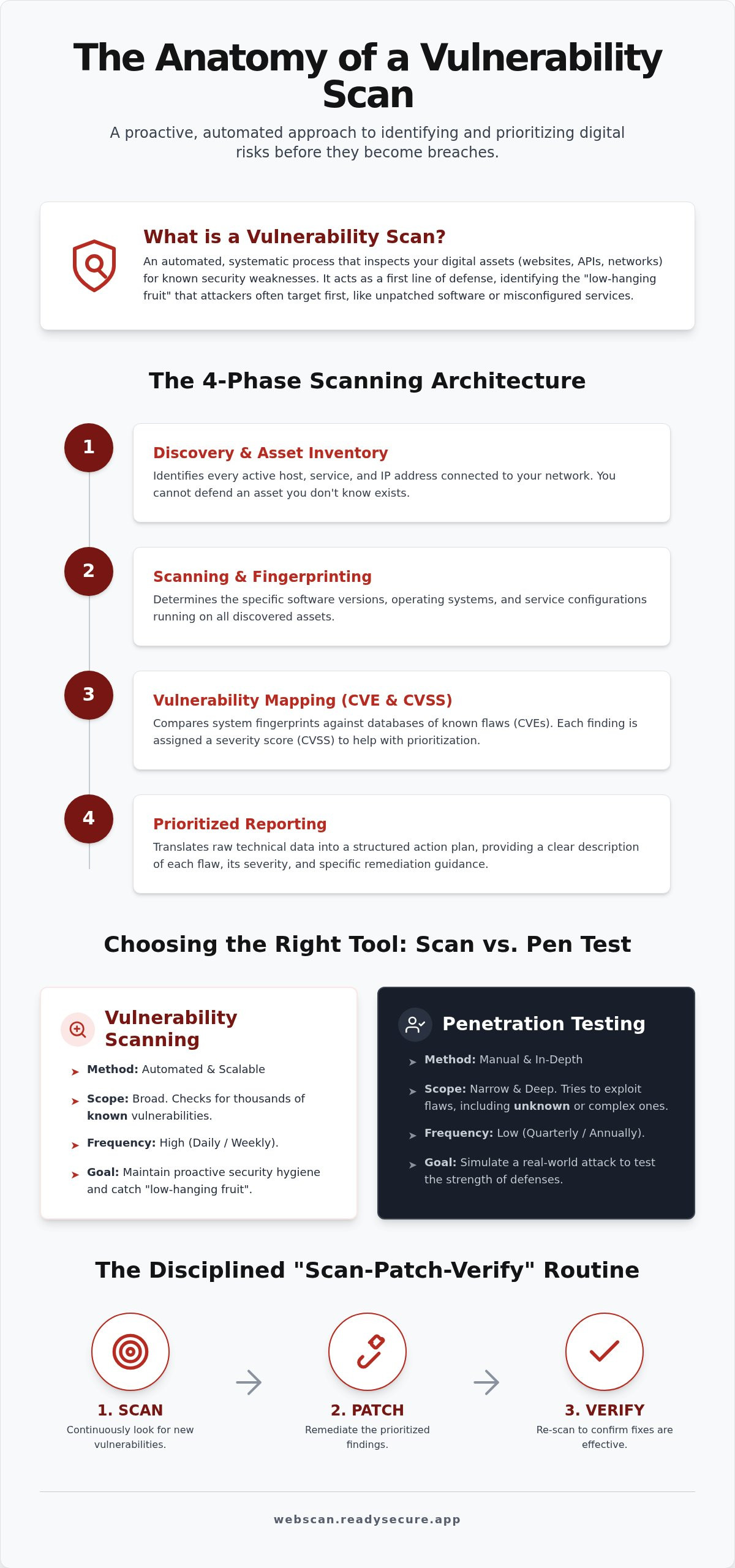
A professional vulnerability scan is a methodical four-part process. It begins with Discovery and Asset Inventory. This phase identifies every active host, service, and IP address on your network. You cannot defend an asset if you don't know it exists. The second phase is Scanning and Fingerprinting. This step determines the specific software versions, operating systems, and service configurations running on those discovered assets. Third is Vulnerability Mapping. In this phase, multiple scanning engines compare your system's unique fingerprints against vast databases of thousands of known flaws. The final phase is Prioritized Reporting. This stage translates raw technical data into a structured action plan for your IT team.
The Power of Multi-Engine Scanning
One scanner is rarely enough to capture the full picture of a modern environment. Different tools specialize in different layers of your infrastructure. Nmap is the industry standard for port discovery and network mapping. OpenVAS provides the deep inspection required for complex network services. Nuclei and ZAP focus on the logic of modern web applications and template-based detection of specific bugs. By layering these engines, you eliminate the blind spots that a single-tool approach might miss. This multi-layered approach ensures that you catch everything from misconfigured SSL certificates to complex injection flaws. If you're ready to see how these engines work together, you can start with a free authorized scan to baseline your current assets.
From Detection to Remediation Guidance
A list of 1,000 vulnerabilities is a burden, not a benefit. Professional scanning focuses on actionable prioritization. Each report must include a clear description of the flaw, its severity level, and a specific solution for remediation. It's about understanding what is a vulnerability scan result that requires immediate attention versus a low-risk configuration change. High-quality reporting provides the "how-to" for your developers or sysadmins, reducing the time spent on research. Organizations like the FTC suggest that no-cost vulnerability scanning is an excellent way for businesses to begin building this defensive habit. Using historical data also allows you to track security trends over time. This ensures that patches are not only applied but remain effective against new threats.
Navigating the Different Scopes of Security Detection
Does your current security strategy cover every entry point? Effective protection requires an understanding of different scanning scopes. When asking what is a vulnerability scan, it's important to realize that the target dictates the tool. A scan focused on a network server looks for different weaknesses than one targeting a web application's login logic. By categorizing your assets, you can apply the right scanning engine to the right environment, ensuring no blind spots remain in your perimeter.
There are four primary areas where automated detection provides the most value:
- External (Perimeter) Scanning: This tests exactly what a hacker sees from the public internet. It focuses on your "front door," identifying open ports and services that shouldn't be exposed.
- Web Application Scanning: Using engines like ZAP Active/Passive Scanning, this scope dives into the logic of your site. It looks for flaws like broken authentication or insecure direct object references.
- Network Scanning: Tools like OpenVAS and Nmap inspect the underlying servers and internet-facing hosts. This ensures the infrastructure supporting your apps is hardened against known exploits.
- SSL/TLS Inspection: TestSSL Inspection verifies that your data in transit remains encrypted. It identifies expired certificates, weak ciphers, and vulnerabilities like Heartbleed.
External vs. Internal Scanning Needs
Why should you prioritize external scanning? For most online businesses, the external perimeter is the primary threat vector. External scans protect you from global, automated threats that constantly probe the internet for weaknesses. While internal scans identify risks that exist behind your firewall, such as lateral movement potential, they're often the second step in a mature program. Starting with an external scan allows you to secure your most visible assets first. This disciplined approach ensures that your public-facing infrastructure isn't the weakest link in your chain.
API Security: The New Frontier of Scanning
Are your APIs as secure as your website? Traditional scanners often miss API vulnerabilities because they don't understand the underlying structure of REST or GraphQL endpoints. As development speeds increase, automating API audits becomes essential to catch OWASP Top 10 risks early. Using Nuclei Template-Based Scanning allows you to test for specific API flaws that generic tools might overlook. This ensures that the data flowing between your services remains protected, even as your code changes daily. It's a technical requirement that matches the pace of modern software delivery.
Vulnerability Scanning vs. Penetration Testing: Identifying the Right Tool
Why is there so much confusion between these two essential security practices? While both aim to identify weaknesses, they serve different operational roles in your defense strategy. A vulnerability scan is an automated, high-frequency check designed to find known flaws across your entire infrastructure. In contrast, a penetration test is a manual, human-led simulation of a targeted attack. If a scanner is your digital smoke detector that runs constantly, a penetration test is the fire inspector who performs a deep, periodic audit of the building's structure.
When you understand what is a vulnerability scan, you recognize its primary advantage: scalability. You can run automated scans weekly or even daily at a fraction of the cost of a manual engagement. This makes it the most scalable security investment for any digital asset. By identifying the "low-hanging fruit" automatically, you ensure that your basic hygiene is handled without the need for expensive manual labor. Scanners are built to find the thousands of known CVEs that already have documented fixes. Penetration testers, however, are hired to find complex logic errors and "chains" of small vulnerabilities that a machine might miss.
When to Rely on Automated Scanning
Automated scanning is your best tool for continuous monitoring. It's the only practical way to stay ahead of the hundreds of new vulnerabilities disclosed every month. If your team applies a critical patch on a Tuesday, you shouldn't wait for an annual audit to verify the fix. You run a scan immediately to confirm the risk is gone. Regular scanning is also a core requirement for many compliance frameworks, such as PCI DSS 4.0, which mandates ongoing proof of security rather than a one-time check. To begin establishing this baseline for your own assets, you can start a free authorized scan today.
The Synergy of Both Approaches
The most effective security programs use these tools together. Scanners handle the "bulk" work by clearing the deck of common, easily fixed issues. This is a critical step because it makes your eventual penetration test much more efficient. If a pen tester spends three days finding an unpatched server that a scanner could have flagged in seconds, you've wasted your budget on a task that didn't require human expertise. By using scans for routine hygiene, you reserve manual testing for your most business-critical logic. This disciplined approach ensures that your security spend is always prioritized toward the highest possible value.
Establishing an Ethical and Effective Scanning Routine
How do you move from understanding what is a vulnerability scan to maintaining a resilient security posture? The process requires a disciplined "Scan-Patch-Verify" cycle. This workflow ensures that you identify risks, apply the necessary updates, and then run a follow-up scan to confirm the fix was successful. Without the verification step, you're merely assuming your defenses are intact. This routine provides a logical framework that prevents your development team from being overwhelmed by raw data, as it focuses on specific, actionable remediation steps for each identified flaw.
Ethics and legality are the most overlooked aspects of cybersecurity hygiene. Scanning a system without explicit, written permission is often considered a criminal act, regardless of your intentions. This ethical mandate is why professional services prioritize clear boundaries. You must only scan targets that you own or control. By establishing a documented trail of authorization, you protect both your business and your service provider from legal misunderstandings. This transparency builds trust and ensures that your security efforts remain within the bounds of legitimacy.
The ReadySECURE Approach to Authorized Scanning
Professionalism in scanning is defined by accountability. Written authorization protects you by proving that every probe into your network was requested and expected. ReadySECURE addresses this by attaching a signed authorization record to every result, providing a clear audit trail for compliance. If you're looking to establish your baseline without immediate commitment, you can start with a ReadySECURE Free Scan. This initial check provides the technical rigor needed to understand your current exposure while adhering to the highest ethical standards.
Moving Toward Continuous Security Monitoring
Why is a "one-and-done" approach dangerous? New vulnerabilities are discovered daily, and zero-day exploits can emerge at any time. If you only scan once a year, your systems are left exposed for the remaining 364 days. Integrating automated scanning into your monthly maintenance workflows allows you to catch these emerging threats before they're widely exploited. Paid plans often include trend analysis, which lets you measure your security progress over time. This data-driven approach helps you identify recurring configuration errors and proves the long-term value of your security investments to stakeholders.
Securing Your Digital Perimeter with Confidence
Understanding what is a vulnerability scan is the first step toward a proactive security posture. We've explored how automated tools identify known flaws and why a multi-engine approach is essential for modern infrastructure. By differentiating between routine hygiene and deep manual testing, you can allocate your security budget where it has the most impact. Is your current strategy ready to face the speed of 2026's emerging threats? A disciplined approach to scanning ensures that your assets are protected by more than just a firewall; it provides a verified roadmap for remediation.
ReadySECURE simplifies this process by providing prioritized reports and signed authorization records for every result. Our platform utilizes industry-standard engines like Nmap, OpenVAS, ZAP, and Nuclei to ensure comprehensive coverage of your websites, APIs, and hosts. You don't have to guess which issues to fix first when you have clear remediation steps and a verified audit trail for every finding. Start your first authorized vulnerability scan for free with ReadySECURE to baseline your assets and move toward a more resilient digital future. Building a secure foundation is a journey of continuous improvement, and the best time to begin is now.
Frequently Asked Questions
What is the difference between a vulnerability scan and a pen test?
A vulnerability scan is an automated process that identifies known security flaws across your entire tech stack. It's built for frequency and scale. Conversely, a penetration test is a manual engagement where a human expert simulates a targeted attack to find complex logic errors. While a scan identifies the "what," a pen test explores the "how" of a potential breach. ReadySECURE focuses on the automated scanning phase to provide consistent, affordable security hygiene.
Will a vulnerability scan slow down my website or crash my server?
Modern scanning engines are designed to be non-intrusive. They probe your system for information without attempting to overwhelm your resources or trigger a denial of service. While any network activity consumes a small amount of bandwidth, the impact is typically negligible for production environments. If you have specific performance concerns, you can schedule scans during low-traffic periods to ensure your user experience remains unaffected while your security data is gathered.
How often should my business perform a vulnerability scan?
The frequency of your scans should match the pace of your development and the sensitivity of your data. Most organizations find that weekly or monthly scans provide a reliable baseline for security hygiene. However, if you're asking what is a vulnerability scan in the context of compliance, standards like PCI DSS 4.0 often require more frequent, continuous monitoring. Regular scheduling ensures that you catch new CVEs immediately after they're disclosed by researchers.
Can I scan a website that I do not own for security flaws?
No, scanning assets you don't own or control is illegal and unethical. Unauthorized scanning is often treated as a precursor to a cyberattack by law enforcement and service providers. At ReadySECURE, we require clear written authorization before any scan begins. We attach a signed authorization record to every report to prove that the testing was legitimate. You must always obtain explicit permission from the asset owner before initiating any security assessment on their infrastructure.
What does a 'High' or 'Critical' severity score actually mean?
These scores are based on the Common Vulnerability Scoring System (CVSS), which measures the ease of exploitation and the potential impact on your data. A "Critical" score usually means the flaw can be exploited remotely with little effort, potentially leading to a full system takeover. A "High" score indicates a significant risk that requires urgent attention. Prioritized reports help your team focus on these severe issues first to reduce your overall risk profile quickly and efficiently.
Is a free vulnerability scan enough to keep my site safe?
A single free scan is an excellent way to baseline your current security posture and identify immediate "low-hanging fruit." It provides a snapshot of your risks at a specific moment in time. However, security isn't a one-time event. Paid plans are necessary for long-term safety because they offer automated scheduling, historical data, and trend analysis. These features allow you to track your progress and ensure that new vulnerabilities don't go undetected between manual audits.
What are the most common vulnerabilities found during a scan?
Scanners frequently identify outdated software versions, misconfigured SSL/TLS certificates, and common web flaws like Cross-Site Scripting (XSS). Many systems also reveal open ports that should be restricted or weak encryption ciphers that expose data in transit. By using a combination of engines like Nmap, OpenVAS, and TestSSL, you can detect a wide range of these issues. Identifying these common gaps is the primary goal of establishing a regular scanning routine for your internet-facing assets.
Do I need technical expertise to understand a vulnerability report?
You don't need to be a cybersecurity specialist to make use of a professional report. While the raw data is technical, a high-quality summary prioritizes findings by severity and provides clear remediation guidance. Each result explains the nature of the flaw and the specific steps required to fix it. This structure allows business owners and project managers to understand their risks while giving developers a direct, actionable path to securing the system without needing deep security training.


