

More scan results don’t automatically mean better security. An automated web vulnerability scanner can identify weaknesses in a running website, its code, dependencies, or APIs, but each approach sees a different part of the risk. No single scan can promise complete coverage.
Choosing a scanner means weighing what it tests, how it interacts with the target, and whether the findings are relevant to your environment. A report is a starting point for investigation, not a verdict that every alert is exploitable or every unreported issue is absent. Before scanning, confirm the target and authorization, then consider whether the checks are appropriate for a live system.
This roundup explains the main scanning categories, compares their coverage and limitations, and outlines practical criteria for choosing an approach. You’ll also learn how to keep scans within approved boundaries, assess potential false positives and gaps, and turn prioritized findings into sensible next steps. The goal is coordinated, useful coverage, not a false sense of certainty.
Key Takeaways
- An automated web vulnerability scanner checks defined assets for detectable weaknesses, but its results are not a complete security assessment.
- Compare scanner approaches by what they examine, from application behavior and APIs to network exposure, TLS settings, and dependencies.
- Use scope, configuration, and target behavior to judge what a scan can find and where coverage may fall short.
- Make written authorization and a clearly defined target essential steps before scanning, then review, prioritize, and retest findings.
- See how a multi-scanner service such as ReadySECURE can bring several types of checks together and help organize next steps.
What does an automated web vulnerability scanner do?
An automated web vulnerability scanner checks assets within a defined scope for weaknesses it can detect. It uses rules, probes, and known signatures to look for conditions such as exposed services, insecure application responses, or TLS configuration issues. Unlike a complete security assessment, an automated scan follows configured tests and cannot judge every design choice, business context, or attack path. A scan describes what its checks covered and detected; it does not guarantee complete protection. For a neutral overview of scanner fundamentals, see Vulnerability scanner.
Read scan output as evidence to review, not a final security verdict. A detected condition may be a true vulnerability, a configuration issue, or a signal that needs more context. Check the affected asset and the evidence behind the alert before deciding what it means. A clean report has limits too: the scanner may not have tested every feature, user role, or asset.
Which web assets can an automated scanner examine?
Coverage depends on the scanner type and the authorized target. A website may be checked for visible configuration issues; a web application can be tested through its responses to requests; and an API can be examined through its available endpoints. Internet-facing hosts may be checked for exposed services and ports, while TLS checks examine aspects of encrypted connections.
Scope matters. Specify the domains, applications, APIs, or hosts you control and have permission to scan. A scan limited to a public landing page won’t represent an authenticated application or a separate API. Before running a scan, compare the target list with the systems you intend to assess and note any exclusions. Test depth also depends on configuration and target behavior. Active probes can interact with a live system, so use an agreed scope and scan settings appropriate to that environment.
What can a scan report tell you?
A finding is a condition the scanner detected that may need validation. A useful report identifies the affected asset and includes evidence behind the alert, helping a developer reproduce or investigate it. The details can indicate whether an issue relates to an exposed service, an application response, or a TLS setting.
Severity helps teams sort findings for review, but it isn’t a complete measure of business risk. The same technical issue can carry different consequences depending on the affected data, system role, exposure, and existing safeguards. Consider those factors before deciding what to address first.
Remediation guidance is a starting point, not an automatic fix. Confirm the finding, identify its cause, and choose a correction that fits the application. After making a change, retest the relevant asset to check whether the condition remains and whether the fix has affected expected behavior.
Five automated web scanner approaches and what each can find
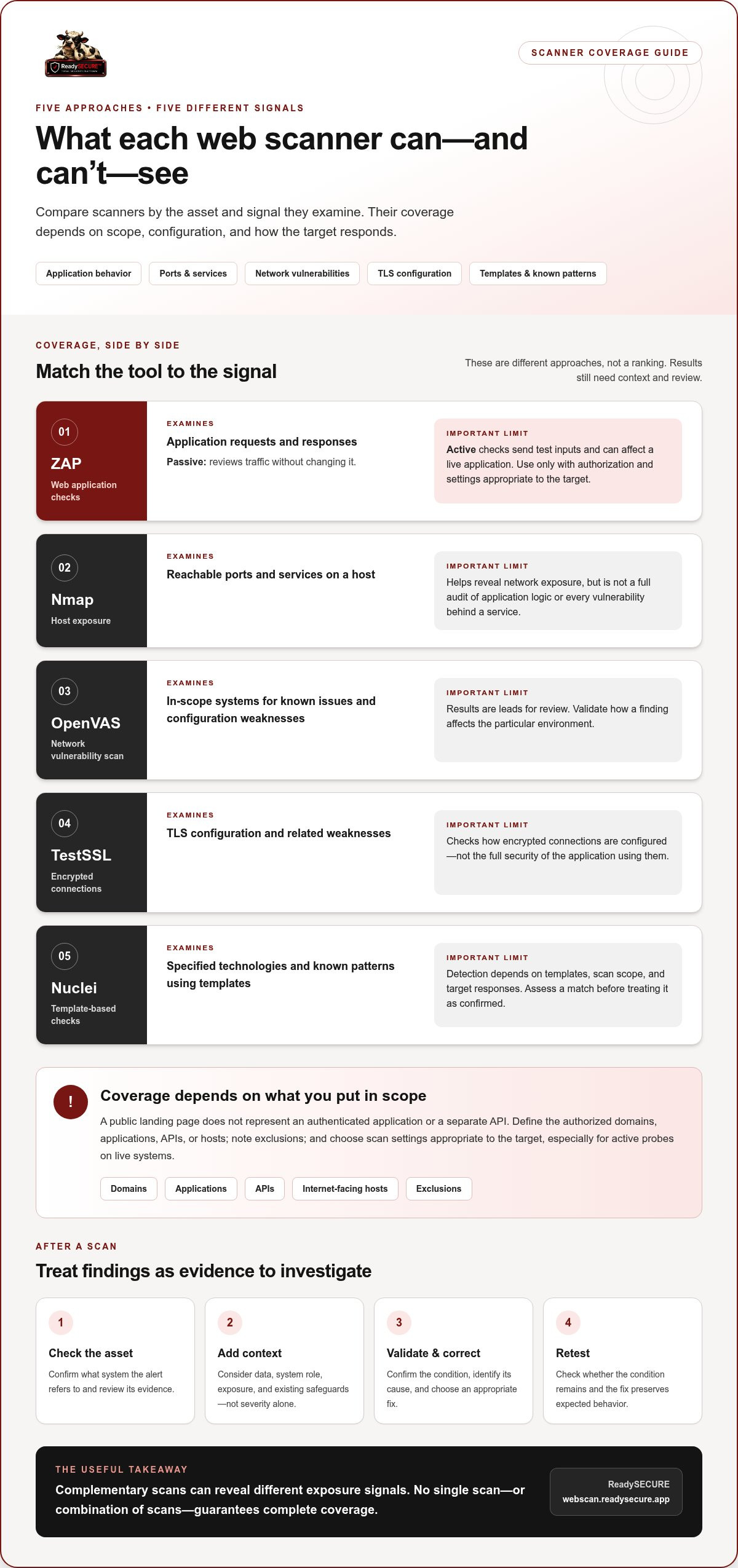
Compare scanner approaches by the asset and signal they examine, not by a single ranking. One automated web vulnerability scanner may test application behavior, while another checks network exposure, TLS settings, or known patterns. Tools can overlap, but results depend on configuration, authorized scope, and how the target responds.
Combining complementary checks can reveal different classes of exposure, but it still doesn’t establish that an application is secure. Each approach has limits, and findings may need validation in the context of the system.
Application, network, and port-scanning approaches
These approaches focus on different layers of a web service:
- ZAP: Supports automated web application checks. Passive scanning reviews requests and responses without changing them; active scanning sends test inputs to look for possible weaknesses and can affect a live application. Use active checks only within an authorized scope and with settings appropriate to the target.
- Nmap: Identifies reachable ports and services on a host. This can help reveal network exposure, but it isn’t a full audit of application logic or every vulnerability in the software running behind a service.
- OpenVAS: Performs network vulnerability scanning, checking in-scope systems for known issues and configuration weaknesses. Its results provide leads for review, not a substitute for validating how a finding affects a particular environment.
TLS and template-based vulnerability checks
TLS and template-based checks add other useful signals:
- TestSSL: Inspects TLS configuration and related weaknesses, helping identify issues in how encrypted connections are configured. It doesn’t assess the full security of the application using that connection.
- Nuclei: Uses templates to check for specified technologies and known patterns. What it detects depends on the templates used, the target’s responses, and the scan scope; assess a match before treating it as a confirmed vulnerability.
To compare scanner accuracy under a common test setup, the OWASP Foundation’s OWASP Benchmark provides a test suite for evaluating web application scanners. Benchmark results can help explain detection and false-positive behavior, but they don’t predict exactly what a scanner will find on your application.
ReadySECURE combines six scanners, including ZAP, Nmap, OpenVAS, TestSSL, and Nuclei, for authorized scans of websites, APIs, and internet-facing hosts controlled by the user. These tools examine different signals, so a combined report can give teams several types of findings to review. Results still need to be assessed against the target and its environment. To see how this approach applies to one authorized target, explore an authorized multi-scanner scan.
How to compare scanner coverage, findings, and limitations
Compare scanners by matching the check to the asset and question you need answered. A port scan can show which services are exposed, but it won’t explain whether a user workflow has a logic flaw. An automated web vulnerability scanner is only as informative as its target scope, configuration, and the responses it can observe. Use the table as a starting point, then check how each result was produced.
| Scanner category | Typical target | Useful signal | Key limitation |
|---|---|---|---|
| Network and port scanning | Internet-facing hosts | Exposed ports, services, or known network weaknesses | Doesn't assess application behavior or business logic |
| Web application scanning | Running websites and applications | Responses that may indicate application weaknesses | Coverage depends on reachable pages, roles, and scan settings |
| TLS inspection | HTTPS endpoints | TLS configuration issues and related weaknesses | Doesn't assess the full application or its data handling |
| Template-based checks | In-scope hosts and endpoints | Matches for specified technologies or known patterns | Only tests patterns covered by the templates and target responses |
These categories can complement one another, but don’t treat a larger finding count as proof of better coverage. NIST’s NIST SP 800-115 provides guidance on planning and conducting technical security testing. Its emphasis on defined methods and scope is useful when comparing what a scan actually tested, rather than relying on broad claims about detection.
How do you judge whether a finding matters?
Start with the evidence: identify the affected asset, reproduce the condition where practical, and determine whether it is exposed in the environment that matters. Then consider severity alongside accessibility, the asset’s role, the data or functions involved, and potential business impact. A scanner-generated indication isn’t automatically a confirmed weakness. Remediation guidance can suggest what to investigate first, but verify the cause and choose a correction that fits the application.
Where do automated scanners have blind spots?
Scanners may miss flaws that depend on business logic, such as a workflow that lets a user perform an action out of sequence. They can also see only what their access and scope allow: excluded endpoints, unavailable authenticated areas, or assets outside the defined target won’t be represented in the results. A quiet report therefore doesn’t establish that no weaknesses exist. Automated scanning is a useful part of security testing, not a replacement for other testing and informed review.
How to run an authorized scan and act on the results
A useful scan starts with permission and ends with a retest. Treat authorization and scope as prerequisites: an automated web vulnerability scanner should only test assets you control or have explicit permission to assess. This keeps the work focused, helps prevent unintended activity, and gives the team a clear record of what was approved.
Set scope and authorization before scanning
Before starting, identify the exact domain, application, API, or host in scope. Written authorization should name the target and come from someone with authority over it. Exclude unrelated third-party systems, even if they share infrastructure or appear connected to the site. Keep a copy of the approval with the scan record so the purpose and boundaries remain clear.
Turn prioritized findings into follow-up work
Use this workflow to move from approval to verification:
- 1. Confirm control and permission. Verify that you own the target or have written authorization to scan it.
- 2. Define the scope. Record the approved domains, applications, APIs, and hosts, along with any exclusions or scan limits.
- 3. Run the scan as configured. Choose checks that fit the target and environment. Keep the authorization record with the results.
- 4. Review and validate findings. Consider severity, exposure, affected asset, and potential business impact. Check the evidence and remediation guidance before treating an alert as confirmed.
- 5. Assign, document, and retest. Give each validated issue an owner, record its status and fix, then scan the relevant asset again to verify whether the condition remains.
Prioritization helps teams decide what to investigate first, but it shouldn’t replace context. A lower-severity issue on a highly exposed or business-critical asset may deserve attention ahead of a more serious finding on an isolated system. Record why a finding was accepted, fixed, deferred, or marked as a false positive so decisions remain visible between scans.
ReadySECURE requires a domain and written authorization, and each result includes a signed authorization record. Its Free Scan covers one target; paid plans add scheduling, scan history, and trend analysis for ongoing follow-through. For broader planning, read this vulnerability scanning guide for startups or explore continuous vulnerability monitoring. To start with an authorized scan of one target, begin a ReadySECURE Free Scan.
When a multi-scanner service such as ReadySECURE fits
A multi-scanner service can suit teams that want several complementary checks organized around an authorized target, rather than selecting and coordinating each scanner separately. It can be useful for an initial view of a website, API, or internet-facing host, especially when teams need a prioritized report to decide what to investigate next. Like any automated web vulnerability scanner, it provides evidence to review, not a guarantee that every weakness has been found.
ReadySECURE scans authorized websites, APIs, and internet-facing hosts controlled by the user. The approach brings different scanner types together, so the results can include signals about application behavior, network exposure, TLS configuration, and known patterns. Validate findings against your systems and decide how each issue affects your environment.
What does the ReadySECURE Free Scan provide?
To begin, users submit a domain and provide written authorization before scanning. The Free Scan covers one target and uses six industry-standard scanners, including Nmap, OpenVAS, ZAP, TestSSL, and Nuclei. Its report prioritizes discovered findings, provides severity information and remediation guidance, and attaches a signed authorization record to each result.
That combination can help a team move from an initial scan to a clear review process: check the evidence, confirm whether a finding applies, then assign an owner and plan a fix. Scanner output still needs human interpretation, and remediation guidance is a starting point for investigation rather than an automatic correction.
When is scheduled scanning useful?
A single scan gives a point-in-time view. Repeating scans can help teams notice changes in findings as an application or its exposure changes, and historical results can make those shifts easier to track. ReadySECURE Paid Plans add scheduling, scan history, and trend analysis, supporting follow-through after an initial scan without suggesting that repeated scanning alone provides complete security.
Choose the approach that fits your target and the follow-up your team can support. If you have an authorized domain ready, you can Start an authorized ReadySECURE Free Scan for one target, then review the report and decide what to investigate or remediate first.
Turn scan results into a clearer security plan
The right automated web vulnerability scanner depends on what you need to examine. Application checks, network scanning, TLS inspection, and template-based testing reveal different signals, while scope and configuration shape what a scan can detect. Treat findings as leads to validate, then prioritize them using severity, exposure, and business impact.
For teams seeking coordinated checks on an authorized target, ReadySECURE combines six scanners, including Nmap, OpenVAS, ZAP, TestSSL, and Nuclei. Its reports prioritize findings and include severity information and remediation guidance. Each result also has a signed authorization record, helping keep the scan’s approved scope clear.
Start with one target you control and written authorization. Review the results, decide what needs investigation, and use follow-up scans to track changes after fixes. Start an authorized ReadySECURE Free Scan to review findings for one target. A disciplined scan won’t answer every security question, but it can give your team a practical, actionable place to begin.
Frequently Asked Questions
What is an automated web vulnerability scanner?
An automated web vulnerability scanner tests defined website-related assets for detectable security weaknesses. It uses configured rules, probes, or known signatures to inspect application responses, network exposure, TLS settings, or other in-scope features. The resulting alerts need review: a finding may require validation, and a clean report doesn’t prove that every part of a website is secure. Scan coverage depends on the target, configuration, and access available.
Can an automated vulnerability scanner find every website vulnerability?
No. A scanner can only detect conditions its checks can recognize in the assets and workflows it can reach. It may miss business logic flaws, inaccessible pages, or weaknesses that require understanding how users and systems interact. Results can also include indications that need validation. Use scanning as one part of a security process, and interpret findings alongside application context and other testing rather than treating a report as a complete assessment.
Is it safe to run an automated vulnerability scan on a website?
It can be appropriate when you control the target or have explicit written authorization, define the scope, and select scan settings suited to the environment. Some active checks send test inputs or interact with application functions, so they may affect a live system. Avoid including unrelated third-party assets. For a responsible process, record what was authorized and review the tool’s scan behavior before running it.
What is the difference between a vulnerability scanner and a penetration test?
A vulnerability scanner automatically checks defined assets for known patterns, exposures, or other detectable weaknesses. A penetration test typically involves a human tester investigating how weaknesses can be combined or exploited within an agreed scope, including paths that automated checks may not understand. The two approaches provide different evidence. A scan report can help identify issues to investigate, but it doesn’t replicate the judgment or depth of a human-led assessment.
How often should you scan a website for vulnerabilities?
Choose a schedule that reflects how often the website, its dependencies, or its exposure changes, along with your team’s ability to review and act on results. Consider scanning after significant changes, such as a new application feature or infrastructure update, and set recurring scans where ongoing visibility is useful. ReadySECURE Paid Plans add scheduling, scan history, and trend analysis. No schedule replaces reviewing results and retesting fixes.
What should you do after an automated vulnerability scan finds an issue?
First, review the evidence and validate whether the finding applies to the affected asset. Consider its severity, exposure, and potential business impact, then assign an owner and document the status and planned correction. Follow remediation guidance as a starting point, not an automatic fix. After making a change, retest the relevant asset to confirm whether the issue remains and record the outcome for future reviews.


