

The scanner that finds the most issues may be the wrong choice for a startup. Vulnerability scanning for startups is useful when its coverage matches assets the team controls and its findings can be checked, prioritized, and fixed. A long report that no one has time to assess can create noise, not confidence.
If your team has limited security expertise and engineering capacity, decide which assets and scan types deserve attention first. The goal isn’t to scan everything indiscriminately. It’s to establish authorized, repeatable coverage and a remediation process your team can sustain.
This guide compares scanning approaches, outlines coverage to consider for websites, APIs, and internet-facing hosts, and explains how to choose a scanner using practical startup-focused criteria. You’ll also learn how to handle false positives, track fixes, and recognize when automated scanning should be supplemented by further assessment.
Key Takeaways
- Choose vulnerability scanning for startups by matching scan coverage to the websites, APIs, and internet-facing hosts your team controls.
- Compare scanners by scope, reporting clarity, authorization practices, and the effort needed to review and act on findings.
- Use automated scans to improve visibility, but don’t treat them as proof that an application is secure; some issues need human judgment.
- Build a repeatable process: inventory assets, authorize and define scope, scan, triage findings, remediate, and rescan.
- Before selecting a service, check how it documents authorization, prioritizes findings, and supports follow-up over time.
Why vulnerability scanning matters for startups, and what it can realistically do
Vulnerability scanning is an automated check for known weaknesses in a defined, authorized scope. A scan may examine a production website, API, or internet-facing host for issues its tools are designed to detect. It is one activity within a broader vulnerability management process, not a complete security assessment. It doesn’t review every design decision, confirm that all weaknesses have been found, or prove a system is secure.
For a startup, scanning can make exposed systems more visible and help the team decide what to investigate first. Its value depends on choosing relevant targets and following up on results. Treat a finding as a lead for review and remediation, not automatic proof of exploitability or business impact.
Which startup assets should be considered for scanning?
Start with an inventory of production websites, APIs, and internet-facing hosts the organization controls. For each asset, record an owner, its purpose, and its business importance. For example, an API that supports a core product may deserve earlier attention than a low-impact public page. This context helps a lean team prioritize coverage instead of treating every result as equally urgent.
Define the authorized scope before scanning. Separate confirmed company-controlled systems from third-party services, shared infrastructure, and any target that hasn’t been approved. If ownership or permission is unclear, leave the asset out until it’s confirmed. This gives the team a clear record of what the scan was intended to cover.
What does a vulnerability scan tell your team?
A scan reports potential weaknesses within its scope and capabilities. For each result, check which asset is affected, review the evidence, validate whether the issue applies, and decide on a response. Severity can help order that review, but it isn’t a complete measure of business risk. An issue’s importance also depends on the asset’s role, exposure, and the consequences if it were abused.
Automation offers repeatable checks, but it can miss issues that require context and may produce findings that need validation. Manual penetration testing is a separate, human-led activity that investigates security beyond routine automated checks. Continuous security monitoring is different again: it aims to observe security signals over time, rather than provide only a scan’s point-in-time results. Vulnerability scanning for startups can improve visibility, but it should be part of a response process that assigns findings for review and tracks them through remediation.
How to compare vulnerability scanning for startups: scope, coverage, and follow-through
When comparing vulnerability scanning for startups, match what a service checks to what your team can realistically review and fix. A long list of tools isn’t proof of useful coverage. Start with your asset inventory, then assess scope, scanning approach, report quality, authorization, and the effort required from your team. For a broader overview of selection criteria, see this guide to automated vulnerability scanning.
Which scan coverage fits a lean engineering team?
Match coverage to the production websites, APIs, and internet-facing hosts on your inventory. Ask providers which target types and scanning methods they support, what each method checks, and whether the checks fit your systems. For example, port scanning can help identify exposed network services, while checks focused on web applications or TLS examine different aspects of an internet-facing target. Broader coverage can help, but only when it includes assets you control and produces results your team can assess. Don’t choose a service solely by the number of tools it names.
| Comparison area | What to check | Why it matters |
|---|---|---|
| Target types | Website, API, and host coverage | Confirms the service matches your exposed assets. |
| Scan approach | Methods and checks explicitly documented | Shows what the scan is designed to detect. |
| Reporting | Prioritization, severity, evidence, and remediation guidance | Helps developers investigate and respond. |
| Authorization | Written approval and clearly recorded scope | Sets responsible boundaries for scanning. |
| Team effort | Setup, report review, and follow-up needs | Keeps the process workable for a lean team. |
How should startups evaluate reports and remediation guidance?
Look for findings that identify the affected asset, explain severity, provide enough evidence to investigate, and suggest practical remediation. The report should help developers distinguish likely actionable issues from results that need validation. Check whether the report makes it clear what was in scope and how authorization was recorded. These details help you assign findings to the right owner and track the response.
Prioritization helps the team address the most relevant findings first. Severity is useful input, not a substitute for considering business context or validating a result.
As another point of comparison, review CISA's Cyber Hygiene services and check whether their scope and eligibility fit your organization. For a startup-controlled target, you can also explore ReadySECURE authorized scanning, which requires a submitted domain and written authorization.
Are automated vulnerability scans enough for a startup? Understand the limits
No. An automated scan can improve visibility, but it can’t guarantee that a startup is secure. Scanners run repeatable checks, making them useful for identifying potential weaknesses across an approved scope. Human-led testing can apply context and investigate system behavior in ways automated checks may not cover. The approaches serve different purposes, and one isn’t a substitute for the other.
For vulnerability scanning for startups to support risk reduction, findings need a response path. Assign an owner to investigate each relevant result, validate whether it applies, prioritize the work, and track remediation. After a fix, verify it through an appropriate follow-up check. Without ownership and follow-through, a scan may produce a report without changing the security of the system.
What can automated vulnerability scanning miss?
Results depend on the systems included in the configured scope, the scanner’s capabilities, and what the target reveals during the scan. An unlisted host or an application path the scan doesn’t reach won’t be assessed. Even within scope, a scanner can identify only issues its checks are designed to detect. No scan should be treated as evidence that every weakness has been found.
Some business logic issues require understanding how an application is meant to work. For example, an automated check may not determine whether a user can access another account’s data through an unusual sequence of otherwise valid actions. These cases may call for assessment beyond routine automated checks. For a deeper comparison of scope and approaches, see this web application security assessment guide.
When should a startup add testing beyond a scan?
Consider additional assessment when a system handles sensitive data, a substantial product change alters how users or services interact, customer requirements call for stronger assurance, or important findings remain unresolved. The right next step depends on the system, the questions the startup needs answered, and the expertise available to assess it.
Manual penetration testing is a separate, human-led service, not the same as automated vulnerability scanning. It can provide contextual investigation, but its scope and depth should be agreed in advance. If your team isn’t sure what level of assurance is appropriate, define the need with a qualified security professional. Keep the distinction clear: scanning helps identify potential weaknesses, while broader assessment may be needed to answer questions that automated checks can’t resolve.
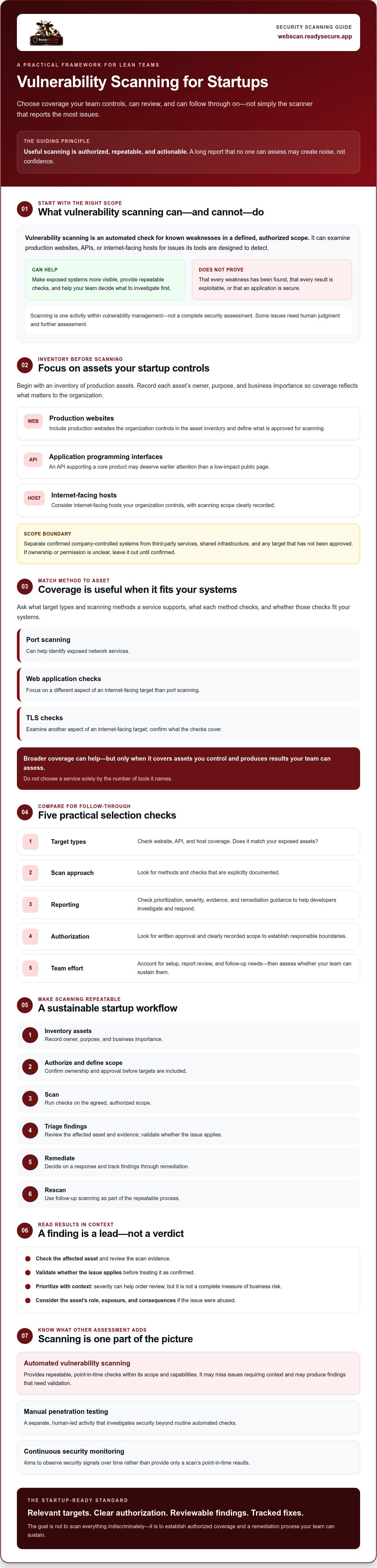
How to build a startup vulnerability scanning workflow your team can sustain
A useful workflow turns scan results into assigned, tracked work. Keep it simple enough to repeat, but specific enough that every target is authorized and every finding has a next step. For a deeper look at recurring program design, read these continuous security scanning strategies.
Use this sequence as a practical starting point:
- Inventory: List the production websites, APIs, and internet-facing hosts your organization controls. Record each asset’s owner and business importance.
- Authorize: Confirm written approval for every target before scanning. Keep third-party systems and unapproved assets out of scope.
- Define scope: Specify which assets are included and what the scan is intended to check. Revisit the scope when systems change.
- Scan: Run the selected checks against approved targets and retain the results with the scope details.
- Triage: Review each finding’s severity, evidence, asset exposure, and business context. Assign an owner and a decision, including when more validation is needed.
- Remediate: Create a trackable task with a responsible person and a clear next action. Record why an issue is deferred or accepted for later review.
- Rescan: Check whether fixes addressed the reported issue and update the asset’s finding history.
How should a startup prioritize scan findings?
Severity helps order review, but it shouldn’t make the decision alone. Consider whether the asset is exposed, how important it is to the business, and whether the report provides enough evidence to act. Give each finding an owner, a next action, and a status. Record deferrals and reassess them when exposure, system behavior, or business impact changes. A report is an input to this process, not completed remediation.
How often should a startup scan?
There’s no universal interval that fits every startup. Consider how exposed an asset is, how often it changes, and how much capacity the team has to review and fix findings. A baseline scan can establish an initial view; scheduled scans can help teams notice changes over time. Neither replaces reviewing results and following up.
Choose a cadence the team can support, then adjust it as the product, exposure, and remediation workload change. ReadySECURE’s paid plans add scheduling, history, and trend analysis for teams that need recurring visibility. To plan an authorized scan of a startup-controlled target, start with a ReadySECURE scan.
Choose an authorized vulnerability scanning service for your startup
A suitable service should make clear what will be scanned, under whose authority, and how your team can use the results. For vulnerability scanning for startups, the process matters as much as the list of checks: the target must be controlled, the scope understood, and findings reviewed after the scan.
What should you confirm before authorizing a scan?
Before approving a scan, check that your organization controls the target and that you’re authorized to request the activity. Write down the intended scope, including the domain or systems covered, and identify anything that must remain excluded. Don’t include third-party targets unless you have appropriate authorization to do so.
- Controlled target: Confirm the domain or system belongs to your organization or is under its control.
- Written authorization: Ensure approval is recorded before scanning begins.
- Defined scope: Specify what’s included and excluded so the scan has clear boundaries.
- Useful reporting: Check that findings include severity, prioritization, and remediation guidance your team can review.
- Follow-up plan: Decide who will validate findings, assign fixes, and check whether remediation worked.
How can ReadySECURE fit an early-stage scanning process?
ReadySECURE provides authorized scanning for websites, APIs, and internet-facing hosts controlled by the user. The process requires you to submit a domain and provide written authorization before scanning. Reports prioritize findings, describe severity, and provide remediation guidance. Each result also includes a signed authorization record, supporting a documented and bounded process.
The ReadySECURE Free Scan covers one scan of one target. It can be a practical starting point for checking a specific, startup-controlled asset, but it isn’t a complete security program or a substitute for ongoing review and remediation. Your team still needs to assess findings, decide what to address, and confirm fixes.
If your startup needs recurring visibility, ReadySECURE Paid Plans add scheduling, history, and trend analysis. Those capabilities can help teams review results over time. Choose an approach based on the coverage and follow-up your organization needs.
If the target, scope, and authorization are clear, you can Explore the ReadySECURE Free Scan as a first step. Review the report in context and use it to guide your team’s next actions.
Make your next scan a step your team can act on
Effective vulnerability scanning for startups starts with authorized coverage of assets that matter, not the longest possible list of checks. Choose an approach that fits your exposed systems and gives your team useful findings. Then assign owners, prioritize remediation, and rescan to check progress.
Automated scanning improves visibility, but it doesn’t prove a system is secure. Treat results as a starting point for investigation, and consider additional assessment when your systems or assurance needs call for it. ReadySECURE’s one-time Free Scan covers one target. Its reports prioritize findings, include severity and remediation guidance, and attach a signed authorization record to each result.
If you’re ready to assess a startup-controlled target, Explore the ReadySECURE Free Scan. Start with a clear scope and a manageable follow-up process so your team can turn findings into action.
Frequently Asked Questions
What is vulnerability scanning for startups?
Vulnerability scanning for startups uses automated checks to identify potential weaknesses within a defined, authorized scope, such as a company-controlled website, API, or internet-facing host. The results can help a team investigate issues, prioritize work, and plan remediation. A scan is one input to security work, not proof that an application is secure. It also doesn’t replace every other form of assessment a startup may need.
How often should a startup run vulnerability scans?
There’s no single schedule that suits every startup. Consider how often exposed systems change, how important they are to the business, and whether the team can review and address findings. A one-time scan can provide an initial view of a target. Scheduled scans, when supported by the service, can help teams track findings over time. Revisit the cadence as your product, exposure, or capacity changes.
Are free vulnerability scans safe to use?
A scan is appropriate only for systems your organization owns or has explicit authorization to test. Before starting, confirm the target and scope, understand what activity the service performs, and follow its authorization process. A free scan can be a useful starting point, but check its target limits and reporting features first. “Free” doesn’t mean a scan is suitable for every asset or security need.
Can vulnerability scanning replace penetration testing?
No. Automated scanning checks for potential weaknesses within its configured scope, while penetration testing is a separate assessment with a different purpose and methodology. A scan can support repeatable checks, but it doesn’t provide every form of human judgment or testing. Choose the approach based on your system, assurance needs, and unanswered security questions. Don’t assume that one automatically covers the work of the other.
What should a startup look for in a vulnerability scanning report?
Look for clear scope, understandable severity information, prioritized findings, and practical remediation guidance. Developers should be able to identify the affected asset, review the evidence, validate whether a finding applies, and determine a next step. A report supports investigation and decision-making; it doesn’t fix weaknesses or guarantee that every relevant issue was detected. Check that someone on the team can own follow-up.
How much does vulnerability scanning cost for a startup?
Pricing depends on the provider, number of targets, scan frequency, and reporting features. Compare what’s included rather than relying only on a headline price, and confirm current plan details directly with the provider. ReadySECURE offers one free scan of one target. Its paid plans add scheduling, history, and trend analysis. Consider which option fits what your team needs to review and track.
Do startups need written authorization before a vulnerability scan?
Scan only systems your organization owns or has clear permission to test. Written authorization helps document the approved target and scope before scanning begins. ReadySECURE requires written authorization and attaches a signed authorization record to each result. Don’t assume a publicly accessible system is automatically approved for testing. If ownership or permission is unclear, resolve that before including the system in a scan.


