

A vulnerability scan that ends with an unread report isn’t monitoring. Continuous vulnerability monitoring is useful when recurring checks reveal changes and findings lead to clear decisions, not when they simply add more alerts to an already crowded queue.
Periodic scans can miss vulnerabilities introduced between assessment dates, but “continuous” doesn’t automatically mean real-time detection. The term may describe scheduled checks, so check which assets are covered, how often they’re scanned, and what the results can show. Without that clarity, teams can mistake a scanning schedule for complete, always-on visibility.
This guide explains what continuous vulnerability monitoring involves, what it can and can’t tell you, and how to build a repeatable process for validating findings, prioritizing risk, assigning follow-up, and tracking resolution. You’ll also learn how to choose an authorized monitoring approach that fits your assets and team capacity. The goal is to make each scan part of a measured response process, rather than another report with no clear owner.
Key Takeaways
- Continuous vulnerability monitoring depends on a defined scan cadence and asset scope, not an assumption of real-time coverage.
- Set clear authorization boundaries for the domains, APIs, and hosts you’re permitted to assess before scanning begins.
- Prioritize findings using severity alongside asset importance, exposure, confidence, and available remediation.
- Build a repeatable workflow that assigns owners, tracks actions, and reassesses assets after changes or fixes.
- Choose a monitoring approach that fits your target count, reporting needs, and team capacity while keeping remediation decisions in your hands.
What Is Continuous Vulnerability Monitoring, and What Does It Actually Monitor?
Continuous vulnerability monitoring is the repeated checking of authorized assets for known weaknesses, so teams can see how vulnerability exposure changes over time. It provides recurring visibility, not a guarantee that every change or new vulnerability will be detected as soon as it appears.
A scan is a technical check performed against a defined target. An assessment interprets scan results to identify and understand potential weaknesses. Monitoring repeats checks on an agreed schedule and compares the results. Vulnerability management is the wider response lifecycle: teams identify, validate, prioritize, assign, remediate, and reassess findings.
The monitored scope can include websites, APIs, internet-facing hosts, network services, and detected software versions. What a scan can reveal depends on its scope and method. It should not be treated as a complete view of every system or a replacement for a broader security program. The high-level idea of continuous monitoring is recurring observation to help identify risk and compliance issues. In practice, vulnerability checks may be scheduled rather than constant.
What changes between a one-time scan and continuous monitoring?
A one-time scan records a point-in-time result for the assets checked. Repeat scans can show whether findings have appeared, changed, or been resolved between checks. This creates a more useful view of exposure over time, provided the same assets and relevant changes remain in scope.
New hosts, software updates, configuration changes, and newly disclosed vulnerabilities can all affect what needs checking. But a scheduled scan only reports what it can detect when it runs. If an asset changes between scans, the visibility gap depends on the chosen cadence. “Continuous” should describe a repeatable schedule and response, not imply instant detection.
How does monitoring relate to vulnerability management?
Monitoring supplies visibility and information for reassessment. It does not, by itself, confirm every finding or decide which issue a team should fix first. People still need to validate results, weigh severity against asset importance and exposure, assign an owner, and track remediation.
A practical cycle is identify, validate, prioritize, assign, remediate, and reassess. The next check helps determine whether a fix worked or exposure remains. For broader program context, see this guide to a continuous security scanning strategy.
How Continuous Vulnerability Monitoring Works: Scope, Scans, and Findings
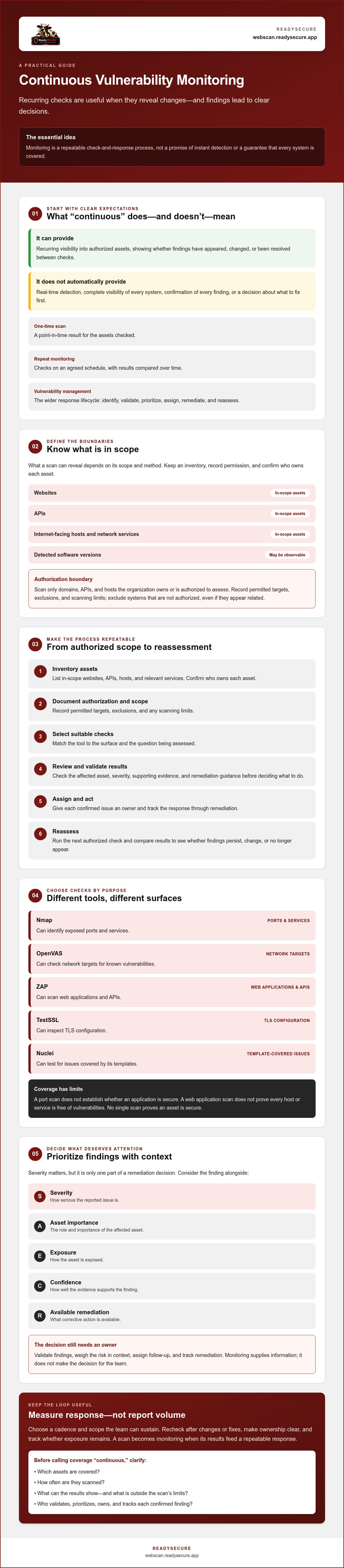
A useful monitoring process begins before a scanner runs. Teams need a current asset inventory, written permission, and a clear record of what each check is meant to cover. Scan only domains, APIs, and internet-facing hosts the organization owns or is authorized to assess.
Use a repeatable sequence:
- 1. Inventory assets. List in-scope websites, APIs, hosts, and relevant services. Confirm who owns each asset.
- 2. Document authorization and scope. Record the permitted targets, exclusions, and any scanning limits. Exclude systems that aren’t authorized, even if they appear related to an in-scope environment.
- 3. Select suitable checks. Nmap can identify exposed ports and services; OpenVAS can check network targets for known vulnerabilities; ZAP can scan web applications and APIs; TestSSL can inspect TLS configuration; and Nuclei can test for issues covered by its templates.
- 4. Review the results. Check the affected asset, severity, supporting evidence, and remediation guidance. Validate findings before deciding what action to take.
- 5. Assign and act. Give each confirmed issue an owner and track the response through remediation.
- 6. Reassess. Run the next authorized check and compare results to see whether findings persist, change, or no longer appear.
These tools examine different surfaces. A port scan doesn’t establish whether an application is secure, and a web application scan doesn’t prove that every host or service is free of vulnerabilities. Automated checks have defined coverage and limits. No single scan proves an asset is secure. The CIS Critical Security Control 7 offers a broader framework for organizing vulnerability management activities.
How should teams set a useful monitoring cadence?
Scan cadence should reflect asset changes, exposure, and team capacity. Scheduled reassessments create a predictable rhythm. Event-triggered checks can follow material changes, such as adding an internet-facing host or making a substantial application update. Neither approach guarantees instant detection. Document why the chosen schedule fits your environment, then revisit it as assets and risk conditions change. There’s no universal interval that suits every organization.
What should a useful vulnerability finding contain?
A finding is easier to act on when it identifies the affected asset, explains the observed evidence, communicates severity, and gives practical remediation guidance. Scan history and trend views can help teams see whether an issue is recurring or the overall picture is changing. For help comparing scanning options, see this automated vulnerability scanning guide.
For a baseline, consider scanning an authorized target, such as a domain you control. ReadySECURE requires written authorization and attaches a signed authorization record to each result. Start with an authorized scan.
How to Prioritize Continuous Vulnerability Monitoring Findings Without Chasing Every Alert
Repeated scans can produce more findings than a team can fix at once. A severity score helps sort the queue, but it doesn’t tell you the full business risk. Prioritize by combining the scanner’s result with the asset’s role, its exposure, the strength of the evidence, and whether a practical fix is available.
How should teams interpret severity and asset context?
A CVE identifier points to a publicly documented vulnerability, while a CVSS score provides a standardized way to describe its severity. Both are useful references, not a complete local risk decision. Check whether the affected component is present and exposed, what the asset supports, and whether the scanner’s evidence matches its configuration.
For example, a hypothetical finding on a public-facing service that supports a key customer workflow may deserve faster review than a similar-severity issue on a restricted, low-use test system. That distinction depends on your environment, the evidence, and available response options, not the score alone.
| Factor | Questions for triage |
|---|---|
| Severity | What severity or CVSS information did the scanner report? |
| Asset importance | What business function depends on this asset? |
| Exposure | Is the affected service reachable from the internet or otherwise broadly accessible? |
| Evidence confidence | Does the finding include evidence that matches the asset’s current configuration? |
| Available remediation | Is there a fix or mitigation, and can the owner apply it safely? |
How can teams reduce alert fatigue and false positives?
Separate scanner output from validated findings. Group duplicate results across scans so the same issue on the same asset doesn’t create repeated, disconnected work. Investigate uncertain results by reviewing the scanner’s evidence and checking the affected asset’s software or configuration. A result that can’t yet be confirmed should be marked for review, not silently treated as fixed or ignored.
For each confirmed issue, record an owner, a target date based on risk and capacity, and the next review point. After remediation, reassess the asset to verify whether the finding remains. This closes the loop and keeps a scan report from becoming an unmanaged queue.
If an organization accepts an exception rather than fixing an issue immediately, document the affected scope, rationale, accountable owner, and review point. Keep exceptions visible and revisit them as conditions change. That discipline turns monitoring results into trackable decisions rather than an endless stream of alerts.
How to Build a Continuous Vulnerability Monitoring Workflow Your Team Can Sustain
A sustainable process turns scan results into owned work, then checks whether that work changed exposure. Keep the routine clear enough that security, IT, application owners, and development teams know what they’re responsible for.
What should a recurring monitoring checklist include?
- Confirm authorization and scope. Verify written permission, ownership of each target, exclusions, and the right contacts for infrastructure changes before scanning.
- Maintain the asset inventory. Record the monitored domains, APIs, and hosts, along with their accountable owners. Update the inventory when systems are added, retired, or changed.
- Set and review the cadence. Document the schedule and why it fits the assets, their exposure, and your team’s capacity. Revisit it when those conditions change.
- Review and assign findings. Security can coordinate validation and prioritization; IT can handle infrastructure findings; application owners and development teams can assess issues in their systems and plan fixes.
- Track decisions and reassess. Record scan dates, coverage, findings, owners, remediation decisions, exceptions, and follow-up status. After a fix or material system change, reassess the relevant asset.
For unresolved findings, document why they remain open, the accountable owner, and the next review point. Keep remediation evidence with the finding, such as a change record or a later scan result, so closure is based on a recorded decision rather than an assumption.
Measure whether the workflow is working, not just how many alerts it produces. Useful indicators include the share of intended assets covered, time from scan to triage, remediation status, and findings that recur after reassessment. These measures can reveal gaps in scope, slow handoffs, or fixes that haven’t held.
Where do automated scans stop?
Automated scanners identify known or detectable conditions within their configured scope. Their output needs appropriate validation, and a clean result doesn’t guarantee the absence of risk. Vulnerability scanning is also distinct from manual penetration testing and broader security reviews, which examine different questions and aren’t replaced by recurring automated checks.
For a small-team perspective on establishing a practical program, read this vulnerability scanning guide for startups. To establish a baseline for a target you own or have written authorization to assess, start an authorized vulnerability scan.
When a Vulnerability Monitoring Service Helps, and How to Start Responsibly
A monitoring service may help when your team needs repeatable checks and clearer reporting but has limited capacity to run every scan manually. Before choosing one, compare the number and type of assets you need to assess with the schedule you can support and the people available to review findings. A service can help with scanning and reporting; your organization remains responsible for authorizing each target, deciding what to fix, and carrying out remediation.
What should you check before choosing a monitoring service?
Confirm which asset types the service supports, how you define permitted targets and exclusions, and whether scans can be scheduled to match your needs. Check what the report includes: severity, evidence, remediation guidance, historical results, and trend information. The workflow should also make written authorization and the approved target clear. Ask how often scheduled checks run. Recurring scans shouldn’t be mistaken for real-time monitoring.
How can a first scan become a useful baseline?
Choose one domain, API, or internet-facing host that you own or have explicit written authorization to assess. Record the intended scope, review the results, validate priority findings, and assign owners before deciding on follow-up. A first scan offers a starting point for comparison, not proof that the asset is secure.
ReadySECURE provides a single free scan for one authorized target. Its reports prioritize findings, show severity, and provide remediation guidance; each result includes a signed authorization record. ReadySECURE Paid Plans add scheduling, scan history, and trend analysis, which can help teams compare results across repeated checks. These capabilities support scheduled reassessment, not real-time detection, and don’t make remediation decisions for you.
For any service, make sure your team can act on the information it produces. If findings have no reviewer or owner, additional reports may create more queue than progress. Establish who will validate results, assign work, record exceptions, and decide when reassessment is useful.
If you’re ready to establish a baseline, start an authorized ReadySECURE scan for a target you control or have written permission to assess.
Turn Scan Results Into a Repeatable Security Practice
Continuous vulnerability monitoring works best when repeat scans are tied to a clear response process. Define which authorized assets are in scope, choose a cadence your team can sustain, and make sure findings are validated, prioritized, assigned, and reassessed. Scheduled scanning creates recurring visibility, but it shouldn’t be mistaken for real-time detection.
ReadySECURE supports this process with reports that prioritize discovered issues and provide remediation guidance. A signed authorization record is attached to each result, helping document permission and scope. Paid plans add scheduling, scan history, and trend analysis to support repeat assessments and comparisons over time. Your team remains responsible for reviewing findings and deciding how to respond.
Start with a target you own or have written authorization to assess. Start an authorized ReadySECURE scan to establish a baseline and identify practical next steps. A clear scope and a manageable follow-up plan can help your team turn each scan into informed action.
Frequently Asked Questions
What is continuous vulnerability monitoring?
Continuous vulnerability monitoring is the repeated checking of authorized assets for detectable vulnerabilities as systems and exposure change. It can include scheduled scans of websites, APIs, and internet-facing hosts, with results reviewed over time. The checks provide visibility into findings, but don’t automatically detect every change as it happens. For the process to be useful, teams need to validate results, prioritize issues, assign owners, and reassess after remediation.
Is continuous vulnerability monitoring the same as real-time monitoring?
No. Continuous vulnerability monitoring often means recurring scans on a defined schedule, not uninterrupted observation or instant detection. A vulnerability introduced just after a scan may not appear in results until a later check. Confirm the service’s scan cadence and asset coverage so you understand the gaps between assessments. Treat “continuous” as repeatable monitoring unless the provider clearly describes real-time capabilities and how they work.
How often should vulnerability scans be repeated?
There isn’t one scan interval that fits every organization. Set a schedule based on how often assets change, how exposed they are, and whether your team can review and act on findings. Consider an additional check after a material infrastructure or application change. Document why the cadence is appropriate, then revisit it as scope, exposure, or response capacity changes. A frequent schedule is only useful if results receive timely follow-up.
Can automated vulnerability monitoring prevent every security incident?
No. Automated monitoring can help identify known or detectable weaknesses within the configured scan scope, but it can’t establish that an asset is free of risk or prevent every incident. Coverage depends on the assets, scan method, and timing. Results need validation, and remediation still requires action by responsible teams. Use scanning as one input to a broader security program, not as a substitute for other appropriate security reviews and controls.
What is the difference between vulnerability monitoring and vulnerability management?
Vulnerability monitoring provides recurring visibility into potential weaknesses through scheduled checks and reassessment. Vulnerability management is the broader lifecycle for acting on that information: identify, validate, prioritize, assign, remediate, and reassess. Monitoring can show whether findings appear or persist, but it doesn’t decide business priority or apply fixes. A practical program connects each useful finding to an owner, a recorded decision, and a follow-up check.
Can I scan a website or API without the owner’s permission?
No. Scan only websites, APIs, and hosts that you own or are explicitly authorized to assess. Before a check, confirm written permission and define the approved targets and any exclusions. This keeps the scan within the agreed scope and makes responsibilities clear. ReadySECURE requires a domain and written authorization from the owner, and attaches a signed authorization record to each result.
What should a vulnerability monitoring report include?
A useful report identifies the affected asset, describes the finding and its evidence, communicates severity, and provides remediation guidance. These details help a team validate the result, assess its relevance, and assign follow-up. Scan dates and historical results can show whether issues persist or change across checks. ReadySECURE reports prioritize discovered issues, show severity, and include remediation guidance, with a signed authorization record attached to each result.


