

A website can pass an application test while other services remain exposed at the network edge. An internet facing host scanner helps map what is reachable from outside, but its results don’t prove an application is secure or reveal every weakness.
It’s reasonable to want a clear view of what the public internet can reach, and to consider whether scanning could disrupt systems or raise false alarms. Scan only assets you control or are authorized to assess, define the scope carefully, and treat findings as evidence to verify, not automatic proof of compromise.
This guide explains what an external host scan may reveal, including reachable ports, exposed services, and potential configuration or vulnerability issues. It compares host scanning with web application testing, then walks through setting a responsible scope and turning prioritized results into practical follow-up actions. The distinction matters: host scanning maps exposure, while application testing examines how software behaves and handles risks.
Key Takeaways
- Use an internet facing host scanner to see which systems and services appear reachable from the public internet.
- Match the assessment to your goal: host scanning and web application testing examine different targets and produce different evidence.
- Before scanning, inventory assets, confirm ownership, document authorization, and exclude systems outside your control.
- Review findings by severity and supporting evidence, then verify relevant issues before planning remediation.
- Use scan results to guide follow-up, while recognizing that automated checks cannot confirm an environment is fully secure.
What Is an Internet-Facing Host Scanner, and What Can It See?
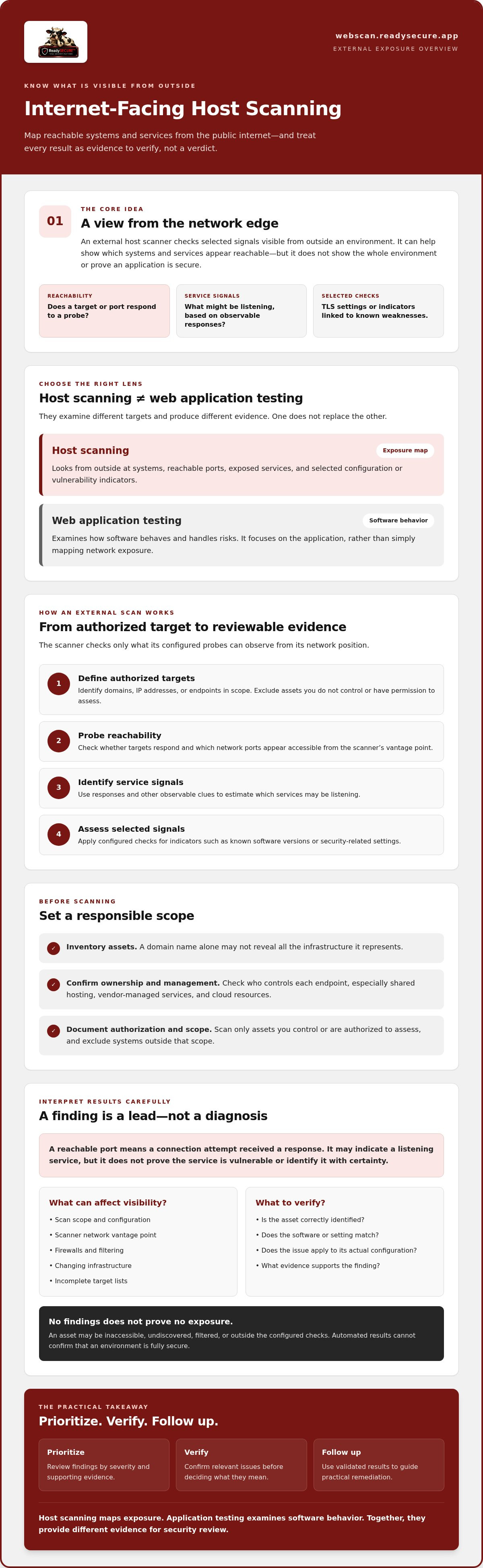
An internet-facing host is a system or endpoint that can be reached from the public internet. It may be intended for public access, such as a website, or exposed because of how a service or network is configured. An internet facing host scanner checks selected signals visible from outside an environment, helping teams understand what exposed systems appear to offer.
In brief: Host discovery identifies internet-reachable systems and observable services. It is not a complete security assessment. A finding indicates potential exposure to investigate, not proof that a host has been compromised. The scanner’s view is limited to the targets and checks included in its configuration.
Which assets count as internet-facing hosts?
Examples include public web servers, mail gateways, APIs, and cloud-hosted endpoints. These assets may use different providers or be managed by separate internal teams, even when they relate to the same organization or domain. A domain name alone may not show the full infrastructure it represents.
Before adding an endpoint to a scan, confirm who owns or manages it and whether it is within the authorized scope. This is especially important for shared hosting, vendor-managed services, and cloud resources. An organization may use an endpoint without controlling the underlying system.
What does an external scanner observe?
Depending on its checks, an external scanner may report reachable network ports, service responses, TLS configuration details, and selected indicators associated with known vulnerabilities. A port scanner checks which ports respond from a particular network vantage point. Service responses can provide clues about what may be listening, but they don’t necessarily reveal the full system or its internal configuration.
- Reachability: Whether a target or port responds to a probe.
- Service signals: Responses that may help identify an exposed service.
- Configuration and vulnerability indicators: Selected checks for issues such as TLS settings or known weaknesses.
Results depend on the scope, scan configuration, network access, and scanner coverage. Firewalls, filtering, changing infrastructure, and incomplete target lists can affect what is visible. An inaccessible or undiscovered asset may not appear in the report, so no findings doesn’t prove that no exposure exists. Treat results as evidence for review and follow-up, not a verdict on the entire environment.
How Does an Internet-Facing Host Scanner Find Exposures?
An external scan follows a defined path from an authorized target to evidence that needs review. The scanner doesn’t see an organization’s entire environment. It checks what its configured probes can observe from the network position it uses.
- Define authorized targets. Identify the domains, IP addresses, or endpoints in scope. Exclude assets the organization doesn’t control or have permission to assess.
- Probe reachability. Check whether targets respond and which network ports appear accessible from the scanner’s vantage point.
- Identify services. Examine responses and other observable signals to estimate which services may be listening.
- Assess selected signals. Apply configured checks for indicators such as known software versions or security-related settings.
Scanner output depends on the target, the scanner’s vantage point, and the checks enabled for that scan. Different scanner types inspect different layers, so their results can complement one another. A port scan can reveal reachable services, while other checks may examine TLS settings or identify vulnerability indicators. Together, this evidence can guide review, but an automated result is not a confirmed diagnosis.
From reachable port to potential vulnerability
A reachable port tells you that a connection attempt received a response. It may indicate a listening service, but it doesn’t prove that the service is vulnerable or identify it with certainty. Identification may rely on a service response, a banner, or another observable signal. Those clues can be incomplete or obscured by network devices.
If a scanner matches an observed version to a known issue or flags a configuration, treat the result as a lead. Confirm that the affected asset is correctly identified, that the software or setting is current, and that the issue applies to its actual configuration. A matching version string alone doesn’t establish exploitability.
Why can findings be uncertain or incomplete?
An incomplete asset inventory can leave targets out of scope. Firewalls or other filtering may block probes, authentication limits may prevent checks that require access, and cloud or hosted infrastructure can change between scans. Scanners can therefore miss exposures or report indicators that need validation. A detection rule may lack context about a particular deployment and produce a false positive.
For each finding, compare the reported evidence with the affected asset and current vendor guidance before deciding what to do. Prioritize based on severity and the system’s role, then track whether corrective work resolves the issue. NIST’s Guide to Enterprise Patch Management Planning provides a framework for treating identification, prioritization, and remediation as an ongoing risk-management process.
For an authorized assessment of systems you control, you can review ReadySECURE host scanning. Automated findings are a starting point for informed follow-up, not a substitute for verifying what applies to your environment.
Host Scanning vs. Web Application Testing: Which Scope Do You Need?
Choose the assessment based on the question you need answered. An internet facing host scanner checks systems and services observable from outside your environment. Web application testing focuses on how an application behaves, including issues in its features and request handling. Recurring monitoring describes how often checks are repeated, not a separate assessment layer. Depending on the scope, it can track changes in host exposure, application findings, or both.
- Host scanning: Targets public-facing hosts, ports, services, and selected configurations. Typical output includes reachable services and potential exposure indicators.
- Web application testing: Targets defined application pages, functions, or APIs. Results can identify application-specific weaknesses that a host-level view may not reveal.
- Recurring monitoring: Repeats scoped checks over time to help teams notice changes or new findings. Its usefulness depends on what is included and how consistently the checks run.
These approaches answer different questions. A host scan doesn’t establish that an application is secure, and an application assessment may not inventory every service exposed on its host. For a closer comparison of assessment approaches and scope decisions, see this web application security assessment guide.
When is host scanning the right starting point?
Start with host scanning when you need an external view of known assets and the services reachable on them. It can help check whether expected endpoints are visible and highlight changes in exposure for follow-up. This supports awareness of the network edge, but it isn’t a substitute for application-specific checks or authenticated testing. Those methods can examine behavior or access-controlled areas within their defined scope.
How do port and vulnerability scanners differ?
A port scan checks which ports respond from the scanner’s vantage point and may help characterize the services exposed there. It answers a basic reachability question. A vulnerability scan checks for signals associated with known weaknesses or security-relevant configurations. Those indicators need review. A scanner match alone doesn’t confirm that a weakness is exploitable in the target environment.
The two types of checks provide complementary evidence. Port-scan results help establish what appears reachable, while vulnerability checks can point to conditions that warrant investigation. For more detail, consult the Nmap port scanning service guide and the OpenVAS overview. Define the scope around your objective, then choose checks that address it.
How to Prepare for a Host Scan and Triage Its Findings
A useful scan starts before any probes run. An internet facing host scanner can only assess the targets and checks included in its scope. Preparation helps prevent missed assets, out-of-scope testing, and findings without useful context.
- Inventory assets. List the domains, hosts, and endpoints you intend to assess.
- Confirm ownership. Check who controls each asset, including cloud or third-party hosted systems.
- Authorize the scope. Record written permission, approved targets, testing boundaries, and exclusions.
- Run the scan. Use the agreed scope and configuration.
- Review the evidence. Validate findings, assign follow-up, and track their status.
For more detail on permission and preparation, see the authorized domain vulnerability scanning steps.
Define scope before running an external scan
Specify the exact domains and hosts to assess, along with permitted testing boundaries and any systems to exclude. Don’t assume that a domain or cloud endpoint is yours to scan simply because your organization uses it. Shared infrastructure and third-party hosting may have provider restrictions, so confirm requirements with the responsible provider before including those assets.
Keep written authorization tied to the specific assets and activity approved. If the target list or testing scope changes, update the authorization before proceeding. This creates a clear record of what was permitted and helps prevent accidental testing of systems outside your control.
Turn scan output into a prioritized work queue
For each reported issue, review the affected asset, evidence, severity, and remediation guidance. Then consider how exposed the asset is, its business role, and whether the evidence confirms an applicable issue. A severe signal on a critical public service may need prompt investigation. Validate an uncertain match before treating it as confirmed.
Separate confirmed findings from indicators that need further investigation. Assign each item to an accountable owner, record the next action, and track its status through verification. A scan report can help teams identify and prioritize work, but it doesn’t make changes to the affected system.
ReadySECURE requires a submitted domain and written authorization, and its scan results include prioritized findings, severity, and remediation guidance. To assess an authorized target, start a ReadySECURE scan.
What an Authorized Internet-Facing Host Scan Can, and Cannot, Tell You
An external scan gives teams a structured view of selected signals visible from outside their environment. It can identify potential exposures, provide evidence to investigate, and help direct follow-up. It can’t prove that a host has been compromised, establish that every weakness has been found, or confirm that an application is secure. Its conclusions are limited to the authorized targets and checks included in the scan.
How should teams understand a scan report?
Use severity as a starting point, not the only measure of priority. Consider whether the asset is reachable, how important it is to the business, and whether the reported evidence confirms an issue in the environment as it currently exists. A high-severity indicator deserves attention, but validate its relevance before deciding on a response.
Review the affected asset and supporting evidence, then use the remediation guidance to assign follow-up to the technical owner responsible for that system. Track the decision and outcome, including whether a finding is confirmed, needs more investigation, or doesn’t apply. A report is a work aid, not a fix. A scan with no findings also doesn’t prove that a host or application is secure. Checks may not cover every asset, configuration, or issue.
Where does ReadySECURE fit in an authorized scanning workflow?
ReadySECURE offers authorized vulnerability scanning for websites, APIs, and internet-facing hosts controlled by the user. Scans require a submitted domain and written authorization. Its platform runs six scanners on a scheduled basis and returns prioritized findings with severity and remediation guidance, along with a signed authorization record. The combined results can inform review, but automated scanning doesn’t replace validation or broader assessment.
One free scan covers a single target. Paid plans add scheduling, scan history, and trend analysis, which can help teams review findings over time. Choose the scope that matches your authorized assets and follow-up needs.
To assess one authorized target, explore ReadySECURE Free Scan.
Make External Scanning Part of Responsible Follow-Up
An internet facing host scanner can show which systems and services appear exposed from outside your environment, but its results are a starting point for review, not proof of compromise or a guarantee of security. Choose the right scope, scan only assets you’re authorized to assess, and validate evidence before prioritizing follow-up. Host scanning complements application testing; it doesn’t replace it.
Turn useful findings into accountable work. Consider severity alongside exposure and business context, then use remediation guidance to coordinate next steps with the technical owner. A clear report helps teams focus, while careful validation prevents uncertain signals from being treated as confirmed vulnerabilities.
ReadySECURE scans authorized websites, APIs, and internet-facing hosts. Each scan requires written authorization, and results include prioritized findings, severity, remediation guidance, and a signed authorization record. If you’re ready to assess an authorized target, Explore ReadySECURE Free Scan.
With a defined scope and a thoughtful review process, you can build a clearer view of external exposure and make informed decisions about what to address next.
Frequently Asked Questions
What does an internet-facing host scanner check?
An internet-facing host scanner checks selected signals visible from outside an organization’s network. Depending on scope and configuration, it may identify reachable ports, service responses, TLS settings, and indicators associated with known vulnerabilities. It can help reveal what an external party may be able to reach, but results cover only the targets and checks included. No finding doesn’t prove that an asset has no security issues.
Is an internet-facing host scanner the same as a vulnerability scanner?
Not necessarily. An internet-facing host scanner focuses on systems and services reachable from the public internet. Vulnerability scanner is a broader term for tools that check targets for indicators of known weaknesses or unsafe configurations. Some host scanners include vulnerability checks, while others focus mainly on identifying reachable ports and services. In either case, validate detected indicators against the asset’s current software and configuration.
Can an external host scan disrupt a website or server?
A carefully scoped scan using conservative checks is generally designed to gather information, but no scan should be assumed to have zero operational impact. The effect depends on the scan configuration, target, network controls, and system condition. Before scanning, obtain written authorization, confirm testing boundaries, and coordinate with the responsible technical team. For fragile or business-critical systems, consider a limited scope and monitor for unexpected effects.
How is host scanning different from web application testing?
Host scanning examines externally observable systems, ports, services, and selected configurations. Web application testing focuses on how a defined website or API behaves, including its features, inputs, and responses. The scopes may overlap in some environments, but the methods answer different questions. A host scan can identify exposed services without assessing application logic, while application testing may not inventory every service reachable on its host.
What happens if a host scanner finds an open port?
An open port means the scanner received a response to a connection probe on that port. It may indicate a listening service, but it doesn’t confirm that the service is vulnerable or improperly configured. Review the reported port and service evidence, confirm whether the exposure is expected, and identify the system owner. If the service isn’t needed or should not be public, have the responsible team assess appropriate access controls.
Are automated host scan results always accurate?
No. Automated results can be incomplete or uncertain. A scanner may flag a version or configuration signal without enough context to confirm that a weakness applies to the specific system. Firewalls, limited access, changing infrastructure, or an incomplete asset list can also affect results. Validate each finding against the affected asset, available evidence, and current vendor guidance. Prioritize confirmed issues while tracking uncertain results for further review.
How often should internet-facing hosts be scanned?
Frequency depends on how quickly assets change, their exposure, and the organization’s risk and operational needs. Weekly scanning is a common practice for external systems, while rapidly changing cloud environments may call for more frequent or continuous checks. Reassess after meaningful infrastructure or configuration changes, too. Whatever schedule you choose, keep the asset inventory current, authorize the scope, and make sure findings have an owner and follow-up process.


