

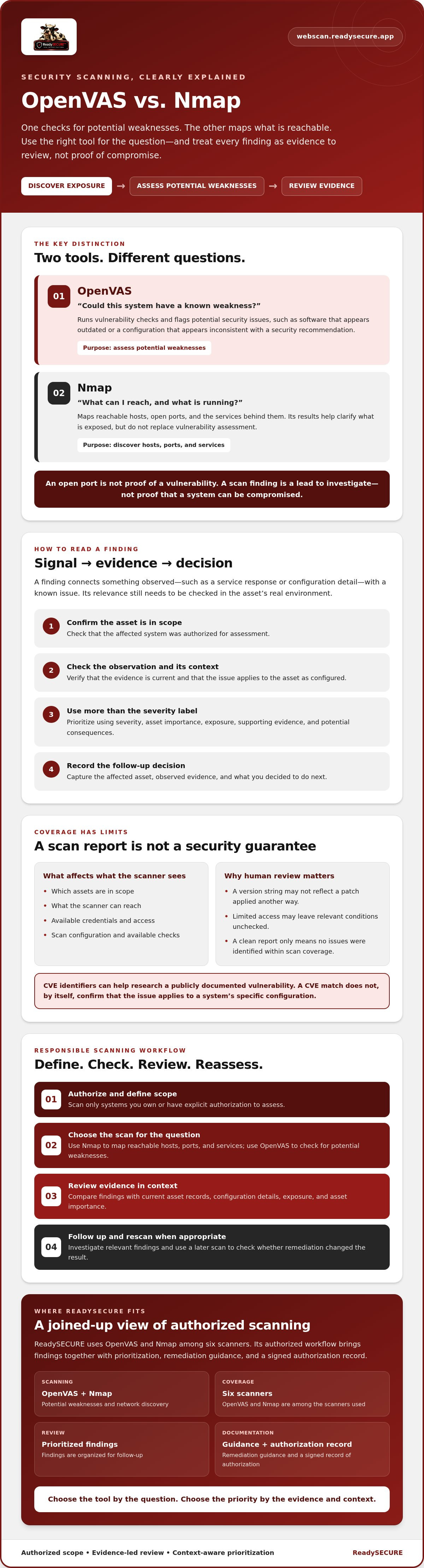
A list of open ports can look alarming, but it doesn’t confirm a vulnerability. That’s the key difference between openvas and Nmap: OpenVAS checks for potential security weaknesses, while Nmap maps reachable hosts, open ports, and the services behind them. They answer related questions, but neither replaces the other.
If you’re unsure whether a service is simply exposed or actually vulnerable, you’re not alone. A scan finding is a lead to investigate, not proof that a system can be compromised. Before scanning, confirm you have clear authorization and a defined scope.
This article explains what OpenVAS can detect, where its findings have limits, and how it compares with Nmap. You’ll learn when to use one tool or both, how to review results, and what to check next. We’ll also cover responsible scanning and how an authorized workflow can combine findings with severity ratings, remediation guidance, and a record of authorization.
Key Takeaways
- Use openvas to check for potential weaknesses, then review the evidence before deciding what needs attention.
- Use Nmap to discover reachable hosts, open ports, and services. Its results clarify what’s exposed but don’t replace vulnerability assessment.
- Choose a scan based on the question you need answered, and limit its scope to assets you’re authorized to assess.
- Prioritize findings by severity, asset importance, exposure, and supporting evidence rather than treating every alert as equally urgent.
- ReadySECURE uses OpenVAS and Nmap among six scanners, with prioritized findings, remediation guidance, and a signed authorization record.
What Is OpenVAS, and What Does It Actually Scan For?
OpenVAS is a vulnerability-scanning tool used to check authorized systems for potential security weaknesses. Its purpose is to help owners identify conditions that may need investigation or remediation, not to prove that an attacker can exploit them. The name stands for Open Vulnerability Assessment Scanner; for background on its history and relationship to the Greenbone Vulnerability Management framework, see the Open Vulnerability Assessment Scanner (OpenVAS) overview.
In short: vulnerability scanning uses automated checks to flag possible weaknesses. Penetration testing involves testing security risks in context. A scan finding is a signal to assess, not proof of compromise or successful exploitation.
What kinds of findings can OpenVAS report?
Results depend on the target, scan configuration, and vulnerability checks available to the scanner. A check may flag a service that appears to use vulnerable software or a configuration that matches a known security issue. For example, an exposed service could appear to be running an outdated version, or a system setting could appear inconsistent with a security recommendation. These are potential findings, not guaranteed detections.
A finding connects observed information, such as a service response or configuration detail, with a known issue. Check that the affected asset is in scope, that the observation is current, and that the issue applies in the asset’s actual environment. An alert should guide follow-up, not automatically dictate a fix.
What OpenVAS does not prove
A scan cannot establish that a system is completely secure. Automated checks are limited by what the scanner can reach and observe, which assets are in scope, and how the assessment is configured. Restricted access or incomplete coverage can leave relevant conditions unchecked.
An automated scan is not the same as manual validation or penetration testing. OpenVAS can identify potential issues based on available checks, but a finding may need human review to determine its relevance and practical risk. A clean report means the scan didn’t identify issues within its coverage; it isn’t proof that no weaknesses exist.
For responsible use, scan only systems you own or have explicit authorization to assess. Review results alongside asset importance, exposure, and current system details. This makes the report useful without overstating what the tool has established.
How OpenVAS Finds Vulnerabilities: Checks, Evidence, and Limits
A vulnerability scan follows a defined process. First, set the authorized scope and choose a configuration suited to the systems being assessed. The scanner then runs checks against information it can observe, such as service responses or accessible system details. Afterward, review the findings, investigate relevant evidence, and rescan when appropriate to check whether remediation changed the result.
Each check looks for conditions associated with a known security issue. Depending on the check and available access, it might compare an observed software version or response with information about a vulnerability. The checks and evidence available vary with the scanner’s implementation, configuration, and access to the target.
How vulnerability checks relate to CVEs and severity
A CVE, or Common Vulnerabilities and Exposures identifier, refers to a publicly documented vulnerability. If a report links a finding to a CVE, the identifier can help you research the issue and whether it applies to the affected asset. It doesn’t confirm that the system is vulnerable in its specific configuration.
Severity ratings help order findings for review, but they don’t establish local risk by themselves. A severe issue on an isolated, low-importance asset may call for a different response than a less severe issue on a critical, internet-facing system. Consider the asset, its exposure, the available evidence, and the potential consequences before setting priorities.
Why results can be incomplete or need validation
Coverage depends on which assets are in scope, what the scanner can reach, whether suitable credentials are available, and how the scan is configured. A network restriction may prevent checks from reaching a service. Without appropriate access, checks that rely on internal system details may not be able to inspect them.
Some findings also need validation. For example, a check may flag software based on a version string even if the system has been patched another way. Conversely, limited access may prevent a check from observing a weakness. Compare the report with current asset records, configuration details, and other reliable evidence before deciding what to do.
Scanner output is evidence to investigate, not a final verdict on whether a system is vulnerable or secure. Record the affected asset, the observed evidence, and your follow-up decision. After changes are made, an appropriate rescan can help determine whether the reported condition is still present. For an authorized assessment workflow, you can review a ReadySECURE scan; its results include prioritized findings, severity, remediation guidance, and a signed authorization record.
OpenVAS vs. Nmap: Vulnerability Checks or Port and Service Discovery?
These tools answer different assessment questions. Nmap helps map what’s reachable and which ports and services are exposed. OpenVAS checks observed target conditions for potential vulnerabilities. Choose based on the evidence you need, not on which tool seems more comprehensive.
| Comparison | Nmap | OpenVAS |
|---|---|---|
| Primary purpose | Discover reachable hosts, open ports, and services. | Check for potential vulnerabilities in observed systems and services. |
| Typical output | Host, port, and service information. | Potential vulnerability findings and supporting details. |
| Strength | Shows what appears accessible within the scan scope. | Relates observed conditions to security issues that may need review. |
| Limit | An open port or identified service doesn’t confirm a vulnerability. | A finding needs validation and doesn’t prove exploitability. |
The outputs can inform one another, but neither tool’s results replace validation. An exposed service is not automatically vulnerable, and a vulnerability alert needs to be checked against the system’s current state and context.
When should you use OpenVAS instead of Nmap?
Start with Nmap if your immediate question is, “Which hosts and services can be reached within this authorized scope?” Choose OpenVAS when you need to investigate whether observed systems or services may have known vulnerabilities. Neither is universally better. The right choice depends on the assessment objective, and you may need both to build a clearer picture.
Can OpenVAS and Nmap be used together?
Yes. Service discovery can provide context for later vulnerability checks. For example, knowing which services are visible can help focus review on relevant assets, but it doesn’t confirm a weakness. Keep both scans within explicitly authorized assets and agreed boundaries. For more detail on the discovery side, see this Nmap port scanning service guide.
How to Choose and Interpret an OpenVAS Scan Responsibly
A useful scan starts before the scanner runs. Decide what you need to learn, confirm the assessment boundaries, and plan how findings will be reviewed. This keeps the results relevant and helps prevent scanning systems that aren’t authorized targets.
What should you confirm before scanning?
Confirm that you own each target or have explicit written authorization to assess it. Record the target identifiers, exclusions, agreed timing, and purpose. Don’t include third-party systems unless permission clearly covers them. If the assessment involves websites or applications, this web application security assessment guide can help with broader scope decisions.
A practical scan and review workflow
- Confirm authorization. Keep the approval and scope available to the people conducting and reviewing the scan.
- Define assets. List the approved hosts or services, and note exclusions so the scan stays within bounds.
- Select the question. Decide whether you’re checking for potential vulnerabilities, reviewing exposed services, or investigating a specific concern.
- Run the scan. Use a configuration suited to the authorized assets and assessment objective.
- Review findings. Consider the affected asset, reported evidence, severity, exposure, and business importance together.
- Document decisions. Record who owns each follow-up, the next action, and how remediation will be verified.
How should you triage a finding?
Severity is a useful starting point, not a complete priority decision. Consider whether the asset supports a critical business function, whether it’s exposed, and how strong and current the reported evidence is. A high-severity finding on a sensitive, reachable system may deserve prompt review. A lower-severity issue on a less important asset still needs an informed decision, but may be handled differently.
Validate findings using approved methods before assigning remediation priority. Check that the reported condition applies to the asset as it currently exists, then document whether it needs remediation, further investigation, or another response. After changes, verify the outcome with appropriate evidence, such as a follow-up scan.
An empty report isn’t assurance that every weakness has been found. Scope, access, and configuration shape what a scan can assess, so record those limits alongside the results. ReadySECURE provides authorized scans with prioritized findings, severity, remediation guidance, and a signed authorization record. Start an authorized scan for an approved target.
Where OpenVAS Fits in an Authorized ReadySECURE Scan
ReadySECURE uses OpenVAS as one of six scanners in authorized assessments of websites, APIs, and internet-facing hosts controlled by the owner. OpenVAS isn’t a standalone ReadySECURE product. It’s part of a broader workflow designed to provide asset owners with findings within a clearly authorized scope.
What does ReadySECURE add around OpenVAS?
The six scanners include OpenVAS, Nmap, ZAP, TestSSL, and Nuclei. Each contributes a different perspective. For example, Nmap focuses on port discovery, while OpenVAS checks for potential network vulnerabilities. Using multiple scanners can bring different findings together, but it doesn’t mean every issue will be detected or confirmed.
ReadySECURE reports prioritized findings with severity and remediation guidance, helping users decide what to investigate and address first. Each result also has an attached signed authorization record, documenting the permission connected to the assessment. That record supports responsible, traceable scanning; it doesn’t validate a finding or guarantee that a system is secure.
One free scan covers one target. Treat its report as a starting point for review, not a complete security verdict. Consider findings alongside the asset’s role, exposure, and available evidence.
When should you consider a broader assessment?
If your question extends beyond network vulnerability checks, choose tools and scope that match the systems you need to assess. A website or API may call for web application scanning in addition to network checks. The automated ZAP scanning guide offers more context on that type of assessment.
Start with the risk question, then confirm which assets are authorized and which scanning approaches fit the scope. Automated findings can guide follow-up, but they don’t amount to manual penetration testing or remediation services. Keep those limits clear and use the results to inform your next decision.
To assess an approved target through this broader scanning workflow, start an authorized ReadySECURE scan.
Choose the Right Scan for Your Next Step
The distinction is straightforward: Nmap maps reachable hosts, ports, and services; openvas checks observed conditions for potential vulnerabilities. They can complement each other, but scan results are leads to review, not proof of compromise or a guarantee that a system is secure.
Keep assessments within assets you own or are explicitly authorized to scan. Then use the report’s evidence, severity, exposure, and business context to decide what to investigate and prioritize. ReadySECURE combines OpenVAS with five other scanners in its workflow, with prioritized findings, severity, remediation guidance, and a signed authorization record attached to each result. One free scan is available for one target.
If you’re ready to assess an approved target, start an authorized ReadySECURE scan. Review the results carefully, follow up on relevant findings, and use what you learn to make informed security decisions.
Frequently Asked Questions
What is OpenVAS used for?
OpenVAS is used to scan authorized systems for potential vulnerabilities. It runs checks against conditions it can observe, such as exposed services or configurations, and reports possible matches to known security issues. The findings help owners decide what to investigate and prioritize. They aren’t proof that a weakness can be exploited, so review the evidence against the affected system’s current configuration and business context.
Is OpenVAS the same as Nmap?
No. OpenVAS focuses on vulnerability checks, while Nmap primarily identifies reachable hosts, open ports, and services within an authorized scope. Nmap can show that a service is exposed, but an open port alone doesn’t establish that the service is vulnerable. The tools can complement each other: service discovery can add context to vulnerability checks, but findings from either tool may still need validation.
Can OpenVAS find every vulnerability?
No scanner can guarantee that it finds every weakness. Coverage depends on the assets in scope, network access, credentials, scan configuration, and the checks available to the scanner. Some issues may not be visible to automated checks, while findings can require confirmation against the target’s actual state. Treat a clean report as “no issues identified within this scan’s coverage,” not as proof that the system is secure.
Is OpenVAS safe to run on a website or server?
Only scan websites or servers you own or have explicit authorization to assess, and agree on the scope before running checks. Scanning sends requests to the target, and the impact can depend on the scan configuration and system. For important or sensitive services, coordinate with the responsible operators, choose an appropriate configuration, and plan how to respond if the scan affects service. Don’t scan third-party systems without permission.
What is the difference between a vulnerability and an open port?
An open port indicates that a network service appears reachable on a system. A vulnerability is a weakness in software, configuration, or another system condition that may create security risk. An exposed service may be correctly configured and up to date, or it may have a weakness that needs investigation. Port discovery helps show what’s accessible; vulnerability checks assess whether observed conditions may match known issues.
Does an OpenVAS scan replace a penetration test?
No. An OpenVAS scan runs automated checks for potential vulnerabilities, while a penetration test involves a broader process of testing security in context. A scan can help identify issues for review, but it doesn’t prove exploitability or assess every risk. Whether further testing is appropriate depends on the assessment question, authorization, scope, and required evidence. Don’t treat an automated report as a substitute for testing it wasn’t designed to perform.
Is OpenVAS free to use?
OpenVAS is an open-source vulnerability scanner, and the Greenbone Community Edition is the free and open-source version described in the article. Running a scanner yourself may still involve setup and computing resources. A scanning service is a separate offering: ReadySECURE provides one free scan for one target, while its paid plans add scheduling, history, and trend analysis. Check the terms of the specific software or service you plan to use.
To scan an approved target and review prioritized findings with remediation guidance, start a ReadySECURE Free Scan.


