
How much of your digital infrastructure is currently visible to an attacker while remaining invisible to your security team? It's a sobering question for any professional managing a modern network. You likely already know that manual checks can't keep pace with evolving threats. This is why many organizations are turning to vulnerability scanning as a service to maintain a disciplined defense. However, the sheer volume of available software often leads to information overload. Distinguishing between network, web, and API scanners is difficult, and the fear of accidentally triggering a system outage during an unauthorized scan is a valid concern.
We understand that security is not a single tool; it's a prioritized stack of specialized scanners working in concert. This guide provides a clear list of industry-standard tools and frameworks necessary to identify, prioritize, and remediate security risks across your digital infrastructure. We'll examine the differences between open-source and commercial options while providing a roadmap for implementing automated scanning that respects your operational boundaries. By the end of this roundup, you'll have the technical clarity needed to build a robust security posture for 2026.
Key Takeaways
- Understand the fundamental shift toward continuous, tool-driven assessments and how to categorize scanners by their specific functions.
- Evaluate the trade-offs between open-source engines and commercial enterprise tools regarding depth, cost, and ease of use.
- Learn the essential steps for defining your scanning scope and securing formal authorization to protect your legal standing.
- Discover how utilizing vulnerability scanning as a service allows you to orchestrate multiple industry-standard engines through a single interface.
- Establish a clear roadmap for prioritizing and remediating security risks across your entire digital infrastructure.
Understanding the Vulnerability Scanning Tool Landscape
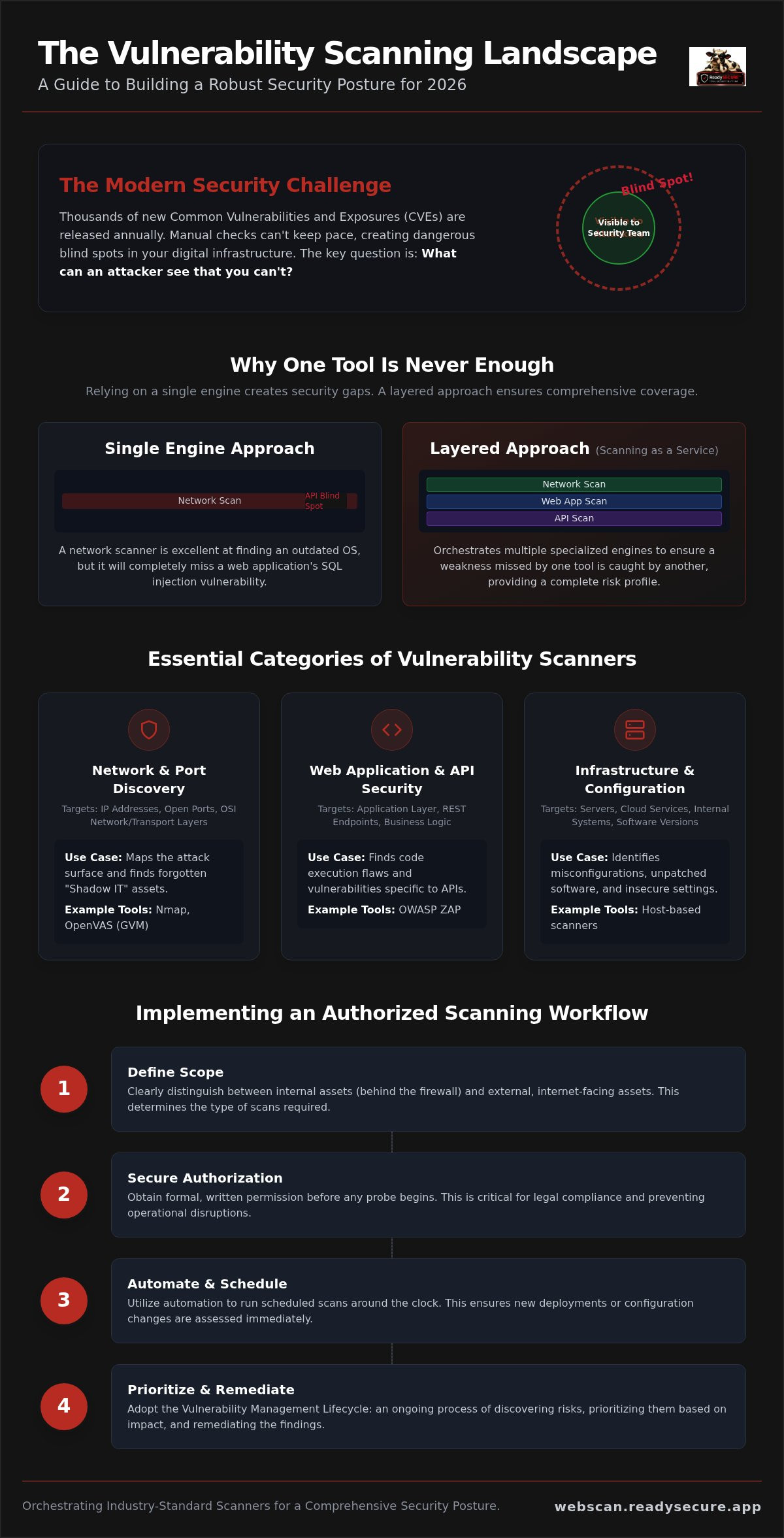
What exactly is vulnerability scanning? At its core, a Vulnerability scanner is a specialized software tool that automates the identification of security weaknesses within your digital environment. It probes systems to find misconfigurations, unpatched software, and insecure settings. In 2026, the industry has shifted decisively toward vulnerability scanning as a service to provide continuous, tool-driven assessments. This change is necessary because the speed of modern software delivery creates new risks faster than any human team can track.
Effective security requires a clear distinction between internal and external scanning. Internal scans assess the risks behind your firewall, such as lateral movement potential or internal server misconfigurations. External scans focus on your internet-facing assets, which are the most likely targets for initial compromise. Regardless of the target, you must prioritize authorized scanning. This means obtaining formal, written permission before any probe begins. This practice ensures legal compliance and prevents technical disruptions, distinguishing professional security work from unauthorized activity.
Why One Tool is Never Enough
Can a single tool see everything? The short answer is no. Security engines are highly specialized. For instance, a network scanner is excellent at finding an outdated version of Linux, but it won't detect a SQL injection vulnerability in a web application. Similarly, specialized SSL/TLS inspection tools focus on cipher suites and certificate chains, while a port scanner merely checks if a door is open.
Relying on a single engine creates dangerous security blind spots. If your tool doesn't have a specific signature or template for a new threat, that threat remains invisible. This is why many teams adopt vulnerability scanning as a service to orchestrate multiple specialized engines simultaneously. This layered approach ensures that a weakness missed by one tool is caught by another, providing a more comprehensive view of your risk profile.
The Role of Automation in Modern Security
How do security teams keep pace with the thousands of new Common Vulnerabilities and Exposures (CVEs) released every year? They use automation. Automated tools work around the clock to cross-reference your infrastructure against global threat databases. This is particularly vital during new deployments, where a small configuration change can inadvertently open a massive hole. Scheduled scans ensure that these errors are caught immediately rather than months later during a manual review. The Vulnerability Management Lifecycle is an ongoing process of discovery, prioritization, and remediation.
Essential Categories of Vulnerability Scanning Tools
How do you organize a security audit when your infrastructure spans multiple layers? Effective defense requires categorizing tools by their primary function: Network, Web Application, and Infrastructure. Network tools generally target the transport and network layers of the OSI model, focusing on IP addresses and open ports. Conversely, web application scanners operate at the application layer to inspect code execution and data handling. For a vendor-neutral comparison of these categories, you can consult OWASP's list of scanning tools. Utilizing vulnerability scanning as a service allows teams to orchestrate these different tool types without maintaining separate, complex hardware for each engine.
Network and Port Discovery Tools
Nmap remains the industry standard for port scanning and service discovery. It maps out your attack surface by identifying which services are listening on which ports. OpenVAS (GVM) builds on this by performing deep network vulnerability assessments. These tools are critical for identifying "shadow IT," which refers to forgotten or unauthorized internet-facing hosts. If an asset is visible to the internet but invisible to your management console, it's a primary target for attackers. Host-based scanning helps bridge this gap by providing visibility into the specific software versions running on those assets.
Web Application and API Security Scanners
Web applications and APIs require a specialized approach because they often contain logic flaws that network scanners miss. OWASP ZAP is a staple for performing both active and passive scans on web interfaces. As modern SaaS architectures become more complex, the rise of API-specific vulnerabilities has made auditing REST endpoints mandatory. Adopting vulnerability scanning as a service ensures these API audits happen automatically as part of your deployment pipeline. This is why continuous API security scanning is now a standard practice for protecting the integrity of customer data.
SSL/TLS and Configuration Audit Tools
SSL/TLS configuration is often overlooked, yet it's a fundamental pillar of digital trust. TestSSL is essential for identifying weak ciphers, expired certificates, and vulnerabilities like Heartbleed. It's important to remember that misconfigured SSL doesn't just invite security breaches; it can also lead to a drop in SEO rankings as search engines prioritize secure sites. For rapid detection of specific, known exploits, template-based scanning with Nuclei is highly effective. It uses YAML-based templates to send targeted probes, allowing you to check for new vulnerabilities across thousands of hosts in minutes. If you're ready to see how these engines perform on your own site, you can run a ReadySECURE free scan to get immediate results.
Open-Source vs. Commercial Enterprise Tools
Should you invest in a high-cost enterprise suite or build a custom security stack from the ground up? This is a central debate for security managers who must balance budget constraints with technical requirements. Legacy commercial platforms often provide a polished user experience and dedicated support teams, making them attractive for large scale corporate environments. However, these proprietary systems frequently come with significant licensing fees that can strain mid-market budgets. Open-source alternatives provide comparable scanning depth without the upfront software costs, though they require more technical expertise to manage effectively. Total Cost of Ownership for self-hosted tools includes server maintenance, regular software updates, and the hours of expert configuration required to reduce false positives.
For many organizations, the ideal solution is a hybrid model that captures the best of both worlds. Adopting vulnerability scanning as a service allows you to access the technical rigor of elite open-source engines while benefiting from the streamlined interface of a professional platform. This "Professional Open Source" approach removes the manual configuration headache while maintaining the depth required for modern compliance. It ensures that your team spends their limited time fixing vulnerabilities rather than troubleshooting the scanning software itself.
The Power of Open-Source Security Engines
Why do the world's top security researchers contribute to open-source engines? Tools like ZAP and OpenVAS are trusted because their scanning logic is transparent and community-vetted. Unlike proprietary software, anyone can inspect how an open-source tool identifies a threat, which ensures there's no "black box" logic that might miss certain classes of vulnerabilities. The primary challenge remains the steep learning curve associated with command-line interfaces and manual environment setup. Professional services overcome this by wrapping these engines in a user-friendly SaaS layer that delivers actionable data without the technical friction.
When to Move to a Managed SaaS Platform
When does a DIY approach become a liability for your team? As your infrastructure grows, managing individual reports from multiple disconnected tools becomes an administrative burden. Managed SaaS platforms solve this by providing centralized reporting and prioritized remediation guidance. Instead of a massive list of raw data, you receive a dashboard that highlights which specific patches will reduce your risk the most. Historical trend analysis is also critical for proving to stakeholders that your security posture is improving over time. These platforms also simplify technical hurdles, making it easier to scan domain for vulnerabilities without writing custom scripts or managing complex server clusters. Utilizing vulnerability scanning as a service ensures that your security program remains scalable, consistent, and audit-ready.
Implementing an Authorized Scanning Workflow
How do you move from owning security tools to maintaining a secure perimeter? It starts with a disciplined, five-step workflow that ensures every scan is both legal and effective. A professional approach to vulnerability scanning as a service relies on this structure to provide consistent results without disrupting your operations. Following a methodical sequence prevents technical oversights and ensures your team stays focused on genuine risks.
- Step 1: Define the Scope. You can't protect what you can't see. Catalog all internet-facing assets, including domains, IP addresses, and REST APIs.
- Step 2: Obtain Authorization. This is a non-negotiable legal requirement. Secure formal, written consent for all targets to avoid being flagged as a malicious actor.
- Step 3: Select Your Stack. Ensure your toolset covers the three primary layers: Network, Web Application, and SSL/TLS configuration.
- Step 4: Establish a Schedule. Security isn't a one-time event. Set up recurring weekly or monthly automated audits to catch vulnerabilities introduced during new deployments.
- Step 5: Integrate Findings. Connect your scan reports directly to your development or IT remediation workflow so that fixes happen in days, not months.
The Criticality of Scanning Authorization
Why is formal permission so important? Scanning a site you don't own can be flagged as malicious activity by internet service providers or automated defense systems. This can lead to IP blacklisting or even legal repercussions. Professional security reporting utilizes "Signed Authorization Records" to prove the scan was legitimate. These records are essential when you need to document your security posture for compliance audits or meet the strict requirements of cybersecurity insurance providers. If you need to verify your own site's security today, you can start with a ReadySECURE Free Scan to get an authorized assessment immediately.
Prioritization: Moving from Data to Action
Don't let your team drown in raw data. Vulnerability fatigue occurs when you're faced with hundreds of low-level findings that don't actually threaten your business logic. To stay efficient, use CVSS (Common Vulnerability Scoring System) scores to prioritize critical and high-severity issues first. A vulnerability scanning as a service platform should provide more than just a list of holes; it must offer remediation guidance. Knowing exactly how to fix a configuration error is just as important as finding it. This transition from discovery to action is what separates a basic scan from a mature security program.
ReadySECURE: Orchestrating Industry-Standard Scanners
How do you manage six different security tools without six different management consoles? ReadySECURE provides the answer by offering vulnerability scanning as a service that orchestrates the world's most trusted engines. Instead of manually configuring server environments or maintaining individual tool versions, you access them through a single, unified SaaS interface. This platform simultaneously runs Nmap, OpenVAS, ZAP, TestSSL, and Nuclei to provide a 360-degree view of your digital infrastructure. It ensures that your network, web applications, and SSL configurations are all audited in a single pass, saving your team hours of manual labor and configuration troubleshooting.
Six Scanners, One Prioritized Report
Why spend weeks troubleshooting open-source installations when you can focus on remediation? ReadySECURE eliminates the configuration headache by managing the underlying infrastructure for you. When a scan completes, you don't receive six disjointed data dumps. Instead, you get a single, prioritized report that intelligently merges findings from all engines. This report provides clear remediation guidance, allowing your developers to understand exactly how to close a security hole. Every result also includes a signed authorization record. This document is a critical asset for proving that your security activities were legitimate and authorized. It's often required for compliance audits, vendor assessments, or cybersecurity insurance renewals. For organizations needing deeper insights, ReadySECURE Paid Plans offer automated scheduling and historical trend analysis to visualize your security improvements over time.
Getting Started with Professional Scanning
How can you assess your current risk without a massive upfront investment? The ReadySECURE Free Scan is the ideal starting point for evaluating a single internet-facing target. By submitting your first domain, you'll see exactly how these industry-standard engines identify weaknesses in your perimeter. This initial assessment often reveals forgotten ports, insecure ciphers, or unpatched web vulnerabilities that pose immediate risks. Moving from a single scan to continuous security monitoring is the next logical step in a disciplined defense strategy. It ensures that as your infrastructure evolves, your visibility into potential threats remains constant. This systematic approach allows you to maintain a high level of digital safety without the overhead of a large security operations center. You can protect your assets with a ReadySECURE Free Scan today to begin your journey toward a more secure digital future.
Establishing a Disciplined Security Posture for 2026
Choosing the right tools is the first step toward a resilient digital infrastructure. We've established that a layered approach, combining specialized network, web, and SSL engines, is the only way to eliminate dangerous blind spots. Professional security management requires more than just discovery; it demands a structured workflow that prioritizes authorized scanning and clear remediation pathways. This systematic approach transforms raw data into a reliable roadmap for long-term security.
By adopting vulnerability scanning as a service, your team can leverage elite open-source engines without the operational burden of manual setup or server maintenance. ReadySECURE provides a professional path forward by orchestrating six industry-standard engines and including signed authorization records with every result. You'll receive prioritized remediation guidance to ensure your limited time is spent on the most critical risks. Take the first step toward a verifiable and disciplined defense today.
Run your first authorized security scan for free with ReadySECURE
Frequently Asked Questions
What is the difference between a vulnerability scan and a penetration test?
A vulnerability scan is an automated tool that identifies known security gaps, while a penetration test is a manual simulation of an attack. Utilizing vulnerability scanning as a service provides continuous, tool-driven discovery of weaknesses like unpatched software or misconfigured headers. Conversely, a penetration test involves a security professional actively trying to exploit those gaps. Scans are best for regular maintenance, while pen tests are deeper, point-in-time assessments conducted by humans.
How often should I use vulnerability scanning tools on my website?
You should use scanning tools at least weekly or whenever you deploy new code or infrastructure changes. Monthly scans are a minimum baseline for stable environments, but automated scheduling ensures that new CVEs are caught shortly after they're released. Continuous monitoring is essential because the threat landscape evolves daily. Regular scanning prevents small configuration errors from becoming long-term security liabilities that attackers can discover before your team does.
Can vulnerability scanning tools break my website or slow it down?
Professional tools are designed to be non-disruptive, but aggressive active scans can occasionally impact performance or trigger account lockouts. This is why selecting a platform that uses authorized, industry-standard engines like ZAP and OpenVAS is critical. These tools can be configured to scan at a pace that respects your server resources. Using a managed service helps ensure that the scanning intensity is balanced to provide deep coverage without causing operational downtime.
Are free vulnerability scanning tools safe to use?
Free tools are safe if they come from reputable, community-vetted sources like the OWASP Foundation or established security vendors. The primary risk with unknown free online scanners is the potential for data harvesting or unauthorized probing. Using a trusted entry point like the ReadySECURE Free Scan ensures your data is handled professionally. Community-standard engines like Nmap and Nuclei are used by security experts globally because their logic is transparent and reliable.
What does an "authorized" vulnerability scan mean?
An authorized scan is one where the target owner has provided explicit, written permission for the security probe to occur. This is a fundamental requirement for ethical security work. It distinguishes legitimate testing from malicious activity and protects you from potential legal risks. Professional platforms provide signed authorization records with every result. These documents prove to stakeholders and service providers that the activity was sanctioned and conducted within agreed-upon digital boundaries.
Do vulnerability scanning tools help with PCI DSS compliance?
Yes, automated tools are a core requirement for PCI DSS compliance, specifically regarding regular internal and external scans. While a vulnerability scanning as a service platform helps you meet several technical requirements, you must still ensure your overall program aligns with the specific standard's documentation rules. Regular reports that include remediation guidance and historical data are vital for proving to auditors that you're actively managing your security risks over time.
What should I do after a vulnerability scanning tool finds a critical risk?
You should immediately prioritize the finding based on its CVSS score and the sensitivity of the affected asset. Start by reviewing the remediation guidance provided in your scan report to understand the necessary patch or configuration change. Once the fix is implemented, run a follow-up scan to verify that the vulnerability is successfully closed. Prompt action prevents attackers from exploiting known weaknesses that have already been identified by your automated security tools.


