

What if an open port is a useful clue, not proof that a system is vulnerable? An nmap port scanning service can map reachable ports and identify services that may be exposed, but that view alone can’t confirm whether an attacker could exploit a weakness.
That distinction matters when you’re assessing risk. You need to know what a scan can reveal, where its limits are, and how to keep testing within systems and network ranges you’re explicitly authorized to assess. You also need results that help you decide what to check next, not just a list of ports.
This article explains what Nmap port scanning can find, how it differs from broader vulnerability scanning, and what to check when comparing services. You’ll also learn how to define scope and authorization, interpret results without treating every open port as a vulnerability, and prioritize follow-up work. ReadySECURE includes Nmap alongside other scanners, with prioritized reporting and a signed authorization record attached to each scan result.
Key Takeaways
- Use an nmap port scanning service to see which ports and services were reachable within the scan’s defined scope and at that time.
- Interpret results in context: filtering, host availability, and scan configuration can affect what the scan observes.
- Compare port discovery with vulnerability scanning by checking each service’s purpose, report details, and assessment limits.
- Before choosing a service, verify written authorization, target boundaries, reporting details, and how scan data is handled.
- ReadySECURE combines Nmap with other scanners. Its free scan covers one target, while paid plans add scheduling, history, and trend analysis.
What Does an Nmap Port Scanning Service Actually Do?
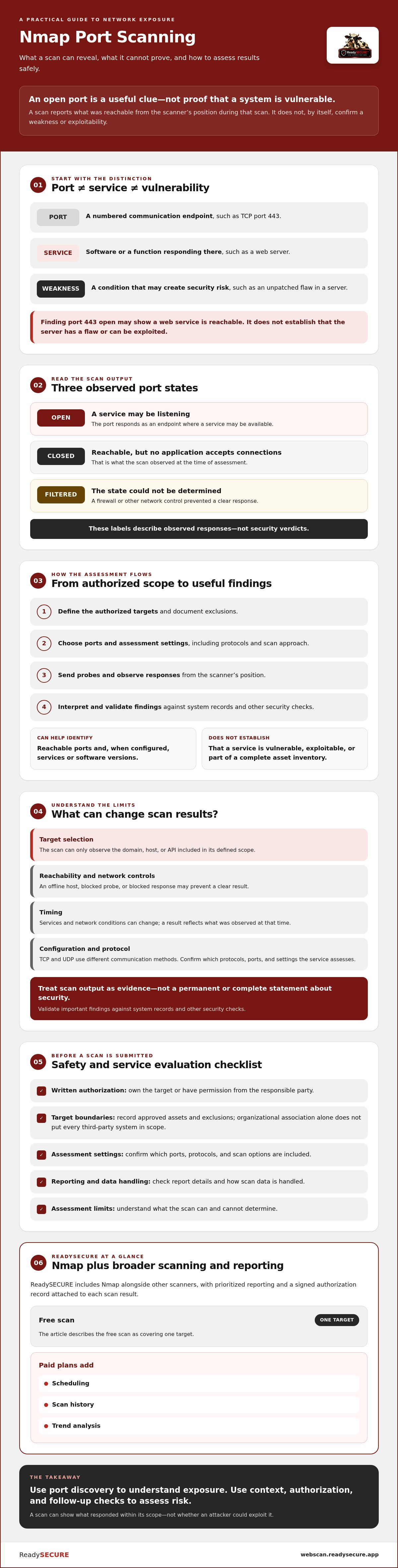
An nmap port scanning service checks a defined set of authorized network targets to see which ports respond and, depending on its configuration, what services may be available through them. It provides a view of reachable network exposure from the scanner’s position during that scan. It isn’t a complete inventory of every system, nor does it reveal every security condition.
Keep three concepts separate. A port is a numbered communication endpoint, such as TCP port 443. A service is the software or function responding there, such as a web server. A vulnerability is a weakness that could create security risk, such as an unpatched flaw in that server. Finding port 443 open may show that a web service is reachable; it doesn’t establish that the server has a flaw or can be exploited.
Port scanning identifies reachable communication endpoints and may help identify their services; an open port alone does not prove that a vulnerability exists or that a system can be exploited.
Nmap (Network Mapper) is used for network discovery and security auditing. A service built around it should also make clear which targets are in scope and what the results can and can’t tell you.
What do open, closed, and filtered ports mean?
An open port responds as an endpoint where a service may be listening. A closed port is reachable, but no application is accepting connections on it during the scan. A filtered result means the scanner couldn’t determine whether the port is open or closed because a firewall or another network control prevented a clear response. These states describe observed responses, not security verdicts.
What information can Nmap identify?
Nmap can probe selected ports and report their observed states. When service or version detection is enabled, it may also identify the software associated with a responding port. That information can help an administrator check whether an exposed service is expected and review it further. Identification isn’t confirmation of exploitability, and an incomplete scan shouldn’t be treated as a complete asset inventory.
Results depend on whether the target is reachable from the scanner, how network controls handle probes, and the scan configuration. A host that’s offline or a port blocked along the route may not provide a clear result. Treat the report as evidence of what the scan observed at that time, then validate important findings against system records and other security checks.
How Does an Nmap Port Scan Work, and What Affects Its Results?
A port scan follows a straightforward sequence: define the authorized targets, select the ports and assessment approach, send probes, observe the responses, then review what those responses indicate. The details matter. A scan is meaningful only when its scope is clear and its findings are interpreted in light of how the target and network responded.
A port scan result is a time-bound observation of an authorized target, not a permanent or complete statement about its security. A host may be unavailable during one assessment and reachable later. Network controls may also block or alter responses, so an unclear result doesn’t necessarily mean a port is closed.
Which scan factors can change the findings?
Target selection determines what the scan can observe. The agreed scope should specify the domain, host, or API being assessed, along with any exclusions. Network filtering can prevent probes from reaching a target or responses from returning. The time of the scan matters too, since services and network conditions can change.
TCP and UDP use different communication methods, so assessing them can require different approaches. Don’t assume a service checks both protocols or uses a particular port range. Confirm which protocols, ports, and other scan settings are included with the provider. The official Nmap documentation explains Nmap’s capabilities, but a provider’s available configuration may differ. Verify those details before relying on a scan to answer a specific question.
How should teams define authorized scope?
Before submitting a target, confirm that you own it or have written permission from the party responsible for it. A domain’s relationship to your organization doesn’t automatically mean every associated host or third-party system is in scope. Document approved assets and exclusions, then check that the service’s assessment boundaries match that record.
A clear scope helps prevent accidental testing of systems outside the intended assessment. For broader guidance on setting boundaries for different assessment methods, see the guide to comparing web application security assessment approaches.
ReadySECURE offers authorized scans for websites, APIs, and internet-facing hosts controlled by the user. Nmap is part of a multi-scanner service, not a standalone Nmap tool. For a scoped assessment, you can review ReadySECURE scanning options and confirm that the target is one you’re authorized to assess.
Nmap Port Scanning vs. Vulnerability Scanning: What Is the Difference?
Nmap port scanning and vulnerability scanning answer related but different questions. Port scanning helps establish which network services appear reachable. Vulnerability scanning assesses for potential security issues using additional checks, methods, and coverage that vary by scanner. Neither label guarantees a complete assessment, so compare what a service actually checks and reports.
| Comparison | Nmap port scanning | Vulnerability scanning |
|---|---|---|
| Primary purpose | Discover reachable ports and, when configured, identify services or versions. | Assess for potential security weaknesses using the scanner’s supported checks. |
| Typical output | Observed port responses and possible service details for the assessed target. | Potential issues, findings, or indicators that may need validation and prioritization. |
| Assessment limits | Doesn’t establish that a reachable service has an exploitable vulnerability. | Results depend on the scanner’s methods, coverage, configuration, and target access. A scan isn’t proof that every weakness has been found. |
For example, discovering a reachable web service tells you there’s an exposed service to review. It doesn’t prove the software is vulnerable. A vulnerability scanner may check for additional conditions, but its findings still need to be interpreted in context. The tools are complementary, not interchangeable.
When is an Nmap-only scan useful?
An Nmap-only assessment can be a focused choice when your question is about network exposure: which approved services appear reachable from an external perspective? It can support asset discovery or help compare observed services with what your team expects to be exposed. Treat the results as an input to technical review. An unexpected service may warrant investigation, while a significant finding may require follow-up testing to understand risk.
When does a layered scan provide more context?
Different scanners assess different classes of issues. A web application scanner, for instance, can provide checks that port discovery alone doesn’t perform. See this practical guide to automated ZAP scanning for more on complementary web application checks.
ReadySECURE combines Nmap with five other scanners, including OpenVAS, ZAP, TestSSL, and Nuclei. It provides a prioritized report with remediation guidance, but the included tools shouldn’t be mistaken for proof of exhaustive coverage. If you’re comparing an nmap port scanning service with a broader option, ask which assessment methods are included, what each report supports, and what needs human validation. Choose based on the question you need answered.
How to Evaluate an Nmap Port Scanning Service Safely
A suitable service should make its boundaries clear before scanning and its findings understandable afterward. Use this checklist to compare providers and confirm the process fits your organization’s authorization and reporting needs:
- Authorization: Confirm ownership or written permission for every target before submitting it.
- Scope: Check that target identifiers and exclusions are recorded, and that the scan stays within those agreed limits.
- Reporting: Look for clear observations, relevant severity context, stated limitations, and practical remediation guidance.
- Interpretation: Ask whether the report separates what the scan observed from conclusions and suggested follow-up.
- Data handling: Find out what scan data is collected, who can access it, and how it is retained or handled.
These questions help reveal whether an nmap port scanning service offers more than a list of port states. A useful report should help your team decide what to verify next, without presenting an observation as a confirmed security incident.
What should an authorized scan service document?
Before scanning, the service should capture permission, the identifiers of approved targets, and the agreed scope. Afterward, look for findings that show what was observed, where it was observed, and what limitations affect interpretation. Severity context and remediation guidance can help teams plan investigation, but the report should make clear which details are observations and which are recommendations.
ReadySECURE attaches a signed authorization record to each scan result and provides prioritized findings with remediation guidance. That record documents authorization for the scan; it shouldn’t be treated as a guarantee of any legal or compliance outcome.
How can you interpret findings without overreacting?
Start by confirming the reported host, port, service, and scan observation. Then compare the result with asset records and ask the responsible technical team whether the service is expected. An open port alone doesn’t prove a vulnerability, compromise, or unauthorized access. It indicates a responding endpoint that may need context and review.
If a result is uncertain, validate it with the team responsible for the system and choose suitable follow-up assessment. Prioritize investigation based on verified exposure and the role of the service, not port status alone. This keeps attention on evidence rather than assumptions.
If you want to apply these checks to a website you control, try ReadySECURE’s free website security scan. The free option covers one scan of one target.
When Does ReadySECURE Make Sense for Nmap Port Scanning?
ReadySECURE may suit teams that want an authorized, multi-scanner check of websites, APIs, and internet-facing hosts they control. Nmap is one component of the service, alongside five other scanners. This provides a broader set of scan findings than a standalone port check, while keeping the assessment tied to targets users are authorized to assess.
The ReadySECURE Free Scan covers one scan of one target. It can provide an initial point-in-time view, but it isn’t continuous protection or an ongoing monitoring plan. If you need repeated assessments, ReadySECURE Paid Plans add scheduling, scan history, and trend analysis. Confirm that the target is in scope and that the service’s available configuration fits your assessment needs.
Is one scan enough, or do you need ongoing monitoring?
One scan can help establish a starting point. It can’t show how exposure changes after a deployment, configuration update, or other system change unless you assess the target again. Decide how often to reassess based on changes to your environment, your risk priorities, and your organization’s monitoring needs. For planning recurring assessments, read this guide to continuous security scanning.
Paid plans include scheduling, history, and trend analysis to support repeated scanning over time. These capabilities help teams review changes between assessments; they don’t remove the need to verify important findings or act on confirmed issues.
What should you do after receiving the results?
Start with the prioritized findings and remediation guidance. Review them with the person responsible for the target, verify important observations, and decide what needs investigation or correction. Document decisions and follow-up actions so the team can track what was confirmed and what remains unresolved. Set the next assessment timing according to system changes, risk, and monitoring needs.
If a scoped, authorized check fits your needs, start an authorized ReadySECURE Free Scan. It covers one target, making it an option for an initial assessment rather than a substitute for ongoing monitoring.
Turn Port Scan Findings Into Focused Security Work
An nmap port scanning service can show which ports and services appear reachable within an authorized scope. An open port is a point to investigate, not proof of a vulnerability or compromise. Scan results are observations from a particular time, so review them alongside system context and other relevant checks.
Choose a service that records authorization and scope, distinguishes observations from interpretations, and helps your team decide what to verify next. ReadySECURE combines six scanners, including Nmap, and provides prioritized reporting with remediation guidance. A signed authorization record is attached to each scan result.
The ReadySECURE Free Scan covers one scan of one target, making it a practical starting point for an initial check. Paid plans add scheduling, scan history, and trend analysis for teams that need to review changes over time.
Start an authorized ReadySECURE Free Scan for a target you control and are authorized to assess. With clear scope and careful follow-up, your team can turn scan findings into sensible next steps.
Frequently Asked Questions
What does an Nmap port scan show?
An Nmap port scan shows how selected ports on an authorized target respond at the time of the scan. An nmap port scanning service may report ports as open, closed, or filtered, and some configurations may try to identify the service. These observations help teams understand network exposure, but they don’t confirm that a service is vulnerable, exploitable, or compromised. Interpret the results in light of the scan’s scope and conditions.
Is an open port a security vulnerability?
No, an open port isn’t automatically a vulnerability. It means a service responded to the scan, and that service may be necessary and appropriately secured. Risk depends on what’s exposed, how it’s configured, who can reach it, and whether a relevant weakness exists. Confirm the service and its business purpose before deciding what to investigate. Port status alone doesn’t prove a vulnerability or compromise.
Can an Nmap port scanning service scan any domain?
No. A service should scan a domain or host only when you own it or have explicit authorization to assess it. Confirm the approved assets, scope, and exclusions before starting. Public accessibility isn’t permission. ReadySECURE requires written authorization and attaches a signed authorization record to each scan result. Clear authorization and scope help keep an assessment within the boundaries approved by the responsible owner.
What is the difference between Nmap and a vulnerability scanner?
Nmap is commonly used to discover network ports and, depending on configuration, identify services. Vulnerability scanners use their own methods to assess for additional security issues. Their checks and coverage vary, so neither should be treated as a universal substitute for the other. A layered assessment can provide broader context, but findings still need review and validation before your team decides what action to take.
Can a port scan disrupt a website or server?
A scan sends network traffic to its authorized target, and its impact depends on the target, scan configuration, and environment. Don’t assume every scan is impact-free. Before scanning, confirm acceptable testing conditions with the system owner, especially for sensitive or production systems. Choose a service that clearly explains its authorization process, and keep the assessment within approved targets and boundaries.
Does ReadySECURE use Nmap as a standalone service?
No. ReadySECURE includes Nmap as one of six scanners in its authorized scanning service, rather than offering a standalone Nmap tool. Other included scanners include OpenVAS, ZAP, TestSSL, and Nuclei. The service provides prioritized reporting with remediation guidance, and a signed authorization record is attached to each result. One free scan covers one target; paid plans add scheduling, history, and trend analysis.
How often should you run an Nmap port scan?
There’s no single scan schedule that fits every organization. Consider changes to internet-facing assets, infrastructure updates, exposure, and your internal security needs when deciding when to reassess. A scan reflects conditions at a particular time, so it doesn’t replace ongoing security practices. ReadySECURE paid plans include scheduling, scan history, and trend analysis. Review plan details to determine whether those capabilities fit your reassessment needs.


