

A scan can find real weaknesses and still leave you unsure what to fix first. That’s why a web application security assessment should be judged not by the number of findings alone, but by whether its scope and testing method fit your application’s exposure and your team’s ability to act on the results.
It’s reasonable to expect clear answers: Is an automated scan enough, or do you need a deeper assessment or penetration test? Automated tools can identify some issues, but they have limits and don’t replace manual testing. The right choice depends on what you need to examine, what evidence you require, and how you’ll prioritize remediation.
This guide explains what each approach can reveal, where its coverage ends, and how to define a practical scope for your website or API. You’ll also learn what makes findings actionable and how authorized automated scanning, such as ReadySECURE, can provide an initial external view of assets you control. The goal is a controlled assessment that informs your next steps, not a report that leaves you guessing.
Key Takeaways
- A web application security assessment can examine more than a single scan, including application behavior, exposed services, configuration, and transport security.
- Compare automated scanning, manual testing, and penetration testing by coverage, repeatability, human interpretation, evidence, and operational needs.
- Use automated findings as evidence, not proof that every security issue has been identified. Consider application context when deciding what to investigate further.
- Build a controlled process: define the purpose, inventory targets, obtain written authorization, assess, triage findings, remediate, and reassess.
- ReadySECURE offers an authorized automated starting point for an owned website, API, or internet-facing host. One free scan covers one target, while paid plans add scheduling, history, and trend analysis.
What Does a Web Application Security Assessment Evaluate?
A web application security assessment is a scoped review of an application and its exposure. It begins by identifying what to examine, then interprets the findings and considers what to address. A vulnerability scan can be part of the process, but a scan alone doesn’t define the assessment or show how results should inform risk decisions.
Depending on its objectives, a review may consider how the application behaves, which services are reachable from the internet, how components are configured, and whether data is protected in transit. These checks relate to broader application security principles, including threats and weaknesses that can affect web applications. Automated findings can help teams identify and prioritize concerns, but they can’t prove an application is secure or that every weakness has been found.
What assets and application layers belong in scope?
Start with an inventory, then decide which assets to include. A defined scope may cover production or test environments, domains, APIs, and internet-facing hosts. Consider relevant entry points, user roles, and exposed services too. A public login page and an administrative function, for example, may present different risks and require different testing considerations.
Record exclusions alongside included assets. This makes the testing boundary clear and reduces the chance of assessing a system without permission.
- Assets: List approved domains, API endpoints, hosts, and environments.
- Access and behavior: Identify entry points and roles relevant to the assessment.
- Boundaries: Document excluded systems and confirm written authorization for every target.
How is an assessment different from a vulnerability scan?
A vulnerability scan uses automated checks against defined targets to detect recognizable issue patterns, such as exposed services or configuration concerns. Its results depend on the targets and checks used. An assessment is broader: it sets objectives and boundaries, reviews evidence in context, and supports decisions about follow-up and remediation.
The labels alone don’t guarantee manual testing, complete coverage, or a particular level of assurance. Before choosing an approach, confirm what methods are included, what access is available, and what conclusions the final findings can support.
Which Web Application Security Assessment Methods Should You Compare?
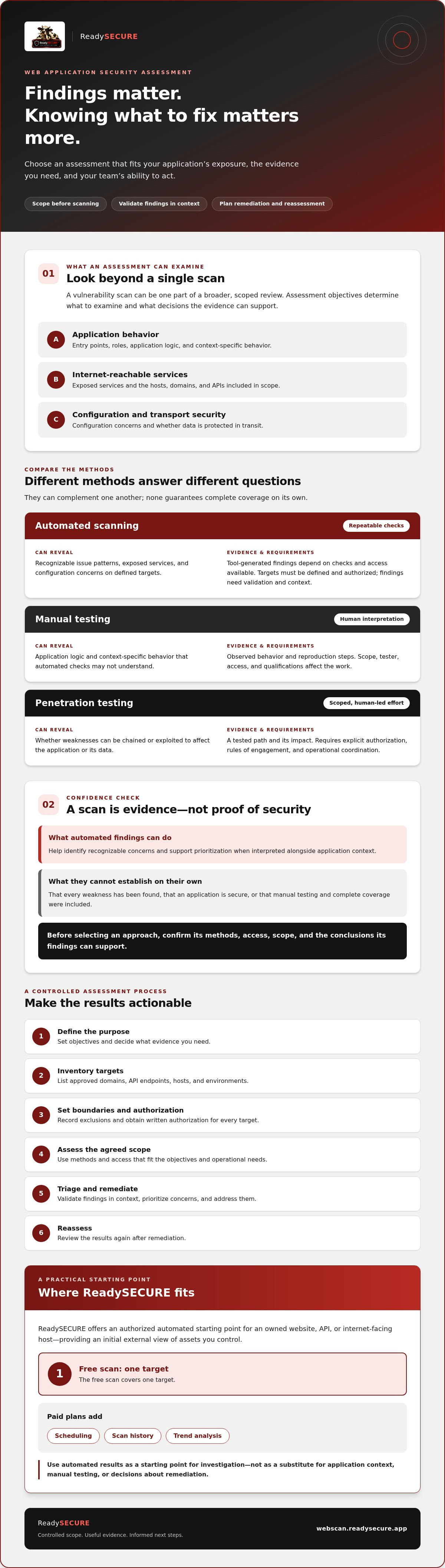
Compare methods by what they can reveal and what decisions they support. Automated scanning is repeatable and useful for finding recognizable issues. Manual testing adds human interpretation of application behavior. A penetration test is a scoped, human-led effort to evaluate whether weaknesses can be used to affect the application or its data. These approaches can complement one another, but none guarantees complete coverage on its own.
The OWASP Web Security Testing Guide (WSTG) provides a structured reference for web application testing. Use it to frame questions about coverage, not as proof that a particular engagement includes every test it describes.
When does automated scanning fit the assessment objective?
Automated scanning can provide a repeatable external view of authorized targets. The tools have distinct roles: OWASP ZAP supports active and passive web application scanning; OpenVAS checks network vulnerabilities; Nmap identifies open ports; TestSSL inspects TLS configuration; and Nuclei performs template-based detection. Their findings can help direct investigation, but teams should verify relevance, assess context, and prioritize before remediation.
When should a team consider manual testing?
Consider human-led testing when you need to examine business logic, role-specific behavior, or interactions that depend on application context. ReadySECURE provides authorized automated scanning, not manual penetration testing. When comparing providers for human-led work, ask about scope, authorization practices, deliverables, and tester qualifications. For an initial automated view of assets you control, you can review ReadySECURE scanning.
Can an Automated Assessment Provide Enough Confidence?
An automated scan can provide useful evidence, but it can’t prove an application is completely secure. It checks defined targets for issues its tools are designed to recognize. This makes scanning repeatable and useful for tracking findings over time, but results still need to be reviewed against the application’s context and the assessment’s objectives.
The Technical Guide to Information Security Testing and Assessment from NIST offers a framework for planning technical security tests. The same discipline applies when reviewing automated results: understand what was tested, what evidence was collected, and what conclusions that evidence can support.
What can automated findings tell a security team?
A report can show which asset a tool flagged, the issue category and severity, the evidence captured, and suggested remediation. These details help a team decide what to investigate first. A severity score alone, however, doesn’t establish exploitability or business impact. Review it alongside the asset’s internet exposure, the data or functions it handles, and whether the reported behavior can be reproduced.
An automated assessment can establish what its configured checks observed on the defined targets, not that the application is free of vulnerabilities.
What can an automated scan miss or misclassify?
Some weaknesses depend on application logic, user roles, or a sequence of actions that a scanner may not understand. Access-controlled behavior may also fall outside the scan’s view if the necessary access isn’t supported or configured. Coverage varies, so confirm which targets and checks are included before interpreting a clean result.
False positives and false negatives both require review. Validate reported issues before treating them as confirmed, and don’t assume that an absent finding means an issue cannot exist. For a web application security assessment, use automated results as one source of evidence, then decide whether the application’s exposure and assurance needs call for additional testing.
How Should You Scope, Authorize, and Act on an Assessment?
A useful web application security assessment has clear boundaries before testing begins and a defined process for handling results. Use this sequence:
- Define the purpose: Decide what questions the assessment should answer.
- Inventory targets: List approved domains, APIs, environments, and internet-facing hosts.
- Authorize: Obtain written permission for every system in scope.
- Assess: Run only the agreed testing methods against the approved targets.
- Triage and remediate: Review evidence, assign owners, and address validated risks.
- Reassess: Check fixes and retain results to track changes over time.
Before scanning, document exclusions, the target environment, operational constraints, and contacts for questions or unexpected impact. Clear boundaries protect your organization and systems outside the approved scope.
What should an assessment scope and authorization record include?
Record target identifiers, ownership or permission to test, permitted activities, exclusions, approval, and a contact and escalation path for urgent findings or unexpected effects. Written authorization must be in place before testing. ReadySECURE requires written authorization and attaches a signed authorization record to each result, helping teams retain evidence of the approved scope.
How should teams prioritize and verify findings?
Review each finding against its severity, the asset’s exposure and importance, and the available evidence. Confirm whether the issue applies, assign an owner, and define a remediation action. A report’s remediation guidance can inform that work, but it isn’t remediation performed on your behalf. After fixes, reassess and retain records to compare outcomes and spot recurring issues.
For a practical review of scan results, consult the existing guide, “Interpreting Your External Vulnerability Scan Report.” Clear authorization and documented follow-up turn findings into accountable work, rather than a report that sits unread.
If your targets are owned by you or expressly authorized for testing, start an authorized scan and use its findings as input to your review and remediation process.
When Is ReadySECURE a Practical Assessment Starting Point?
ReadySECURE can suit owners who want an authorized automated view of a website, API, or internet-facing host they control. It offers a way to examine an external target and receive organized findings without treating a scan as a complete security review. The right fit depends on your goal: an initial view of an asset or a repeatable source of evidence to support ongoing review.
What does ReadySECURE provide after an authorized scan?
After written authorization, the platform runs six industry-standard scanners on a scheduled basis. The resulting report prioritizes discovered issues, includes issue severity and remediation guidance, and attaches a signed authorization record to each result. This can help teams understand what was identified, where it was found, and what to investigate or address next.
Those findings are inputs to your security work, not a guarantee that every vulnerability has been found. ReadySECURE provides automated scanning, not manual penetration testing or managed remediation. Teams remain responsible for validating findings in context, deciding on fixes, and carrying out that work. If your objective requires human-led analysis of business logic or a deeper manual test, automated scanning alone may not meet the need.
How can teams decide whether to start with a free scan?
First, confirm that you control the target or have express permission to test it. Then define the single target you want to review. ReadySECURE’s free offering covers one scan of one target, so it can be a practical starting point when you want an initial automated view rather than recurring comparisons across assets.
If you need repeated assessment, ReadySECURE Paid Plans add scheduling, history, and trend analysis. These features can help teams review findings over time and see whether issues persist or change. They support monitoring and decision-making, but they don’t replace validation, remediation, or additional testing when the application’s risk and assurance needs call for it.
For a web application security assessment that begins with authorized automated evidence, choose a target you’re permitted to test and Start an authorized ReadySECURE scan.
Choose a Scope You Can Act On
A practical web application security assessment starts with the assets and risks that matter most to your organization. Define what’s in scope, obtain written authorization, and choose testing methods based on the evidence you need. Automated scanning can provide repeatable findings, but it can’t prove complete security or replace human-led testing when deeper analysis is needed.
Confidence also depends on what happens after testing. Review findings in context, prioritize issues, assign remediation work, and reassess to verify changes. ReadySECURE requires written authorization before scanning, attaches a signed authorization record to each result, and provides reports that prioritize discovered issues and offer remediation guidance. Those reports support your decisions; your team remains responsible for fixes.
If an authorized automated view of a website, API, or internet-facing host you control fits your next step, Start an authorized ReadySECURE scan. A clear scope and disciplined follow-up can turn security findings into progress, one actionable step at a time.
Frequently Asked Questions
What is included in a web application security assessment?
A web application security assessment can review application behavior, exposed services, configuration, and transport security, depending on its scope. Teams may include production or test environments, domains, APIs, internet-facing hosts, entry points, and relevant user roles. The process also sets objectives, confirms authorized targets, interprets evidence, and plans next steps. Ask which checks and assets are included, since the term alone doesn’t guarantee manual testing or complete coverage.
Is an automated web application security assessment enough?
An automated web application security assessment can provide repeatable evidence about issues its configured checks detect on defined targets. It can help identify findings to investigate and prioritize, but it can’t prove the application is secure or that every vulnerability was found. Automated tools may not understand business logic or context-dependent behavior. If you need deeper assurance, consider whether human-led testing is also appropriate based on application risk and your assessment objectives.
What is the difference between a vulnerability scan and a penetration test?
A vulnerability scan uses automated checks to detect recognizable issue patterns on specified targets. A penetration test is a scoped, human-led effort to investigate whether weaknesses can be used to affect security objectives. Both require clear boundaries and authorization, and neither label guarantees complete coverage. Confirm the methods, access, evidence, and deliverables included before choosing. An assessment can include scanning, interpretation, and follow-up planning without including a penetration test.
Do I need written authorization before scanning a website?
Yes. Obtain written authorization before scanning a website, API, or host, and confirm that permission covers each target and the intended testing. Ownership or approval should be clear, especially if a system is managed by another organization or hosted by a third party. Document included assets, exclusions, contacts, and any testing constraints. ReadySECURE requires written authorization before scanning and attaches a signed authorization record to each result.
How often should a web application security assessment be performed?
There isn’t one interval that suits every application. Consider reassessing after meaningful changes to the application or its exposure, and set a review cadence that reflects your risk, operational needs, and available remediation capacity. Repeated reviews can help teams track whether findings persist or new issues appear. ReadySECURE Paid Plans add scheduling, history, and trend analysis, supporting recurring review without implying a universal scan frequency.
What should I do after receiving an assessment report?
Review each finding against its evidence, severity, asset exposure, and business importance. Validate whether it applies, assign an owner, and set a remediation action and priority. Treat report guidance as an input to your work, not as a fix performed for you. After changes, reassess to check the result and retain records for comparison. ReadySECURE reports prioritize discovered issues and include remediation guidance.
Can ReadySECURE perform a manual penetration test?
No. ReadySECURE provides authorized automated vulnerability scanning for websites, APIs, and internet-facing hosts controlled by the user. Its reports organize discovered issues, severity, and remediation guidance, but the service does not provide manual penetration testing or managed fixes. If your objective requires human-led testing of application logic or attack paths, look for a provider whose agreed scope explicitly includes that work, and confirm authorization practices and deliverables before testing begins.


