
Can a finding labeled “critical” tell you what to fix first? Not by itself. Professional vulnerability reports connect evidence and severity with the business context and a clear next step. A score can flag urgency, but it doesn’t explain how an issue affects a specific system or which team should respond.
When scan results are dense, it can be hard to give executives a concise view of risk while providing technical teams with enough detail to investigate and remediate. A useful report serves both audiences: it summarizes important risks, documents what was found, and offers practical remediation guidance.
This article explains what to look for in a professional vulnerability report, how to prioritize findings using severity and context, and how to turn scan results into security actions. It also covers what automated scanning can establish, and what it can’t. An authorized scan provides a structured starting point, but it isn’t a complete security assessment, and results may need human validation. Understanding that distinction helps teams use reports as evidence for informed decisions, not as a guarantee that every vulnerability has been found.
Key Takeaways
- Professional vulnerability reports are most useful when findings include evidence, severity, and practical next steps.
- Check the asset and scan scope before interpreting a result. A finding only makes sense in context.
- Use severity alongside asset importance and exposure to decide which issues need urgent investigation.
- Turn findings into a remediation workflow by validating issues, assigning owners, applying fixes, and rescanning.
- ReadySECURE reports provide prioritized findings for authorized scans of targets you control, offering a structured starting point for action.
What Makes Professional Vulnerability Reports Useful?
A vulnerability report records identified issues, supporting evidence, severity, and recommended next actions. Its value depends on how clearly those details help people decide what to do. A security vulnerability is a weakness that could be exploited, but listing a possible weakness doesn’t by itself establish the risk to a particular organization.
A professional vulnerability report connects observed evidence to a practical priority and a clear next step, in a format suited to its readers and scope. There’s no single format that fits every assessment. What matters is whether readers can understand what was examined, what the findings show, and what decisions or follow-up actions are warranted. A scan can reveal issues within its scope, but it can’t prove that every vulnerability has been found or that an environment is secure.
Who uses a vulnerability report, and what do they need?
Different readers need different levels of detail, but those needs should connect. Engineers need reproducible findings, such as the affected asset, observed behavior, and evidence that helps them investigate and plan a fix. Security leads use severity and context to coordinate work, set priorities, and track actions across teams. Executives need a concise, accurate summary of exposure, potential business impact, and unresolved risks, without having to interpret technical details line by line.
A strong report supports both views. A leadership summary shouldn’t hide uncertainty or imply that a rating alone explains business impact. Technical evidence should remain available to the people responsible for validating and addressing the issue.
What should a report help the reader decide?
First, which findings need investigation or remediation before others? Severity can signal urgency, but asset importance, exposure, and existing controls can change the order of work. A high-severity issue on a low-impact asset may call for a different response from a moderate finding on a critical, internet-facing system.
Next, what supports each finding? Readers should be able to distinguish observed evidence from interpretation and understand what was tested and within what scope. That makes it easier for technical teams to reproduce or validate a result and for decision-makers to see the basis for a recommendation.
Finally, what remains unresolved? A report informs decisions; it doesn’t eliminate risk or guarantee that no other weaknesses exist. Treat findings as a structured basis for investigation, remediation, and follow-up, not as proof of complete security.
What Should a Professional Vulnerability Report Include?
A report is useful only if readers can identify what was examined and trace each finding to evidence and a next step. Professional vulnerability reports should make the assessment boundaries clear before presenting conclusions. Without that context, a result could be applied to the wrong asset or mistaken for a broader security judgment than the scan supports.
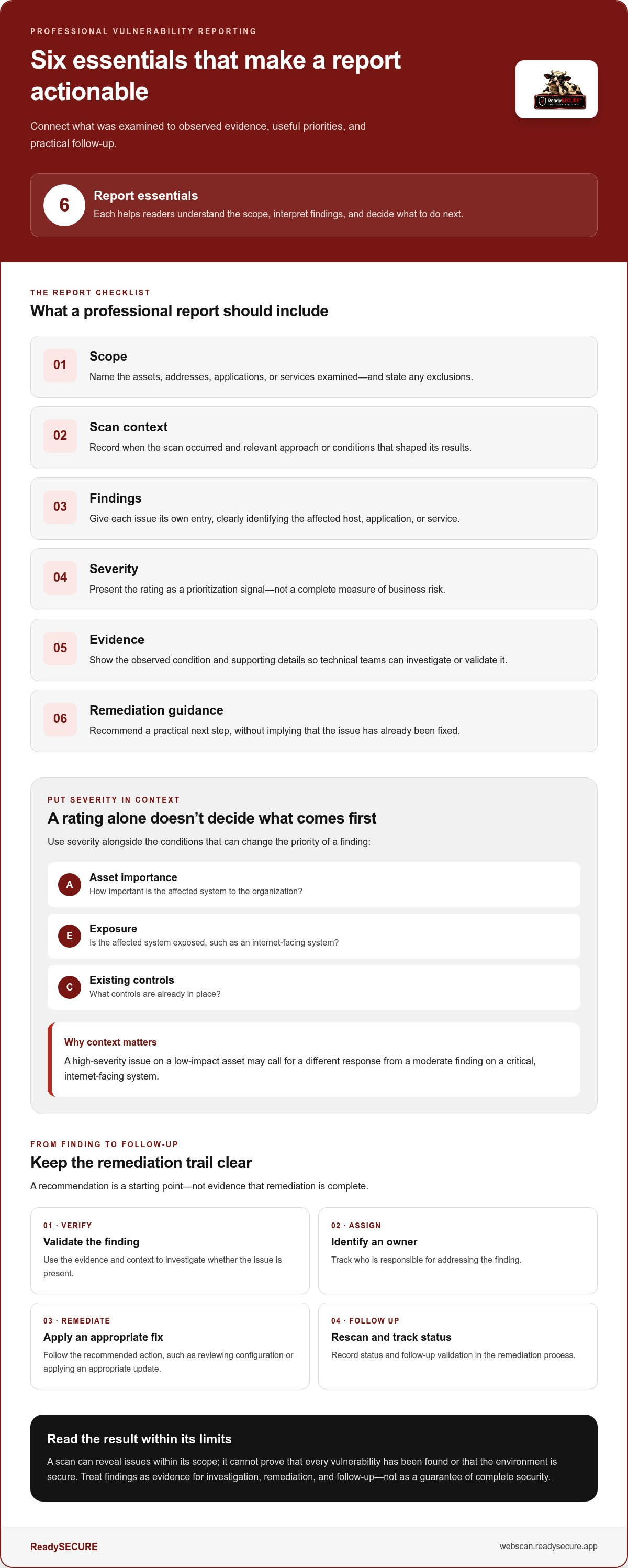
A practical report checklist includes:
- Scope: The assets, addresses, applications, or services examined, plus any stated exclusions.
- Scan context: When the scan occurred and relevant information about the approach or conditions that shaped the results.
- Findings: Separate entries identifying each reported issue and its affected target.
- Severity: The reported rating, presented as a prioritization signal rather than a complete measure of business risk.
- Evidence: The observed condition and supporting details that help readers understand the basis for the finding.
- Remediation guidance: A practical recommended action, without implying that the issue has already been fixed.
Asset identification matters. “A vulnerable service was detected” leaves teams guessing. Naming the affected host or application gives them a starting point for verification. Scope matters just as much. If only an internet-facing host was scanned, don’t interpret the report as a review of internal systems or every part of an application.
How should findings and evidence be presented?
Give each finding its own entry, with a clear title and affected target. Include the affected service and observed condition, along with reproduction context when available. This helps a technical team investigate whether the issue is present and where to focus. Make the distinction explicit: record what the scan observed, then separate any interpretation of possible impact. A scanner’s output alone may not establish how a finding affects business operations.
A finding is actionable when its evidence supports a severity rating and the recommended response addresses the issue shown. That connection helps readers assess the basis for the rating and the reason for the proposed next step. For organizations handling reports from external researchers, CISA’s guidance on establishing a coordinated vulnerability disclosure (CVD) program offers a reference for receiving and acting on vulnerability reports.
What makes remediation guidance actionable?
Good guidance points to a practical next step, such as reviewing an affected service’s configuration or applying an appropriate update. Track the assigned owner, status, and follow-up validation in a remediation process, rather than treating the recommendation as proof that a fix is complete. For broader planning context, see this guide to vulnerability scanning for startups. Teams can also use authorized vulnerability scanning to surface findings for review.
How Should You Interpret Severity and Automated Scan Findings?
A severity rating helps describe a finding, but it doesn’t decide your organization’s response on its own. Prioritization also depends on which asset is affected, whether it’s exposed, what the evidence confirms, and what business functions rely on it. Professional vulnerability reports are most useful when they show these details alongside the rating, rather than treating a score as a complete risk decision.
Does a high severity score always mean immediate business impact?
No. Severity ratings and organizational context answer different questions. CVSS, the Common Vulnerability Scoring System, provides a framework for rating vulnerability severity; it doesn’t account for every organization’s asset value, environment, or mitigating controls. Before drawing conclusions, consider the affected asset, its exposure, and the evidence behind the result. A high-rated issue on a restricted, low-impact system may need a different response from a moderate finding on a customer-facing service.
Use the report to guide investigation and triage, not to skip them. For practical guidance on what a vulnerability report should include, OWASP outlines useful information for communicating vulnerability findings.
| Reported severity | Asset importance | Exposure context | Recommended response |
|---|---|---|---|
| High | Low-impact test host | Restricted access | Validate the finding and assess existing controls before setting priority. |
| Medium | Critical business service | Internet-facing | Investigate promptly; consider exposure and potential operational impact. |
| Low | Supporting system | Limited exposure | Confirm the condition and track appropriate follow-up. |
How can teams handle uncertain or duplicate findings?
Automated scan results can identify conditions that need further investigation. Confirm that the reported asset is in scope and check whether the observed condition is present before marking a finding as resolved or assigning final remediation status. A scan can inform action, but it isn’t a manual penetration test. It doesn’t establish that every path has been explored or that every reported issue has the same impact in practice.
Similar alerts may describe one underlying condition across multiple assets. Group related findings for efficient tracking, but retain each affected system so teams don’t lose sight of separate exposure or remediation needs. The automated web vulnerability scanner roundup offers additional context on how automated scanning fits into vulnerability discovery. For authorized scanning of a target you control, ReadySECURE scanning provides prioritized results for investigation.
How Do You Turn Vulnerability Report Findings Into a Remediation Plan?
A finding becomes useful when it has an owner, a decision, and a path to verification. Use this workflow to move from report to tracked action without treating every alert as equally urgent:
- Confirm scope. Check that the affected asset belongs to the assessment and identify the system or service involved.
- Validate the finding. Review the evidence and investigate uncertain results before deciding on a fix or marking an issue as resolved.
- Prioritize. Consider severity alongside asset importance, exposure, and potential operational impact. Separate findings that need urgent investigation from routine backlog work, and set priorities based on your environment rather than a universal deadline.
- Assign an owner. Name the team or person responsible for the next action and set a target review date.
- Remediate or document a decision. Record the action taken, or explain why work is deferred or risk is accepted, including the reason and who made the decision.
- Rescan and review. Follow up to check whether the reported condition remains detectable, then update the finding’s status.
Use Start an authorized ReadySECURE scan to generate structured findings for a target you control and have authorized in writing.
How should teams assign and track findings?
Keep a central record with the finding, affected asset, responsible owner, planned action, current status, and target review date. If work is deferred or risk is accepted, document the reason and make the decision visible to the appropriate stakeholders. This gives technical teams enough detail to manage the fix while allowing leadership updates to stay concise: what remains open, why it matters, and what decision or action is pending.
Keep implementation notes, validation evidence, and other technical detail with the remediation record. Summarize progress for executives without losing the status of unresolved findings. Professional vulnerability reports support this process, but the organization still needs clear ownership and follow-through to close the loop.
When should a team rescan after remediation?
Rescan after a change intended to address a reported condition, as long as the target remains within the authorized scope. A follow-up scan can show whether that condition is still detectable under the scan’s conditions. It’s evidence from a point in time, not permanent assurance: systems change, and a scan doesn’t establish that every possible weakness has been eliminated.
For a broader view of recurring discovery, prioritization, and follow-up, read this practical guide to continuous vulnerability monitoring. Scheduled scans and historical results can help teams track changes over time and review whether remediation is reflected in later findings.
How Can ReadySECURE Support Professional Vulnerability Reporting?
ReadySECURE provides authorized automated scanning to help turn findings into a structured starting point for security work. Submit a target you control, such as a website, API, or internet-facing host, and provide written authorization to scan it. The platform runs the scan on a scheduled basis. Each result includes a signed authorization record, helping keep the scope and permission for the scan clear.
What does ReadySECURE scan and report?
ReadySECURE uses six industry-standard scanners, including Nmap, OpenVAS, ZAP, TestSSL, and Nuclei. Reports present prioritized findings with severity and remediation guidance, giving technical teams information to investigate and plan next steps. Scanner output can help identify issues within the scan’s scope, but it can’t establish that every vulnerability has been found or prove an environment is secure. Automated scanning also doesn’t replace manual penetration testing or managed remediation.
That distinction matters for decision-makers. A report can show what the scan detected and provide a basis for follow-up, while teams still need to evaluate findings in context, decide on remediation, and verify changes. Professional vulnerability reports support informed action; they don’t guarantee that risk has been eliminated.
When is a free scan enough, and when does ongoing reporting help?
One free scan covers one authorized target, making it a practical starting point when you want to review a single website, API, or host. If you need repeated scans, ReadySECURE paid plans add scheduling, scan history, and trend analysis. These features can help teams track how findings change over time and review whether issues remain detectable after changes.
Choose based on the number of targets you need to assess and how often you want to review results. A single scan provides a point-in-time view; scheduled scanning and historical reporting support continued tracking. Neither replaces broader security judgment, but both can help teams organize discovery and follow-up within an authorized scope.
To begin with one target you control and have authorized in writing, run a free authorized vulnerability scan.
Turn Report Findings Into Clear Security Actions
Professional vulnerability reports are most valuable when they connect evidence and severity to decisions teams can act on. Use scan scope and asset context to prioritize findings, validate uncertain results, and assign owners. A report helps guide remediation, but it doesn’t prove that every vulnerability has been found or that all risk is eliminated.
ReadySECURE reports provide prioritized findings with severity and remediation guidance, and each result includes a signed authorization record. One free scan covers one target. For ongoing visibility, paid plans add scan scheduling, report history, and trend analysis to help teams track changes over time.
Start with a target you control and have authorized in writing. Start a free authorized vulnerability scan to get structured findings your team can review and use to plan next steps. Clear evidence, considered priorities, and consistent follow-up can help make security work more manageable.
Frequently Asked Questions
How do I know whether a vulnerability report is reliable?
Check whether the report clearly identifies what was scanned, when it was scanned, and how each finding is supported. Reliable professional vulnerability reports distinguish observed evidence from assumptions, identify affected assets, and provide enough context for a team to investigate or reproduce a result. Also review the stated scope and limitations. A clear report is useful evidence for decisions, but its findings may still need validation in your environment.
Does a high severity rating always mean a vulnerability must be fixed first?
No. Severity helps describe a vulnerability, but it doesn’t account for every organization’s business context. Consider the affected asset’s importance, its exposure, available mitigating controls, and the evidence behind the finding. For example, a moderate issue on a critical, internet-facing service may deserve earlier investigation than a higher-rated issue on an isolated test system. Use severity as one prioritization input, not as a standalone remediation queue.
Can an automated vulnerability report replace a penetration test?
No. An automated report can identify potential issues within the scan’s scope and provide structured findings for investigation, but it doesn’t replace manual penetration testing. Automated scanning doesn’t establish that every vulnerability or attack path has been found, nor does it fully assess how weaknesses could be combined in a specific environment. Treat scan results as a useful starting point for security decisions, with conclusions matched to the method used.
How often should a company generate vulnerability reports?
Set scan frequency according to the number and importance of your targets, how exposed they are, and how often systems change. A scan provides a point-in-time view, so repeat scans can help teams review changes and check whether previously reported conditions remain detectable. ReadySECURE paid plans include scheduling, history, and trend analysis for ongoing tracking. The right cadence depends on your environment and monitoring needs, not a universal schedule.
What should a business do after receiving a vulnerability report?
Confirm the affected assets are in scope, review the evidence, and validate uncertain findings before deciding on action. Then prioritize issues using severity and business context, assign an owner, and track the action and status. If work is deferred or risk is accepted, record the reason and keep it visible to relevant decision-makers. After remediation, follow up with a scan or other validation to check the reported condition.
Can I scan a website without the owner’s permission?
No. ReadySECURE scans only websites, APIs, and internet-facing hosts that you control and have authorized in writing. Before submitting a target, make sure the authorization covers that asset and the scanning activity. If a website belongs to another organization, obtain its written authorization before scanning it. This keeps the work within an approved scope and provides a clear record of permission for the assessment.


