

How often should you run scheduled website vulnerability checks? The right cadence depends on how exposed your website is, how often it changes, and how quickly your team can review and address findings. A fixed calendar can miss new risks after a deployment, while scans that run faster than your team can respond may produce repeated findings without progress.
It’s reasonable to want a clear cadence, useful results, and proof that each check was authorized. Scanning can identify known vulnerabilities, but automated checks can’t show the full business impact of every issue or replace a deeper, human-led assessment. Treat each result as part of a documented security cycle, not as a guarantee that the site is secure.
This guide explains how to set a risk-based schedule, compare recurring findings, and connect each issue to an owner, remediation, and verification. It also covers what automated checks can and can’t detect, and why authorization and scan history matter. ReadySECURE paid plans include scheduling, scan history, and trend analysis, with a signed authorization record attached to each result.
Key Takeaways
- Set scheduled website vulnerability checks around your site’s exposure, risk, rate of change, and capacity, rather than choosing a universal interval.
- Distinguish planned scans from continuous monitoring and manual penetration testing so you understand what each check can show.
- Move findings through a consistent workflow: review, validate, prioritize, assign, remediate, and rescan.
- Keep a clear record of target scope, scan time and status, findings, severity, and remediation progress.
- ReadySECURE requires written authorization for controlled targets and provides prioritized reports with remediation guidance.
What Are Scheduled Website Vulnerability Checks, and What Do They Prove?
Scheduled website vulnerability checks are repeatable, authorized scans of a defined website scope, run at planned times or intervals. The scope might include a public website and selected internet-facing components that you control. Defining the scope and providing written authorization clarify what may be tested and create a record of the check.
A scheduled scan shows detectable issues at the time it runs. Comparing results can reveal changes between checks, but a scan can’t establish that every weakness has been found or that the site is secure. A scan result is evidence of what the scanner detected within its scope, not proof that a website is secure.
A scheduled scan is also different from a manual penetration test. Automated scanning checks for issues its methods and coverage can detect. A human-led test investigates weaknesses in more depth and may assess how they could be used. For a foundational overview, see Penetration Testing Explained.
How Do Scheduled Checks Differ from Continuous Monitoring?
A scheduled check runs at set times or intervals, such as after a planned release or during a recurring review. Its results capture the target’s observable state during that scan. Comparing runs can help identify new findings, recurring issues, or changes after remediation.
Continuous monitoring is a broader, ongoing observation process. Depending on how it is implemented, it may track activity or changes between scans. The terms aren’t interchangeable: a recurring scan provides periodic snapshots, while continuous monitoring aims to provide ongoing visibility.
What Can an External Website Check Find?
An external check examines what’s observable from outside the website within the authorized scope. Depending on scanner coverage and the target’s state, it may identify exposed services, configuration issues, or detectable vulnerabilities in known software. These findings can help your team decide what to investigate and address.
Coverage depends on which hosts and components are included, what the scanners test, and what the target exposes during the check. A public-facing scan may not see behavior behind authentication or uncover flaws in application logic, such as whether a workflow enforces the right business rules. Those areas may need other assessment methods. Treat scan results as evidence for the next security decision, not a complete account of risk.
How Often Should You Schedule Website Vulnerability Checks?
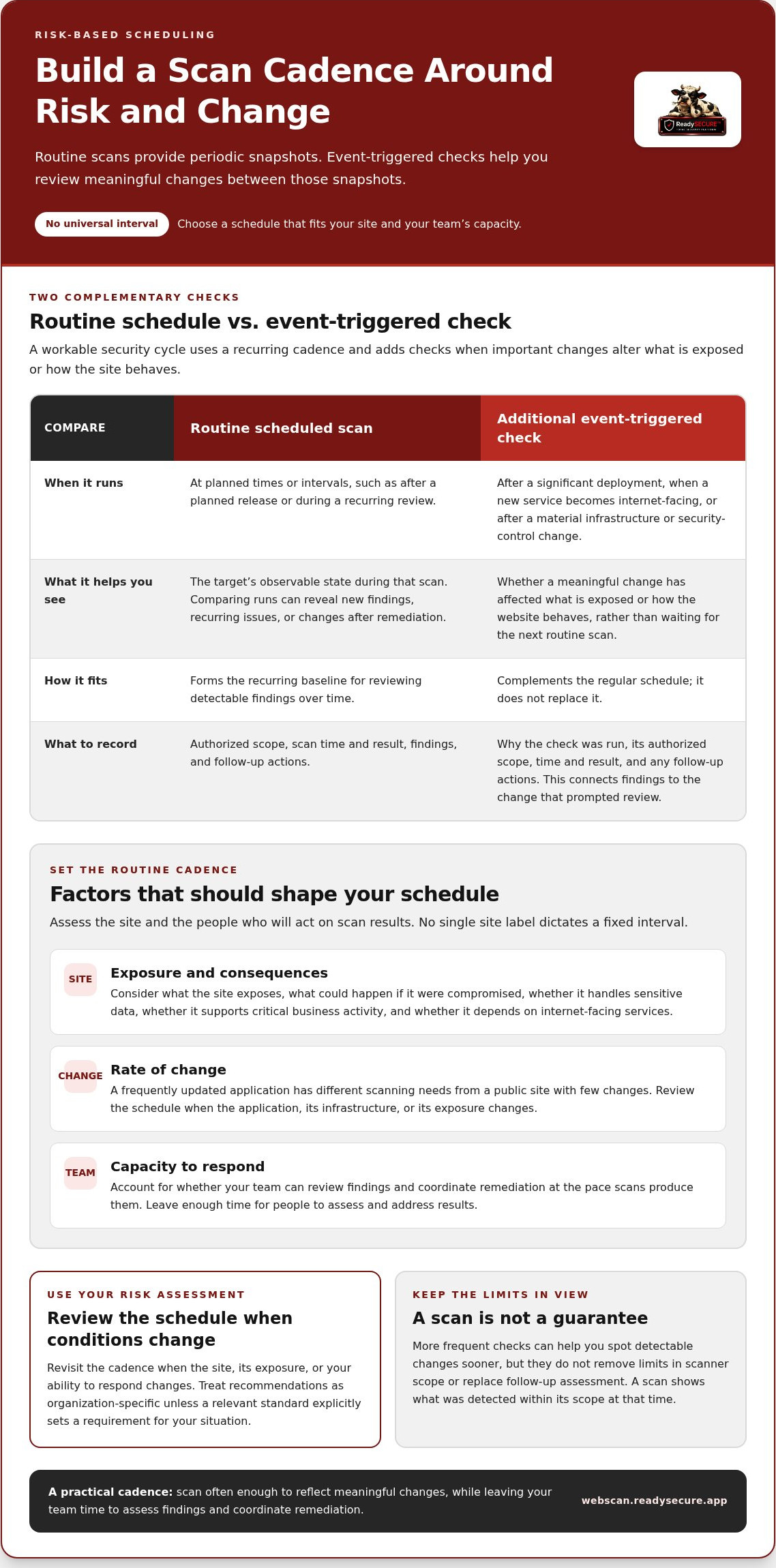
There isn’t one interval that suits every website. A public site with few changes has different scanning needs from an application that changes often, exposes multiple services, or supports important business operations. Set a routine cadence based on exposure, risk, change, and your team’s capacity to review and act on results.
A scan schedule is a risk decision, not a guarantee of coverage. More frequent checks can help you spot detectable changes sooner, but they don’t remove the limits of scanner scope or replace follow-up assessment. The OWASP Web Security Testing Guide offers broader web application testing guidance to inform a security program beyond automated scans.
Which Factors Should Shape Your Scan Schedule?
Start with what the site exposes and what could happen if it were compromised. Consider whether it handles sensitive data, supports critical business activity, or depends on internet-facing services. Then account for how often the application changes and whether your team can review findings and coordinate remediation at the pace scans produce them.
A stable public site may call for a different routine than a frequently updated application, but neither label dictates a fixed interval. Use your organization’s risk assessment and operational capacity to choose a schedule. Review it when the site, its exposure, or your ability to respond changes. Treat cadence recommendations as organization-specific unless a relevant standard explicitly sets a requirement for your situation.
When Should You Run an Additional Check?
A routine calendar isn’t the only reason to scan. Consider an additional check after a significant deployment, when a new service becomes internet-facing, or after a material change to infrastructure or security controls. These events can change what’s exposed or how the site behaves, so waiting for the next routine scan may leave a gap in your view.
Triggered checks complement the regular schedule; they don’t replace it. Record why the check was run, its authorized scope, the time and result, and any follow-up actions. This distinguishes event-driven results from routine scans and helps connect findings to the change that prompted review.
Make the schedule workable: scan often enough to reflect meaningful changes, but leave enough time for people to assess and address results. ReadySECURE paid plans include scheduled scans and scan history, helping teams review findings across runs and adjust their routine as their environment changes.
How Do You Turn Scheduled Scan Findings into Useful Security Work?
A scan report becomes useful when findings lead to decisions, ownership, and follow-up. Treat each result as something to investigate, not a task to close automatically. A consistent workflow connects scheduled website vulnerability checks to remediation instead of letting repeated reports accumulate without action.
- Review: Check the finding, affected asset, evidence, and scan scope.
- Validate: Confirm that the issue applies to the asset and isn’t based on an outdated version or incorrect identification.
- Prioritize: Assess severity alongside exposure, exploitability, and business impact.
- Assign: Name an owner and target date for action.
- Remediate: Apply the appropriate fix or record a reasoned decision if the issue won’t be addressed now.
- Rescan: Use a later authorized scan to check whether the finding remains.
For more detail on interpreting individual results, consult the existing guide on interpreting an external vulnerability scan report.
How Should Teams Prioritize Repeated Findings?
Severity is one input, not the whole priority decision. Consider how exposed the affected component is, whether the issue appears exploitable, how important the asset is to the business, and whether compensating controls reduce the risk. A lower-severity finding on a critical, public-facing service may deserve attention before a higher-severity issue on an isolated, low-impact asset.
Scanner output is a signal to investigate, not automatic confirmation that an issue can be exploited in your environment. If a result includes a CVE reference, use it to identify the reported vulnerability and support your investigation. The identifier doesn’t establish whether the affected version is present, reachable, or materially risky in your specific context.
When a finding recurs, compare the affected asset and evidence with earlier results. Check whether it remains open, was fixed but is still detectable, or has appeared on a different asset. This helps distinguish one unresolved issue from a new occurrence and avoids treating every repeat as an unrelated task.
How Do You Verify That a Finding Is Resolved?
Give every actionable finding an owner, a target date, and a recorded status, such as open, in progress, resolved, or accepted risk. After remediation, a later authorized scan can check whether the observed issue still appears. If it does, investigate whether the fix was incomplete, the wrong asset was changed, or the finding needs further validation.
Record false-positive decisions and accepted risks with a clear rationale and a named person responsible for review. This context makes future triage more consistent and helps your team reassess a decision if the asset, exposure, or controls change.
What Should a Reliable Website Vulnerability-Check Process Record?
A useful record should let someone later answer three questions: what was checked, was the check authorized and completed, and what happened to the findings? Keeping these details together makes scheduled website vulnerability checks easier to trace and compare. Records support accountability, but they don’t prove that no vulnerabilities exist.
Which Details Make a Scan Record Traceable?
Capture the target and authorized scope, the written authorization, the scan date and time, and the run status. Preserve each finding with its severity, remediation guidance, assigned owner, and current status. If the scanning workflow provides a signed authorization record, retain it with the result so evidence of permission stays connected to the check.
| Record | Purpose | Example fields |
|---|---|---|
| Target and authorization | Shows what was approved for testing | Host or URL, in-scope assets, written authorization, signed record |
| Scan execution | Shows when the check ran and whether it completed | Date and time, scan status, scope or configuration changes |
| Finding details | Supports investigation and prioritization | Affected asset, finding description, severity, remediation guidance |
| Remediation tracking | Shows who is handling the issue and its outcome | Owner, target date, open or resolved state, disposition and rationale |
How Can Scan History Show Progress?
History helps distinguish an unresolved finding from a new issue or one that reappears after remediation. Compare affected assets and finding details across runs, and note changes to scope or scanner configuration. If a result disappears after the scope changes, that alone doesn’t show that the issue was fixed.
Track open, resolved, recurring, and newly discovered findings as separate states. This makes trends easier to interpret and gives teams a clearer view of whether remediation is reducing the backlog. For a deeper look at comparing results over time, consult the existing guide on vulnerability trend analysis.
ReadySECURE attaches a signed authorization record to each result, while paid plans include scan history and trend analysis. Review an authorized website scan to create a traceable result for a target you control.
How Can ReadySECURE Support Scheduled Website Vulnerability Checks?
Recurring checks are most useful when their scope is clear, authorization is documented, and results can be compared over time. ReadySECURE scans websites, APIs, and internet-facing hosts that you control. Submit the target and provide written authorization before scanning. This defines the approved boundaries and connects the result to a record of permission.
What Does the ReadySECURE Scanning Workflow Include?
After authorization, ReadySECURE runs six industry-standard scanners, including Nmap, OpenVAS, ZAP, TestSSL, and Nuclei, against the approved target. Reports prioritize discovered issues and include severity and remediation guidance, helping your team decide what to review and address. Each result includes a signed authorization record, keeping the scan output and evidence of permission linked.
Automated findings are useful signals, not a promise that every weakness will be detected. Coverage depends on the authorized scope and what scanners can observe. Review results in context, investigate relevant findings, and use other assessment methods where deeper evaluation is needed.
When Is a Scheduled Scanning Plan a Practical Fit?
Recurring scanning can suit teams that want checks to run on a planned schedule and need scan history to follow findings across runs. ReadySECURE paid plans add scheduling, history, and trend analysis. Comparing results can help show whether an issue persists, returns after remediation, or appears on a newly checked target. This history supports vulnerability management, but the responsible team still needs to make decisions and follow up.
Automation supports a repeatable checking process. It doesn’t replace manual penetration testing, a different, human-led assessment. Use each method for its intended purpose, and don’t treat a completed scan as proof that a site is secure.
ReadySECURE offers a free scan of one target. To scan a website or other internet-facing target you control, start with a ReadySECURE scan and provide written authorization for the target.
Make Your Scan Schedule Part of the Security Cycle
Effective scheduled website vulnerability checks reflect your site’s exposure, risk, and pace of change. A useful schedule combines routine scans with additional checks after significant changes, without treating scan frequency as proof that every weakness will be found.
Make each result actionable: review and prioritize findings, assign owners, record remediation decisions, and rescan to verify fixes. Keep authorization, scope, scan status, and history together so your team can track recurring issues and progress. ReadySECURE requires written authorization for targets you control, and its prioritized reports include severity and remediation guidance. Paid plans add scheduling, scan history, and trend analysis to support recurring checks.
Ready to make your checking process more repeatable? Start with a ReadySECURE scan for a target you control. Provide written authorization and use the resulting report to guide your next security actions.
Frequently Asked Questions
How often should you run website vulnerability checks?
Choose a schedule based on your website’s exposure, data sensitivity, business impact, rate of change, and your team’s ability to review results. A stable public site may need a different cadence from an application with frequent releases or newly exposed services. Set routine scheduled website vulnerability checks, then review the schedule when risk or the environment changes. Run an additional authorized check after a significant deployment or material configuration change.
Are scheduled vulnerability checks the same as continuous monitoring?
No. A scheduled vulnerability check runs at a planned time or interval and provides a view of detectable issues during that scan. Continuous monitoring is a broader, ongoing observation process that may track changes or activity between scans. A recurring scan can contribute to a monitoring program, but it doesn’t provide continuous visibility by itself. Keep the terms distinct when documenting what your security process checks and when it checks it.
Can automated website vulnerability checks find every security issue?
No. Automated checks can identify issues their scanners detect within the authorized scope, such as some exposed services, configuration problems, and known vulnerabilities. Coverage depends on scanner methods and what the target reveals during the scan. Application logic flaws and behavior behind authentication may need other assessment methods. Treat a clean result as evidence of what the scan observed, not proof that the website has no vulnerabilities.
What should you do after a scheduled vulnerability scan?
Review the report, validate findings, and prioritize them using severity alongside exposure, exploitability, and business impact. Assign each actionable issue an owner and target date, then track its status through remediation. Record the rationale for any accepted risk or false-positive decision. After a fix, run a later authorized scan to check whether the observed issue remains. Compare results with previous scans to identify recurring or newly discovered findings.
Do scheduled website vulnerability checks replace penetration testing?
No. Automated vulnerability checks and manual penetration testing serve different purposes. A scan checks for issues detectable by its automated methods within the agreed scope. A penetration test is a human-led assessment that investigates weaknesses more deeply and may examine how they could be used and what impact they could have. Scheduled scans support repeatable vulnerability management, but they don’t provide the same assessment as a penetration test.
How can you prove that a website vulnerability scan was authorized?
Keep written authorization linked to the exact target and scope, along with the scan date, status, and resulting report. Authorization should come from someone with control of the target, and the record should make clear what was approved. ReadySECURE requires written authorization for targets users control and attaches a signed authorization record to each result. Retaining both records helps show that a scan was permitted and performed within its approved scope.


