

What if the strongest proof of your website’s security isn’t a badge, but a clear record of what was tested, when, and with whose permission? If you’re asking how to get proof of website security 2026, look for evidence that is dated, clearly scoped, and tied to an authorized scan. It can show that specific checks were run, but it cannot prove a site is perfectly secure.
That distinction matters. A vulnerability scan report is useful evidence, not a certification, compliance attestation, or guarantee. To make the report credible, document authorization, identify the target and scan date, and record what happened to any findings. A report that prioritizes issues and includes remediation guidance also helps you explain what security work is complete and what remains open.
This guide explains how to build an evidence trail, what scan results can and cannot establish, and how to choose an approach that fits your website and evidence needs. You’ll also see how an authorized ReadySECURE scan, with a signed authorization record attached to each result, can provide a practical starting point.
Key Takeaways
- Learn how to get proof of website security 2026 by matching the evidence to the question stakeholders need answered.
- Use a checklist to record the authorized target, scan date, report version, and any scope limitations.
- Understand how scan reports differ from TLS certificates, penetration-test reports, and compliance attestations.
- Make findings easier to verify by tracking an owner, status, remediation date, and validation evidence for each issue.
- See how ReadySECURE’s authorized scanning combines six industry-standard scanners to help document a website’s security posture.
What Counts as Proof of Website Security in 2026?
Security proof is a record of what was checked, when it was checked, what the test covered, and what happened next. It does not prove that a website has no vulnerabilities or will remain secure. The broader principles of Computer security include vulnerabilities and countermeasures, but any single test provides evidence only about its own scope and methods.
An authorized scan report records detected issues on a specified website, application, or host within a defined scope and at a particular time. It shows that testing took place and gives you findings to investigate and address. It cannot establish that every weakness was found, certify regulatory compliance, or guarantee overall security. For anyone asking how to get proof of website security 2026, clear details about the target, authorization, date, and coverage make scan evidence meaningful.
Different documents support different claims. A TLS certificate helps establish a secure connection and authenticate a domain, but it does not show that the site was checked for other vulnerabilities. A compliance attestation documents an assessment against a particular standard and scope. A penetration-test report records testing designed to identify security weaknesses, but its results are still limited to the engagement’s scope and timing. A security guarantee is a promise, not a test record.
What can a vulnerability scan actually demonstrate?
A scan report records issues detected by the tools and methods used against the specified target. Automated results reflect the site’s condition at scan time. A scan may miss weaknesses outside its coverage, and a finding may need review to understand its context. Treat the results as evidence of what the scan detected, not proof of total security or regulatory compliance.
Why do authorization and scope matter?
Written authorization establishes permission to test the specified target. Scope identifies which domain, host, or application was included, helping readers understand what the report does and does not cover. Without these details, a report can be difficult to verify and may be mistaken for evidence about systems that were not tested. ReadySECURE attaches a signed authorization record to each scan result. For more context on responsible testing, read the authorized domain vulnerability scanning guide.
A credible record also connects testing to follow-up. Keep the report with its date and scope, then document how findings were reviewed and whether they were addressed or validated. This evidence trail gives stakeholders a useful, bounded account of security work without overstating what one scan can prove.
How to Build a Credible Website Security Evidence Trail
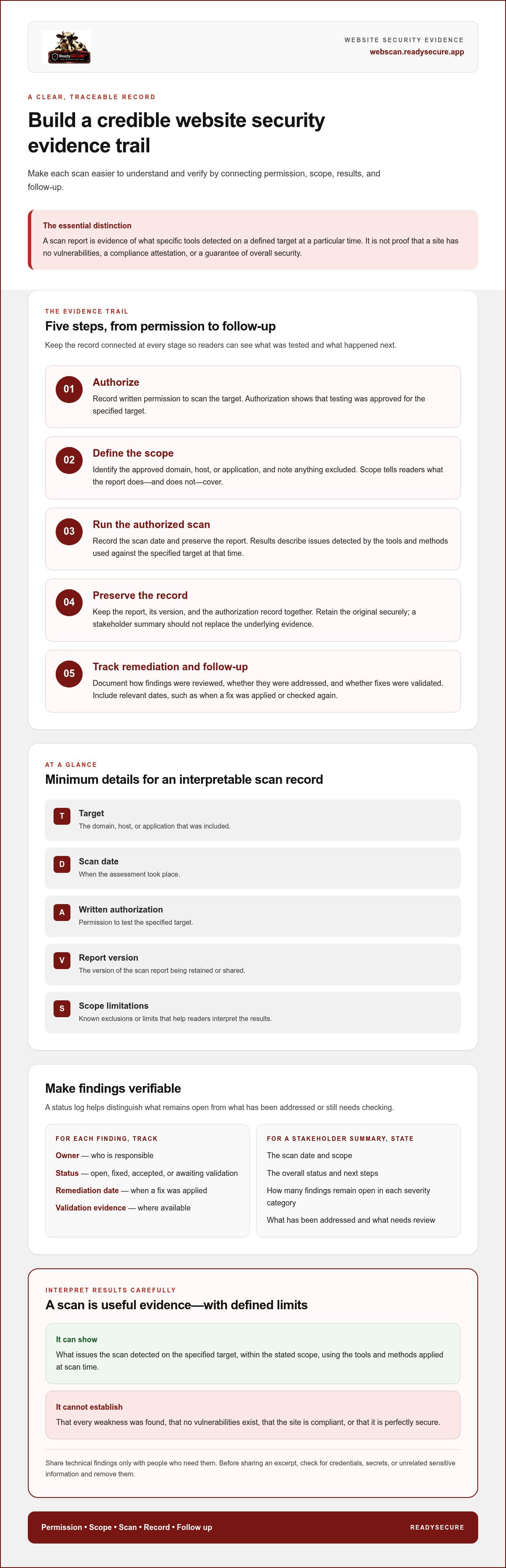
A report is more useful when readers can trace it from permission through follow-up. To understand how to get proof of website security 2026, keep the process simple and documented:
- Authorize: Record written permission to scan the target.
- Define scope: Identify the approved domain, host, or application, and note what is excluded.
- Scan: Run the authorized assessment and record its date.
- Preserve: Keep the report, its version, and the authorization record together.
- Remediate and follow up: Track findings through review, fixes, and validation where available.
At minimum, an interpretable scan record identifies the target, scan date, written authorization, report version, and known scope limitations.
What should a website security evidence package contain?
Keep approval and scan evidence connected. ReadySECURE attaches a signed authorization record to each scan result, and its reports prioritize discovered issues by severity and include remediation guidance. Retain these materials alongside a status log so readers can distinguish findings that are open, fixed, accepted, or awaiting validation. Include relevant dates, such as when a fix was applied or checked again.
Summarize severity and status in plain language. For example, state how many findings remain open in each severity category, what has been addressed, and what still needs review. Do not present “no findings detected” as proof that no vulnerabilities exist. The NIST Cybersecurity Framework offers broader guidance for organizing cybersecurity work. A scan report documents a specific test, not an entire security program.
How should you share scan evidence safely?
Prepare a brief stakeholder summary with the scan date, scope, overall status, and next steps. Share detailed technical findings only with people who need them to assess or resolve issues. Before sending an excerpt, check for credentials, secrets, or unrelated sensitive information, and remove them. Preserve the original record securely so the summary does not replace the underlying evidence.
For help understanding what scan results do and do not show, see this vulnerability scan report guide. To begin documenting an authorized scan, start with a website security scan for a target you own or have permission to test.
Which Website Security Proof Is Right for Your Purpose?
Start with the question the evidence needs to answer. An operations team may need a current record of detected vulnerabilities and follow-up. A customer may request evidence of testing during due diligence. An audit may specify a formal standard, assessment type, and scope. Match the document to the request rather than treating every security artifact as interchangeable. If you’re considering how to get proof of website security 2026, first identify the claim the reviewer needs you to support.
| Evidence type | What it demonstrates | Scope and time sensitivity | Key limitation |
|---|---|---|---|
| Vulnerability scan report | Issues detected by specified scanning methods | Defined targets and scan date; results can become outdated as systems change | Doesn’t show every possible weakness or establish compliance |
| TLS certificate | Certificate-based identity for a domain and support for an encrypted connection | Applies to the certificate’s domain and validity period | Doesn’t assess application vulnerabilities or overall security |
| Penetration-test report | Results of a defined security test and its findings | Limited to the agreed targets, methods, and testing period | Doesn’t guarantee all weaknesses were found or remain fixed |
| Compliance attestation | Assessment against a named standard or set of criteria | Bound by the attestation’s scope and assessment period | Doesn’t automatically cover systems or requirements outside that scope |
Is a vulnerability scan report the same as a security certificate?
No. A TLS certificate supports domain identity and encryption for a connection; it is not a vulnerability assessment. A scan report documents what specified tools detected on a defined target at a particular time. Each can support a different security claim, but neither establishes that a website is entirely secure. For practical guidance on broader protective measures, see the FTC’s FTC cybersecurity basics.
When might automated scanning need additional assessment?
Automated scanning can identify issues within its methods and scope, but application logic, authenticated workflows, and business-specific risks may call for other forms of assessment. For example, a scan of a public-facing site may not cover what happens after a user signs in or completes a transaction. The right evidence depends on the reviewer’s stated criteria. For help thinking through assessment scope, see this web application security assessment comparison.
Before submitting evidence, compare the requested target, testing method, date, and standard with what your document actually covers. A scan report can support operational review and due diligence, but it does not, by itself, satisfy a defined audit requirement or prove the absence of vulnerabilities.
How to Turn Scan Findings into Useful, Verifiable Evidence
A list of vulnerabilities is only a starting point. To make scan results useful, triage each finding by severity, whether the affected system is exposed, the business context, and the available remediation guidance. A lower-severity issue on a public-facing system may deserve attention sooner than its label alone suggests, while a finding on a limited-use asset may call for a different response.
Remediation records strengthen a scan report’s practical value by showing who handled each finding, what action was taken, and whether the change was checked. This turns a snapshot into a traceable account of follow-up without implying that every risk has been eliminated.
How should teams document remediation?
Track each finding from initial review through action and current status. A simple record can include the finding reference, assigned owner, severity, decision, action date, and validation evidence. Keep relevant change records or retest results with the record, but protect credentials, secrets, and sensitive implementation details from unnecessary disclosure.
Use distinct statuses so stakeholders can see what remains:
- Fixed: A change was made, with validation recorded where available.
- Open: The issue still needs investigation or remediation.
- Accepted: An authorized decision-maker documented why the risk is being accepted.
- Awaiting validation: A fix was applied, but its effectiveness has not yet been checked.
Keep the summary concise. Report counts or categories by status and severity, then explain the next action for unresolved items. Retain detailed technical evidence for the people responsible for review and remediation.
How often should website security evidence be refreshed?
Scan evidence describes a target at a point in time. A deployment, dependency update, configuration change, or newly exposed service can alter the picture, so an older report may no longer represent the current system. Consider a repeat scan after material changes and set a recurring schedule that reflects the target’s exposure, risk, and organizational requirements. No single interval suits every website.
A follow-up scan can help show whether detectable findings changed after remediation. It can also surface new issues within the scan’s coverage. It cannot prove that all risk has been removed, so preserve the original report and compare results carefully. For a practical starting point, run an authorized scan of a target you control and use its findings to build a documented follow-up record.
How ReadySECURE Helps Create Authorized Website Scan Evidence
ReadySECURE helps document authorized vulnerability scanning. It does not certify a website or promise that it is free of risk. The process begins with a target you control and written authorization to test it. Scanning runs on a scheduled basis, creating a record connected to the approved target and permission.
ReadySECURE uses six industry-standard scanners, including Nmap, OpenVAS, ZAP, TestSSL, and Nuclei. The report prioritizes discovered findings by severity and provides remediation guidance, helping you organize what needs review and communicate follow-up to your team. Each scan result has a signed authorization record attached.
What does a ReadySECURE scan report help you document?
Prioritized results help you review detected issues in a structured way, while severity ratings and remediation guidance give your team a starting point for deciding what to address. The attached signed authorization record documents permission for the scan. Read the findings alongside the stated target and scope: the report records results from that assessment, but it is not a certification, compliance attestation, or guarantee that no vulnerabilities exist.
When is a one-time scan enough, and when does monitoring help?
One free scan covers a single target and can provide a current view of the website, API, or internet-facing host you are authorized to test. If you need to review changes over time, ReadySECURE Paid Plans add scheduling, history, and trend analysis. These features can help teams compare results and track patterns, while each scan remains evidence of its own scope and point in time.
Ongoing scans can support a continuing review process, but they do not replace investigation of findings or prove every risk has been removed. For more context on selecting an approach and considering scan frequency, read the automated vulnerability scanning buying guide.
If you’re deciding how to get proof of website security 2026, start with the evidence need: one authorized scan for a specific target, or recurring scans with history to support ongoing review. Start an authorized ReadySECURE scan for a target you own or have permission to test.
Make Your Security Evidence Clear and Current
Credible website-security evidence is not a promise of perfect protection. It is a traceable record of an authorized test, its target and date, its findings, and the follow-up. Choosing evidence that matches the reviewer’s request helps you show what was checked without claiming more than the results support.
For how to get proof of website security 2026, focus on two practical steps: preserve authorization and scope with the scan report, then track each finding through remediation and validation. ReadySECURE reports prioritize findings and include remediation guidance, with a signed authorization record attached to each scan result. One free scan covers one target; paid plans add scheduling, history, and trend analysis.
Start with a target you own or are authorized to test, and choose the scan approach that fits your evidence needs. Start an authorized ReadySECURE scan to create a clear starting point for your security review. A well-documented process makes it easier to explain your posture accurately and plan what comes next.
Frequently Asked Questions
How do I get proof that my website was security-scanned?
Keep a dated scan report that identifies the authorized target and scope tested. Include written permission, the scan date, and any known coverage limits so readers can understand what the results mean. For how to get proof of website security 2026, connect the report to a follow-up record showing how findings were handled. ReadySECURE attaches a signed authorization record to each scan result and prioritizes findings by severity with remediation guidance.
Does a vulnerability scan report prove that a website is secure?
No. A vulnerability scan report documents issues detected by the scan’s methods on its specified target and date. Automated testing may not find every weakness, and the website can change after the scan. Treat the report as evidence that a defined check took place, not proof of zero risk, complete security, or compliance. Record remediation and validation separately to show what happened after findings were reported.
Can a website security scan report be used for an audit or customer review?
It can help demonstrate that a website was scanned, especially when the report clearly states its target, date, authorization, and scope. Whether it meets an audit or customer requirement depends on the reviewer’s criteria. A scan report alone is not a compliance attestation and may not satisfy a request for a particular standard or assessment. Compare the requested evidence with what the report actually covers before presenting it.
What should be included in proof of a website security scan?
Include the approved target, written authorization, scan date, report version, and known scope limitations. Preserve the report’s findings, severity labels, and remediation guidance. Add a follow-up record that identifies each issue’s owner and status, such as open, fixed, accepted, or awaiting validation, with dates where available. Protect sensitive technical details, and make sure any summary accurately reflects the underlying report.
Is an SSL certificate proof that my website has no vulnerabilities?
No. A TLS certificate helps establish a domain’s identity and supports an encrypted connection between a browser and website. It does not test the site for application vulnerabilities, insecure settings beyond its specific function, or other weaknesses. A vulnerability scan report serves a different purpose by recording detected issues within a stated target and scope. Neither a certificate nor a scan proves that a website has no vulnerabilities.
How often should I scan my website to keep security proof current?
There is no single scan interval that suits every website. Refresh evidence after material changes, such as a deployment, dependency update, configuration change, or newly exposed service. Set a recurring schedule based on the site’s exposure, risk, and any evidence requirements from customers or auditors. ReadySECURE Paid Plans add scheduling, history, and trend analysis to support ongoing review, while each report remains a record of its own scan.
Can I scan a website without the owner’s permission?
Only scan websites you own or have explicit authorization to test. Written permission should identify the target and establish what is approved for scanning. Without authorization, do not proceed; a publicly accessible website is not automatically an approved target. ReadySECURE requires written authorization for controlled targets, and a signed authorization record is attached to each scan result. This documents permission alongside the evidence from the scan.


