

What if your next scan misses an exposed API because nobody knew it belonged in scope? For vulnerability scanning for saas companies, the challenge isn’t simply running a tool. Domains, APIs, and internet-facing hosts change, ownership can be unclear, and a poorly scoped scan can create production concerns or a false sense of coverage.
Those concerns are reasonable. Scans are useful when they’re authorized, focused on assets your team controls, and followed by decisions about what to fix. A finding also needs context: some results may be false positives, and an external scan can’t establish the security of internal systems or every application risk.
This guide explains how to scope assets, choose a practical scan cadence, interpret results, and assign owners and next actions. You’ll also learn what external scanning can and can’t tell you, and how scan history can help track changes over time. The goal is a disciplined process that turns findings into action, not a report that sits unread.
Key Takeaways
- Map owned domains, public applications, APIs, and internet-facing hosts so scan scope reflects the SaaS environment you control.
- Use vulnerability scanning for saas companies as one source of security evidence, not a substitute for a broader assessment.
- Match scan cadence to asset changes, exposure, and team workflows rather than relying on a universal schedule.
- Review findings, validate potential false positives, and assign each confirmed issue an owner and next action.
- Use scan history to track changes and check whether remediation has resolved previously identified issues.
What vulnerability scanning for SaaS companies should cover
Vulnerability scanning is automated testing that checks specified, authorized targets for identifiable security weaknesses. A scanner examines what it can reach and compares observed services, configurations, or application responses with known issue patterns. As this Vulnerability scanner overview explains, scanners can help identify weaknesses, but their results are limited to what the tool can inspect.
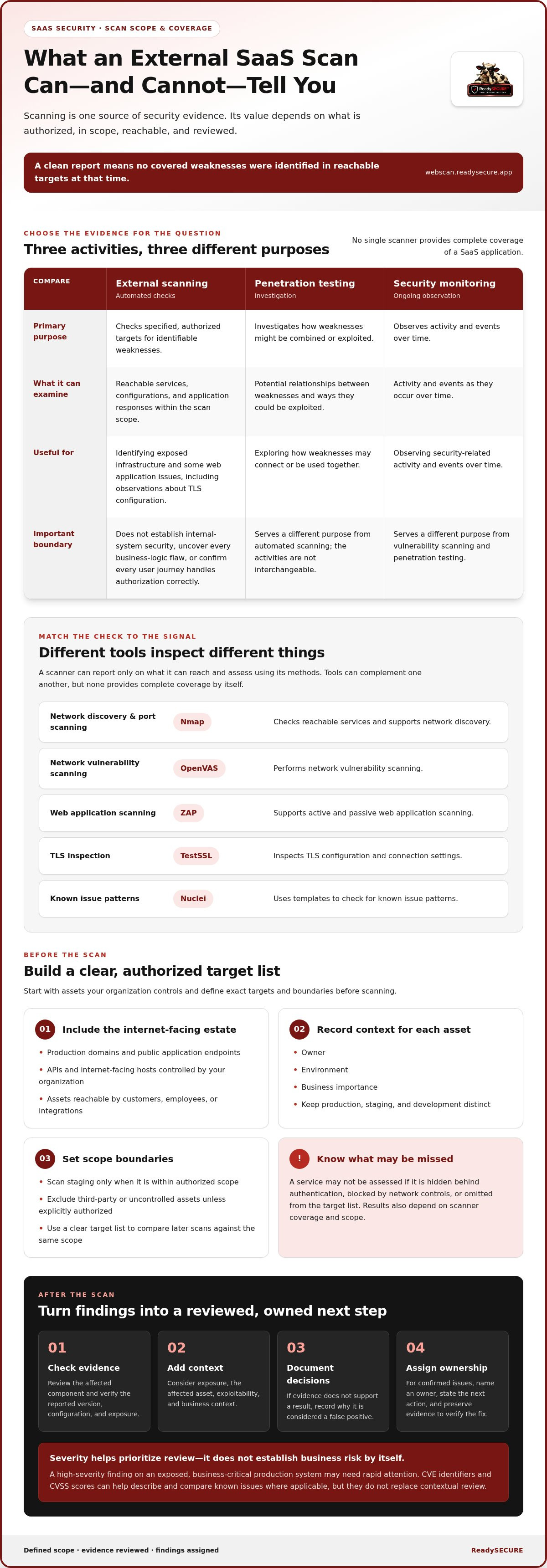
Vulnerability scanning finds potential weaknesses in defined assets; penetration testing investigates how weaknesses might be combined or exploited; security monitoring observes activity and events over time. These activities serve different purposes. External scanning can identify exposed infrastructure and some web application issues, but it doesn’t replace testing complex application logic or authenticated user flows.
Which SaaS assets belong in an external scan?
Start with an inventory of production domains, public application endpoints, APIs, and internet-facing hosts controlled by your organization. Include assets that customers, employees, or integrations can reach from the internet. For each one, record an owner, environment, and business importance. This makes it easier to spot an unassigned asset or decide which findings need attention first.
Keep production, staging, and development systems distinct. A staging hostname may expose a different service or outdated configuration, but it should only be scanned when it’s within the authorized scope. Define exact targets before scanning, and exclude third-party systems or assets your organization doesn’t control unless you have explicit authorization. A clear target list also helps your team compare later scans against the same scope.
What does an external vulnerability scan reveal?
Depending on the tools and scope, a scan may identify exposed services, known vulnerabilities, web application issues, and observations about TLS configuration. Different approaches inspect different signals: port scanning checks reachable services, web application scanning examines responses and behaviors, and TLS inspection reviews connection settings.
Results depend on target accessibility, scanner coverage, and scope. A service hidden behind authentication, blocked by network controls, or omitted from the target list may not be assessed. A scan can also flag a potential issue that needs human review to determine whether it applies in context.
A clean report isn’t proof that a SaaS product is secure. It means the scan didn’t identify covered weaknesses in the targets it could reach at that time. It can’t establish the security of internal systems, uncover every business-logic flaw, or confirm that all user journeys handle authorization correctly. For vulnerability scanning for saas companies to be useful, teams must understand what was tested and what remained outside the scan.
How SaaS vulnerability scanners identify and prioritize findings
A reliable scanning workflow starts before the tools run. Confirm written authorization, define targets and boundaries, then choose scan methods suited to those assets. Afterward, review the evidence, prioritize findings in context, and route confirmed issues to the teams responsible for the affected systems. Without that handoff, a scan can produce a report without prompting useful action.
What roles do different scanner types play?
Different scanners examine different signals. Nmap is associated with network discovery and port scanning. OpenVAS performs network vulnerability scanning, while ZAP supports active and passive web application scanning. TestSSL inspects TLS, and Nuclei uses templates to check for known issue patterns. These tools can complement one another, but no single scanner provides complete coverage of a SaaS application.
The right combination depends on the authorized scope and the questions your team needs answered. An exposed service, a web application response, and a TLS configuration require different checks. A scanner can only report on what it can reach and assess using its methods, so read results alongside the scan scope and coverage.
How should SaaS teams interpret severity and evidence?
Severity helps prioritize review, but it doesn’t establish business risk on its own. A high-severity finding on an exposed, business-critical production system may need rapid attention. The same rating on an isolated, low-impact asset may require a different response. Consider exposure, the affected asset, exploitability, and business context before setting urgency.
Review the supporting evidence and affected component before classifying a result. Check whether the reported version or configuration is present, whether the target is genuinely exposed, and whether the issue applies to that environment. If the evidence doesn’t support the finding, document why it’s considered a false positive rather than silently dismissing it. CVE identifiers and CVSS scores can help teams describe and compare known issues where applicable, but they don’t replace contextual review.
For vulnerability scanning for saas companies, a useful result ends with a clear handoff: identify the affected asset, assign an owner, state the next action, and preserve the evidence needed to verify the fix. The NIST Secure Software Development Framework offers a reference for integrating secure practices into development processes, including vulnerability handling. A ReadySECURE scan gives your team a way to start with a defined, authorized target.
What vulnerability scanning can and cannot tell a SaaS team
An automated scan is useful evidence, not a complete security assessment. It can surface weaknesses detectable within its scope and methods, but it can’t establish that every feature, user journey, or system is secure. For vulnerability scanning for saas companies, understanding these limits helps teams use results responsibly instead of treating a clean report as proof of safety.
Scanning, penetration testing, code review, and runtime monitoring answer different questions. The OWASP vulnerability scanning tools resource provides context on scanning approaches, but no single method covers every risk.
| Method | What it can help reveal | What it doesn’t establish alone |
|---|---|---|
| External vulnerability scanning | Detectable weaknesses on specified, reachable targets, such as exposed services or known issue patterns. | Security of excluded assets, internal systems, or every application workflow. |
| Penetration testing | How weaknesses may be combined or exploited within an agreed assessment scope. | Continuous security between assessments or exhaustive coverage of all possible risks. |
| Code review | Potential flaws in source code, including issues that may not be visible from outside. | How the deployed service behaves under every real-world condition. |
| Runtime monitoring | Events and behaviors observed while systems operate. | Whether unobserved code or configuration contains a vulnerability. |
Does a vulnerability scan replace penetration testing?
No. Scanning automates checks for identifiable weaknesses; penetration testing uses a broader, scoped assessment approach to examine how systems behave and whether weaknesses can be chained. They’re complementary, not interchangeable. A team might scan exposed assets to identify issues for review, then use a penetration test to investigate specific security objectives or complex attack paths.
Why can a scan miss a SaaS application risk?
Some routes require authentication, and a scan without access to those user flows may not reach them. Business logic and access-control behavior can also depend on sequences of actions, account roles, or application state that automated checks don’t fully assess. Configuration visible only from inside the environment may likewise fall outside an external scan.
Scope matters. Unlisted assets, excluded targets, and inaccessible services aren’t assessed in that scan. A false positive is a reported issue that review finds doesn’t apply as stated; a false negative is a real weakness the scan doesn’t detect. These are reasons to validate evidence and combine scanning with other security practices.
Document the targets, access conditions, methods, and known exclusions alongside each report. That context helps teams distinguish “no issues detected within this scan” from “no security risks exist,” and prevents scan results from overstating assurance.
How to build a repeatable vulnerability scanning process for SaaS
A repeatable process connects every scan to an authorized asset, a responsible owner, and a follow-up action. Use this workflow as a baseline, then adapt it to your release practices, exposure, and operational needs. The automated vulnerability scanning buying guide offers broader implementation considerations.
- Inventory assets. Record production domains, APIs, public application endpoints, and internet-facing hosts, along with each asset’s owner and business importance.
- Authorize targets. Obtain written authorization for the assets to be scanned, and keep the record tied to the approved targets.
- Define scope. Specify included systems, environments, and exclusions. Keep production, staging, and development targets distinct.
- Scan. Select appropriate checks for the authorized assets and retain the scan date, target list, and results.
- Triage. Review evidence, severity, exposure, asset importance, and plausible impact. Validate findings before treating them as actionable.
- Assign. Route each actionable finding to a named engineering or infrastructure owner with a review deadline.
- Remediate. Record the fix or document accepted risk separately from work that remains open.
- Rescan. Retest affected targets and record whether the issue was resolved, persists, or needs further investigation.
How should teams prioritize SaaS findings?
Severity is a useful starting signal, not a complete priority decision. Combine it with internet exposure, the affected asset’s importance, evidence quality, and plausible impact. For each finding, record its evidence, severity, triage decision, owner, remediation status, and retest outcome. This history helps teams distinguish verified fixes from accepted risks and unresolved work.
How can teams maintain scan scope as SaaS changes?
Revisit the target list when a production domain, API, or internet-facing host is added, retired, or materially changed. Keep written authorization and scope records aligned with the targets actually scanned. Set scan timing around meaningful changes, exposure, release or infrastructure workflows, and the team’s capacity to review results. There isn’t one interval that fits every SaaS environment. For broader cadence guidance, see the continuous security scanning strategy.
For vulnerability scanning for saas companies, consistency matters more than producing isolated reports. ReadySECURE scans an authorized target. The free scan covers one target, while paid plans add scheduling, history, and trend analysis. These options support a repeatable review process and help teams track how findings change over time. Review ReadySECURE scanning.
Where ReadySECURE fits in a SaaS vulnerability scanning workflow
ReadySECURE provides external vulnerability scanning for websites, APIs, and internet-facing hosts that you control and are authorized to test. It fits into the scan-and-triage stages of a security workflow: identify an owned target, review findings, then route confirmed issues to the team responsible for remediation.
What happens during an authorized ReadySECURE scan?
Submit a domain and provide written authorization before scanning begins. ReadySECURE runs six industry-standard scanners, including Nmap, OpenVAS, ZAP, TestSSL, and Nuclei. The resulting report presents prioritized findings, severity, and remediation guidance. A signed authorization record is attached to each result, giving your team a record of the permission associated with the scan.
Use the report as an input to your own triage process. Review the evidence and affected asset, validate whether a finding applies, assign an owner, and track the fix through verification. ReadySECURE provides scan findings and guidance; your team decides how to remediate within its development and infrastructure workflows.
Scope matters. An external scan can assess only authorized targets within its reach and doesn’t establish the security of internal systems, every authenticated workflow, or all application risks. A ReadySECURE free website security scan is a practical starting point for one owned target, not proof of complete security.
When is a single scan or scheduled plan useful?
The free option covers one scan of one target, which can help a team review a specific website, API, or internet-facing host. Paid plans add scheduling, scan history, and trend analysis. These features support repeat reviews and help teams observe changes across scans, such as new findings or issues that remain after remediation.
Choose scan timing around meaningful changes to your assets, their exposure, and the team’s capacity to review and act on results. A scheduled scan still needs human follow-through: interpret findings, assign owners, document decisions, and verify fixes. Keep the target list and authorization aligned with the systems being scanned.
When you’re ready to assess a target you control, start an authorized ReadySECURE scan.
Make Each Scan Part of a Clear Security Process
Effective vulnerability scanning for saas companies depends on more than detecting potential weaknesses. Define an authorized scope, review evidence in context, and connect each actionable finding to an owner and next step. Then rescan to check whether the issue was addressed.
Keep the limits clear, too. An external scan provides useful evidence about specified targets, but it can’t prove that every system, workflow, or application risk is secure. Treat findings as a starting point for informed decisions, not a complete security assessment.
ReadySECURE requires written authorization before scanning, attaches a signed authorization record to each result, and provides prioritized findings with severity and remediation guidance. This gives your team structured information to support its own triage and follow-up.
Start with a target you control and are authorized to scan. Start an authorized ReadySECURE scan and use the results to support a repeatable review process.
Frequently Asked Questions
Is vulnerability scanning necessary for SaaS companies?
Vulnerability scanning can help SaaS teams identify observable weaknesses across authorized websites, APIs, and internet-facing hosts. Its value depends on accurate scope, useful evidence, and follow-through by the teams responsible for fixes. Treat scanning as one part of a security program, not as proof that every application risk has been found. Pair scan results with other security practices suited to your systems and objectives.
How often should a SaaS company run vulnerability scans?
There’s no single schedule that fits every SaaS environment. Consider how exposed an asset is, how often it changes, and how scans fit into release and infrastructure workflows. A repeatable schedule helps teams compare results over time, while meaningful changes may prompt an additional review. Record each scan’s scope and findings consistently so owners can spot changes, review outstanding issues, and decide what needs attention.
Can vulnerability scans find API security issues?
Yes, scanners can identify some observable API and web application issues when endpoints are accessible and included in authorized scope. Coverage depends on the scanner and its configuration. A scan may not exercise every authenticated route, authorization rule, or business logic flow. Document which endpoints were included, review evidence in context, and use other assessment methods when you need deeper insight into authenticated behavior or application-specific risks.
What is the difference between a vulnerability scan and a penetration test?
A vulnerability scan automates checks for detectable weaknesses within a defined scope. A penetration test is a separately scoped assessment that investigates security using methods beyond routine automated scanning. The right choice depends on your objectives, access, and the systems under review. A scan report can help identify issues for follow-up, but it shouldn’t be described as a penetration test or treated as equivalent evidence.
Does a clean vulnerability scan mean a SaaS application is secure?
No. A clean result means the scan didn’t report findings within its scope and capabilities at that time. It says nothing definitive about unscanned assets, internal systems, authenticated workflows, or business logic that the scan didn’t assess. Keep the scope alongside the report, continue other security practices, and review targets again as the environment changes. Use “no findings detected” rather than claiming the application is risk-free.
How should a SaaS team handle a vulnerability scan finding?
First, review the evidence, affected asset, and scan scope to determine whether the finding applies. Then consider severity alongside exposure and business context, assign a responsible owner, and record the decision and remediation status. After a change, verify whether the issue is resolved and retain the outcome. If the team accepts the risk or identifies a false positive, document that decision rather than treating the finding as silently closed.
Can ReadySECURE scan a SaaS company's website or API?
Yes. ReadySECURE scans websites, APIs, and internet-facing hosts controlled by the user after a domain is submitted and written authorization is provided. Reports include prioritized findings, severity, remediation guidance, and a signed authorization record attached to each result. The free option covers one scan of one target. Paid plans add scheduling, scan history, and trend analysis to support repeat reviews over time.
To scan an authorized website, API, or internet-facing host, start a ReadySECURE scan.


