
A Trust Center gives customers one place to learn how a business protects data, handles privacy, and approaches security. Building customer trust through website security takes more than displaying a badge: explain actual practices clearly and support them with safeguards. Reassure customers without exposing sensitive details.
Customers reasonably expect a website to protect personal information and make checkout feel secure. But they cannot see the systems behind a page, and unclear policies or suspicious activity can erode confidence. Transparent communication bridges that gap, while consistent security practices address risks customers cannot see.
This article explains how to share security and privacy information through a Trust Center, communicate policies plainly, and support safer payment experiences. It also covers common website threats, including vulnerabilities and mixed content, and how awareness and scanning can help identify issues before they undermine customer confidence.
Key Takeaways
- Use a Trust Center to make security, privacy, and compliance information easier for customers to find and understand.
- Explain what customer data you collect, why you collect it, and how your security practices address common concerns.
- Make checkout feel clear and secure by using HTTPS consistently and presenting payment steps without confusing or suspicious signals.
- Watch for vulnerabilities, expired certificates, and mixed content that could weaken website security or unsettle visitors.
- Use authorized security scanning to identify potential issues, then prioritize findings by severity and remediation needs.
1. Why is Transparency on Security Measures Important for Customer Trust?
Customers cannot inspect a website’s security controls before sharing an email address or payment details. Clear information helps them understand how their data will be used and what protections are in place. For example, a privacy policy can explain what a contact form collects, why the business needs it, and how customers can request changes. This transparency gives people a practical basis for deciding whether to proceed.
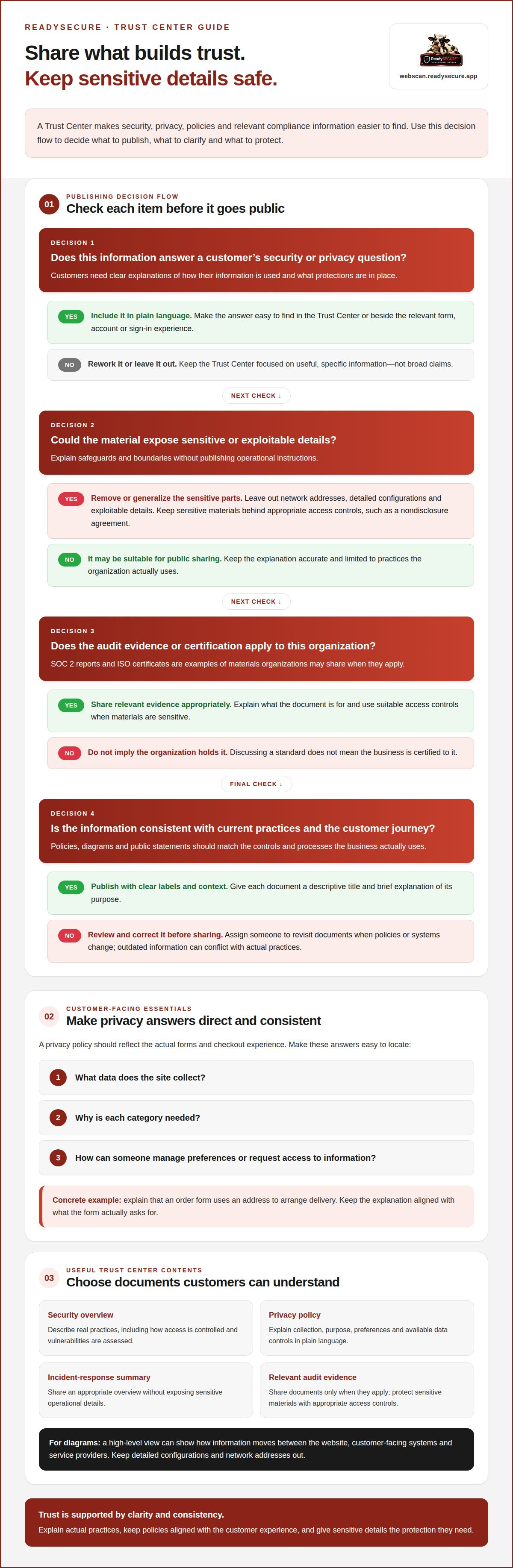
A Trust Center makes those answers easier to find. It is an external resource that brings together information about an organization’s security, privacy practices, policies, and compliance. A customer can use it to review the company’s approach without searching across product pages, legal notices, and support articles. An enterprise might also use a Trust Center to share appropriate security documents with business customers. Keep the navigation simple, label documents clearly, and separate public information from sensitive materials.
What should a business showcase? Describe real practices, not broad claims. Explain how access is controlled, how vulnerabilities are assessed, and how security information is reviewed. If you publish a penetration-testing summary, describe its scope and general approach without revealing exploitable details. Do not imply that a certificate or badge proves every system is secure. Specific, bounded explanations are more useful than claims of complete protection.
A privacy policy should answer direct questions: What data does the site collect? Why is each category needed? How can someone manage preferences or request access to their information? Give a concrete example, such as explaining that an order form uses an address to arrange delivery. Keep the policy aligned with the actual form and checkout experience. If a page requests information the policy does not explain, the gap can make the whole process seem less credible.
Reviews also call for transparency. Publish genuine customer feedback, including criticism, and explain what changed after an issue. For example, if a customer reports confusing account settings, describe the adjustment without exposing private account details. Never manufacture testimonials or present selected praise as the full picture. Honest context helps readers assess feedback on its merits.
If a website suffers a data breach, respond publicly with confirmed information about the incident, its impact, and the steps being taken. Give affected customers clear guidance, then share meaningful updates as the response progresses.
These practices support building customer trust through website security by making security understandable and accountable. Transparency does not mean publishing sensitive configurations. It means giving customers useful answers, correcting inaccurate information, and keeping policies and public statements consistent with actual practices.
3. Communicating cybersecurity policies and initiatives
Businesses can present their security and privacy practices through a clearly organized Trust Center, concise policies, and plain-language explanations. Give customers a direct path to relevant information, and keep each page consistent with the controls and processes the business actually uses.
Use a security policy to explain how the organization manages access, reviews vulnerabilities, and responds to incidents. A high-level infrastructure diagram can show how information moves between a website, customer-facing systems, and service providers. Leave out network addresses, detailed configurations, and other information that could help an attacker. Explain safeguards and boundaries without exposing operational instructions.
Choose documents according to what customers need to understand. A Trust Center might include a security overview, privacy policy, incident-response summary, or relevant audit evidence. SOC 2 reports and ISO certificates are examples of documents organizations may share when they apply. Do not imply that a business holds a certification simply because it discusses that standard. Keep sensitive materials behind appropriate access controls, such as a nondisclosure agreement.
Make shared documents easy to use. Give each file a descriptive title, publication date, and brief explanation of its purpose. Assign someone to review it when policies or systems change. An outdated diagram or policy can conflict with current practices and prompt avoidable questions. Customer feedback and recurring security questionnaires can also show which explanations need clearer wording.
Password policies should explain account protections without exposing internal secrets. For customer accounts, describe available multi-factor authentication and the steps for changing or recovering a password. For staff access, explain how strong administrator passwords, restricted privileges, and multi-factor authentication help limit unauthorized access. Avoid publishing password examples that users might copy.
Keep the privacy policy aligned with the actual customer journey. Explain how account registration, order forms, and support requests use submitted information. Separate essential processing from optional preferences, and make available data controls easy to find. If customers can update preferences in an account, name the action and show where to find it. Clear labels reduce uncertainty without making readers interpret technical language.
Put the answers where customers need them: link privacy details beside forms, account protections near sign-in, and security documents in the Trust Center. A business reviewing its own exposure can use authorized website security scanning to inform the technical details it communicates. Public statements should match current practices, not planned improvements.
4. Customer trust in secure payment experiences
Customers need clear signs that checkout protects their information and handles payment requests carefully. HTTPS encrypts data between a browser and server, while a current TLS certificate supports that secure connection. These protections matter especially when shoppers enter personal or payment details. Use HTTPS throughout checkout, not just on the final payment screen.
Which website security features reassure customers most? A secure HTTPS connection, a straightforward payment flow, and accurate trust badges can help customers assess checkout. Badges should reflect actual practices, not suggest protections the business does not provide. If payment details are stored, PCI-DSS is a relevant security standard to address. Explain the steps customers take, the information requested, and what happens after payment.
Make payment requests easy to verify. Show the business name, order details, total, and payment method before submission. A mismatch between the checkout page and payment prompt can look suspicious. For example, an unexplained redirect to another platform may worry a customer who expects to pay on the business’s site. Explain any change in payment source before the customer reaches that step.
Small usability problems can look like security problems. A checkout button that shifts on a phone, a form that resets, or an unexplained error can make customers hesitate. Test the full payment journey on mobile and desktop. Check that fields stay visible, buttons respond to touch, and validation messages explain how to correct an entry. Keep essential order information readable without excessive scrolling.
Use customer experience analytics to locate friction, not to guess at its cause. Review checkout drop-off points, slow pages, repeated form errors, and device type. If analytics show visitors leaving after a payment-method screen, inspect that step for confusing labels or unexpected redirects. Around 20% of customers may abandon a cart when checkout seems questionable. A clear, consistent flow helps address the concerns that can lead to abandonment.
Responsive design supports confidence when layouts adapt to different screens without hiding important details. On a smaller display, keep the order summary, security explanations, and final payment action easy to find. Make error messages specific, such as identifying an incomplete billing field instead of showing a generic failure. Test real checkout scenarios, including declined payments and corrections, so customers know what to do next.
Keep the experience consistent from product page to confirmation. A familiar logo, matching business name, clear receipt, and understandable next steps help customers recognize each stage. Review the payment flow after changing site templates or payment platforms. A security feature reassures customers only when it works as expected and its purpose is clear.
5. Common website security threats
A website can look normal while an outdated plugin, exposed account, or misconfigured page creates risk. These weaknesses can affect customer information, interrupt access, or change what visitors see. Knowing the warning signs helps owners prioritize practical fixes and explain their commitment to protecting the site.
Vulnerable software is a common concern. An outdated content management system or plugin may contain a weakness attackers can exploit. Keep software updated, remove unused extensions, and review administrator accounts. For example, removing a former employee’s account reduces unnecessary entry points.
Credential theft can start with a deceptive login page or a reused password. Attackers may use stolen credentials to access administrator accounts or customer data. Require strong passwords for site accounts, limit staff privileges to work needs, and enable multi-factor authentication where available. Treat unexpected login behavior as a signal to investigate, not proof of a breach.
Malware can alter website content, redirect visitors, or expose information. Watch for unusual behavior, such as unexpected pop-ups, unfamiliar files, or sudden redirects from a product page. Automated scanning and malware detection can help identify signs of trouble. Maintain an incident response plan that assigns responsibility for investigation, containment, and customer updates.
Mixed content is another visible issue. It occurs when a page loads some assets, such as images, over HTTP rather than HTTPS. That mismatch can weaken site integrity even when the main page uses HTTPS. Review each page and embedded resource, then update insecure references so visitors receive content through a protected connection.
To secure a site with HTTPS, install and configure a TLS certificate, redirect HTTP traffic to HTTPS, and check that pages load without mixed content. Add security headers through the web server or hosting platform, then test that browsers receive them. Keep the certificate renewed. An expired certificate can trigger browser warnings that make a legitimate site appear unsafe.
For a small U.S. business, website security costs depend on site complexity, hosting, payment processing, and the work required; service pricing is provided after a quote request. A basic brochure site has different needs from a store handling customer accounts and payments. Budget decisions should account for software updates, backups, monitoring, and the time needed to respond to findings.
Certifications and security badges can communicate specific evidence, but they don't remove technical risk. No single website security measure provides 100 percent protection. Review vulnerabilities, suspicious activity, access controls, and configuration together. The practical takeaway is to monitor continuously, prioritize fixes by severity, and make public security claims match current safeguards.
5. How does website security affect customer trust and purchase decisions?
A purchase asks customers to take a small risk: share information and trust a business to handle it responsibly. Website security influences whether that risk feels acceptable. More than 81% of consumers need to trust a brand before considering a purchase. Clear, consistent security signals can support that trust, while confusing warnings or unexplained redirects can interrupt a buying decision.
First impressions form quickly. Users can judge whether a website looks trustworthy within 50 milliseconds. That impression is not a full security assessment, but visible problems can raise doubts immediately. An expired certificate warning, an unexpected login prompt, or a page that behaves differently after clicking “buy” may cause a visitor to pause. Clear design and reliable page behavior help customers continue with confidence.
Trust also develops over time. Nielsen Norman Group describes website trust as a gradual process in which skepticism falls as a relationship develops. A customer may first browse product details, then create an account, and later make a purchase. Each interaction should support the same expectations. If a privacy statement says one thing but a form requests unrelated information, that mismatch can weaken credibility.
Security signals work best when they are accurate and consistent. Use HTTPS across the website, keep certificates current, and make the business identity clear throughout checkout and confirmation. A badge should identify a real safeguard or recognized assessment, not imply that every risk has disappeared. Customers can assess a specific statement about how information is protected more easily than a broad claim that a site is “completely secure.”
Purchase decisions also depend on what happens when something goes wrong. A payment error should explain whether the order was submitted and what the customer can do. If an outage affects orders, a timely status update helps customers understand the issue and avoid repeated submissions. Clear follow-through shows that security and service remain priorities after a problem, not just during checkout.
Review the purchase journey from a first-time visitor’s perspective. Open a product page, follow the account or guest checkout path, and read each confirmation. Note browser warnings, unexpected domain changes, unclear data requests, or errors without guidance. Then address the cause and update relevant customer-facing information. This process connects technical safeguards with the decisions customers actually make.
For a practical view of website exposure, scan a website you own or are authorized to assess. A scan can surface potential issues for review, but customer trust also depends on clear communication and consistent handling of each interaction.
ReadySECURE: ReadySECURE Free Scan
ReadySECURE Free Scan is a practical starting point for website owners who want to identify potential security issues. Scanning is limited to websites, APIs, and internet-facing hosts you control or have written authorization to assess. Results help reveal issues for review, with findings prioritized by severity and accompanied by remediation guidance.
ReadySECURE also offers TestSSL Inspection and ZAP Active/Passive Scanning for a closer look at specific areas. For organizations that need ongoing scanning, ReadySECURE Paid Plans provide scheduling, a risk register, status tracking, and aging of findings. Teams still need to review the results and decide how to address them.
If you’re ready to assess a site you’re authorized to scan, visit ReadySECURE’s scanning platform.
Make security a continuing part of your customer experience
Customer expectations change as websites add features, update platforms, and introduce new ways to share information. Treat security as an ongoing part of those decisions, not a one-time technical task. Assign clear responsibility for reviewing website changes, tracking reported problems, and keeping customer-facing explanations aligned with current practices.
Choose one area that needs attention, such as an unfamiliar vulnerability finding or an unclear security statement. Record who will assess it, what action follows, and how customers will be informed if their experience is affected. This keeps security work connected to the people who rely on the site, rather than isolated from everyday decisions.
That steady discipline is central to building customer trust through website security. It helps teams make thoughtful improvements while communicating with accuracy and care. ReadySECURE can help you consider website security scanning for a site you own or have authorization to assess. Contact ReadySECURE about website security to discuss a practical next step. Each clear, responsible action gives customers another reason to feel confident.
Frequently Asked Questions
Why is Transparency on Security Measures Important for Customer Trust?
Transparency helps customers make informed choices by showing how a business handles information and responds to problems. It also helps them spot inconsistencies. For example, if checkout asks for information the privacy explanation does not account for, customers can question the request before continuing. Clear, accurate explanations make it easier to assess a business’s practices and raise concerns when something seems inconsistent.
Why is customer trust critical for SMBs?
For a small or midsize business, customer trust can support repeat purchases, referrals, and ongoing relationships. A customer who doubts how an order or account is handled may choose another business, while a clear response to a concern can help preserve the relationship. Trust also matters in business partnerships: prospective customers may assess security practices before sharing data or relying on a service. Consistent, credible communication helps smaller businesses demonstrate accountability.
What are the best practices for protecting customer data on a website?
Collect only information needed for a clear purpose, limit staff access to the records required for their roles, and remove access when responsibilities change. For example, a newsletter signup form usually does not need a customer’s billing address. Protect stored records with appropriate safeguards, maintain backups, and define who handles access requests or suspected exposure. Review these practices after changes to forms, vendors, or account workflows so new data collection does not go unmanaged.
What are common website security risks that damage customer trust?
Beyond visible browser warnings, customers can be affected by exposed administrator pages, insecure third-party scripts, or misconfigured storage that reveals information. For example, a compromised advertising script could alter a page even when the main website loads normally. Denial-of-service attacks can also make a site unavailable during a purchase or account task. Watch for unexpected page changes, unusual service interruptions, and customer reports, then investigate the specific circumstances.
How to compare website security tools, audits, and providers?
Compare security tools by whether they provide authorized scanning that identifies potential issues and helps prioritize findings by severity and remediation needs. For audits or providers, review relevant evidence such as SOC 2 reports or ISO certificates, check that shared information reflects actual practices, and keep sensitive documents behind appropriate access controls.


