

There isn’t one chance that applies to every website. The chances of your website getting hacked depend on factors such as outdated software, exposed login details, and the scripts and services your site relies on. A breach can affect more than the site itself: attackers may alter pages, steal information, or disrupt your business.
It’s reasonable to wonder whether attackers overlook smaller or less familiar websites. But automated tools can search websites for weaknesses, so a site’s size alone doesn’t determine its risk.
This article explains why attackers target websites, how neglected updates and third-party scripts can create openings, and what may happen after a compromise. You’ll also learn which security checks can help reveal weaknesses before they become bigger problems.
Key Takeaways
- Assess the software and components your website depends on to spot weaknesses that can make it easier to compromise.
- Understand why attackers target websites and which warning signs may point to unauthorized access.
- Consider how third-party scripts can expose visitors and transactions to client-side attacks.
- Recognize that a breach can affect more than website availability, including trust, data, and business operations.
- Use authorized security scanning to identify and prioritize vulnerabilities before they lead to further harm.
Outdated CMS, plugin, and theme software
A website’s exposure can increase when its CMS, plugins, themes, or server software miss security updates. WordPress sites aren’t automatically more likely to be hacked than other websites. Risk depends on software weaknesses and how quickly they’re addressed.
Outdated Software Vulnerabilities
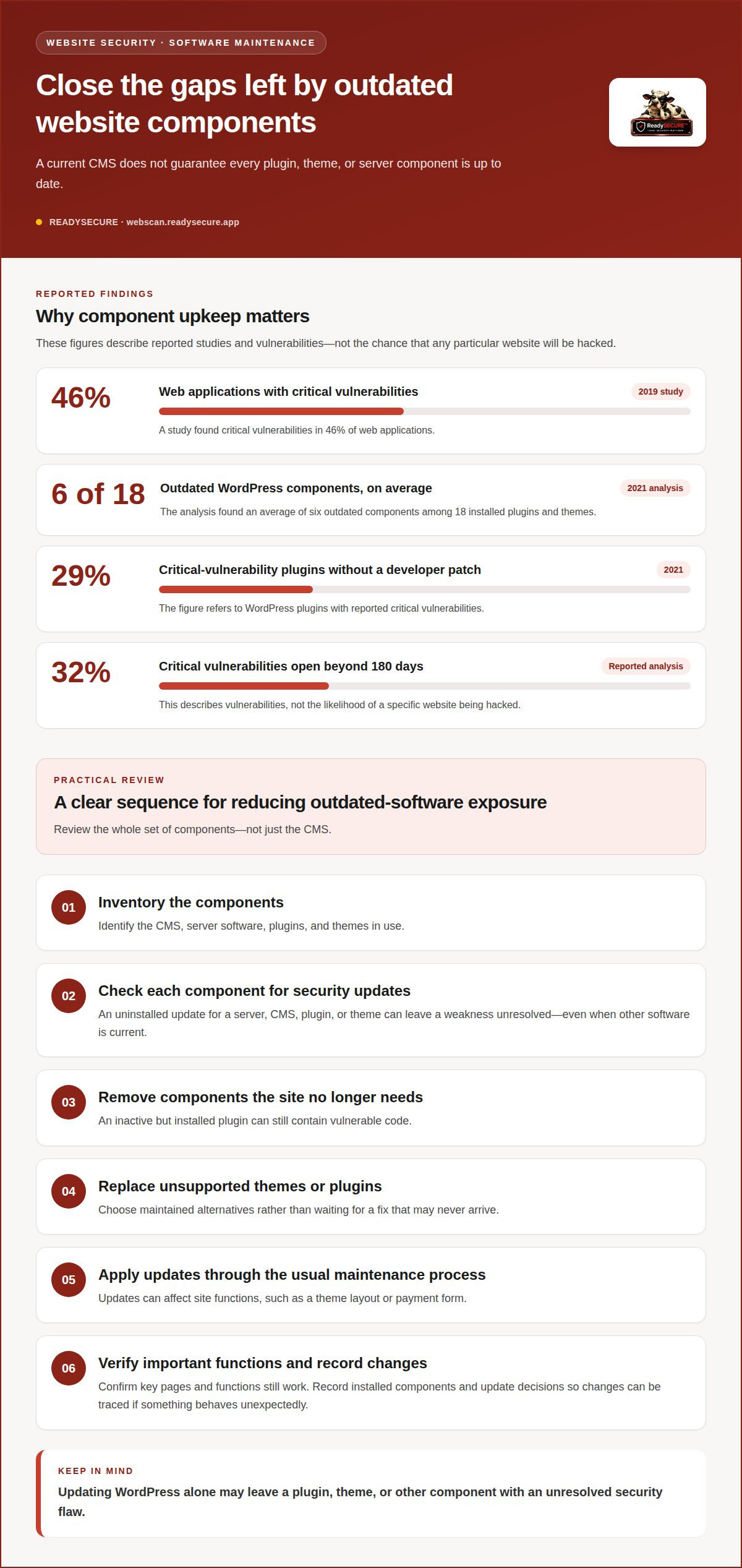
An outdated component is software that hasn’t received available security fixes, leaving known vulnerabilities unresolved. Attackers can exploit these weaknesses to access files or introduce malware. In 2019, a study found critical vulnerabilities in 46% of web applications. Uninstalled updates for a web server, CMS, plugin, or theme can leave a site exposed, even when the rest of its software is current.
WordPress Plugin and Theme Risks
WordPress plugins and themes add site features, but each component can also contain vulnerabilities. An analysis of WordPress sites in 2021 found an average of six outdated components among 18 installed plugins and themes. In that same year, 29% of WordPress plugins with reported critical vulnerabilities received no developer patch. A component that no longer receives updates can therefore remain vulnerable after its flaw becomes known.
Each plugin adds software that needs maintenance. For example, a contact-form plugin may need updates separately from WordPress itself and the site’s theme. Updating only WordPress can leave the form or another component with an unresolved security flaw. Review installed components as a group rather than assuming that an up-to-date CMS means everything is current.
Outdated software matters because attackers don’t need to find a new flaw for every target. Automated bots crawl the internet for vulnerabilities in website code and infrastructure. When a known weakness remains exposed, a site can be found and probed without anyone first deciding that its business is a specific target.
Time matters after a vulnerability is disclosed. A reported analysis found that 32% of critical vulnerabilities stayed open beyond 180 days. That figure describes vulnerabilities, not the chance that any particular website will be hacked. It illustrates why a delayed update can prolong exposure, especially when a component remains accessible and no patch has been installed.
For a practical review, identify the CMS, server software, plugins, and themes in use, then check which need security updates. Remove components the site no longer needs: an inactive but installed plugin can still contain vulnerable code. Replace unsupported themes or plugins with maintained alternatives rather than waiting for a fix that may never arrive.
Updates need care, too: a change can affect site functions such as the theme layout or payment form. Apply updates through the site’s usual maintenance process, then confirm that important pages and functions still work. Record installed components and update decisions so you can trace what changed if an error or unexpected behavior appears.
Why Do Hackers Target Websites?
Attackers target websites because a compromised site can expose data, accounts, or computing resources. Some attacks aim to steal information; others alter pages, distribute malware, or use the site to reach visitors. Automated attacks let them probe websites without knowing the owners or business names.
A website is compromised when someone accesses its files without permission. A visible defacement can make a breach obvious, but other signs are less direct. Look for unfamiliar administrator accounts, unexpected file changes, redirects to unrelated pages, or behavior that differs between visitors.
Search results can provide another clue. Cloaking shows different content to different users, potentially hiding malicious pages from the site owner. Search Google using the site: operator and your website’s root URL to find indexed pages, including unfamiliar ones that may have been added without authorization.
Other warning signs include browser security alerts, unexpected password-reset messages, and customer reports of suspicious redirects. For example, investigate if visitors reach an unfamiliar sales page after clicking your homepage. One symptom may not reveal how access occurred, but several unusual changes warrant prompt attention.
After a suspected compromise, act in a controlled order:
- Restrict access to affected parts of the site to limit further changes.
- Preserve relevant files, access records, and timestamps for investigation.
- Review administrator accounts and remove access that shouldn’t remain.
- Identify the entry point, such as a compromised login or vulnerable component.
- Remove malicious changes, restore clean files, and address the weakness that enabled access.
- Review the site again and monitor for repeated changes or suspicious activity.
Changing passwords alone may not remove malware or close the original entry point. An attacker, for example, could retain access through an altered file even after a stolen account password is changed. Recovery needs to address both the unauthorized changes and the weakness that allowed them.
In the US, website security and malware cleanup costs depend on the scope of the compromise, affected systems, infection depth, and recovery work. Pricing is determined after a quote request.
To understand exposed weaknesses before an incident, consider an authorized website vulnerability scan of systems you control.
Are security breaches increasing or decreasing?
Recent figures point to growing pressure from automated attacks and newly discovered weaknesses. However, incident counts describe broad activity, not the individual risk faced by every website.
Reported Breach Trends
Reported breach trends track changes in attacks or incidents over time, helping security teams understand where exposure is growing. In 2025, attacks per website rose 27% year over year, while API exploitation rose 181%. The number of recorded zero-days was 2.5 times the previous year’s total. These measures point to changing threats, but don’t predict whether a specific site will be breached.
Prevention depends on addressing weaknesses attackers can reach. Hosting provides the infrastructure for a site, but hosting alone doesn’t prevent unauthorized access. An SSL certificate encrypts data sent between a visitor’s browser and a website; it doesn’t fix vulnerable software, stolen credentials, or unsafe server settings.
Small Business Hacking Rates
There isn’t one percentage that describes how often small-business websites get hacked. Risk depends on factors such as exposed services, account security, software maintenance, and the data or functions a site makes accessible. A small online store with administrator accounts and payment features has different exposure from a simple site with few interactive functions.
Make prevention practical by reviewing access and exposure instead of relying on broad statistics about business size. Limit administrator access to people who need it, use two-factor authentication, and remove accounts that no longer need access. These controls make unauthorized account use harder, including when a password has been exposed.
Automated activity also shapes security concerns among web professionals. In 2025, 90% of websites faced at least one bot attack. A bot request isn’t automatically a successful breach, but repeated automated attempts can probe login pages, APIs, and other exposed functions. This makes it useful to distinguish attempted attacks from confirmed unauthorized access when reviewing a security report.
Common risks include weak or reused passwords, too many administrator accounts, missing HTTPS, exposed services, and outdated components. Each creates a different route for attack. HTTPS protects information in transit, while access controls limit who can change website content. Neither replaces the other.
Prevention works best as a set of complementary practices. Maintain software, restrict access, use two-factor authentication, and review security findings for exposed weaknesses. A firewall or antivirus tool can help, but neither guarantees that every application flaw or account risk is addressed. Prioritize findings by severity and whether they affect an internet-facing system.
Third-party scripts and client-side attacks
A third-party script is code your website loads from an external service. Analytics, chat widgets, advertising tools, and payment features can all rely on scripts. The browser runs this code as part of the page, so a threat in an external script can affect visitors even when your website’s own files remain unchanged.
That creates a supply-chain risk: your site depends on code managed outside your own software, and the code may change after integration. For example, a compromised advertising script could inject content into pages that load it. A payment skimmer could capture information entered into a checkout form before it reaches the payment provider.
The risk is not theoretical. The UK Information Commissioner’s Office fined British Airways £20 million after attackers injected a skimming script into its website and payment pages. The incident shows how a client-side attack can target visitors through a familiar, legitimate-looking page rather than by visibly defacing the site.
Cross-site scripting is another client-side threat. It occurs when attacker-controlled content is executed in a visitor’s browser through a vulnerable web application. A 2019 study found 30% of web applications were vulnerable to cross-site scripting. Depending on the weakness, injected code may alter displayed content or interact with information stored in the browser.
Third-party code can also create risks beyond conventional scripts. In 2023, a car dealership’s website chatbot agreed to sell a Chevy Tahoe for $1 after a user rewrote its instructions. That example involved a chatbot response, not a payment-page skimmer, but it highlights why externally supplied or embedded features need clear boundaries and review.
Review scripts by purpose, owner, and page placement. A map tool on a contact page serves a different role from a payment script on checkout pages. Remove integrations that no longer serve a clear purpose, and limit each script to the pages that need it. Fewer unnecessary dependencies mean fewer external components to monitor.
- Inventory: Record each script, its provider, and the pages where it runs.
- Review: Confirm the business purpose and remove abandoned integrations.
- Restrict: Avoid loading a payment or chat script across pages that don’t need it.
- Monitor: Investigate unexpected changes to page behavior, especially on forms.
For stored payment or account information, assess what a script can access and whether that access is necessary. A script on a checkout page may see information entered there, while a script on a public article page may have no reason to interact with forms. Separating these functions reduces unnecessary exposure.
Client-side security depends on knowing what the browser receives, not just what the server stores. A site can look normal while a malicious script quietly changes page behavior. Reviewing external dependencies alongside application vulnerabilities can reveal attack paths that a server-only view might miss.
Consequences of a hacked website
A website breach can affect visitors, business operations, and trust in your organization. The outcome depends on what attackers access and change. A defaced homepage is obvious, while malicious code can run quietly on a checkout page or expose stored information. These consequences can overlap, turning one unauthorized entry into several practical problems.
Visitors may encounter redirects, fake content, or malware instead of the page they expected. On an online store, altered checkout code could disrupt a purchase or put customer information at risk. A compromised login page might capture credentials. Even without a visible outage, suspicious behavior can make customers hesitate to return or complete a transaction.
Disruption can continue after malicious files are removed. Staff may need to pause affected functions, investigate changes, restore clean content, and assess whether accounts or data were exposed. If a booking form stops working, for example, the business may lose requests while the feature is investigated and restored. The impact depends on which systems and functions were affected.
Time can make the consequences harder to contain. The average time to identify a data breach in 2020 was 228 days, and the average time to contain one was 80 days. These historical averages don’t predict the duration of a particular incident. They show why delayed detection can leave an attacker’s access or malicious changes in place for longer.
Search visibility and customer confidence may also suffer. If Google or a browser flags a site for malware or phishing, visitors may see a warning before reaching it. Search results can reveal unfamiliar pages added by an attacker, while cloaking may show different content to different users. The business then has to address both the technical issue and the confusion visitors encountered.
After discovering a breach, prioritize the response:
- Limit access to affected website functions while investigating.
- Preserve relevant records and identify what changed.
- Determine whether accounts, forms, or stored information were exposed.
- Remove malicious content and fix the weakness that enabled access.
- Restore affected functions, then monitor for renewed changes.
Restoring a backup alone may return the site to an earlier state without closing the original entry point. An update may address a known software weakness, but recovery also needs to consider altered accounts, files, and settings. Treat a breach as both a cleanup issue and a security weakness that needs investigation.
To identify exposed weaknesses on a website you control, scan your website for vulnerabilities with written authorization.
ReadySECURE
ReadySECURE helps website owners identify and prioritize vulnerabilities on systems they control. Submit your domain with written authorization, and the platform scans the authorized target and provides a report of findings, severity, and remediation guidance.
Choose the ReadySECURE Free Scan to begin assessing exposure, or use ReadySECURE Paid Plans for scanning needs beyond that starting point. TestSSL Inspection focuses on SSL configuration, while ZAP Active/Passive Scanning assesses web applications for security issues. These scans help clarify which findings need attention, but they don’t replace remediation or guarantee that a site cannot be compromised.
If you want to assess a website you own or are authorized to test, contact ReadySECURE.
Make website security an ongoing decision
There isn’t a fixed answer to the chances of your website getting hacked. A useful next step is to make security a regular part of website ownership, with someone responsible for reviewing findings and deciding what to address first. That responsibility matters when your site changes, adds an integration, or depends on software that needs maintenance.
A clear process keeps security work from becoming a one-time task. Record decisions, assign follow-up, and revisit unresolved issues as the website evolves. If you’re deciding what to examine next, a security scan can help identify exposed weaknesses and support informed decisions about your site.
Contact ReadySECURE about website security to discuss an authorized scan for a website you control. A deliberate review is a practical step toward managing risk with greater clarity.
Frequently Asked Questions
Are all web applications vulnerable?
No. A web application can have weaknesses, but that doesn’t mean every application is vulnerable or can be compromised in the same way. A 2019 study found hackers could attack users in nine out of ten web applications it analyzed. That finding describes the applications in that study, not every website. Risk depends on an application’s design, configuration, exposed features, and how its security issues are managed.
Can I completely eliminate the risk of being hacked?
No security measure can eliminate every possible attack path. New flaws, account misuse, and configuration mistakes can create exposure even when a site has protective controls. The practical goal is to reduce opportunities for unauthorized access and make problems easier to detect. Use separate accounts for each administrator, remove access when roles change, and keep a response plan that identifies who investigates suspicious activity.
How are website hacks done?
Attackers gain unauthorized access by exploiting a weakness or using access they have obtained, then change the site or its data. They may abuse a vulnerable form, use stolen account credentials, or alter a file to redirect visitors. Entry points and motives differ: some attackers seek information, while others use websites to display unwanted content or reach visitors.
How common are website hacks and data breaches each year?
There isn’t one complete annual count that represents every website hack and data breach worldwide. A historical estimate put the average at 30,000 newly hacked websites per day in 2012, but that figure shouldn’t be treated as a current annual total. Reports also measure different things, such as attempted attacks, confirmed incidents, or exposed records. Check what a report counts before applying its figures to your own site.
What factors make a website more likely to be hacked?
Exposure depends on a site’s accessible functions and how well its accounts, software, and external connections are managed. A site with administrator access, customer forms, APIs, and payment features has more functions to secure than a static information page. Risk can also rise if credentials are reused or a third-party service has excessive access. Review each public-facing feature and the accounts that can change it.
How can I check whether my website has been hacked?
Look beyond the homepage. Compare recent website changes with approved releases, review administrator sign-ins, and inspect server records for activity you can’t explain. Check for unexpected changes to pages, redirects, or outbound connections. A security scan can identify exposed vulnerabilities, but it cannot prove by itself whether an attacker accessed the site. If evidence suggests unauthorized access, preserve relevant records before changing or removing files.
What are the most common ways hackers break into websites?
Common routes include exploiting vulnerable software, taking over accounts, and abusing insecure application features. A phishing email may trick an administrator into revealing login details; a vulnerable form may let an attacker submit harmful input. External scripts can also affect what visitors’ browsers receive. Because these methods leave different signs, reviewing account activity, application behavior, and dependencies can help narrow down an incident.
How can I reduce the chances of my website getting hacked?
Use unique passwords for administrative accounts, enable two-factor authentication, and give each person only the access their role requires. Remove unused accounts and review external integrations when your site changes. Keep a clean backup separate from the live website, and test that it restores the functions your business relies on. For security testing, scan only websites and systems you own or are authorized to have tested.


