

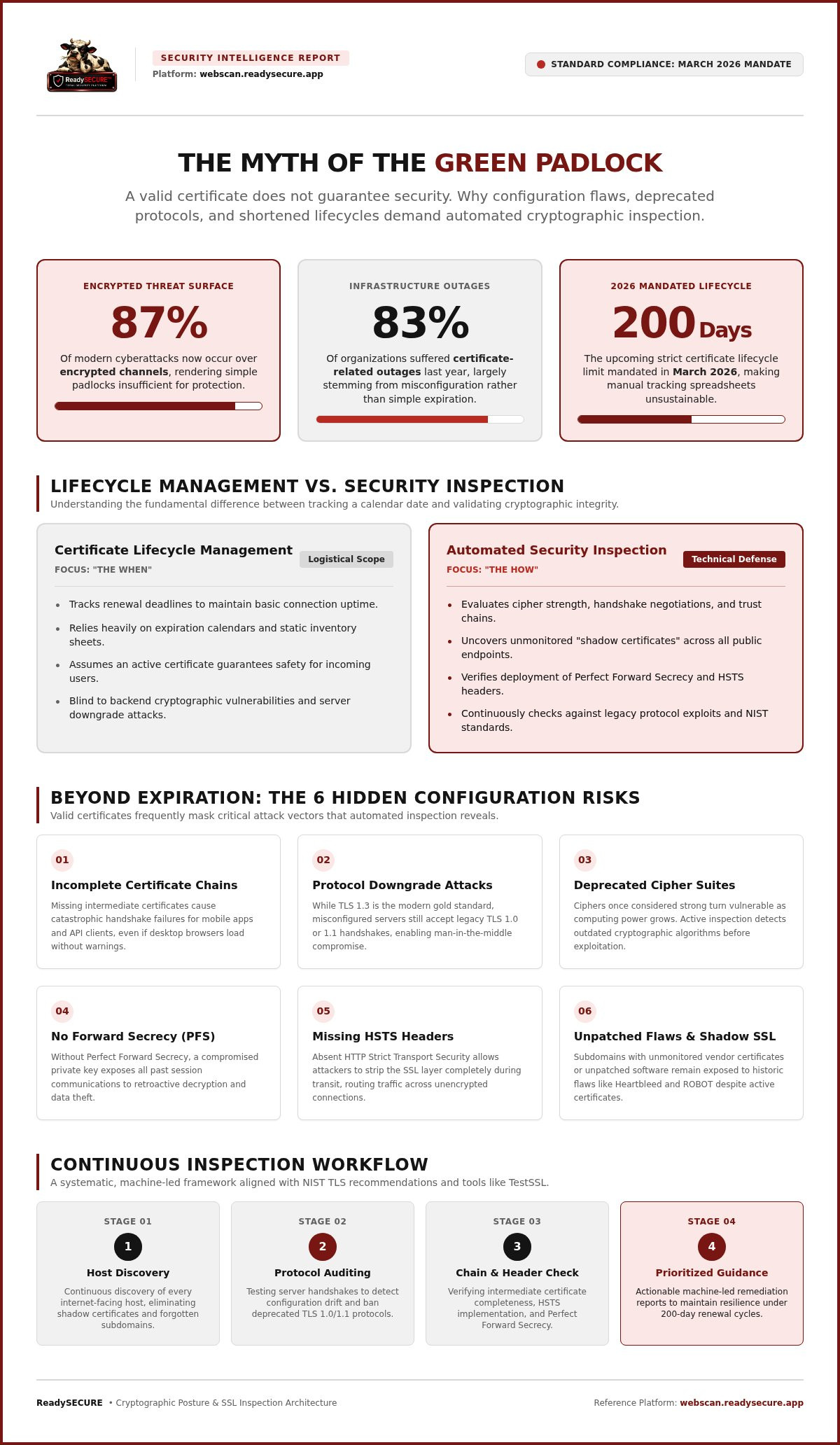
Did you know that over 87% of modern cyberattacks now occur over encrypted channels? While many IT teams focus solely on keeping the connection active, a valid certificate is no longer a definitive marker of safety. In fact, research shows that up to 83% of organizations suffered certificate-related outages last year; many of these stemmed from configuration errors rather than simple expirations. Relying on manual spreadsheets is a liability in an era where automated ssl certificate inspection is the only way to maintain visibility.
You likely track expiration dates religiously to avoid service disruptions, but that's only the surface of the problem. We'll help you discover why a valid SSL certificate does not guarantee security and how automated inspection identifies the configuration gaps that hackers actually exploit. This guide previews the shift toward shorter certificate lifecycles, such as the 200-day limit mandated in March 2026, and the risks of deprecated protocols. You'll gain a clear process for auditing your encryption standards and the confidence that your site's defenses are truly robust.
Key Takeaways
- Understand why a valid certificate status is not a guarantee of security, as it often masks deep configuration flaws and weak encryption protocols.
- Identify specific technical risks, such as deprecated cipher suites and incomplete certificate chains, that leave your organization vulnerable to man-in-the-middle attacks.
- Learn how automated ssl certificate inspection replaces unreliable manual tracking with a continuous, machine-led review of your entire cryptographic posture.
- Discover a repeatable workflow for inventorying assets and establishing a security baseline using industry-standard tools like TestSSL.
- See how integrating authorized scanning into your routine provides prioritized remediation guidance to meet 2026 compliance requirements.
The Myth of the Green Padlock: Defining Automated SSL Certificate Inspection
For years, users were taught to look for the "green padlock" as a definitive sign of safety. This is a dangerous misconception. A valid certificate merely confirms that the connection is encrypted and the domain is controlled by the requester. It does not guarantee that the encryption is strong or that the server is secure. Automated ssl certificate inspection is the systematic, machine-led review of these configurations. It moves beyond simple validation to ensure your technical setup meets the rigorous security standards required in 2026.
There is a fundamental difference between certificate lifecycle management and security inspection. Lifecycle management focuses on the "when," ensuring a certificate is renewed before it expires. Security inspection focuses on the "how," evaluating the technical depth of the encryption itself. Attackers rarely wait for a certificate to expire. Instead, they exploit weak cipher suites or misconfigured parameters on sites that appear perfectly "valid" to a standard browser.
Why Expiration Alerts Are Only the Beginning
Is your expiration calendar enough? Probably not. Monitoring expiration is a logistical task, not a security one. It ensures uptime, but it does not prevent data theft. A significant risk involves "shadow certificates." These are certificates created by developers or third-party vendors without central oversight. Because they exist outside your primary inventory, they often use weak keys or outdated standards. Automation is essential for discovering every internet-facing host. It ensures that no forgotten subdomain becomes an entry point for an intruder.
The Core Components of a Professional Inspection
What does a thorough inspection actually look for? It starts with the certificate chain. If a server fails to provide the correct intermediate certificates, the trust chain breaks. This causes failures for mobile apps and API clients even if the site looks fine in a desktop browser. A professional inspection also analyzes supported protocols. While TLS 1.3 is the modern standard, many servers still allow legacy connections that are easily compromised.
Finally, inspection identifies specific Transport Layer Security protocol vulnerabilities. Even with a current certificate, a server might be susceptible to historic flaws like Heartbleed or ROBOT if the underlying software isn't patched. By automating this review, you ensure that your cryptographic posture is defined by technical integrity rather than just a calendar date.
Beyond Expiration: The Technical Reality of SSL/TLS Vulnerabilities
A valid certificate is only the first step in securing a connection. The underlying configuration of your server often presents a much larger surface for attack than the expiration date itself. Cipher suites that were considered "strong" a few years ago can become "weak" overnight as new vulnerabilities are discovered or computing power increases. Maintaining a secure posture in 2026 requires more than just valid paperwork; it requires a technical deep dive into how your server negotiates every handshake.
Perfect Forward Secrecy is a cryptographic property that ensures even if a server's private key is compromised in the future, past session keys remain secure and previous communications cannot be decrypted. This is no longer an optional feature but a necessity for modern compliance. Additionally, misconfigured headers such as HTTP Strict Transport Security (HSTS) can undermine a valid certificate by allowing users to connect over insecure channels. Without these headers, an attacker can strip the SSL layer entirely through a man-in-the-middle attack, leaving your data exposed despite your "valid" status.
The Danger of Protocol Downgrade Attacks
Attackers often use downgrade attacks to force a server to use an older, insecure protocol like TLS 1.0 or 1.1. While your primary site might prefer TLS 1.3, a misconfigured legacy endpoint could still be listening for weaker connections. This is a common issue with configuration drift in cloud environments. When new instances are deployed from outdated templates, they often revert to insecure defaults. High-quality automated ssl certificate inspection identifies these lapses by testing the server's response to various handshake requests. Following the NIST guidelines for TLS implementations is the best way to ensure your servers reject these dangerous fallback attempts. For a broader look at maintaining your security posture, refer to our Automated Vulnerability Assessment: 2026 Guide.
Vulnerabilities in the Certificate Chain
A certificate doesn't exist in isolation; it relies on a chain of trust leading back to a Root Certificate Authority. If your server is missing intermediate certificates, many clients will trigger a "connection not private" warning. This often happens because desktop browsers are better at "filling in the gaps" than mobile apps or automated API clients. Using automated ssl certificate inspection allows you to verify the integrity of the entire trust chain across all subdomains simultaneously. These tools also flag the use of deprecated hashing algorithms like SHA-1, which are now forbidden under 2026 standards. You can verify your current configuration today to ensure your trust chain is complete and compliant.
Manual vs. Automated SSL Inspection: Evaluating the Security Gap
Manual checks are like taking a single photograph of a moving target. They provide a moment of clarity that expires as soon as the administrator logs off. In contrast, automated ssl certificate inspection offers continuous visibility into your cryptographic health. It captures the "drift" that happens when new subdomains are added or server software is updated without a formal security review. Is your manual checklist enough to catch these changes in real time? While large enterprises use these tools to manage thousands of certificates, small businesses face a higher relative risk. Automated exploit bots don't discriminate based on revenue. They scan the entire IPv4 space for weak ciphers, making automated defense a necessity for teams of any size.
The Human Error Factor in SSL Management
Manual configuration is rarely perfect. A common mistake involves incorrect port binding, where a certificate is updated for web traffic on port 443 but forgotten on a legacy API port. The "set it and forget it" mentality is particularly dangerous because security standards evolve. What was considered a safe configuration yesterday may violate the IETF recommendations for secure TLS deployments today. Relying on memory or manual checklists leaves gaps that attackers easily find. For teams looking to identify specific, known vulnerabilities across their infrastructure, adopting a strategy like the one in our Nuclei Template Scanning: A Professional Guide helps bridge the gap between discovery and technical validation.
Efficiency and Scalability of Automation
Running manual TestSSL checks on every internet-facing host is a massive time sink. A security professional might spend hours manually auditing a handful of servers, only to have the data become stale by the next week. Scheduled SaaS scanning transforms this workflow by providing a repeatable process that runs in the background. This shift allows your team to stop acting as "discovery agents" and start acting as "remediation experts." Instead of hunting for problems, you receive a prioritized report that highlights the most critical risks first. This level of organization is vital for development teams who need clear, actionable steps to fix configuration errors without disrupting the production environment. By centralizing automated ssl certificate inspection, you ensure that security is a consistent baseline rather than a periodic chore.
Implementing a Continuous SSL Inspection Workflow
Establishing a methodical workflow for automated ssl certificate inspection ensures that no technical endpoint is overlooked. You cannot secure what you do not know exists. The first step in any professional strategy is to inventory all internet-facing hosts, including subdomains and hidden APIs. Once your assets are mapped, you must establish a baseline. This initial snapshot documents your current protocol support and cipher strengths, providing a reference point for all future tests. After the baseline is set, schedule regular scans to detect configuration drift. Drift often occurs during routine server updates or when new cloud instances are deployed with default settings. Finally, integrate these results into your existing remediation pipeline. Security findings should be treated as actionable tickets rather than static reports.
Using TestSSL for Deep Inspection
TestSSL is recognized as an industry standard for SSL/TLS testing because it provides a granular review of the handshake process without requiring proprietary agents. It identifies hundreds of potential flaws, ranging from protocol versions to specific cipher vulnerabilities. Interpreting a TestSSL report does not require specialized security knowledge if you focus on the severity levels. "Critical" findings represent immediate risks, such as support for deprecated protocols or expired certificates, which require urgent intervention. "Informational" findings typically highlight certificate metadata or minor configuration suggestions that improve your overall security posture but do not represent an immediate breach risk. Focusing on these priorities ensures your team remains efficient.
Establishing an Authorization Record
Security testing is only legitimate if it is authorized. In a professional environment, every automated ssl certificate inspection must be accompanied by a signed authorization record. This document serves as a formal agreement that the testing is a sanctioned part of your 2026 security strategy. It protects the technical team and provides clear evidence to stakeholders that the scans are conducted with ethical clarity and legal consent. Proving legitimacy is essential for maintaining trust within an organization. It transforms security testing from an intrusive probe into a disciplined, transparent process for safeguarding digital assets. You can start your authorized SSL scan today to build your first security baseline with full transparency.
ReadySECURE: Integrating SSL Inspection into Your Security Posture
Managing a secure digital perimeter requires more than reactive alerts. ReadySECURE provides a structured environment where automated ssl certificate inspection becomes a core component of your defensive strategy. Instead of relying on a single tool, the platform leverages TestSSL alongside five other industry-standard scanners, including Nmap, ZAP, OpenVAS, and Nuclei. This multi-layered approach ensures that your SSL configuration is validated from multiple technical perspectives. By moving from manual checks to ReadySECURE Paid Plans, you establish a cadence of scheduled monitoring that captures configuration drift before it can be exploited.
The transition from a one-off audit to a continuous process is essential for meeting 2026 security benchmarks. ReadySECURE prioritizes remediation by delivering clear, actionable reporting. You don't have to sift through thousands of lines of raw data to find what matters. The platform interprets the findings and presents them in order of severity, allowing your technical team to focus on the most critical gaps first. This disciplined approach to digital safety transforms security from a source of uncertainty into a measurable, manageable business function.
A Comprehensive View of Web Security
Why is SSL inspection alone insufficient? A valid certificate on a server with unpatched vulnerabilities or open, unnecessary ports still leaves you exposed. This is why SSL data must be integrated into a broader Continuous Security Scanning strategy. ReadySECURE combines cryptographic insights with findings from Nmap port scanning and ZAP active/passive scanning to build a complete risk profile. Having a single source of truth for all external vulnerabilities eliminates the blind spots created by siloed security tools. It allows you to see how a protocol weakness might interact with an application-layer flaw, providing a depth of visibility that manual audits cannot match.
Getting Started with Your First Scan
How can you begin improving your site's technical integrity? The most efficient path is to submit your domain for a Free Website Security Scan. This initial audit provides an immediate health check of your SSL/TLS configuration and other critical attack vectors. You can expect a prioritized report that clearly distinguishes between critical vulnerabilities and informational findings. As you continue with automated ssl certificate inspection, you can use the scan history and trend analysis features to measure your security progress over time. This data is invaluable for proving to stakeholders that your encryption standards are not just valid, but consistently hardening against modern threats.
Hardening Your Infrastructure Against Modern Encrypted Threats
A valid certificate is merely the baseline for digital trust. The real risks lie in configuration drift, weak cipher suites, and legacy protocols that remain active long after they're deprecated. Relying on a calendar alert for expiration is no longer a viable security strategy. Instead, implementing automated ssl certificate inspection ensures that your technical setup remains compliant with 2026 standards and resilient against automated exploit bots.
ReadySECURE simplifies this complex process by providing a unified view of your external attack surface. Every scan is an authorized engagement that includes signed records for your compliance audits. By combining industry-standard tools like TestSSL, ZAP, and Nuclei, the platform delivers a comprehensive risk profile with no-nonsense prioritized remediation guidance. It's time to move beyond the myth of the green padlock and embrace a disciplined, technical approach to encryption.
Run a ReadySECURE Free Scan to inspect your SSL configuration today and take the first step toward a more transparent and secure digital environment. You don't have to manage these complexities alone; professional tools are ready to help you maintain a robust defense.
Frequently Asked Questions
What is the difference between an SSL certificate and SSL inspection?
An SSL certificate is the digital file that enables encryption, while SSL inspection is the technical audit of how that certificate is deployed. The certificate proves identity and domain control. The inspection evaluates the server's protocol support, cipher strength, and implementation headers. You can have a valid certificate on a server with dangerously weak settings. Automated ssl certificate inspection identifies these configuration gaps that a simple certificate check ignores.
Can automated SSL inspection detect Heartbleed or similar vulnerabilities?
Yes, professional inspection tools identify specific technical flaws like Heartbleed, ROBOT, or Ticketbleed. These vulnerabilities exist in the server's software or its TLS implementation rather than the certificate itself. A valid certificate won't stop an attacker from exploiting an unpatched OpenSSL library. Automated tools test the server's reaction to specific handshake requests to confirm if these historic vulnerabilities are still active on your internet-facing hosts.
How often should I run an automated SSL certificate inspection?
You should run an inspection at least monthly or whenever you update your server configuration. Security standards and "best practices" evolve quickly, meaning a strong setup today might be considered weak tomorrow. Continuous monitoring is the most effective way to catch configuration drift in cloud environments. ReadySECURE Paid Plans allow you to schedule these scans automatically, ensuring your cryptographic posture is verified against 2026 standards without manual intervention.
Is it legal to run an automated SSL scan on my own website?
It is entirely legal and ethical to scan websites, APIs, and hosts that you own or have explicit permission to test. In a professional context, you should always maintain a signed authorization record to prove the scan was sanctioned. ReadySECURE provides these signed records for every scan. This documentation ensures your security testing is transparent, legitimate, and compliant with internal governance or external insurance requirements.
Does a valid SSL certificate protect my site from all hackers?
No, a valid SSL certificate only protects data in transit between the user and the server. It doesn't defend against SQL injection, cross-site scripting, or credential theft. Hackers often use valid certificates on malicious sites to appear trustworthy. While encryption is a baseline requirement, it's just one layer of a broader defense. You need active scanning for application-layer vulnerabilities to achieve comprehensive protection.
What is TestSSL and why is it used in automated inspections?
TestSSL is an industry-standard, open-source tool used for deep analysis of SSL/TLS configurations. It's favored because it provides a granular review of every supported protocol and cipher suite without requiring proprietary agents. ReadySECURE utilizes TestSSL because it delivers technical precision that stakeholders can trust. It identifies misconfigurations like incomplete certificate chains or missing security headers, making it a cornerstone of automated ssl certificate inspection workflows.
What happens if my SSL inspection finds a weak cipher suite?
If a weak cipher suite is discovered, your server is vulnerable to man-in-the-middle attacks or data decryption. You should immediately update your server configuration to disable the insecure ciphers and prioritize modern standards like AES-GCM or ChaCha20. ReadySECURE reports provide prioritized remediation guidance, showing exactly which settings to change. Fixing these issues ensures your encryption remains unbreakable by modern computing standards and meets 2026 compliance requirements.
Do I need an SSL inspection if I use a Content Delivery Network (CDN)?
Yes, you still need to inspect your configuration even when using a Content Delivery Network (CDN). While a CDN handles the connection at the edge, the "origin" connection between the CDN and your server must also be secure. Misconfigurations at the origin can lead to data exposure or "downgrade" attacks. Inspecting both the edge and the origin ensures that encryption is consistent across the entire data path.


