

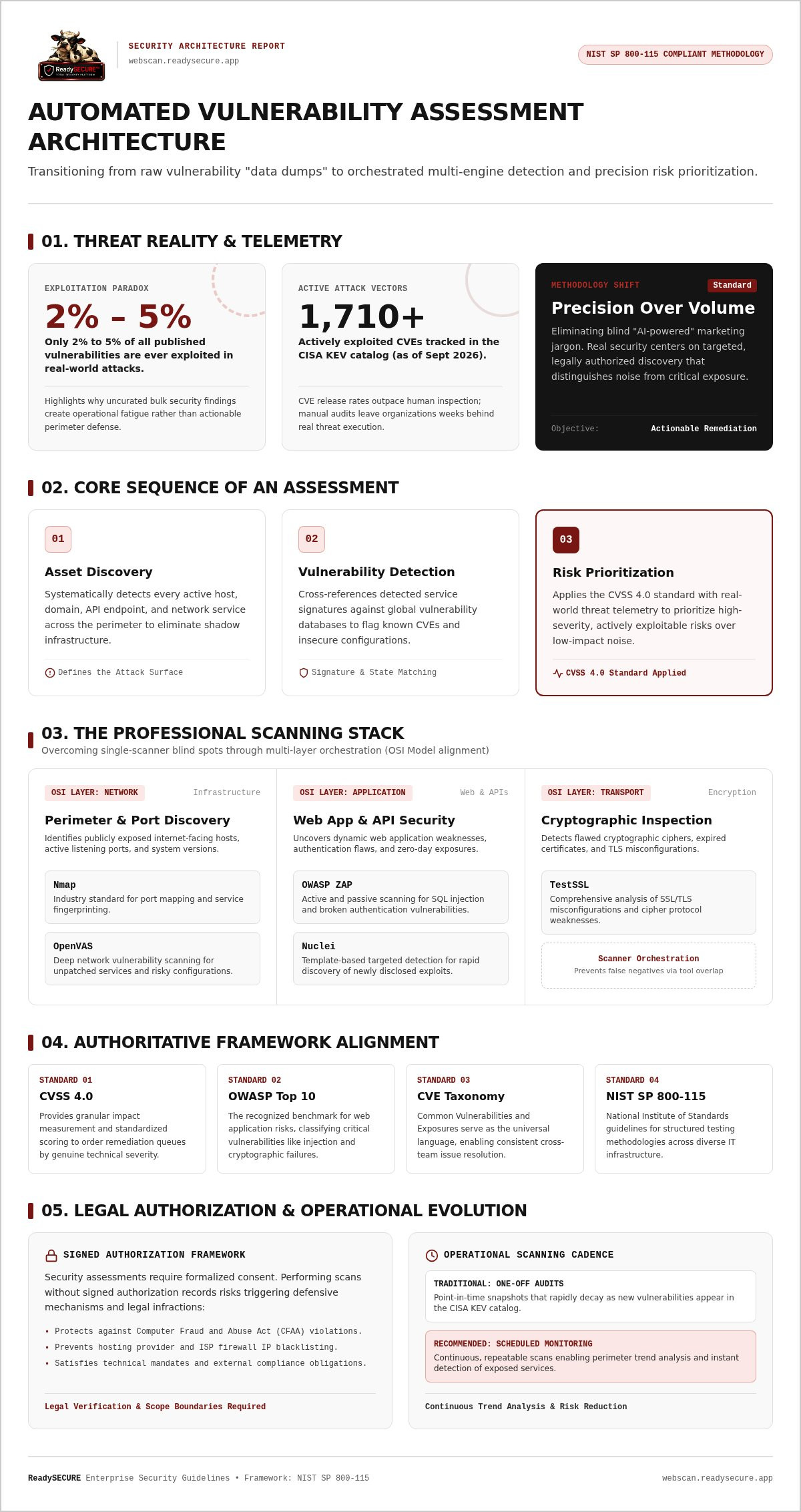
Did you know that between 2% and 5% of all published vulnerabilities are ever actually exploited in real-world attacks? It's a sobering statistic that highlights why traditional security reports often feel like useless data dumps. You're likely tired of "AI-powered" marketing speak that masks how tools actually function, and you might even fear that running an automated vulnerability assessment could trigger legal issues or ISP blocks if handled incorrectly.
We understand that security isn't about the volume of findings; it's about the precision of the response. This guide helps you master the mechanics of professional risk assessments and learn how to implement an authorized, multi-scanner strategy for your digital assets. You'll gain a clear understanding of the industry-standard scanners used in professional environments, such as Nmap, OpenVAS, and ZAP. We'll also provide a framework for prioritized remediation based on severity and real-world threat telemetry. By the end, you'll have a repeatable, legal process for scanning internet-facing hosts that satisfies both your technical requirements and your compliance obligations.
Key Takeaways
- Understand how an automated vulnerability assessment scales security checks across vast digital assets that are too repetitive for manual testing.
- Learn why a single tool is insufficient and how orchestrating multiple specialized engines like Nmap and OpenVAS provides a more comprehensive risk profile.
- Discover the necessity of signed authorization records to ensure all security scanning remains legal and avoids triggering ISP blocks or CFAA violations.
- Move beyond "data dump" reports by implementing a framework that prioritizes vulnerabilities based on real-world severity and threat telemetry.
- Establish a repeatable process for defining your attack surface and transitioning from one-off scans to consistent, scheduled monitoring for trend analysis.
What is an Automated Vulnerability Assessment?
An automated vulnerability assessment is a systematic, software-driven method used to identify, rank, and report security weaknesses across digital assets. It's not a replacement for human oversight, but a necessary tool for scaling security checks that are too vast for manual review. By using an automated vulnerability scanner, organizations can consistently monitor websites, APIs, and cloud-hosted servers for known flaws without the delays associated with manual testing.
Why is this approach mandatory in 2026? The speed of new CVE (Common Vulnerabilities and Exposures) releases has outpaced human review capabilities. As of September 2026, the CISA Known Exploited Vulnerabilities (KEV) catalog tracks over 1,710 actively exploited CVEs. Organizations that rely on manual discovery for these threats often find themselves weeks behind the exploitation curve. Automation bridges this gap by providing near-instant detection of internet-exposed vulnerabilities.
The Core Components of an Automated Security Risk Assessment
A professional assessment follows a logical sequence to ensure no host is overlooked. It begins with asset discovery, which identifies every active host, domain, and service on the network. Following this, the vulnerability detection phase matches system signatures against global threat databases to find known weaknesses. Finally, the process concludes with risk prioritization. Modern assessments utilize the CVSS 4.0 standard, which provides granular impact measurements to help security teams focus on the most critical risks first.
Reference Standards: OWASP and CVE
Effective scanning relies on industry-standard benchmarks to provide context to technical findings. The OWASP Top 10 is the recognized standard for web application security, categorizing the most critical risks like injection and cryptographic failures. To ensure clarity across different security teams, scanners use CVE identifiers as a universal language for vulnerabilities. Mapping the results of an automated vulnerability assessment to these frameworks ensures that stakeholders receive a report grounded in technical rigor and industry consensus. This disciplined approach prevents "data dumps" and focuses remediation on the flaws that actually matter.
The Anatomy of a Professional Scanning Stack
Why is a single scanner never enough for a comprehensive assessment? The answer lies in the specialized nature of security tools. A single tool rarely provides a complete automated vulnerability assessment because different scanners focus on different layers of the OSI model. While one engine might excel at detecting unpatched services on a server, it may be completely blind to a cross-site scripting flaw in a web application. Professional security teams solve this by using "Scanner Orchestration," which involves running multiple specialized engines in sequence. Orchestration prevents false negatives by overlapping tool capabilities. This methodical approach follows the NIST SP 800-115 security testing guidelines, which recommend using a structured methodology to identify technical flaws across diverse infrastructure.
Network and Port Discovery (Nmap & OpenVAS)
Network discovery is the foundation of any technical risk review. Nmap serves as the industry standard for port scanning and service fingerprinting, allowing you to see exactly which services are active on a host. Once the ports are mapped, OpenVAS performs deep network vulnerability scanning to identify unpatched services or risky configurations. These tools are essential for identifying "Internet Facing Hosts" that are accidentally exposed. Do you know which of your internal services are visible to the public? Using Nmap and OpenVAS together ensures that your perimeter remains tightly defined and monitored.
Web Application and API Security (ZAP & Nuclei)
Web layers require a more nuanced set of eyes. ZAP (OWASP Zed Attack Proxy) performs both active and passive scanning to catch common application-level vulnerabilities like SQL injection or broken authentication. Nuclei complements this by utilizing template-based scanning for rapid detection of specific, recently discovered exploits. For a detailed breakdown of this technique, you can read our Nuclei Template Scanning Guide. Using these tools in tandem ensures that both generic flaws and specific zero-day risks are identified before they can be exploited.
Encryption and SSL Inspection (TestSSL)
SSL/TLS misconfigurations remain a leading cause of data breaches. TestSSL is a specialized tool used to verify cipher suites, certificate validity, and protocol support. It ensures that data in transit is actually protected by modern standards rather than legacy, vulnerable protocols. Automated SSL checks should be a mandatory baseline for any modern web assessment. If you want to see how these specialized scanners work together on your own infrastructure, you can initiate an authorized security scan to receive a prioritized report.
Automated vs. Manual Vulnerability Assessments
How do you choose between a software-driven approach and a human-led test? The primary differences lie in speed, cost, and scope. An automated vulnerability assessment can be completed in minutes or hours, whereas manual penetration testing often requires weeks of preparation and execution. While manual testing is essential for high-stakes environments, its cost-prohibitive nature makes it difficult to scale across every minor asset or code change. Automation provides the baseline hygiene required to catch "low-hanging fruit" before a human tester even begins their work.
Continuous visibility is the greatest advantage of automation. Manual tests provide a point-in-time snapshot that becomes obsolete the moment a new patch is released or a configuration is altered. By following CISA Cyber Hygiene scanning services best practices, organizations can maintain a persistent defensive posture. This ensures that internet-accessible assets are monitored for new CVEs as they emerge, rather than waiting for an annual manual review. It's a shift from reactive patching to proactive, scheduled monitoring.
Strengths of Automation
Automation excels at repeatability. It ensures the same rigorous checks are performed every time a developer pushes code to production. You can schedule these scans during low-traffic periods to minimize performance impact without requiring a security engineer to be present. Over time, this data allows for detailed trend analysis. By tracking your security posture over several months, you can identify whether your remediation efforts are actually reducing your overall risk surface. This consistency is impossible to achieve with manual testing alone.
Limitations to Acknowledge
Scanners have technical boundaries. They often struggle with complex business logic flaws, such as multi-step user workflows that require human intuition to bypass. Additionally, every automated tool generates some degree of noise. This makes prioritized reports essential for filtering out false positives that might otherwise distract your team. Ultimately, while an automated vulnerability assessment identifies technical flaws, a "human-in-the-loop" is still required to make final remediation decisions based on specific business context. Automation handles the volume, while humans handle the nuance.
The Ethical Framework: Why Authorization Matters
What is the difference between a legitimate security test and a cyberattack? The distinction lies entirely in authorization. An automated vulnerability assessment performed without explicit permission is indistinguishable from malicious activity in the eyes of the law. Under the Computer Fraud and Abuse Act (CFAA), accessing a network without authorization can lead to severe legal consequences. Even if your intentions are purely diagnostic, you risk civil lawsuits, state-level anti-hacking penalties, or being blocked by your Internet Service Provider (ISP) if you fail to establish a legal foundation first. While the DOJ updated its policy in 2022 to protect good-faith research, this provides no safe harbor against civil litigation or cloud hosting breach claims.
Ethical boundaries require that you only scan targets you own or have explicit permission to test. Professional assessments rely on a Signed Authorization Record to prove legitimacy. This document serves as a critical piece of evidence when communicating with hosting providers like AWS or Microsoft Azure, who maintain strict policies regarding traffic that looks like a probe. By maintaining a clear audit trail, you protect your organization from being flagged as a threat actor during routine testing. It's a disciplined approach that ensures your security efforts don't accidentally compromise your legal standing.
Documenting the Scan
What should be included in a formal authorization? A valid form must list the specific IP addresses, domains, and APIs included in the scope. It should also define the Rules of Engagement, detailing the timeframe for the scan and the specific scanners used in the stack. ReadySECURE addresses this by attaching a signed authorization record to every result. This provides a transparent record for your internal team and external stakeholders, ensuring that every automated vulnerability assessment is fully documented and legally sound. These records are essential for proving that you've followed a repeatable, authorized process.
Authorized Vulnerability Assessment for Compliance
Many modern compliance frameworks mandate regular scanning to maintain certification. For example, PCI DSS v4.0.1 requires external scans at least every 90 days, while frameworks like SOC2 and HIPAA expect evidence of continuous risk management. A prioritized report doesn't just show you what is broken; it demonstrates a proactive security posture to auditors. If you're ready to start building this evidence trail, you can access the ReadySECURE Free Security Scan to begin your first authorized audit. Taking this step ensures you meet regulatory demands while staying within strict ethical and legal boundaries. To secure your infrastructure today, you can request an authorized security scan for your primary domain.
Implementing a Scalable Assessment Strategy
Building a sustainable security program requires moving beyond ad-hoc testing. How do you move from a single scan to a mature, scalable operation? A successful strategy follows five core steps to ensure nothing is overlooked. First, you must define your attack surface by cataloging all domains, APIs, and public-facing IPs. Second, establish an authorization baseline for every target to maintain legal and ethical boundaries. Third, set a scanning cadence that reflects the volatility of your assets. We recommend daily scans for active APIs and weekly assessments for stable network infrastructure. Fourth, integrate these reports directly into your existing IT ticketing or development workflows, such as Jira or GitHub. This ensures that findings are treated as actionable tasks rather than ignored emails. Finally, perform regular trend analysis to measure remediation effectiveness. By tracking how quickly your team closes "Critical" gaps, you can prove the value of your automated vulnerability assessment program to stakeholders.
From Free Scans to Continuous Monitoring
Starting small is the most effective way to validate your tool stack without overwhelming your team. You can begin with a single target using the ReadySECURE Free Scan to see how the orchestration of Nmap, OpenVAS, and ZAP performs against your specific infrastructure. Once you've verified the quality of the findings, transitioning to ReadySECURE Paid Plans allows for multi-target scheduling and a permanent historical record of your security posture. This shift enables a Continuous Security Strategy that detects configuration drift as soon as it occurs. It's a disciplined approach that provides a level of protection that annual tests cannot match.
Interpreting and Acting on the Report
Receiving a report with hundreds of findings often leads to "security fatigue," where the sheer volume of data prevents any real action. How do you decide where to start? You should focus your efforts on "Critical" and "High" issues first. Resolving these high-impact vulnerabilities typically eliminates approximately 80% of your total organizational risk. A professional automated vulnerability assessment provides prioritized lists that filter out the noise of low-impact findings. By utilizing the specific remediation guidance included in each report, your IT team can significantly speed up the patching process. This focus ensures that your resources are always directed toward the threats that matter most.
Strengthening Your Defensive Posture for 2026
Security in 2026 isn't about running a single tool and hoping for the best; it's about the disciplined orchestration of industry-standard engines that provide overlapping coverage. You've learned that a professional automated vulnerability assessment must be grounded in explicit authorization to protect your legal standing and satisfy compliance auditors. By moving from one-off scans to a scheduled, scalable strategy, you ensure that your internet-facing assets are never left unmonitored as new CVEs emerge.
ReadySECURE simplifies this complex process by combining the power of Nmap, OpenVAS, ZAP, and Nuclei into a single, transparent workflow. Every result comes with a signed authorization record to verify legitimacy for your ISP and cloud hosting providers. You'll receive prioritized reports with clear remediation steps, allowing your team to focus on resolving critical threats instead of wading through technical noise. Start your first authorized vulnerability scan for free with ReadySECURE today. Taking this proactive step now creates a reliable foundation for your organization's long-term digital resilience.
Frequently Asked Questions
What is the difference between a vulnerability scan and a penetration test?
A vulnerability scan is an automated, software-driven process that identifies known flaws by matching system signatures against a threat database. It's designed for speed and scale across vast infrastructure. In contrast, a penetration test is a manual, human-led engagement that attempts to exploit vulnerabilities to test defensive depth. While ReadySECURE provides comprehensive automated scanning using tools like OpenVAS and ZAP, it does not offer manual penetration testing services.
Is automated vulnerability assessment legal?
Yes, an automated vulnerability assessment is entirely legal when performed on assets you own or have explicit permission to test. Unauthorized scanning can violate the Computer Fraud and Abuse Act (CFAA) and lead to severe legal repercussions. Professional services ensure legality by requiring written consent and providing a signed authorization record for every scan. This documentation proves the activity is a legitimate security audit rather than a malicious probe or cyberattack.
How often should I run an automated security risk assessment?
Your scanning frequency should reflect the volatility of your digital assets and your compliance needs. We recommend running scans daily for high-traffic APIs and weekly for stable network infrastructure or server hosts. Compliance frameworks like PCI DSS v4.0.1 mandate external scans at least once every 90 days. Regular scheduling allows you to detect configuration drift and new CVEs as they are published, rather than waiting for an annual review.
Can automated scanning break my website or API?
While modern scanners are designed to be non-intrusive, there is a small risk that active scanning could impact performance in fragile legacy systems. Tools like ZAP send simulated attack payloads to test for flaws, which may occasionally cause high resource consumption. We recommend performing your first automated vulnerability assessment during low-traffic periods to monitor how your infrastructure handles the traffic before setting up a recurring, high-frequency schedule for your production environments.
What is a "False Positive" in a vulnerability report?
A false positive occurs when a scanner incorrectly identifies a non-existent vulnerability. This often happens because the tool detects a specific software version but cannot verify if a security patch was applied or if mitigating controls are in place. Professional reports reduce "security fatigue" by prioritizing results based on severity. While scanners provide the technical data, a human-in-the-loop is still necessary to validate findings against your specific business context.
Do I need a security expert to interpret the results?
You don't necessarily need a specialist to understand the core findings of a professional report. ReadySECURE reports are prioritized and include clear remediation guidance to help IT teams and developers take immediate action. However, for complex business logic flaws or high-stakes environments, having a security professional review the data can help you decide which patches to prioritize. The goal of automation is to provide actionable data that non-specialists can use.
Does a free scan provide the same depth as a paid plan?
The technical depth of the scanning engines remains the same across all tiers. A ReadySECURE Free Scan utilizes the same stack of six industry-standard scanners, including Nuclei and TestSSL, to audit a single target. Paid plans add essential management features such as multi-target scheduling, historical reporting, and trend analysis. These features are critical for organizations that need to track their security posture over several months rather than performing a one-off audit.
How do I prove to my hosting provider that my scan was authorized?
You can prove legitimacy by providing a signed authorization record to your provider. Cloud hosting providers like AWS and Azure have strict policies regarding traffic that resembles a security probe. ReadySECURE includes a signed record with every scan result to serve as a formal audit trail. This document identifies the source IP, the targets in scope, and the specific timeframe of the audit. Presenting this record prevents accidental account suspensions.


