

What good is a long list of vulnerabilities if your team can’t tell what’s exposed, what matters most, or who should act? Choosing an external vulnerability scanner for businesses means looking beyond whether it can run checks against public-facing systems. Start with authorized scope, then consider whether the results give your team clear, practical next steps.
If visibility feels incomplete or scanner reports are difficult to prioritize, you’re not alone. A scan can identify certain weaknesses visible from the internet, but it can’t replace a full security assessment or guarantee that every issue will be found. Clear authorization, appropriate coverage, and a response process matter just as much as the tool itself.
This 2026 guide explains what external scanning can and can’t assess, how to compare approaches against your assets and response capacity, and how to turn findings into repeatable remediation work and evidence. ReadySECURE scans websites, APIs, and internet-facing hosts you control, with a signed authorization record attached to each result. Its reports prioritize findings and provide remediation guidance, connecting approved scope with concrete next steps.
Key Takeaways
- Choose an external vulnerability scanner for businesses by matching its asset coverage and scan methods to your internet-facing systems.
- Build a clear scope by confirming asset ownership, setting boundaries, and documenting approval before scanning begins.
- Compare reporting and repeatability, not just the number of scanning tools. Prioritized findings are easier to turn into decisions.
- Move accepted findings into remediation work by assigning an owner, an action, a target date, and a documented status.
- See how ReadySECURE’s scan reports and signed authorization records can support clear follow-up and evidence.
What an External Vulnerability Scanner Does for a Business
An external vulnerability scan checks approved systems from the perspective of someone connecting over the public internet. Automated tests look for potential weaknesses in assets reachable from outside the business, such as exposed services, indicators of outdated software, or insecure configurations. The results help teams see what may be visible to an attacker and decide what needs closer review.
An external vulnerability scanner assesses authorized, internet-reachable assets for potential weaknesses. Internal testing examines systems from inside the network, while penetration testing attempts to validate security weaknesses through controlled testing. These activities answer different questions. A scanner can flag a possible issue, but a finding alone doesn’t prove that it can be exploited or show the full impact of a compromise. For a broader view of how scanning fits into a security program, see this professional vulnerability scanning guide.
Which business assets can an external scanner assess?
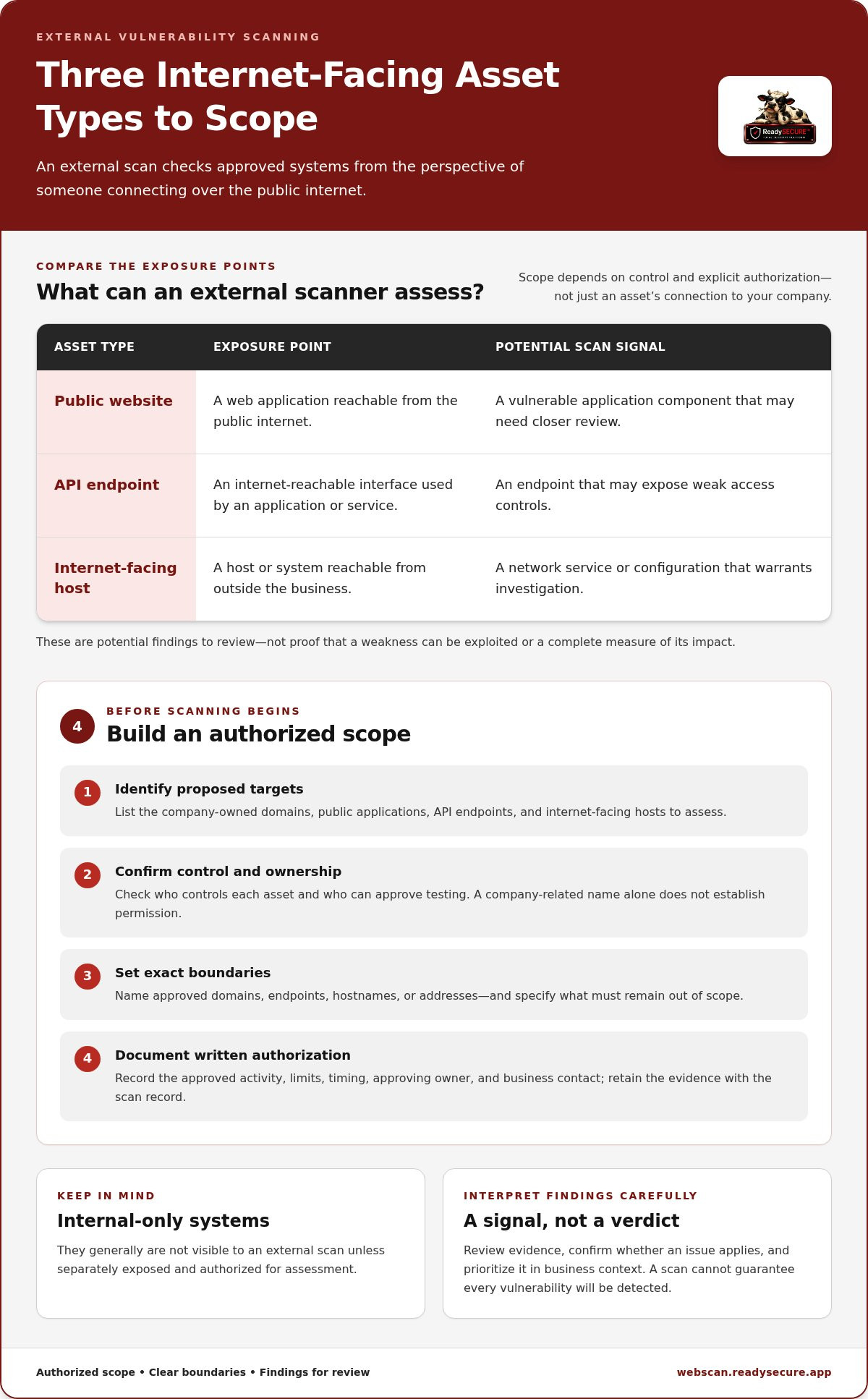
Common scope categories include public websites, API endpoints, and internet-facing hosts. Each presents a different exposure point. A website may reveal a vulnerable application component, an API may expose an endpoint with weak access controls, and a host may have a network service or configuration that warrants investigation.
Scope depends on control and explicit authorization, not simply on whether an asset appears related to your company. A subdomain might belong to a business unit, a vendor, or a third-party service. Before including it, establish who controls it and who can approve testing. Apply the same care to API endpoints and hosted infrastructure. Internal-only systems generally aren’t visible to an external scan unless they’re separately exposed and authorized for assessment.
This boundary is practical as well as ethical: a scan should stay within the approved assets and testing limits. A general overview of vulnerability scanners explains their role in identifying possible security weaknesses, but each business assessment still needs a clearly defined scope.
What can a scan tell you, and what can it not prove?
An automated result is a signal to investigate, not a final risk judgment. It may identify an exposed service, flag a potentially outdated component, or report a configuration that appears unsafe. Your team can review the evidence, confirm whether the issue applies to the asset, and prioritize it according to severity and business context. Some findings need validation; others may be false positives or irrelevant to the system as configured.
A scan also has limits. It observes what its tests can reach and recognize during the assessment. It doesn’t guarantee that every vulnerability will be detected, establish that a weakness is exploitable, or replace every security assessment. An external vulnerability scanner for businesses is most useful as a repeatable source of exposure information, paired with careful scope, human review, and a clear response process.
How to Define an Authorized Scope for External Vulnerability Scanning
A useful scan begins before any tests run. First, identify the internet-facing assets you want assessed. Then confirm who controls each one, set clear boundaries, obtain written authorization, and retain the evidence with the scan record. This sequence helps prevent accidental testing of a vendor’s systems, a former business unit’s infrastructure, or another party’s property.
Written authorization is a prerequisite, not a formality: it establishes which assets may be tested, what the scan may do, and who approved it. A domain that includes your company name isn’t automatically yours to scan. Establish ownership and permission for the specific target.
How should a business identify in-scope internet-facing assets?
Start with company-owned domains, known public applications, API endpoints, and internet-facing hosts. Use internal asset records and input from IT, application owners, and business units to identify what is active and who is accountable for it. Record an owner and business contact for each proposed target so scope questions and findings have a clear route to the right team.
What makes asset ownership and boundaries complicated?
A subdomain may point to a vendor-managed platform, while an API may be operated by a separate team or exposed through a third-party service. Treat these as distinct scope decisions rather than assuming access to a parent domain grants permission to test everything beneath it. Separate assets you control from those managed by vendors or owned by others, and obtain the relevant approval before including a third-party system.
Once you’ve assembled the candidate list, define boundaries in specific terms. Avoid broad instructions such as “scan our web presence.” Name the approved domains, endpoints, hostnames, or addresses, and state what must remain out of scope. A practical record should include:
- Approved targets: the exact assets authorized for assessment and their responsible owners.
- Exclusions: third-party-hosted services, unrelated subdomains, or other assets that must not be tested.
- Permitted assessment: the approved scanning activity and any limits on its scope.
- Timing and contacts: the intended scan window, approving owner, and business contact for questions or operational concerns.
Keep the authorization alongside the scan results, rather than in a separate location that’s hard to connect to the work. This gives security, IT, and business stakeholders a consistent record of what was approved and provides useful evidence during later reviews. If a target, owner, or boundary changes, update the record before the next scan instead of relying on an old approval.
For a product-specific example, the domain vulnerability scanning authorization steps describe the free-scan process. Apply the same discipline with any external vulnerability scanner for businesses: match every approved target to a responsible owner and retain the authorization record. ReadySECURE supports this workflow with a signed authorization record attached to each scan result. See the process at ReadySECURE authorized scanning.
How to Compare External Vulnerability Scanners for Business Needs
Compare scanners against the assets you need to assess and the work your team can do with the results. A long feature list or a high tool count won’t tell you whether a scanner covers your public applications, provides evidence your team can understand, or supports follow-up over time.
Choose for authorized asset coverage and actionable output, not headline claims. Use the criteria below to compare approaches on the same basis:
| Criterion | What to compare | Practical question |
|---|---|---|
| Supported assets | Websites, APIs, and internet-facing hosts | Does coverage match the targets you’re authorized to assess? |
| Scan methods | Port discovery, network checks, web application tests, TLS inspection, and template-based detection | Do the methods address the exposures relevant to your environment? |
| Authorization evidence | Records connecting approval to targets and scan results | Can you show what was approved and assessed? |
| Reporting | Severity, supporting details, and remediation guidance | Can owners understand and act on findings? |
| Repeatability | Target limits, scheduling, report history, and trend views | Can you compare results over time and see what changed? |
Which scanning capabilities matter for external business assets?
Different methods reveal different signals. Nmap is used for port discovery, OpenVAS for network vulnerability scanning, ZAP for active or passive web application scanning, TestSSL for TLS inspection, and Nuclei for template-based detection. These are distinct scanner roles, not interchangeable tests. Multiple perspectives can broaden what a scan examines, but they don’t guarantee complete coverage or prove that every finding is exploitable.
Assess reporting quality alongside technical breadth. A useful report makes it possible to identify what was detected, which approved asset is affected, how severe the issue is rated, and what remediation may address it. ReadySECURE uses multiple scanners and provides severity-prioritized findings, remediation guidance, and a signed authorization record attached to each result. Its paid plans add scheduling, history, and trend analysis, helping teams make repeat scans part of a routine process rather than a one-off check.
When is a scanner different from a penetration test?
Automated scanning repeatedly checks approved targets for potential weaknesses using defined methods. A penetration test is a deeper assessment involving human-led investigation and testing to examine how weaknesses may affect security in context. They serve different purposes, so don’t compare them as if they were equivalent scanner features. This web application security assessment comparison explains how scope and approach shape the work.
Operational fit matters as much as detection. Check how many targets can be included, whether scans can be scheduled, whether prior reports remain available, and whether changes are easy to track. The right external vulnerability scanner for businesses should fit both the approved asset scope and your team’s capacity to review, assign, and follow through on findings.
How to Turn External Scan Findings into Business Remediation Work
A scan report becomes useful when each relevant finding leads to a decision and an accountable next step. Don’t treat every alert as a confirmed vulnerability or assign work based on severity alone. Review the evidence, assess the asset’s business role and public exposure, then route the issue to someone who can verify or address it.
How should teams prioritize scanner findings?
Use severity as a starting point, not a complete measure of business risk. A lower-severity issue on a critical customer-facing application may deserve attention before a higher-rated finding on a less important asset. Consider how exposed the system is, what function it supports, the potential impact, and how strong the scan evidence is.
Separate findings that need verification from confirmed issues ready for remediation. For example, a scanner may flag a potentially outdated component, but the asset owner should confirm whether that component is present and affected. Record the review outcome so the team doesn’t repeatedly investigate the same uncertain result. For more detail on interpreting scan reports, use this external vulnerability scan report guide.
For each accepted finding, create a trackable work item with the information needed to move it forward:
- Finding and evidence: summarize the issue, affected asset, severity, and relevant scan details.
- Owner and action: name the accountable person or team and define the proposed remediation or further investigation.
- Target date and status: set a practical due date and record whether the issue is new, under investigation, confirmed, in remediation, or resolved.
If a team disputes a finding or needs more information, keep it open as under investigation rather than marking it resolved. If remediation is deferred, document the decision and reason. Clear records help security and business owners understand what remains outstanding without mistaking silence for closure.
How can repeat scans support accountability?
Repeat scans can show whether an issue persists, returns, or no longer appears in the same way. Compare results over time and classify changes as new, recurring, resolved, or still under investigation. A result disappearing from a later report is useful evidence, but teams should confirm remediation through their normal change and validation processes before closing the work item.
Schedule scans only when asset ownership is established and teams can review the findings. Otherwise, recurring reports may create noise without improving response. A repeatable process works best when scan history connects to owners, remediation records, and a scope that remains authorized.
ReadySECURE paid plans include scheduling, history, and trend analysis to support repeat monitoring. To put authorized scanning into practice, start an authorized external scan and use the resulting evidence to guide review and follow-up. An external vulnerability scanner for businesses supports remediation when findings are assigned, tracked, and reviewed to closure, not simply collected.
How ReadySECURE Supports an Authorized External Vulnerability Scan
ReadySECURE gives businesses a defined path from approved target to documented scan results. Start with a website, API, or internet-facing host that your organization controls. Submit the target and provide written authorization, then the platform runs the scan on a scheduled basis within that approved scope. This ties the assessment to assets you’re permitted to test and creates a clear record of the work.
What does a ReadySECURE scan provide?
The scanning process uses six industry-standard scanners to assess targets from different technical perspectives. The set includes Nmap for port scanning, OpenVAS for network scanning, ZAP for active and passive application scanning, TestSSL for TLS inspection, and Nuclei for template-based scanning. These different scanner roles can surface different potential issues, but they don’t guarantee that every vulnerability will be detected.
After the scan, the report prioritizes discovered issues by severity and includes remediation guidance to help teams decide what to review and address. Each result also includes a signed authorization record. That record connects the finding to approved scanning activity, supporting internal review and evidence retention. Teams should still assess findings in context and decide whether further verification or remediation is appropriate.
When should a business choose a free scan or paid plan?
The ReadySECURE Free Scan provides one scan of one target. It can be a focused starting point for a business with a specific, authorized asset to assess. If your team needs repeat monitoring, ReadySECURE Paid Plans add scheduling, scan history, and trend analysis. These features help you compare results across scans and track how exposure changes over time.
Before choosing, consider whether you need a single assessment or a repeatable record for ongoing review. A one-time scan may suit a defined question about one target. A scheduled approach can better support teams with established asset ownership and the capacity to review findings as they arrive. The ReadySECURE free website security scan guide outlines the specific free-scan workflow.
An external vulnerability scanner for businesses is most useful when authorized scope, technical findings, and follow-up records work together. ReadySECURE combines those elements for customer-controlled websites, APIs, and internet-facing hosts, keeping scan results connected to signed authorization evidence. It identifies potential issues and supports remediation planning, but it doesn’t guarantee complete detection or replace every type of security assessment.
Start an authorized ReadySECURE scan for a target your organization controls.
Make External Scanning Part of Your Security Routine
Connect scanning with the decisions your business already makes. Tie finding reviews to asset ownership, remediation planning, and change management so exposure information leads to action rather than sitting in a report. An external vulnerability scanner for businesses can support that routine, but your team’s follow-through is what turns observations into improved security practices.
ReadySECURE keeps the process traceable: each scan result has a signed authorization record, and prioritized findings include severity information and remediation guidance. Start with the free scan for one target, or use a paid plan when scheduled scans, history, and trend analysis better fit your monitoring needs. Review the records with the responsible teams and use them to guide the next cycle.
Choose a target your organization controls, establish its scope, and begin with a documented assessment. Start an authorized ReadySECURE scan and take a clear, practical next step toward managing internet-facing risk.
Frequently Asked Questions
What is an external vulnerability scanner for businesses?
An external vulnerability scanner for businesses checks approved systems from outside the organization, using an internet-facing view to identify potential security weaknesses. It can help reveal risks on public websites, APIs, and hosts that may not be apparent from internal network checks. Results depend on the targets and tests included, so treat a scan as one source of security information, not a complete map of every possible exposure.
Is an external vulnerability scan the same as a penetration test?
No. An external vulnerability scan uses automated checks to flag possible weaknesses on approved targets. A penetration test involves deeper investigation by security professionals to assess how weaknesses could be exploited and what impact they may have. A scan can identify areas that warrant closer review, but it doesn’t establish exploitability by itself. Organizations may use both approaches for different security objectives.
Can an external vulnerability scanner scan an API?
Yes, an external scanner can assess API endpoints that are reachable from the internet and explicitly included in the approved scope. For useful results, identify the intended API base URL and relevant endpoints, and clarify which environments are authorized, such as staging or production. API coverage varies by scanning method. A basic external check may not assess authenticated workflows or business logic in depth, so interpret coverage accordingly.
Will an external vulnerability scan disrupt a business website?
Disruption isn’t inevitable, but no scan should be assumed to have zero operational impact. The effect can depend on the tests run, the target’s configuration, and its capacity to handle requests. Before scanning a production site, document scope and timing, notify the responsible technical contact, and monitor the service during the assessment. If availability is especially sensitive, consider an approved staging environment where it accurately represents the production setup.
How often should a business run external vulnerability scans?
Set scan frequency according to how quickly internet-facing assets change, the level of exposure, and the team’s ability to review findings. Reassess after material changes to applications, hosting, or network configuration, and keep recurring scans on a schedule your team can act on. For PCI DSS, applicable external vulnerability scans must be conducted at least quarterly by a PCI SSC Approved Scanning Vendor. Other scans don’t automatically satisfy that requirement.
Does an external vulnerability scan prove a business is compliant?
No. A scan report can provide evidence about the targets assessed and the findings observed, but compliance depends on the applicable standard, its full control requirements, and the organization’s broader evidence. For example, PCI DSS requires qualifying external scans to be conducted by an Approved Scanning Vendor. A general vulnerability scan shouldn’t be treated as proof that this or any other compliance obligation has been met.
What should a business do after receiving an external vulnerability scan report?
First, confirm that each reported asset belongs to the approved scope and route the result to the team responsible for it. Check the evidence against the affected system before treating an uncertain alert as confirmed. Then document the decision, remediation or investigation plan, and follow-up outcome in a work-tracking record. Preserve the report with related approval and change records so reviewers can understand what was assessed and how the business responded.


