

Did you know that the average cost of a data breach has reached $4.99 million as of 2026? It is a sobering figure that reflects the increasing sophistication of digital threats. You likely feel the weight of this risk every time you update your site or handle sensitive customer information. How can you effectively identify website security risks without being a professional hacker? The fear of a reputation-damaging exploit is real, especially when the median window from vulnerability discovery to active attack has collapsed to under five days.
We understand that the technical complexity of cybersecurity can be paralyzing. You deserve a clear, ethical path to protect your business assets. This guide teaches you the disciplined, authorized process for detecting vulnerabilities in your web infrastructure before they are exploited. We will move beyond the confusion of generic tools to establish a professional scanning routine. By the end of this article, you will have a repeatable framework for risk identification, a clear list of what to prioritize using CVSS v4.0 standards, and the confidence that your security posture is built on technical rigor rather than guesswork.
Key Takeaways
- Define your full digital footprint, including APIs and technical debt, so you don't leave any asset unprotected.
- Follow a disciplined five-step process to identify website security risks legally. This begins with securing written authorization and inventorying all hosts.
- Build a professional defense. Use industry-standard tools like Nmap for network mapping and ZAP for application-layer vulnerabilities.
- Apply CVSS v4.0 standards to distinguish between critical exploits and informational findings. It's the best way to prioritize your remediation efforts.
- Implement a repeatable, automated scanning strategy. This replaces manual guesswork with consistent, prioritized reporting.
Understanding the Modern Web Attack Surface
The modern web attack surface is more complex than it was even two years ago. It consists of every point where an unauthorized user can try to enter data or extract data from an environment. This includes your public website, APIs, subdomains, and any internet-facing host connected to your infrastructure. To effectively identify website security risks, you must first acknowledge that your perimeter is no longer a single door. It's a sprawling network of entry points that requires constant oversight.
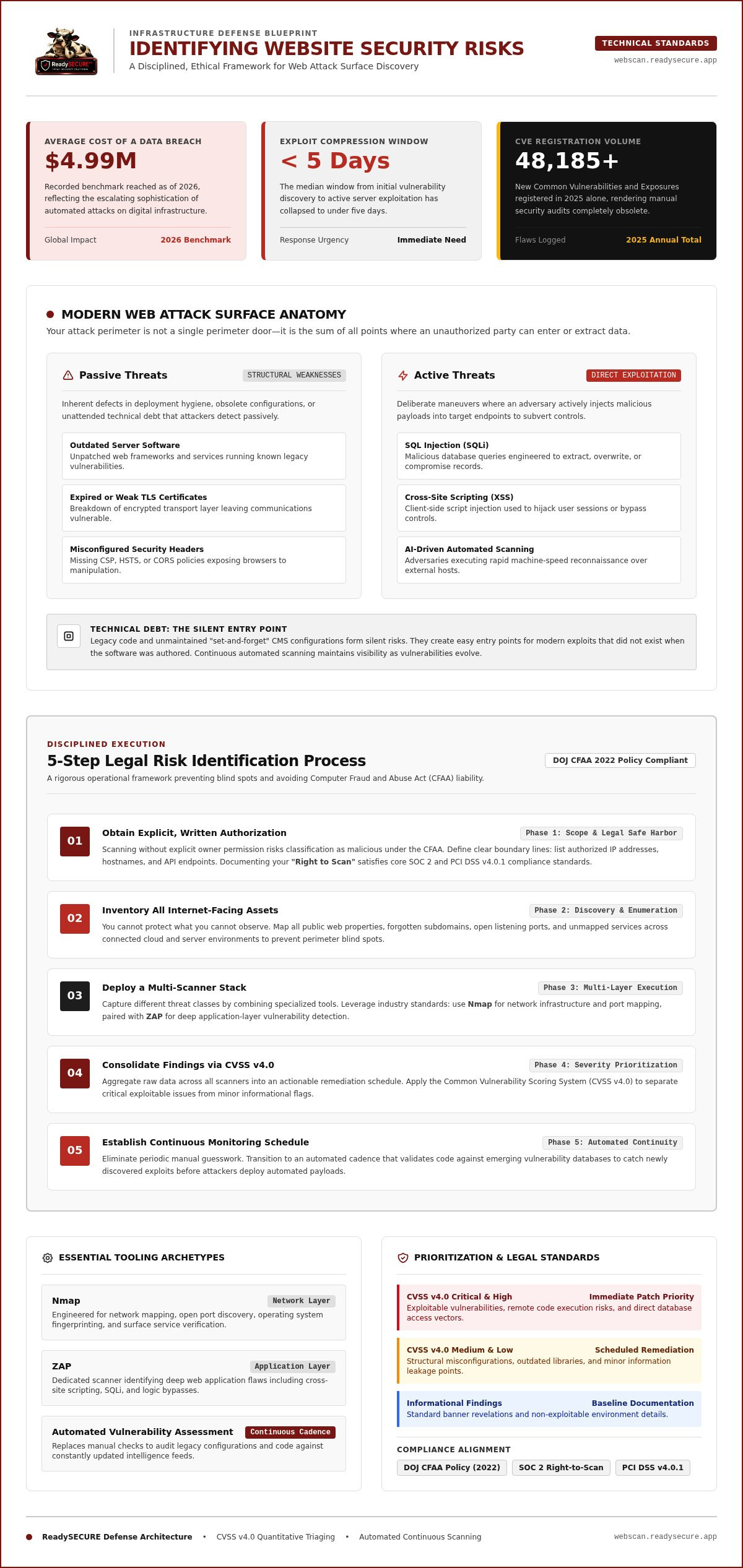
In 2026, the baseline for security has shifted toward automated detection. Why is this the new standard? Adversaries now use AI-driven tools to scan for flaws at a speed that outpaces manual human reviews. We categorize these risks into two primary groups: passive and active. Passive threats involve structural weaknesses like outdated software, expired TLS certificates, or misconfigured security headers. Active threats are specific maneuvers, such as SQL injection or cross-site scripting, where an attacker deliberately sends malicious code to your server to bypass controls.
Why Manual Checks Are No Longer Sufficient
Can a human reviewer keep up with the current volume of threats? The answer is a definitive no. In 2025 alone, over 48,185 new Common Vulnerabilities and Exposures (CVEs) were registered. This volume makes manual checks impractical for any organization that values its uptime. Human reviewers often miss subtle configuration errors that a machine can flag in seconds. An attack surface is the sum of all points where an unauthorized user can try to enter data or extract data from an environment. Relying on manual oversight creates gaps that attackers are eager to exploit.
The Role of Technical Debt in Security Risks
Technical debt is a silent contributor to your total risk profile. It often appears as legacy code or "set it and forget it" CMS configurations that haven't been audited in years. These forgotten assets create easy entry points for modern exploits that didn't exist when the code was first written. How do you stay ahead of these evolving flaws? A regular automated vulnerability assessment is the only way to track risks as they change. It ensures that even your oldest code is checked against the newest threat intelligence. This consistent oversight is vital to identify website security risks before they turn into costly breaches.
A 5-Step Process to Identify Website Security Risks Legally
Professional risk identification is a disciplined, authorized process. It is not a one-off event or a random tool run. To effectively identify website security risks, you must follow a structured workflow that ensures both technical depth and legal compliance. Following a haphazard approach can lead to incomplete data or, worse, legal liability under the Computer Fraud and Abuse Act (CFAA).
The US Department of Justice updated its CFAA charging policy in 2022 to shield good-faith security research, but this protection only applies when you stay within an authorized scope. We recommend a rigorous five-step framework to maintain integrity while securing your infrastructure:
- Step 1: Obtain explicit, written authorization for the target domain to ensure all testing is legal and documented.
- Step 2: Inventory all internet-facing assets and subdomains to prevent blind spots in your perimeter.
- Step 3: Deploy a multi-scanner stack to capture different classes of vulnerabilities, from network flaws to application-layer bugs.
- Step 4: Consolidate findings into a prioritized report based on the CVSS v4.0 scoring standard.
- Step 5: Establish a schedule for continuous monitoring to catch new threats as they emerge.
Phase 1: Authorization and Scope
Why is authorization the first step? Scanning a website without the owner's permission can be interpreted as a malicious act, regardless of your intent. You must define the boundaries of your test clearly. This includes listing specific IP addresses, APIs, and hostnames that are in scope. Documenting your "Right to Scan" is a core requirement for compliance frameworks like SOC 2 or PCI DSS v4.0.1. This documentation serves as your legal safe harbor and ensures that your efforts to identify website security risks remain ethical and professional.
Phase 2: Discovery and Enumeration
You cannot protect what you don't know exists. Discovery involves finding hidden subdomains, open ports, and unmapped services that may be running on your servers. Professional tools help map your technology stack, identifying the specific versions of your operating system, web server, and database. This stage is critical because attackers often target forgotten development subdomains or legacy APIs. Adhering to CISA website security guidance means treating every internet-facing host as a potential entry point that requires validation. If you are ready to begin this process, starting with a ReadySECURE Free Scan provides an immediate, authorized overview of your current exposure.
Essential Tools for Automated Vulnerability Identification
To identify website security risks with technical precision, you must move beyond generic site checkers. A professional security audit relies on a stack of specialized tools that interrogate different layers of your digital environment. No single scanner is exhaustive. Some excel at finding open network ports, while others focus on the logical flaws of your web application. Using a combination of these tools ensures that your defense is not dependent on a single point of failure.
Nmap remains the industry standard for network mapping and service discovery. It identifies which ports are open and what services are listening on your server. OpenVAS builds on this by performing a full network vulnerability assessment, checking for unpatched software across your operating systems. For the application layer, ZAP (Zed Attack Proxy) is indispensable for identifying OWASP Top 10 risks. It actively crawls your site to find flaws like broken access control or injection vulnerabilities. This multi-layered approach aligns with CISA's Cyber Hygiene scanning services, which emphasize continuous evaluation of all internet-facing assets.
The Power of Multi-Scanner Stacks
Why is a multi-scanner stack necessary? A port scanner like Nmap might find an open web server, but it won't tell you if that server is vulnerable to a specific cross-site scripting attack. Combining Nmap's discovery capabilities with ZAP's deep application analysis ensures you don't miss hidden entry points. Additionally, Nuclei template scanning allows for targeted vulnerability detection. It uses a vast library of community-contributed templates to scan for specific, high-priority flaws that generic scanners often overlook. This variety is the only way to identify website security risks across a complex attack surface.
SSL and Encryption Health Checks
Your encryption protocols are just as vital as your application code. Misconfigured SSL/TLS settings can lead to data interception and a loss of user trust. As of March 15, 2026, the maximum validity period for public TLS certificates is only 200 days. This shorter window makes manual tracking nearly impossible for most teams. Beyond expiration, you must check for weak cipher suites and outdated protocols that could hurt your SEO or compliance standing. This is why automated SSL certificate inspection is a baseline requirement for modern web operations. It ensures your encryption remains robust even as industry standards evolve.
Analyzing Your Findings: Prioritizing Risks by Severity
Once you complete your scan, you will likely face a list of dozens or even hundreds of findings. How do you decide which to fix first? To effectively identify website security risks, you must move beyond raw data and apply a rigorous prioritization framework. A common mistake is treating every alert with the same urgency. This approach leads to developer burnout and leaves your most critical exposures open to exploitation while your team fixes minor cosmetic flaws.
Decoding Severity Scores
The industry relies on the Common Vulnerability Scoring System (CVSS) to quantify risk. The current standard, CVSS v4.0, evaluates both the technical impact on the vulnerable system and the subsequent impact on connected infrastructure. A vulnerability is labeled "Critical" if it allows for remote code execution with little to no user interaction. A CVSS score of 9.0 or higher requires immediate remediation due to its high impact and ease of exploit. In contrast, "Informational" findings often relate to server banners or minor configuration details that don't pose an immediate threat but provide reconnaissance data to attackers.
Why does exploitability matter? A vulnerability might have a high technical impact but be extremely difficult to trigger in your specific environment. Professional teams cross-reference CVSS scores with the Exploit Prediction Scoring System (EPSS) to determine the real-world likelihood of an attack. This helps you separate actionable security risks from theoretical flaws or false positives. A false positive occurs when a scanner flags a vulnerability that isn't actually present or exploitable due to compensating controls. Manual verification of "High" and "Critical" alerts is essential to ensure your developers aren't chasing ghosts.
Creating a Remediation Roadmap
Your roadmap should begin with "low-hanging fruit." These are often simple configuration changes, such as updating security headers or removing legacy TLS protocols. These fixes provide immediate protection with minimal development time. Once these are resolved, focus on complex fixes like SQL injection or broken authentication. These issues require deeper code changes and rigorous testing. You should also consult CISA’s Known Exploited Vulnerabilities (KEV) catalog. If a flaw is on that list, it is already being weaponized and must be addressed regardless of its base score.
The average Mean Time to Remediate (MTTR) for high-risk application vulnerabilities stands at 54.81 days. Your goal should be to beat this benchmark by focusing on the highest-impact flaws first. The process doesn't end when the developer pushes a fix. You must perform a follow-up scan to verify that the vulnerability is truly closed. This cycle of scanning and verification is the only way to identify website security risks as they reappear and ensure long-term site health. If you need a prioritized report that provides clear remediation guidance, you can get a professional vulnerability report here to streamline your security workflow.
Scaling Your Security Strategy with ReadySECURE
Identifying website security risks is not a task you can mark as "complete" after a single audit. The digital threat landscape moves too fast for static, one-time checks. ReadySECURE solves this challenge by automating a sophisticated stack of six industry-standard scanners, including Nmap, OpenVAS, ZAP, TestSSL, and Nuclei. Instead of running these tools individually and manually correlating the data, the platform orchestrates the entire process. This automation ensures a consistent, disciplined approach that eliminates the human error often found in ad-hoc testing.
Why should you move away from manual checks? Scheduled scans provide a baseline for your security posture that manual audits cannot match. They allow you to track vulnerability trends over time and verify that previous remediations remain effective. By shifting to continuous security scanning, you reduce your exposure window from months to hours. This proactive strategy is essential for maintaining compliance with standards like PCI DSS v4.0.1, which mandates strict, ongoing vigilance over payment pages and consumer-facing scripts.
Professional Reporting for Stakeholders
Transparency is a core value of a professional security program. ReadySECURE generates clean, prioritized reports designed for both technical teams and executive stakeholders. These reports don't just list flaws; they provide actionable remediation guidance to help your developers work efficiently. To maintain legal and ethical clarity, we attach signed authorization records to every scan result. This documentation proves that your efforts to identify website security risks were fully authorized and conducted within a defined, professional scope. It transforms raw data into a narrative of progress and accountability that boards can easily understand.
Getting Started with a Free Security Audit
You don't need to overcomplicate your first step toward a more secure site. Running your first authorized scan takes only minutes. The ReadySECURE Free Scan provides a high-level overview of your most visible vulnerabilities, giving you an immediate starting point for improvement. It is a no-cost way to evaluate your current defense without the complexity of configuring individual tools. This initial audit helps you understand your immediate needs before scaling to a more comprehensive plan. Ready to identify your risks? Start your free website security scan today.
Building a Resilient Digital Defense
Securing your web infrastructure requires a shift from reactive patching to a disciplined, proactive strategy. You've learned that the modern attack surface is too complex for manual oversight and that a multi-scanner stack is the professional standard for comprehensive coverage. By following a structured five-step process, you can identify website security risks legally and ethically while ensuring no asset is left unmonitored. Prioritizing your findings based on CVSS v4.0 scores ensures your development team focuses on the vulnerabilities that pose the greatest threat to your reputation.
Maintaining this level of technical rigor doesn't have to be a burden on your internal resources. ReadySECURE provides authorized scanning using six industry-standard tools, delivering prioritized reports with clear remediation steps. Every scan includes signed authorization records to ensure your compliance requirements are met with full transparency. It's time to replace uncertainty with factual confidence in your security posture.
Identify your website security risks now with a ReadySECURE Free Scan. You have the tools and the framework to protect your business; now it's time to take the first step toward a safer digital future.
Frequently Asked Questions
Is it legal to identify website security risks on my own site?
Identifying website security risks on your own property is legal and encouraged. The US Department of Justice updated the Computer Fraud and Abuse Act policy in 2022 to protect good-faith security research. However, you must maintain explicit, written authorization for every target domain. This documentation proves you aren't engaging in unauthorized access. Without a clear "Right to Scan" record, even well-intentioned testing can lead to legal complications or service provider violations.
What is the difference between a vulnerability scan and a penetration test?
Vulnerability scans are automated, broad assessments that identify known flaws across your infrastructure. They are efficient for continuous monitoring. In contrast, a penetration test is a manual, deep dive where a human expert attempts to exploit vulnerabilities. ReadySECURE focuses on automated scanning using six industry-standard tools like ZAP and OpenVAS. We don't provide manual penetration testing, as our goal is to offer scalable, repeatable risk identification for consistent protection.
How often should I scan my website for security risks?
You should scan your website whenever you change your code or server configuration. For high-traffic sites or those handling payments, weekly or daily scans are the professional standard. With the 2026 reduction of SSL certificate lifespans to 200 days, automated tracking is more critical than ever. Routine scanning ensures that new CVEs, which now number over 48,000 annually, don't leave your site exposed for long periods between manual audits.
Can an automated scan break my website?
While the risk is low, active scanning can occasionally impact site performance or trigger unexpected behaviors in sensitive forms. ReadySECURE uses disciplined, industry-standard tools like Nuclei and Nmap that are configured to minimize disruption. If you're concerned about potential downtime, we recommend running your initial scans in a staging environment. This allows you to identify website security risks safely before performing an authorized scan on your live production infrastructure.
What are the most common security risks found in 2026?
The most frequent risks in 2026 include broken access control, injection flaws, and misconfigured encryption. Stolen or compromised credentials account for 88% of basic web application attacks. We also see a rise in vulnerabilities related to the OWASP Top 10 for LLM Applications as more sites integrate AI. Additionally, many sites fail to meet the new PCI DSS v4.0.1 requirements for cryptographic integrity and automated tamper detection on consumer-facing payment pages.
Do I need to be a developer to understand a vulnerability report?
You don't need a technical background to gain value from our findings. ReadySECURE provides prioritized reports that translate technical data into clear, actionable insights for both developers and business owners. Each report includes remediation guidance that explains the "why" behind every risk. This structure helps you understand your security posture and make informed decisions about resource allocation without needing to parse raw log files or complex exploit code yourself.
What happens if a scan identifies a 'Critical' risk?
A "Critical" risk, typically a CVSS score of 9.0 or higher, requires immediate remediation. These flaws often allow for remote code execution or complete data exfiltration with minimal effort from an attacker. When our scanners identify such a risk, you should follow the provided remediation steps immediately. Once your team implements a fix, you must perform a follow-up scan to verify the vulnerability is closed and hasn't introduced new configuration errors.
Why is authorization required for every ReadySECURE scan?
Authorization is the cornerstone of ethical cybersecurity. We require written authorization for every scan to ensure our tools are never used for unauthorized "shadow" testing. This process protects both you and our platform from legal liability. Every ReadySECURE result includes a signed authorization record, providing a clear audit trail for compliance purposes. This commitment to transparency ensures that your security strategy is built on a foundation of professional integrity and legal safety.


