

Open ports aren’t automatically vulnerabilities. To check whether required ports are open, scan only the host and ports you’re authorized to assess. The right ports depend on the services the host needs to provide. An authorized host scanning service can identify reachable ports and probe them to determine which services respond.
A port scan can give a clear list of open ports, but that list alone doesn’t show whether a service is unnecessarily exposed or safely configured. Interpret results in context: what the host is meant to do, which services should be reachable, and whether the findings indicate real risks.
This guide explains how network and port scans detect exposed services, how TLS and web application scanners examine related risks, and how human review can help validate findings. You’ll also learn how authorization and a defined scan scope keep checks focused on the right systems.
Key Takeaways
- Set clear target boundaries and written authorization before scanning, especially when assessing multiple hosts.
- Use automated results to identify possible issues, then review evidence and context before deciding what needs attention.
- Combine port, network, TLS, and web application checks to build a more useful picture of exposed services.
- Authenticated checks can reveal local configuration details, but scanner permissions should be limited to the access required.
- ReadySECURE Free Scan and the available scanning options can help assess authorized websites, APIs, and internet-facing hosts.
Automated vulnerability scanning across multiple targets
Automated scanning checks defined hosts for reachable services and known security weaknesses. When scanning multiple targets, clear scope, accurate asset discovery, and consistent reporting help teams compare results and decide what to address.
Scanning Workflow Across Multiple Targets
Multi-target scanning assesses several authorized hosts within a defined scope. List each domain, IP address, and permitted target, then group systems by role, such as public websites, APIs, or network hosts. Discovery identifies responding systems and exposed ports. Scanners then check those services for vulnerabilities and return findings in a consistent report format.
For example, an organization can assess its public website and API separately, even if both use the same domain. Scans can run in batches while each result remains tied to its host and scope. This separation helps teams distinguish an unexpected service on one system from a required service on another.
Vulnerability and Compliance Assessment
A vulnerability assessment identifies security weaknesses. A compliance assessment compares system settings with a selected control baseline. Use vulnerability scanning to find issues such as exposed services, outdated software, or weak TLS configurations. Use compliance checks to review whether assessed systems appear to meet required settings.
These assessments support different decisions. An exposed administrative interface may call for access restrictions; a baseline deviation may require configuration changes or documented review. Scan results provide technical evidence, but a finding alone doesn’t establish that a system meets every contractual or regulatory obligation. Map results to the controls that apply and document the assessment scope.
Scanning Services and Vulnerability Tools
A scanning service runs assessment tools within a managed workflow, while a vulnerability scanning tool is software used to perform checks. An authorized host scanning service can coordinate target scope, scanning, and reporting. A tool such as Nmap can identify open ports and help determine which services respond.
The distinction is practical, not absolute. OpenVAS can perform network vulnerability checks, while ZAP can assess web application behavior. Tools may require an operator to set targets and interpret results. A service can bring tools together, but automated findings still need context. An open port, for instance, might support a required application or expose an unnecessary service, depending on the host’s purpose.
Scan Frequency and Applicable Standards
Scan frequency is how often authorized hosts are reassessed after changes or as part of ongoing security work. Set a schedule based on how often systems change, their exposure, and your security requirements. A frequently updated public-facing domain may need reassessment after significant changes; a stable internal host may follow a planned review cycle.
Applicable standards and regulations depend on jurisdiction, industry, contracts, and the systems in scope. Identify relevant requirements, then map their vulnerability-management or configuration-control expectations to a documented scan process. Keep records of authorization, targets, scan dates, results, and follow-up actions. These records show what was assessed and how findings were handled, but a scan report is not proof of full compliance.
Human review of findings and false positives
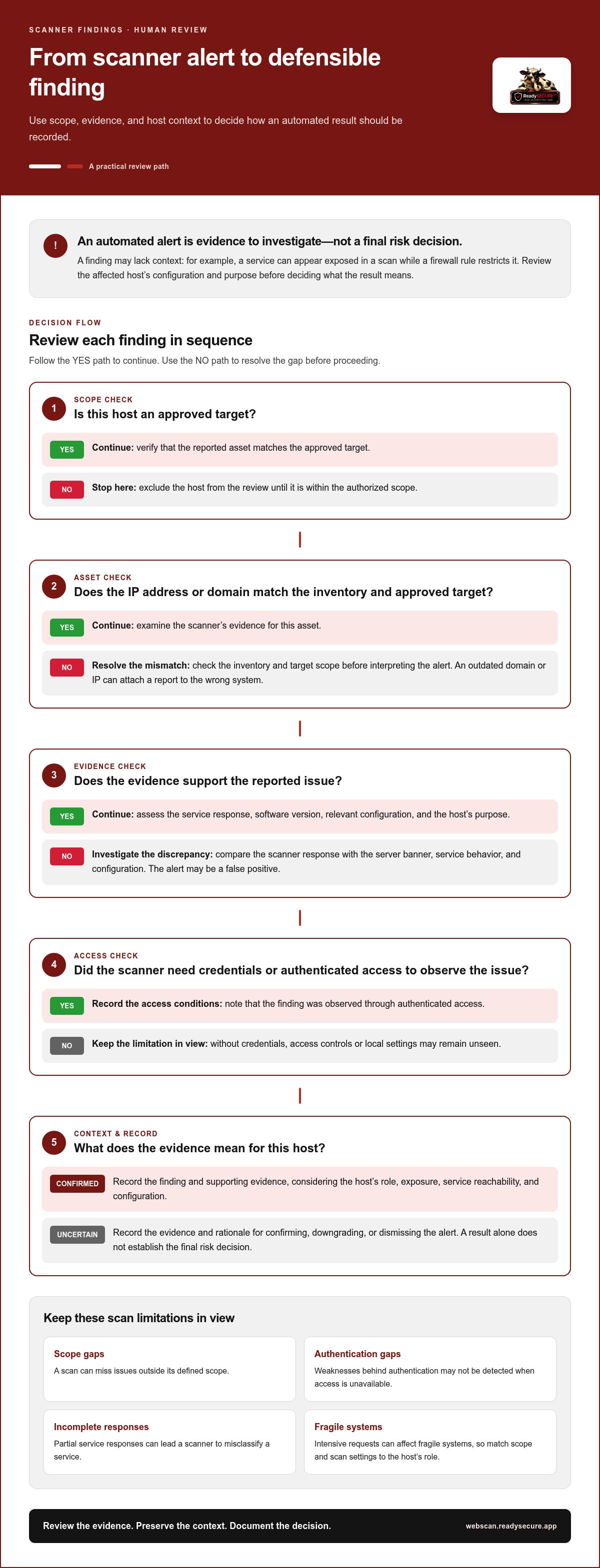
Human review checks scanner findings against the affected host’s configuration and purpose. It can help distinguish exploitable weaknesses from alerts that lack context. An automated result is evidence to investigate, not a final risk decision. For example, a server may report an exposed service that a firewall rule restricts.
A false positive is an alert that does not represent the vulnerability described. Reviewers compare the finding with the service response, software version, and relevant configuration. If a scanner flags an outdated component, check whether it is active on the target or merely present in a file. This helps prevent teams from prioritizing an issue that does not affect the asset.
What are the risks and limitations of host scanning? A scan can miss issues outside its scope, fail to detect weaknesses behind authentication, or misclassify a service when responses are incomplete. Intensive requests can also affect fragile systems, so match scope and scan settings to the host’s role.
Use a repeatable review sequence for each finding:
- Confirm the asset. Match the reported IP address or domain to the inventory entry and approved target.
- Check the evidence. Compare the scanner’s response with the server banner, service behavior, and configuration.
- Assess access. Determine whether credentials or authenticated access were required for the scanner to observe the issue.
- Record the decision. Keep the evidence and rationale when confirming, downgrading, or dismissing an alert.
Context changes risk. A default service on a test server may be isolated, while the same service on an internet-facing asset may be reachable by unintended users. A finding about a web upload feature also needs application context: assess the affected route and configuration rather than infer impact from the word “upload” alone.
Human review has limits, too. A reviewer can assess only the targets and evidence collected during the scan. If credentials were omitted, access controls or local settings may remain unseen. If an asset inventory has an outdated domain or IP address, the report may be attached to the wrong system. Accurate scope and records make review more useful.
To make results actionable, group confirmed findings by affected asset, severity, and remediation owner. Then compare the next scan with the recorded decisions. For a practical starting point, define the domain and authorized targets in a host scanning workflow.
Findings involving machine identities can be reviewed against the OWASP Non-Human Identity Top 10 references, so a scanner alert is considered alongside the identity’s recorded purpose and access. OWASP identifies NHI-01 as the reference for machine identity inventory. This gives reviewers a point of comparison when checking whether the identity is represented in asset records and tied to the correct host or service.
Reviewers can use relevant guidance on secrets, credentials, authorization, and least privilege to frame follow-up questions. These references help reviewers organize follow-up questions about credentials and access, without treating a scanner’s label alone as proof of impact. Recording the relevant reference with the finding can make the review rationale easier to revisit when the asset, credentials, or permissions change.
Network, TLS, port, and web application scanners
Each scanner examines a different layer, so choose checks based on the target’s services. A network scan can reveal reachable machines, while port, TLS, and web application checks examine what those machines expose.
Network scanning
A network scanner checks reachable hosts and services within an approved network scope. OpenVAS Network Scanning can identify systems and assess network-level vulnerabilities. Results depend on the target range, routing, and scanner access. A restricted network path may hide a machine from discovery, while exposed services may appear in the results. Define the authorized scope before scanning, then compare detected hosts with your asset inventory.
Port scanning
A port scanner checks which network ports accept connections on a target. Nmap can identify open ports and infer likely services from its nmap-services table. Its version-scanning subsystem sends probes that services can recognize, helping identify application versions. A banner-grabbing script can display a service’s response. For example, a sample result shows TCP port 21 as open FTP with the banner “220 FTP version 1.0.”
Port numbers are clues, not proof of service identity. Cisco device port lists include HTTP on TCP port 80 and 8080, but a scanner should inspect responses before classifying a service. Nmap can send HTTP HEAD or GET requests and identify HTTP when the response resembles it. If the service remains unknown, Nmap can print a fingerprint for further analysis.
TLS scanning
A TLS scanner examines how a service protects encrypted connections, including certificate details, supported protocols, and cipher configuration. These checks can identify expired certificates or weak connection options. For example, a certificate may be valid even when the server allows an outdated protocol. The finding should identify the specific configuration issue rather than label every encrypted endpoint secure.
Scan each relevant hostname and service separately. A custom TLS check should reflect the system’s role and the connections it needs to support. The useful scope is not every possible endpoint, but the authorized services that require assessment. Record the hostname and port with each result.
Web application scanning
A web application scanner sends requests to a site or API and examines responses for vulnerabilities. ZAP can perform active and passive scanning, while template-based checks match known patterns. Passive checks review observed traffic; active checks send selected test requests. Because these methods have different effects, choose the mode and target paths deliberately.
For example, an application may have a login route and a file-upload route. A scanner can test their responses, but the evidence needs to be interpreted in context. Use a test account or approved test data when access is required. Keep scans within authorized domains and start with a focused profile before expanding to additional application paths.
Authenticated scanning with local security checks
Authenticated scanning uses approved credentials to inspect a host’s internal security settings. Unlike an external connection check, it can reveal local configuration details that network responses alone may not show. For example, an authorized scan of a Windows host can assess settings accessible to the scanner account.
How do I choose and set up an authorized host scanning service? Define the target systems, written authorization, scan purpose, and access method first. Then select credentials with read-only permissions and only the minimum resources required for the checks. Test the approved connection and confirm that scan activity stays within the listed targets.
Hosted scanners may use machine credentials, API tokens, certificates, or agentless network trust. The right method depends on the host and the checks required. A remote scanner may connect through approved network paths, while firewall rules can restrict traffic to the target. Monitor scanner activity for access beyond the approved scope.
Limit privileges carefully. Scanner permissions should allow inspection without unnecessary changes to host settings. Inventory scanner credentials, store secrets centrally, and rotate them on a defined schedule. Log authentication and data-access events for review and alerts. If an account or token is compromised, broad permissions or access across multiple systems can increase the impact.
For Linux and Unix hosts, SSH settings can affect authenticated checks. The listed SSH configuration includes MaxSessions set to 10 sessions and MaxAuthTries set to 6 authentication attempts. These values describe connection and authentication limits; they don’t establish that a scan account has appropriate access. Review the target’s access policy and scanner requirements together.
Windows scans also have practical output constraints. The scan timeout for Windows machines is 3 minutes, and the result.txt file for a Windows machine scan must be below 500 KB. Confirm that the scan completes within its timeout and that its result file meets the stated size limit.
Use a controlled setup sequence:
- List each authorized host and identify its operating system.
- Choose an approved authentication method for each target.
- Grant read-only access to the minimum required resources.
- Run a limited check and review authentication logs.
- Confirm results map to the intended host and scope.
These steps help distinguish a connectivity failure from a security finding. For example, a blocked firewall connection may prevent local checks; it doesn’t prove the host passed them. Record access failures with the scan results, then correct the approved path or credentials before treating missing checks as clean results.
Limit hosted scanner permissions to read-only actions and the minimum resources required. This keeps access focused on inspection rather than broader control of the system.
How does an authorized host scanning service work?
An authorized host scanning service assesses systems their owners have approved for testing. A hosted scanner runs in the provider’s cloud environment and connects through approved network paths. The process combines defined targets, written permission, automated checks, and a report tied to the scan scope.
Start by identifying the domains, hostnames, IP addresses, and services in scope. Written authorization records who controls those assets and approves the scan. This matters when a domain points to third-party infrastructure or different teams manage separate systems. Exclude any host without approval, and make the target list specific enough to prevent scanning beyond the intended boundary.
Next, configure the scan profile and schedule. Choose checks based on the target: a network assessment can examine exposed services, while web checks can inspect an approved website or API. Where authenticated access is needed, credentials or tokens enable the relevant checks. Limit permissions to the resources required and avoid unnecessary privileges for scanner accounts.
During execution, the hosted scanner connects to each authorized target and gathers responses. Discovery can identify reachable systems and services; further checks compare responses with known vulnerability patterns or configuration risks. A port scan, for example, can report an exposed service, while a web application check examines how an approved route responds. Monitor activity for attempts to reach targets outside the scope.
Results should link each finding to the affected asset and supporting evidence. A useful report groups issues by severity, explains the observed condition, and provides practical remediation guidance. For example, a finding about an exposed service should identify the host and port so teams know which system needs attention. Review results in context before assigning remediation work.
Keep authorization visible throughout the workflow. Store the written approval, target scope, scan settings, and resulting records together. A signed authorization record attached to each result helps show why the host was assessed. If ownership or scope changes, update the record before the next scan instead of relying on an old target list.
For multiple systems, use consistent naming and reporting so teams can compare results across assets. Scheduled scans support recurring review, while a scan after a significant system change can check the affected target. Set timing according to asset exposure, change frequency, and security priorities, rather than using one schedule for every host.
Ready to define authorized targets and begin a scoped assessment? Start an authorized host scan with clear scope and permission records.
ReadySECURE: ReadySECURE Free Scan
ReadySECURE Free Scan is a practical starting point for assessing an authorized website, API, or internet-facing host. It runs a full scan of one target and helps identify exposed services and potential vulnerabilities. Review the findings against your system’s purpose and the approved scope.
ReadySECURE Paid Plans include the full scanner set, including TestSSL Inspection and ZAP Active/Passive Scanning, along with scheduling and history. These checks can assess TLS settings and web application behavior. Reports prioritize discovered issues, include severity and remediation guidance, and attach a signed authorization record to each result.
Choose checks that match the systems you control and the risks you need to examine. Scanning supports security assessment, but it doesn’t replace remediation or manual penetration testing.
To begin with an authorized scan, visit ReadySECURE’s scanning platform.
Turn Scan Findings Into a Clear Next Step
Make scanning part of a repeatable security decision process. Identify the systems you control, record their business purpose, and assign someone to review findings and track follow-up. An authorized host scanning service can support this process when its scope matches the systems you own and the questions your team needs answered.
ReadySECURE Free Scan provides a starting point for assessing one target. ReadySECURE Paid Plans add scheduling, history, and trend analysis, while TestSSL Inspection focuses on TLS checks. An authorized host scanning service can help assess selected systems; choose scans according to the assets and risks in scope.
Use each assessment to guide the next security decision, not as a substitute for clear ownership of follow-up work. If an authorized host scanning service fits your assessment needs, Contact ReadySECURE about host scanning to take the next step.
Frequently Asked Questions
How to Check Whether the Required Ports Are Open?
Use an authorized host scanning service to test the specific ports required by services on a host you’re permitted to assess. An open port accepts connections; a closed port has no listening service, while a filtered result may indicate that a firewall blocks a clear response. Compare scan results with the host’s intended configuration. Nmap port scanning can identify exposed ports and responding services.
What is an authorized host scanning service?
It assesses websites, APIs, and internet-facing hosts that their owners control and approve for testing. An authorized host scanning service checks an approved target and reports findings for review. Each target requires a current authorization record that identifies the approving person, the exact text they agreed to, and the date and time of approval. It has to be something you are authorized to have tested.


