

A report that records an incident but hides the next step can undermine confidence. For a security report for client reassurance, make sure the timeline, people, observations, actions, notifications, and evidence are clear and consistent. Assign each follow-up action an owner and due date, then track it through completion.
Clients need more than a list of events. They need to know what happened, how people responded, and who is responsible for what comes next. Clear, factual reporting answers those questions without claiming more than the report can establish.
This guide outlines a practical review process: verify accuracy and completeness, document and preserve evidence, assign and monitor follow-up actions, and choose suitable delivery channels. It also explains how to build client confidence while handling personal and sensitive information responsibly.
Key Takeaways
- Use a consistent review process to catch gaps, conflicting details, and unclear wording before a report is shared.
- Turn recommendations into trackable work by naming an owner, setting a timescale, and monitoring progress.
- Build client confidence with clear, timely updates that distinguish recorded facts from interpretation.
- Choose a delivery channel that fits the urgency and sensitivity of the report, and make access expectations clear.
- Limit personal details and restrict access to images and recordings to people who need them.
Reviewing reports for accuracy and completeness
Review each report in a consistent order: confirm its scope, verify the facts, then assess the follow-up. A careful supervisor review helps clients understand the incident and distinguish observations from assumptions.
-
Compare security reports and related documents
Separate an incident report from a SOC 2 report, penetration test report, or security questionnaire. An incident report records a specific event, its timeline, observations, and response. SOC 2 and penetration test reports address different assessment purposes, while a questionnaire collects answers to client security questions. Check that each document answers the request; don’t present one as a substitute for another.
-
Identify client-requested standards and certifications
Start with the client’s written request and record each certification or compliance standard it names. Requirements vary by client and engagement, so don’t imply that an incident report proves certification or compliance. Check that the evidence matches the requested scope and status. If the report discusses a control, explain what was reviewed without implying a broader attestation.
-
Use client report examples and templates
Choose a template that fits the report’s purpose, then check every field against the event. An incident report should include the date, time, exact location, assignment or post, people involved, and nature of the call or observation. Add the response, notifications, evidence, and recommended follow-up. Use clear headings and structured fields so clients can find key details quickly.
- Have a supervisor compare the timeline with supporting records before approving the report. Check names, dates, times, locations, directions of travel, and notification details for consistency. For example, if an officer reports securing an entrance, confirm that the location and action match the narrative. Separate the officer’s direct observations from information reported by someone else. This context helps clients understand what the report establishes.
- Ask the manager to review completeness, neutral language, and the proposed action for each finding. The report should explain what happened, what the officer did, who was notified, and what remains unresolved. Correct spelling and unclear phrasing, but don’t silently rewrite a submitted record. If an error emerges, follow the employer’s correction or supplemental-report procedure. Then identify recommended investigations, actions, or protocol changes, assigning an owner and due date to each.
Property managers should also check received reports for completeness and accuracy. Patrol reports should say where the officer went, what was checked, what was found, and what action followed.
Assigning owners and due dates to follow-up actions
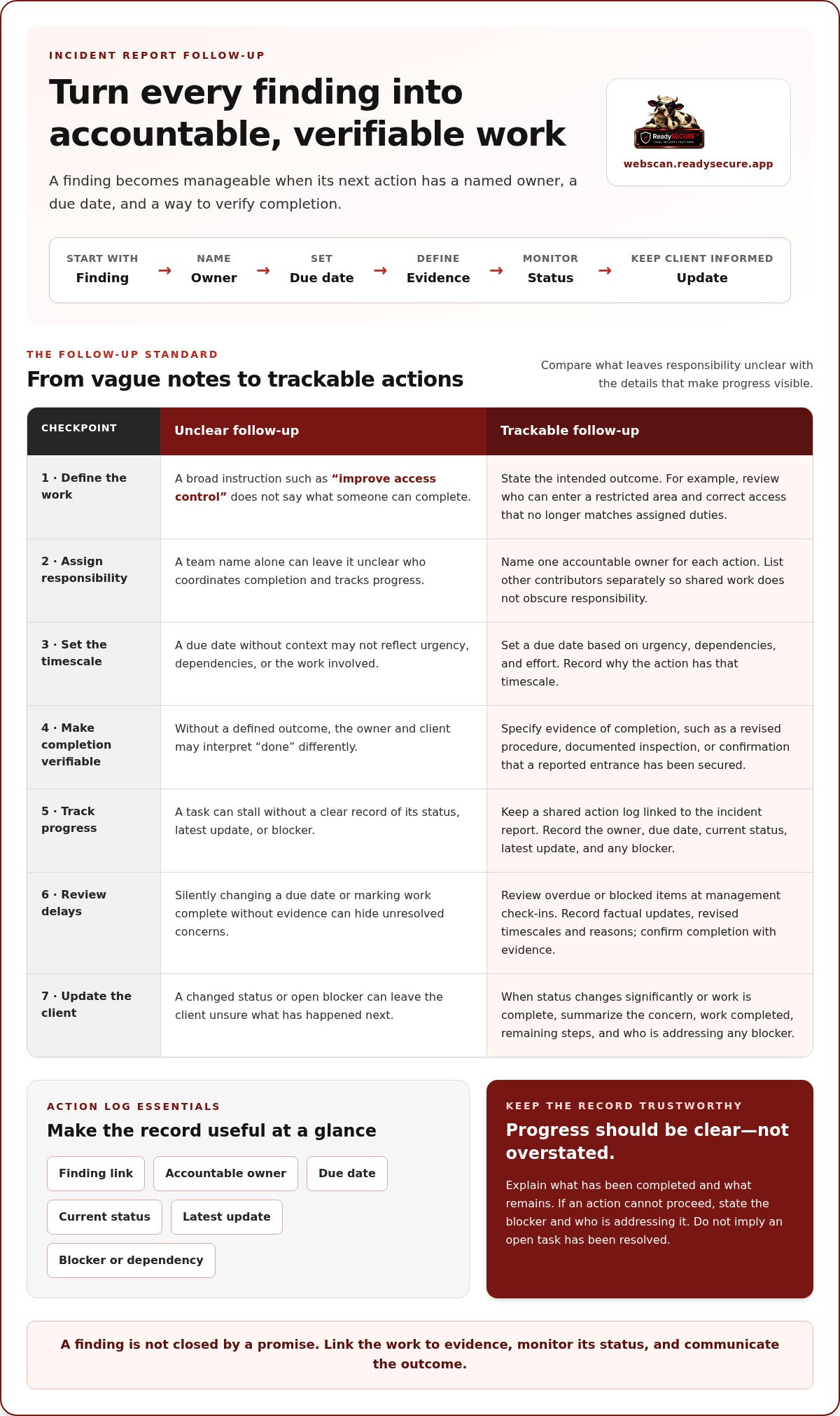
A finding becomes manageable when its next action has an accountable owner and due date. Record each decision alongside the report, then monitor progress until the action is completed or formally revised.
- Turn every finding into a specific action. Avoid vague entries such as “improve access control,” which don’t identify work someone can complete. Instead, state the intended outcome, such as reviewing who can enter a restricted area and correcting access that no longer matches assigned duties. Link the action to the finding so the owner understands its purpose.
- Assign one accountable owner to each action. A team name alone can leave responsibility unclear, so identify the person expected to coordinate completion. For example, if an officer records a hazard, assign the relevant site manager to arrange the response. List other contributors separately so shared work doesn’t obscure who tracks progress.
- Set a due date based on urgency, dependencies, and the work involved. An immediate safety concern may need prompt escalation, while a process change may require review and approval first. Record why the action has that timescale. This helps managers explain why one task takes priority over another.
- Make every action verifiable. Specify what evidence will demonstrate completion, such as a revised procedure, a documented inspection, or confirmation that a reported entrance has been secured. Define the expected outcome before work begins. Otherwise, the owner and client may interpret “done” differently, leaving the underlying concern unresolved.
- Track status changes in a shared action log linked to the incident report. Record the owner, due date, current status, latest update, and any blocker. If site access delays the work, note the dependency and the next review point. Managers can then distinguish an active task from one that has stalled.
- Review overdue or blocked items at each management check-in. Ask the named owner for a factual update, then record any revised timescale and its reason. Don’t silently move a due date or mark an action complete without evidence. For technical findings, a documented scan can help identify issues that need assigned remediation; review website security findings as part of that follow-up.
- Update the client when an action is complete or its status changes significantly. Summarize the original concern, the work completed, and any remaining steps in plain language. If an action cannot proceed, explain the blocker and who is addressing it. This makes progress clear without implying that an open task has been resolved.
Building client confidence
Clients can assess a report when it connects recorded activity to clear findings and next steps. Reassuring evidence identifies an officer’s location, activity time, observations, and actions without claiming more than the records show.
-
Identify reassuring metrics and evidence
Use measures that describe completed work, not sweeping claims about security. A daily activity report can summarize patrols and inspections while highlighting noteworthy events. For each entry, document the officer’s location, activity time, finding, and response. This shows clients what was checked and what followed, rather than relying on an unsupported claim that a site was secure.
-
Use evidence to build client confidence
Connect every conclusion to an observed fact or record. If a patrol identifies an access issue, state the location, what the officer observed, and the action taken. Label information supplied by another person so readers can distinguish it from direct observation. Don’t turn one report into a claim about risks the documented activity did not assess.
- Present findings in an order that makes sense to the client. Start with the event or completed check, then explain its impact, response, and any outstanding action. For example, place an urgent incident before routine patrol notes while retaining the supporting timeline. Clear ordering helps clients find issues that need attention without hiding less serious observations or their context.
- Choose a report format that fits the client’s operational needs. Use headings that distinguish routine activity, incidents, and follow-up, and keep the labels consistent across reports. Clients reviewing a daily patrol summary should be able to find inspections and noteworthy events quickly. Avoid fields that collect information without helping explain security activity or decisions.
- Discuss report usefulness during quarterly check-ins. Ask which details help the client make decisions and which sections add little value. Record agreed template changes and apply them consistently in later reports. This keeps reporting responsive while preserving important evidence, event context, and follow-up.
- Use precise language to represent uncertainty. Separate confirmed observations from estimates or information reported by others, and explain the basis for each conclusion. If the evidence shows only that an officer checked a location, don’t present it as proof that every possible risk was absent. A precise statement is more useful than reassurance the record cannot support.
- End each report with a concise summary of what the client can act on. Identify unresolved issues, decisions needed, and who is responsible for the next update. When no incident occurred, summarize completed patrol checks and relevant observations rather than leaving the report empty. Clients can then understand both the activity and the reason for any follow-up.
Choosing convenient report delivery channels
Choose a delivery method based on urgency, report content, and the client’s preferred access. Make each incident report or activity summary easy for its intended recipient to find and read.
There is no single reporting frequency for every company. Agree on a schedule that fits the service and the client’s needs, and send updates about urgent incidents while they remain active.
- Ask each client how they want reports delivered and record the preference. Offer practical options such as email, a secure portal, or a mobile view. Confirm who should receive routine activity summaries and which contacts need urgent incident notifications. A written distribution plan reduces confusion when personnel change.
- Match the channel to the report’s purpose. Email can deliver a routine summary to named recipients, while a portal keeps reports accessible in one place. A mobile view may suit a contact who needs to read updates away from a desk. Explain the choice clearly so recipients know where to find the report.
- Send an active incident report promptly to the relevant supervisor or client contact. A real-time update can alert them while the issue is active instead of waiting for a routine summary. Clearly label the incident in the subject line or portal, and state whether the report is an initial update or a later account.
- Set a predictable schedule for routine activity reporting with each client. A daily activity report can summarize patrols and inspections, while highlighting noteworthy events. Agree on the delivery rhythm in advance and explain what the summary covers. If an incident occurs between scheduled reports, send its update through the agreed urgent channel.
- Keep the notification separate from the report itself. For example, an email can tell the client that a new report is available in the secure portal. Describe the report’s subject without exposing unnecessary incident details in the message preview. This helps recipients identify the update and directs them to the full record.
- Test the delivery process with the intended recipient before relying on it. Confirm that the right contact can open a sample report on their chosen device and that headings remain visible on a mobile screen. Update the distribution record when roles change. A clear process helps prevent reports going to outdated contacts.
- For clients seeking website security findings, keep technical assessment results separate from guard activity reports. ReadySECURE’s ZAP Active and Passive Scanning supports website vulnerability assessments, with findings presented in a prioritized report. Agree on the appropriate recipient and channel for the report, as you would for other sensitive security records.
Privacy and responsible handling of report data
Review every report for information the recipient needs, then restrict access to relevant details. A patrol record can document security activity without exposing unrelated personal information.
- Keep each entry focused on security-related facts. A security officer can document a patrol location, observed hazard, and action taken without adding unrelated medical or family details. Distinguish information needed to explain the incident from details that merely identify someone. This keeps the report useful while limiting unnecessary personal information.
- Check names and identifying details before distributing a report. Include people connected to an incident when those details help explain what happened, but avoid unrelated identifiers. For example, a report about a hospital corridor should describe the security issue and response, not disclose a patient’s private circumstances. Apply the same care in sensitive settings such as detention centers.
- Limit access to images and recordings to authorized people. Before attaching CCTV footage or a photograph, identify the incident it relates to and confirm that the recipient needs the evidence. A patrol report can refer to a camera or coverage area without sharing the recording with every recipient. Keep access aligned with the review’s purpose.
- Clearly document how evidence is handled. State what the security officer preserved, where it was located, who received it, and when it was transferred. For example, if a video clip supports an incident report, record its camera coverage and handoff. These details let reviewers follow the evidence trail without including unrelated footage or personal content.
- Review notification details before sending updates. Record the recipient, communication method, time, and information shared, then confirm each person had a relevant role. A supervisor may need an immediate incident notification, while a routine patrol summary may go to another contact. Don’t copy people who have no need to receive sensitive details.
- Use a controlled process to deliver reports and attachments. Check recipient names and addresses before sending, and avoid sensitive incident details in message previews. If you share a report through a portal, limit access to its intended recipients. A final review can catch an incorrect attachment or an outdated distribution list.
- For website security findings, share only the report and technical evidence needed for review. An authorized scan can identify vulnerabilities across websites, APIs, and internet-facing hosts, with findings prioritized for action. Review authorized website scan findings to see security issues that may require follow-up, while keeping report access limited to relevant recipients.
ReadySECURE: ReadySECURE Free Scan
ReadySECURE Free Scan offers a way to review website security findings. It is intended for websites, APIs, and internet-facing hosts you own or control. Add your target and provide written authorization before scanning begins. It has to be something you are authorized to have tested.
The platform runs industry-standard scanners on a scheduled basis and produces a prioritized report of discovered issues, their severity, and remediation guidance. A signed authorization record accompanies each result. Use the findings to inform follow-up decisions, then assign any needed remediation to the responsible owner.
For ongoing scanning, ReadySECURE Paid Plans include TestSSL Inspection and ZAP Active and Passive Scanning, along with the full scanner set.
Visit ReadySECURE’s scanning platform to get started.
Make reporting part of your next security decision
A useful reporting process shapes what happens after a finding is recorded. Treat each security report for client reassurance as a starting point for decisions, not an endpoint. Regular review can reveal patterns, clarify ownership, and help adapt reporting as the systems or risks being assessed change.
This approach also keeps client conversations grounded in evidence. If a report raises questions about a website, API, or internet-facing host, choose an assessment that fits the authorized scope and issue. Keep the findings connected to decisions and follow-up so each review contributes to a clearer picture over time.
ReadySECURE offers options including ReadySECURE Free Scan, ReadySECURE Paid Plans, and TestSSL Inspection. To discuss which option aligns with your needs, contact ReadySECURE.
Start with a clear scope and authorization, then make the next review a deliberate part of your security routine.
Frequently Asked Questions
How Are Actions, Notifications, and Evidence Handled?
Treat them as linked records with distinct purposes. Track each action in a work log, record the notification separately, and reference evidence by its identifier rather than attaching it to every message. For example, an incident update can note that a recording is preserved and identify its custodian, while access to the recording remains restricted. This provides a traceable account without spreading sensitive material unnecessarily.
How does reporting improve security accountability?
Reporting makes decisions and unresolved issues visible over time. Managers can compare recurring observations across reports, identify repeated process failures, and decide whether responsibilities or procedures need review. For example, repeated missed access checks may point to a scheduling or handover problem. Recording the decision, its rationale, and the later review distinguishes completed work from an issue that was merely discussed.
What should a security report for client reassurance include?
A useful client-facing report should state its purpose and scope, then distinguish confirmed facts from interpretation. Include an executive summary, the affected asset or location, relevant findings, business impact, and current status. A technical appendix can preserve detail for specialists without burdening other readers. Label the reporting period and version clearly so clients can distinguish a revised document from an earlier account.
How to write a client-facing security report without exposing sensitive details?
Prepare a client version for decisions and keep restricted evidence separately controlled. Replace unnecessary personal identifiers with role descriptions, such as “staff member” or “visitor,” when identity does not affect the finding. Remove credentials, internal system paths, and unrelated screenshots from the client copy. Before release, read it as an unintended recipient would: could the details reveal access methods or expose someone’s private information?
How to report vulnerabilities, incidents, and remediation status to clients?
Organize the report into finding, impact, response, and current status. Label whether a vulnerability was detected by a scan, independently reviewed, or is still under investigation. For an incident, distinguish the event timeline from later analysis. Mark remediation as planned, in progress, completed, or awaiting verification, and state what evidence supports that status. A follow-up scan can help determine whether a technical issue remains observable.
What are the risks of sharing security reports with clients?
Reports can expose system weaknesses, response procedures, personal details, or evidence intended for limited review. An outdated report can also mislead readers if it appears to describe current conditions. Share only the sections needed for the recipient’s role, label the document’s date and status, and review recipients before distribution. Treat attachments and exported copies as sensitive too, since they can be forwarded beyond the original audience.


