

A website security scan has no single fixed runtime. Security scanning for small business websites may be quicker when it covers a limited set of public-facing pages, and take longer when it examines more assets or runs broader tests. Scope and how the website responds both affect duration.
It’s reasonable to want a time estimate before fitting security checks into a busy workday. The scan itself is only part of the picture: consider what automated monitoring can detect, how often scans run, and what happens when a finding needs attention.
This article explains what affects scan time, which issues automated checks can identify, and where their limits are. It also covers when a free scan can be a useful starting point and when a paid security service may suit your needs, particularly if your business handles sensitive data or faces strict regulatory requirements.
Key Takeaways
- Scan time depends on the website’s scope and the checks being run, so understand what a scan covers alongside how long it takes.
- Automated monitoring can flag security issues, but its findings need review and prioritized follow-up.
- Map the website’s public-facing assets to understand what needs monitoring as the site changes.
- Software-version checks can help identify known vulnerabilities that may affect the website’s components.
- Consider paid scanning when sensitive data or strict regulatory standards make broader, ongoing visibility important.
How long does a website security scan take?
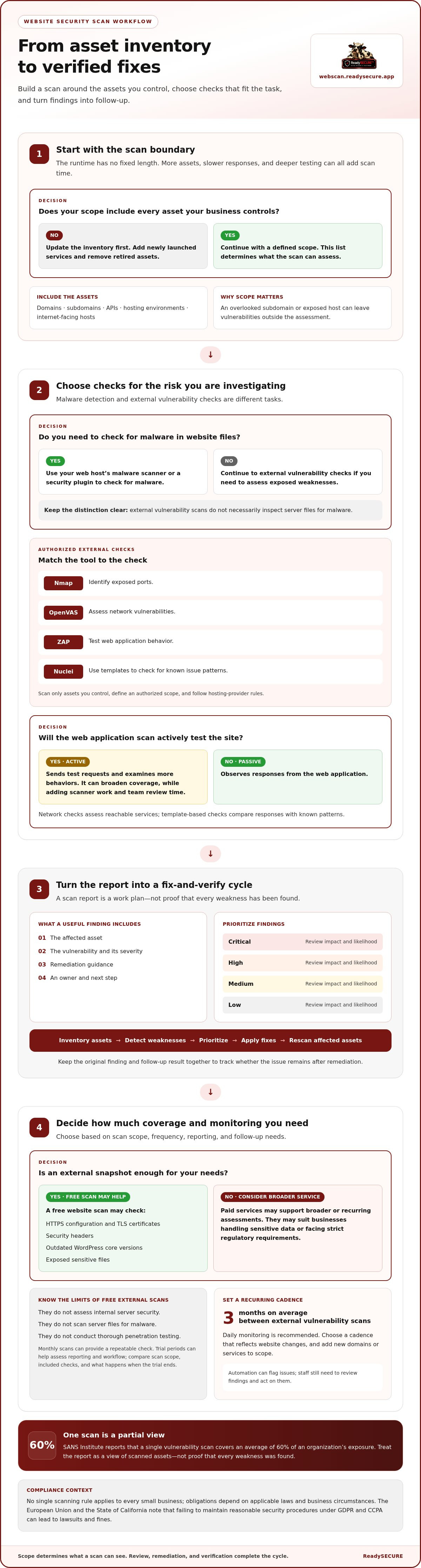
A website security scan has no fixed runtime. Checking one public domain differs from scanning its website, API, and internet-facing hosts. The number of assets, their response speed, and the depth of testing all affect duration. Broader assessments take longer because they examine more systems and potential entry points.
Start with an inventory of assets. Record each domain, subdomain, API, hosting environment, and internet-facing host your business controls. Remove retired assets and add newly launched services. This list defines the scan’s scope: an overlooked subdomain or exposed host can leave vulnerabilities outside the assessment.
Do U.S. laws or regulations require small businesses to scan their websites for security issues? No single scanning rule applies to every small business; obligations depend on applicable laws and business circumstances. The European Union and the State of California note that failing to maintain reasonable security procedures under GDPR and CCPA can lead to lawsuits and fines.
How do I scan a small business website for malware and vulnerabilities? Use your web host’s malware scanner or a security plugin to check for malware, then run an authorized vulnerability scan on assets you control. External vulnerability scans look for exposed weaknesses, but do not necessarily inspect server files for malware.
A practical workflow keeps those checks distinct:
- Confirm ownership and list the domains, APIs, and hosts in scope.
- Run malware detection through the host or a security plugin.
- Use Nmap to identify exposed ports and OpenVAS to assess network vulnerabilities.
- Use ZAP to test web application behavior and Nuclei templates to check for known issue patterns.
- Review the findings, remove false positives, and assign remediation owners.
Scan duration also depends on how each tool interacts with its target. A passive web application scan observes responses; an active scan sends test requests and examines more behaviors. Network checks assess reachable services, while template-based checks compare responses with known patterns. Combining these approaches broadens coverage, but also adds scanner work and review time for your team.
Treat the report as a work plan, not just a list of alerts. A useful finding identifies the affected asset, describes the vulnerability, states its severity, and offers remediation guidance. Prioritize issues as critical, high, medium, or low by considering potential impact and likelihood of exploitation. For example, an exposed administrative service running outdated software may need attention before a low-impact configuration issue.
After remediation, rescan the affected assets to see whether the issue remains. Keep the original finding and follow-up result together so your team can track changes. This turns scanning into a practical security cycle: inventory assets, detect weaknesses, prioritize issues, apply fixes, and verify the result.
Automated scans, alerts, and reporting
Automated scans repeat defined checks, and reports turn findings into work items. For security scanning for small business websites, the scope, frequency, and follow-up determine how useful automation is.
Recurring Scans and Automation
A recurring scan checks approved assets on a schedule, helping teams spot changes between manual reviews. External vulnerability scanning runs every 3 months on average, though daily monitoring is recommended. Choose a cadence that reflects website changes, and add new domains or services to the scope. Automation supports detection; staff still need to review findings and act on them.
Free Scan Checks and Trial Periods
A free website scan may check HTTPS configuration, TLS certificates, security headers, outdated WordPress core versions, and exposed sensitive files. Monthly scans provide a repeatable check, but free external scans don’t assess internal server security, scan server files for malware, or conduct thorough penetration testing. Use trial periods to assess a platform’s reporting and workflow; compare scan scope, included checks, and what happens when the trial ends.
Free and paid scanners differ in scope, monitoring, and reporting. A free check offers an external snapshot; paid services may support broader or recurring assessments. Security scanning for small business websites is most useful when coverage matches the assets and risks the business needs to monitor.
Automated Alerts and Reporting
Useful alerts identify the affected asset, describe the detected vulnerability, and indicate its severity. Reports should help your team distinguish a critical exposure from a lower-impact configuration issue, then assign an owner and remediation step. SANS Institute reports that a single vulnerability scan covers an average of 60% of an organization’s exposure, so treat one report as a view of scanned assets, not proof that every weakness is found.
How much do website vulnerability scanning services cost for small businesses? The price depends on the case and is given after a quote request. Scope, asset count, scan depth, and reporting needs affect the work involved.
What website security vulnerabilities do scanners detect, and what do they miss? A vulnerability scan can identify exposed services, weak configurations, outdated software, and known web application issues. External scans don’t inspect internal server files for malware or provide thorough penetration testing.
Can website security scans disrupt a live website or violate hosting provider rules? Active scans generate test traffic, so define an authorized scope and use settings appropriate for the live site. Follow hosting rules and scan only assets you control.
For an initial review of publicly visible exposure, use an automated website vulnerability scan.
Attack-surface discovery and monitoring
A website’s attack surface includes the public systems and services an attacker can reach. For a small business, these might include its main domain, a customer portal, an API, and a remote-access service. Monitoring starts with identifying these assets and tracking changes that could expose new weaknesses.
Build an inventory from business records and technical settings. Compare it with DNS records, hosting accounts, and application documentation. For each asset, note its owner, purpose, software version, and whether it needs to remain publicly accessible. A forgotten subdomain from an old campaign, for example, may still expose an outdated application.
Use a repeatable discovery process:
- List active domains, subdomains, APIs, and internet-facing hosts your business controls.
- Compare that inventory with DNS and hosting records to find unrecognized assets.
- Identify exposed ports and services, then confirm whether each supports a business function.
- Record application and software versions so later checks can detect meaningful changes.
- Update the inventory after a launch, hosting change, or service retirement.
Attack-surface monitoring helps identify changes between planned reviews. A new subdomain, changed certificate, or newly exposed service can alter a website’s risk profile. Compare each discovery with the inventory, confirm that the asset is authorized, and arrange testing for unexpected changes. This keeps monitoring connected to ownership and business purpose.
Different tools address different parts of the problem. A web application firewall helps block malicious traffic, while security monitoring tools scan for vulnerabilities or suspicious activity. A firewall and a vulnerability scanner have related but distinct roles: one filters traffic, the other identifies weaknesses. Neither replaces an accurate asset inventory.
Useful monitoring also connects findings to operational context. If customers need an application to be public, review its access controls and software version. If a service has no current owner, determine its purpose before deciding whether to restrict or retire it. This helps prevent routine changes from becoming untracked exposure.
Review alerts in light of actual changes, not just severity labels. An alert about a new internet-facing host, for example, should prompt an ownership check; a changed application version may call for vulnerability testing. Record the date, asset, finding, and action taken. That history helps distinguish a new issue from a recurring configuration problem.
Discovery has limits: a scan can assess only assets it can reach and is authorized to test. Internal systems, third-party services, and assets missing from the inventory may remain outside its view. Keep the inventory current, monitor changes, and use findings to guide focused cybersecurity testing of the systems your business relies on.
CVE and software-version detection
A scanner can compare detected software versions with known vulnerability records. The Website Vulnerability Scanner checks a database of more than 100,000 known vulnerabilities to identify issues that may affect detected software versions. A match points to a possible exposure, not proof that an attacker can exploit the system.
CVE identifiers help teams discuss specific, publicly documented vulnerabilities. A report may identify a server component and detected version, then link that version to a relevant CVE. Review the affected product, installed release, and vendor guidance before deciding whether the finding applies. For example, a backported security fix may not be clear from a simple version match.
Version detection is only as useful as the inventory it checks against. Record the website platform, server software, plugins, libraries, and application components. Compare scan results with deployment records, then prioritize internet-facing software that handles sensitive information. If a scanner can’t identify a component or version, it can’t reliably match that component against known issues.
Misconfiguration checks can find weaknesses that version matching misses. A scanner may flag an exposed service, weak security header, or publicly accessible sensitive file. An open administrative interface, for example, can create risk even when its software is current. Review each finding against the intended configuration: a setting may be technically exposed but required for a legitimate business function.
Vulnerability scanning does not establish whether employee credentials appear in a breach or sensitive data has already leaked. Those questions require identity and data monitoring, such as reviewing account activity, access logs, and unexpected public files. If a staff account signs in from an unfamiliar location, investigate the account separately from a CVE alert. If a private document appears in a public directory, treat it as a potential data exposure.
Keep these detection types distinct in the response process:
- Software risk: verify the detected product, version, and associated vulnerability record.
- Configuration risk: compare the flagged setting with the approved server or application configuration.
- Identity risk: review unusual sign-ins, exposed credentials, and account permissions.
- Data risk: investigate exposed files and restrict access to sensitive information.
Follow a clear sequence when a finding appears: confirm the asset, validate the version or configuration, assess exposure, and assign remediation. Update the software or correct the setting, then run a follow-up check. This helps distinguish a confirmed weakness from an inaccurate match and records how the business addressed potential breaches.
When to consider paid security services
A paid security service may be more relevant when a business handles sensitive data, faces strict regulatory requirements, or needs broader coverage than basic external checks provide. Base the decision on a risk assessment: identify the information at stake, the systems that process it, and how quickly your team can act on findings.
For example, a customer portal storing personal details has different exposure from a brochure site with no accounts or forms. A business using several internet-facing hosts also needs a wider view than one checking only its homepage. If a breach interrupts operations, the consequences can extend beyond technical cleanup. Small businesses that experience a data breach after failing to manage risks may shut down operations within 6 months.
Consider paid scanning when any of these conditions apply:
- Your website or application handles sensitive customer or employee information.
- Your business may need a documented approach to security checks.
- Your network includes multiple hosts, APIs, or public-facing services.
- New software, plugins, or infrastructure changes create risks between occasional reviews.
- Your team needs prioritized reports to assign fixes and track follow-up scans.
Look beyond the word “continuous” in a service description. Check which assets are covered, how often scans run, which vulnerability types they detect, and how alerts reach your team. A scheduled scan, an alert about a newly detected issue, and an immediate response are different capabilities. Reports should link each finding to an affected asset, its severity, and practical remediation guidance.
Distinguish vulnerability scanning from penetration testing. A scanner checks for known weaknesses and configuration problems within its defined scope. Don’t assume a service includes penetration testing just because it offers automated scans. Match the method to your question: use network scanning to assess exposed hosts and services, and web application testing to examine application weaknesses.
A paid service isn’t the next step for every website. A simple site with limited functionality may start with its hosting platform’s malware checks and security features. Paid scanning is more useful when a business needs broader asset coverage, repeatable assessments, or structured reports that staff can act on. The key question is whether the current process identifies relevant risks and supports timely remediation.
Before choosing a scan, list the domains, applications, and network assets that matter. Define which systems are authorized for testing, then use the findings to prioritize fixes. This makes the service decision part of a practical security plan, rather than a purchase driven by fear.
For a focused review of internet-facing hosts, start an authorized website security scan.
ReadySECURE: ReadySECURE Free Scan
ReadySECURE Free Scan offers website owners a practical starting point for authorized vulnerability checks. Submit a domain you control and provide written authorization. Each result includes a signed authorization record. The report prioritizes discovered issues by severity and provides remediation guidance to help you decide what to address first.
For a focused check, TestSSL Inspection reviews SSL/TLS configuration. ZAP Active/Passive Scanning assesses web application exposure using active and passive methods. For scheduled scanning, ReadySECURE Paid Plans support ongoing assessment. Choose a scope that matches the assets you control and the questions your team needs answered.
To begin an authorized scan, visit ReadySECURE’s scanning platform.
Make Your Next Security Check Actionable
Choose a next step based on the uncertainty you need to reduce. For an initial view of your website’s exposure, start with an authorized scan. For ongoing assessment, consider how recurring checks fit your maintenance process. A clear scope and a named person responsible for reviewing findings help make security scanning for small business websites an ongoing business practice.
ReadySECURE offers ReadySECURE Free Scan for an initial check, ReadySECURE Paid Plans for continued scanning, and TestSSL Inspection for SSL/TLS review. Choose the option that matches your immediate assessment need, then use the findings to plan follow-up work.
Contact ReadySECURE about website scanning to take the next step. A consistent review process gives your team a practical way to keep security decisions connected to the systems your business relies on.
Frequently Asked Questions
Can a free scan detect all vulnerabilities?
No. A free scan assesses only its defined scope and the systems it can reach, so it cannot prove that every weakness is absent. A public-facing check, for example, may not reveal an issue inside a private server or an account-specific flaw. Compare the scan’s asset coverage and test types with your environment, then investigate important gaps separately.
How does the Website Vulnerability Scanner work?
ReadySECURE webscan checks authorized websites, APIs, and internet-facing hosts using six industry-standard scanners. Each target needs a current authorization record that includes the approving person, the exact text they agreed to, and the approval date and time. The service provides findings with severity and remediation guidance. For example, a website owner can use the report to identify an affected component and plan a fix.
Is it worth investing in a paid security solution?
It can be worthwhile if findings need repeat review, your team needs a record of changes, or important assets are difficult to track manually. Weigh the value of that visibility against the work your team can already do. A business with one simple public site may need a different level of monitoring from one operating customer accounts, APIs, and several connected systems.
What is the best free web application vulnerability scanner?
There is no single best choice for every site; the right scanner depends on authorization, coverage, and report usefulness. ReadySECURE Free Scan provides a full scan of one authorized target using the same scanner set as paid plans. It suits an owner seeking a detailed starting report for one website or API, rather than ongoing scheduled monitoring.
What should I do if my scan results are poor?
Begin by separating confirmed issues from findings that need validation. In ReadySECURE’s report workflow, findings can be tracked as open, accepted, mitigated, or false positive. Assign an internal owner to each actionable issue, document the change, and rescan after fixes to confirm its status. If a result affects a sensitive system, assess its exposure before making production changes.
When should you upgrade to a paid security service?
Consider upgrading when you need scheduled scans, historical results, or an ongoing view of risk across targets. ReadySECURE Paid Plans add scheduling, history, and trend analysis, helping teams compare findings over time. Continuous scanning requires a plan. It’s a practical fit when new deployments or software changes make one-off assessments insufficient.
Why should small businesses consider free scans?
A free scan can turn a general security concern into a specific list of findings to review. It also helps you understand the report format and identify which systems need attention before setting up broader monitoring. ReadySECURE Free Scan requires no card or plan, but it is limited to one authorized target.
What security scans should small business websites run regularly?
Choose checks that match the assets you operate: web application testing for site behavior, TLS inspection for certificates and protocols, and network scanning for exposed hosts and services. External vulnerability scanning is recommended daily in the research for this article. Keep authorization current for every target, and review findings after significant website or infrastructure changes, not only on a calendar schedule.


