

Could a web server expose sensitive information while the website appears to work normally? Yes. The common web server configuration mistakes 2026 teams need to check can hide in default settings, access controls, TLS options, or exposed files, with no obvious warning to visitors.
It’s reasonable to be cautious about changing a working server. Some settings create meaningful exposure; others are lower-priority hardening choices. Treating every issue as urgent can waste time or disrupt legitimate services, while leaving risky defaults unchecked can create avoidable exposure.
This practical checklist explains what to investigate, how to prioritize findings by exposure and operational impact, and how to validate changes without disrupting expected traffic. It covers unnecessary information disclosure, permissive access, outdated protocols, and security headers, then outlines how to test adjustments carefully. An authorized external scan can show what’s visible from the internet, but it doesn’t replace a review of the server’s configuration. Security is an ongoing process of reviewing, changing, and verifying settings.
Key Takeaways
- Use the common web server configuration mistakes 2026 checklist to identify exposed services, unnecessary access, and files that shouldn’t be public.
- Review TLS behavior, HTTP headers, and error responses against your application’s needs rather than applying one universal configuration.
- Prioritize reachable, high-impact weaknesses over lower-risk hardening preferences, then test each change for service impact.
- Inventory server components and document approved changes so teams can track ownership and reduce risky configuration drift.
- Use authorized external scanning as one validation input alongside direct configuration review, not as a substitute for it.
Common web server configuration mistakes in 2026: what to check first
Start with every internet-facing web server and the settings that control how it accepts requests, protects connections, and grants access. The common web server configuration mistakes 2026 teams should investigate vary by environment. Whether managing VPS environments from providers like snel.com or maintaining dedicated infrastructure, Apache, Nginx, and LiteSpeed use different directives, and operating systems, applications, and deployment designs add their own requirements.
A server misconfiguration is an unsafe or unintended setting that makes a system behave differently from its approved security and operational requirements. Finding one is a reason to investigate, not proof that someone has compromised the server. Its practical risk depends on whether it can be reached, what access it grants, and which data or services it could affect.
Which systems and settings belong in the review?
Review the HTTP server software and its supporting configuration, including TLS settings, access controls, and management interfaces that may be reachable from the internet. For an overview of server components and their role, see Understanding Web Servers.
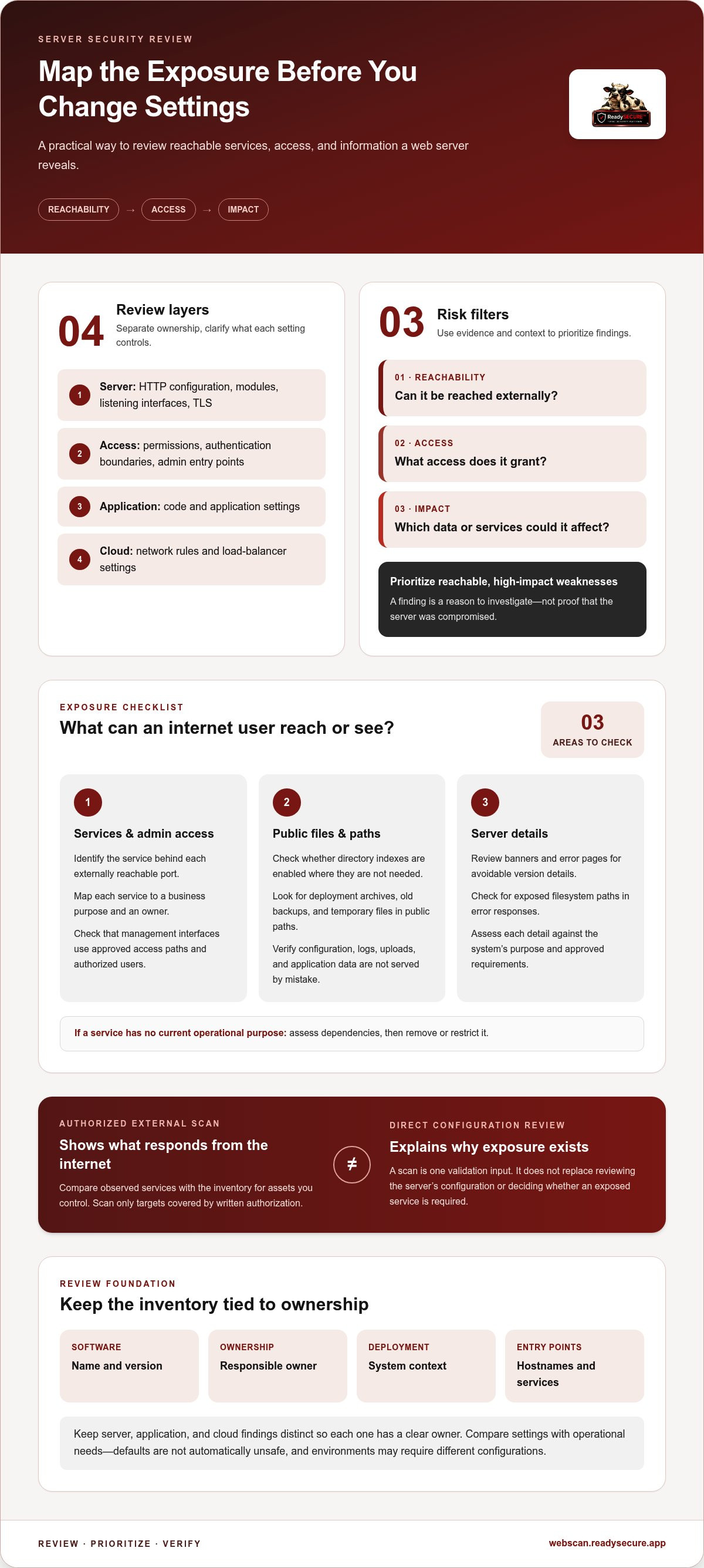
- Server layer: HTTP service configuration, enabled modules, listening interfaces, and TLS behavior.
- Access layer: Permissions, authentication boundaries, and administrative entry points.
- Application layer: Application code and its own settings, which may affect security but are distinct from web-server configuration.
- Cloud layer: Provider controls such as network rules or load-balancer settings, which can determine whether a server is exposed.
Keep these layers distinct so each finding has a clear owner. Record each system’s software and version, responsible owner, deployment context, and internet-facing entry points, including relevant hostnames and services. This inventory helps connect an observed exposure to the configuration that controls it.
Why can a default configuration become a security problem?
Defaults are designed to help software install and run across a range of environments. They may enable features or access that a particular production deployment doesn’t need. That doesn’t make every default unsafe. Compare each setting with the system’s purpose and approved requirements.
For example, a public website may not need an enabled service or management interface. If that interface is reachable from the internet, it gives attackers another point to probe. Its presence alone, however, doesn’t show that anyone accessed it or that the server is compromised.
Prioritize using evidence and context. Ask whether a service is externally reachable, whether authentication and access restrictions are appropriate, and what information or operations it protects. A reachable weakness affecting sensitive data deserves more attention than an isolated hardening preference with little exposure. Authorized external scanning can identify observable services on systems you control; direct configuration review helps explain why they’re exposed and whether they’re required.
Web server exposure mistakes: excess services, access, and file visibility
Once you’ve identified the systems in scope, examine what an internet user can reach and what the server reveals. Exposure isn’t limited to the main website. A forgotten service, administrative interface, or deployment file in a public directory can create another path to investigate. These are common web server configuration mistakes 2026 teams should assess based on actual reachability and business need, not appearance alone.
Are unnecessary ports and administrative interfaces reachable?
Inventory externally reachable services and map each one to a documented business purpose. A listening service may be essential to an application, or it may be left over from setup or troubleshooting. Check both the server and the network controls in front of it, since either layer can affect exposure.
- Identify the service behind each externally reachable port and assign an owner.
- Confirm that management interfaces are limited to approved access paths and authorized users.
- Remove or restrict services with no current operational purpose, after assessing dependencies.
Compare the inventory with results from authorized scans of assets you control. A scan can show which services respond externally, but it should be conducted only with written authorization for the target. Investigate unexpected services against your documented inventory rather than automatically treating them as evidence of compromise.
Can files or server details reveal more than intended?
Review the public document root and all paths served by the web server. Directory listings can expose contents that weren’t meant to be browsed. Deployment archives, old backups, temporary files, and configuration files may contain source code, credentials, internal paths, or other sensitive details if they’re placed somewhere publicly reachable.
- Check whether directory indexes are enabled in locations that don’t need them.
- Search public paths for backup and temporary files, then remove them from web-accessible locations.
- Verify that configuration files, logs, uploads, and application data have appropriate permissions and aren’t publicly served by mistake.
- Review server banners and error pages for avoidable version details or filesystem paths.
Use least privilege: give each user, process, and service only the access needed for its approved function. This limits the potential impact of an exposed account or misused service. NIST’s Web Server Security Guidelines provide broader guidance on securing server software, operating systems, networks, and maintenance.
Reducing version or path disclosure can make reconnaissance less informative, but it doesn’t replace patching, access controls, or removing sensitive files from public paths. After making changes, confirm that legitimate application behavior still works, especially for uploads and error handling. To compare what’s externally visible on a website or host you control with your inventory, use an authorized external scan with written authorization.
TLS, HTTP headers, and error handling: configuration issues to verify
A site loading over HTTPS is a useful starting point, not proof that every connection setting is appropriate. Common web server configuration mistakes 2026 teams should check include outdated protocol support, expired or mismatched certificates, inconsistent HTTP-to-HTTPS routing, and response headers that don’t suit the application. Compare the server’s intended behavior with what users and clients actually observe.
What should you check in TLS and HTTPS behavior?
Verify that certificates are valid for the hostnames in use, serve a complete certificate chain, and have a clear renewal owner. As of March 15, 2026, publicly trusted TLS certificates have a maximum validity of 200 days, making a documented, monitored renewal process important. Check protocol settings too: current guidance is to support TLS 1.2 and TLS 1.3, prefer TLS 1.3, and disable SSL and TLS versions older than 1.2.
Test HTTPS routing across the whole site, not just the home page. A redirect should send HTTP requests to the correct HTTPS destination without looping, breaking subdomains, or leaving sensitive routes accessible over plain HTTP. Review relevant vendor documentation and use a maintained TLS testing method for version-specific recommendations. Application compatibility and your documented security policy may affect the exact choices.
Are security headers and error responses configured deliberately?
Headers tell browsers how to handle a response, but there isn’t one set that fits every application. Review which headers are relevant, where they’re applied, and whether their values match the site’s behavior. For example, a Content Security Policy needs to account for the scripts and other resources a site legitimately loads. A policy that’s too restrictive may break functions; one that’s too permissive may offer little protection.
- Check HTTPS enforcement: Confirm that any Strict-Transport-Security policy matches the site’s domain and subdomain strategy.
- Review content handling: Assess policies such as Content-Security-Policy and X-Content-Type-Options against the application’s resources and response types.
- Inspect error responses: Ensure failures don’t reveal stack traces, filesystem paths, internal hostnames, or configuration details to visitors.
Don’t copy a header configuration without understanding its effects. Test changes in staging, then verify representative user journeys, API calls, embedded content, authentication, and error states before production rollout. Check both browser-facing pages and machine-to-machine endpoints, which may have different requirements. After deployment, confirm the responses directly and review application logs for unexpected failures. Comparing intended and observed behavior helps distinguish a risky setting from a difference that’s harmless or expected.
How to prioritize and fix web server configuration mistakes safely
Finding a risky setting is only the start. Addressing common web server configuration mistakes 2026 teams uncover requires a repeatable process that weighs exposure against operational impact. Avoid rushing changes into production. First establish what’s affected, why the setting matters, and how you’ll confirm the fix.
Use this workflow for each accepted finding:
- Inventory: Identify the affected server, application, configuration file, owner, and dependent services.
- Assess exposure: Confirm whether the setting is reachable from the internet or limited by network controls. Note which routes, users, and assets it affects.
- Prioritize: Rank the issue by reachability, potential impact, data sensitivity, and existing safeguards. Address reachable, high-impact weaknesses before lower-risk hardening preferences.
- Prepare the change: Record the proposed adjustment, create a restorable backup, and define a rollback plan before changing production configuration.
- Change and test: Validate configuration syntax, apply the change through your normal process, and test relevant services and application behavior.
- Document: Record the result, approval, owner, and follow-up work. Update the inventory so future reviews reflect the actual configuration.
An authorized external scan can provide another view of services and findings visible from the internet. Run an authorized scan of a target you control, then use it alongside configuration review. Scanning requires written authorization for a target you control.
How should teams rank findings without overreacting?
Consider whether a finding is internet-reachable, which assets it affects, how sensitive their data is, and whether another control limits exposure. A scanner observation is a prompt to investigate, not automatically a confirmed misconfiguration or evidence of compromise. Validate it against server settings and deployment context. For each accepted finding, assign an owner and a remediation milestone so it doesn’t remain an untracked note.
How can you verify a fix without causing an outage?
When staging is available, test the configuration there, including syntax and application behavior. After deployment, recheck the affected route or service and confirm that legitimate user and system workflows still work. Compare the result with the intended change, then record the verification. Keep the backup and rollback steps available. If an essential service behaves unexpectedly, restore the known-good configuration and investigate before trying again.
Keep server settings accountable with recurring, authorized validation
A configuration review captures a point in time. Deployments, software updates, infrastructure changes, and restored backups can alter settings or bring back exposure that was previously removed. Treat review as an ongoing operating task, not a one-time response to the common web server configuration mistakes 2026 checklist. Revisit relevant controls after meaningful changes and set a recurring review interval that fits your environment and change process.
What should a repeatable configuration review record?
Keep records that let another team member understand what was reviewed, what changed, and what still needs attention. At minimum, capture the asset scope, configuration owner, review date, findings, and remediation status. Record approved exceptions too, including why each is needed, who is accountable, and when it should be reviewed again.
- Update ownership when a server or application changes teams.
- Reassess relevant settings after deployments, software upgrades, network changes, or migrations.
- Close findings only after the correction has been checked and its result recorded.
This history helps distinguish an intentional, approved setting from an accidental change. It also gives teams a practical basis for follow-up instead of relying on memory or scattered notes.
Where does an external vulnerability scan fit?
An external scan can show which services or findings are observable from the internet on a target you control. It adds evidence to a configuration review, but it can’t confirm that every setting is safe or replace checking the server, application, and infrastructure directly. Interpret each result in context, then verify whether the reported exposure is expected and which configuration controls it.
ReadySECURE provides authorized scanning for websites, APIs, and internet-facing hosts. Scanning requires written authorization for a target you control. Results include prioritized findings, severity, and remediation guidance, which teams can use to plan and track their own fixes. A scan is a useful validation input, not a guarantee that every vulnerability or configuration issue will be found.
For a practical starting point, scan one target you control with written authorization, then compare the prioritized findings with your configuration records. Use the results to identify what needs investigation, assign an owner, and verify changes through your normal review process. The aim is steady visibility and accountable follow-through, not a claim that a single scan completes security work.
Make the next review part of the change process
Make configuration review part of normal website operations, rather than a task that depends on someone remembering after a change. Choose an owner, set a review trigger for deployments or infrastructure updates, and keep the next action visible in your team’s change records. That routine helps make the common web server configuration mistakes 2026 checklist useful beyond a single review.
For an external view, start with one website, API, or internet-facing host you control. ReadySECURE requires written authorization, and each result includes a signed authorization record. Reports prioritize discovered issues and provide severity and remediation guidance, giving your team a structured starting point for investigation and follow-up. A scan is one input to validation, not a guarantee that every risk has been found.
Run a free, authorized scan of one target you control, then use the findings to guide your next review. Consistent checks make it easier to see what changed and decide what deserves attention. Build a stronger configuration process one verified step at a time.
Frequently Asked Questions
What are the most common web server configuration mistakes?
Common web server configuration mistakes include unnecessary exposed services, weak access controls, directory listings, and files such as old archives or configuration backups left in public paths. Server banners and detailed error messages can also disclose information, while transport-security settings may not match current needs. Which issues matter depends on the deployment. Verify that a finding is real, reachable, and relevant before changing settings, since rushed fixes can disrupt legitimate functions.
How do I check whether my web server is misconfigured?
Start by listing the internet-facing assets you own, then compare server and application settings with current vendor guidance and your intended design. Check reachable services and public paths for unexpected content. Validate observations against the system itself, since a test may not reveal why a service is available or whether it’s required. Record the review scope and authorization, and test proposed changes safely. A scan result alone isn’t proof of misconfiguration.
Can a default web server configuration be secure?
Yes, a default may suit a particular deployment, but it shouldn’t be assumed safe for every environment. Defaults can enable features that one application needs and another doesn’t. Review which services are active, who can access them, how the software is maintained, and what the application requires. If you retain a default setting, document its purpose and owner. Revisit that decision when the server’s role, exposure, or application changes.
Which web server settings should I fix first?
Start with verified issues that are reachable from the internet and could affect sensitive data or essential services. For example, an exposed administrative route may deserve attention before a low-impact header preference, especially if it lacks an approved access restriction. Factor in existing safeguards and the risk of disruption from a change. Assign an owner, set a remediation milestone, and test the correction. A scanner’s severity label is useful context, not the only factor in setting priorities.
Do HTTP security headers prevent every web application attack?
No. Headers can support specific browser-side protections, but they can’t secure an application on their own. They don’t replace sound application design, effective access controls, software maintenance, or appropriate transport security. Their value also depends on correct settings: a policy that blocks required scripts may break a legitimate workflow, while a permissive policy may offer limited protection. Test header changes against key pages and user journeys before applying them broadly.
How often should I review web server configuration?
Review settings after material changes, including deployments, server upgrades, infrastructure updates, or the addition of an internet-facing service. Also establish a recurring cadence that reflects the system’s risk and how often it changes. Assign a named owner and keep written records of review scope, decisions, exceptions, and unresolved work. Document the reason for each exception and set a future review point so temporary decisions don’t quietly become permanent.
Is an external vulnerability scan enough to confirm my server is secure?
No. An external scan can identify some issues observable on an authorized target, but it can’t establish that every configuration is safe or replace a contextual review. A result may need to be checked against intended services, network controls, and application behavior. Validate and prioritize findings, then retest relevant exposure after remediation. Only scan systems you control with written authorization. Treat the scan as one source of evidence, not a complete security assessment.


