

What if a security scan returns a long list of findings but leaves you unsure what to fix first? Automated web application security testing can identify exposed weaknesses, but its results are useful only when you understand what the tools checked, what they may have missed, and which findings need attention. A clean report isn’t proof that an application is secure, and a flagged issue may need validation before it becomes a remediation task.
Repeatable checks can help you find technical issues without treating every alert as a confirmed risk. This guide explains the main automated testing methods, the weaknesses they can detect, and where automation has limits. It also covers how to define an authorized scope, review evidence, and prioritize follow-up, including why business logic flaws and complex attack paths may need further investigation.
You’ll learn how to interpret severity and remediation guidance and decide what to do next. ReadySECURE provides authorized external scans for websites, APIs, and internet-facing hosts that their owners control, along with prioritized reports. The goal is practical: use automation for consistent checks, then apply informed judgment to decide what happens next.
Key Takeaways
- Automated web application security testing can surface technical weaknesses, but a scan is not a complete security assessment or a guarantee of safety.
- Define the target and obtain written authorization before testing. Related domains, APIs, and hosts aren’t automatically in scope.
- Compare each finding’s evidence, severity, affected asset, reproducibility, and operational relevance before deciding what to address.
- Automated checks can produce false positives and miss issues, so use results to guide prioritization and identify where further review is needed.
- ReadySECURE requires written authorization before scanning a submitted target and provides a prioritized report with a signed authorization record.
What Automated Web Application Security Testing Can, and Cannot, Tell You
Automated web application security testing uses software-driven checks to look for weaknesses in defined targets. A scanner may inspect web responses, identify exposed services, or compare observable behavior with known vulnerability patterns. Its results depend on the target and scope, the scanner’s capabilities and configuration, and the access available to it. A public-facing scan, for example, may see different parts of an application than a test configured with authenticated access.
A scanner finding is evidence of a possible weakness, not proof that an attacker can exploit it or that a specific impact has been confirmed. Vulnerability scanning helps teams identify and prioritize issues, but it is not a complete security assessment and cannot guarantee that an application is safe.
Which assets and weaknesses can automated testing examine?
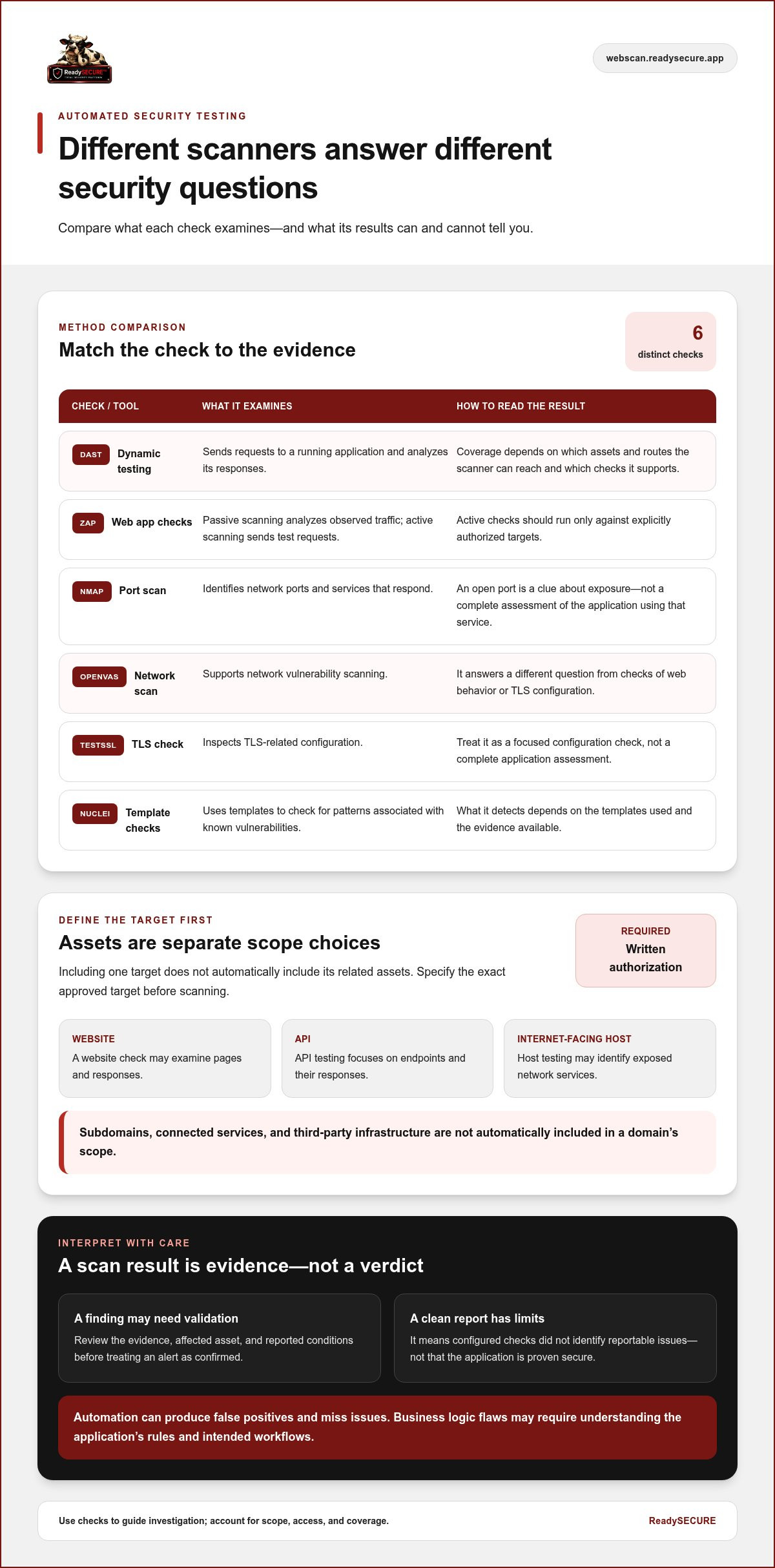
Start by separating asset types. A website, an API, and an internet-facing host are distinct scope choices, even when they support the same service. A website check may examine pages and responses; API testing focuses on endpoints and their responses; host testing may identify exposed network services. Including one target does not automatically include related assets.
Different weaknesses call for different checks. A port scan can identify services that respond over the network. Dynamic testing sends requests to a running application and analyzes its responses; Dynamic Application Security Testing (DAST) is one approach. Template-based checks look for patterns associated with known vulnerabilities. No single method sees everything: coverage depends on which assets and routes the scanner can reach and which checks it supports.
The OWASP Top 10 2025 offers a reference point for common application security risks, including broken access control and security misconfiguration. Use it to frame coverage questions, not as evidence that a particular issue exists. The specific test and the evidence it returns matter.
What automated testing does not establish by itself
A scanner alert needs context. Review its evidence, affected asset, and reported conditions before treating it as a confirmed issue. Some alerts may be false positives, while other weaknesses may not trigger a scanner at all. A serious-looking issue may have limited operational relevance, while a less dramatic finding could deserve attention if it affects a sensitive function.
Business logic flaws are a clear limitation. A tool may observe that a request succeeds, but deciding whether a user should be able to perform that action requires understanding the application’s rules and intended workflows. This kind of contextual review may reveal problems that a pattern-based check cannot assess reliably.
Read a report as a view of what the configured checks observed for a particular scope and at a particular time. A clean report means those checks did not identify reportable issues; it does not prove that the application is secure. Use findings to guide investigation and remediation, and treat gaps in access or coverage as limits on what the scan can tell you.
How Automated Web Application Security Testing Works
Automated web application security testing follows a controlled process, from choosing the target to deciding what to do with the results. The sequence matters: a thorough scan can still be inappropriate or misleading if it runs against the wrong asset or outside approved scope.
Scope and authorization come before the scan
Scope determines what an automated scan can observe: checks can assess only the assets, routes, services, and application behavior included in the approved target and accessible to the scanner. Identify the exact domain, API, or internet-facing host to be tested. A domain’s subdomains, connected services, and third-party infrastructure are not automatically included.
Written authorization is a prerequisite, not a formality. It records permission and helps distinguish an approved security check from activity outside the owner’s consent. ReadySECURE requires written authorization before scanning and attaches a signed authorization record to each result, connecting the scan to its approval.
Different scanners examine different evidence
Tools are not interchangeable. Some observe application responses, while others check network ports, TLS configuration, or known patterns. For example, the OWASP Automated Threats Handbook provides context about automated threats to web applications and can help frame what security checks should investigate.
- ZAP examines web application behavior through passive scanning, which analyzes observed traffic, and active scanning, which sends test requests. Active checks should run only against explicitly authorized targets.
- Nmap scans network ports to identify reachable services. An open port is a clue about exposure, not a complete assessment of the application using that service.
- OpenVAS supports network vulnerability scanning, while TestSSL inspects TLS-related configuration. These checks answer different questions about a target.
- Nuclei uses templates to check for known vulnerability patterns. What it detects depends on the templates used and the evidence available from the target.
These examples show why one result cannot stand in for another. A port check does not test application workflows, and a TLS inspection does not establish whether access controls work as intended.
From approved target to prioritized action
- Define scope: Record the precise assets and boundaries included in the test.
- Authorize testing: Obtain written permission for those specific targets before any scan begins.
- Run checks: Select scanners suited to the evidence you need, and keep tests within the approved scope.
- Review evidence: Examine each alert’s affected asset, supporting details, and conditions instead of treating every result as confirmed impact.
- Prioritize action: Consider severity and relevance, then document ownership and follow-up.
To request an authorized scan, submit a target for scanning. Treat the report as an input to review and remediation, not as a guarantee that every weakness has been found.
How to Evaluate Automated Findings Without Overtrusting Them
A scanner report is a set of leads to assess, not a ready-made risk register. For each alert, compare its severity label with the evidence, affected asset, reproducibility, and the asset’s role in your environment. Automated web application security testing can surface issues consistently, but the report alone can’t determine how much harm a weakness could cause in a particular business context.
Severity is a useful triage signal, not a complete measure of business risk. A high label may reflect a technically serious condition, but practical risk also depends on exposure, the data or functions involved, and whether the reported behavior is actually present. Conversely, a lower-severity issue on a critical asset may deserve prompt attention. Treat labels as a starting point for investigation.
What makes a finding worth investigating first?
Prioritize by combining severity with exposure, evidence quality, and asset importance. Ask whether the affected endpoint is reachable, whether the report includes a request or response that supports the claim, and whether the issue can be reproduced within the authorized scope. Remediation guidance can suggest a next step, such as reviewing a configuration or correcting an input-handling weakness. Confirm the underlying condition before making changes.
A compact tracking record can keep triage consistent across teams. Separate the scanner’s claim from the evidence and your validation decision:
- Scanner signal: Record the finding, severity, and affected asset.
- Supporting evidence: Capture the relevant request, response, configuration detail, or other reported proof.
- Validation status: Mark it as under review, reproduced, not reproduced, or requiring more investigation, and note the next action.
This separation helps prevent a scanner’s confidence or severity label from being mistaken for confirmed impact. It also gives developers and security teams a practical record for follow-up.
When does automated testing need human review?
Human review is especially useful when risk depends on application-specific rules. A scanner may detect that a request returns a successful response, but it may not know whether a user was entitled to view that record or complete that transaction. Questions about role boundaries, approval steps, or unusual workflows require context that may fall outside the scanner’s configured checks.
Reviewers can check whether observed behavior matches the application’s intended design, test relevant workflows within scope, and determine what the evidence means operationally. This doesn’t make every alert a confirmed vulnerability; it helps resolve uncertainty and identify issues automation may not expose. For a broader comparison of assessment approaches and scope, see this web application security assessment guide.
Close the loop by recording the validation outcome, assigning an appropriate next step, and revisiting unresolved findings. A disciplined triage process turns scan output into decisions without treating either an alert or a clean result as the final word on application risk.
How to Put Automated Web Application Security Testing into Practice
A repeatable process makes automated web application security testing safer and more useful. Start with asset ownership and written permission, then match the checks to the approved target. Document decisions and follow-up so each scan supports accountable security work instead of producing a report no one acts on.
Prepare a safe and accountable scan
Before testing, record who controls the asset, the exact domain, API, or internet-facing host in scope, and who approved the scan. Written permission must cover the target being tested. Ownership of one domain doesn’t automatically authorize tests of its subdomains, connected systems, or third-party services.
- Confirm the target: Document the precise asset and any boundaries or exclusions.
- Choose relevant checks: Match scanner capabilities to the asset and the evidence you need. A port scan, web application check, and TLS inspection examine different things.
- Preserve the record: Keep written authorization with the scan results so the findings can be tied to the approved target and activity.
This preparation clarifies what the scan was permitted to examine and what it could reasonably observe.
Turn scan results into tracked security work
After the scan, review findings and assign an owner to each item that needs action. Use severity alongside the evidence, exposure, affected asset, and application context. Record whether a finding is confirmed, under investigation, or not reproduced, then document the remediation decision and any reason for deferring work.
- Track the decision: Note the accountable owner, next step, and status for each relevant finding.
- Retest changes: Where appropriate, run checks against the affected target after remediation to see whether the reported condition remains.
- Keep results comparable: Record changes to scope, scanner selection, and configuration between scans, since these can affect which findings appear.
A continuous security scanning strategy can connect recurring checks with an organization’s security workflow. ReadySECURE provides authorized scans with prioritized findings, remediation guidance, and a signed authorization record. Paid plans add scheduling, history, and trend analysis.
Ready to scan a target you control? Start an authorized security scan. Written authorization is required before scanning, and the free scan covers one target.
Use ReadySECURE for an Authorized Automated Security Scan
Once you’ve defined the target, obtained permission, and considered what automated checks can and can’t establish, ReadySECURE offers a practical way to request an authorized external scan. Submit a domain and provide written authorization before scanning begins. Keep the submitted target within the permission granted; authorization for one domain doesn’t automatically extend to related assets.
What the ReadySECURE scan provides
ReadySECURE runs six industry-standard scanners on a scheduled basis, including Nmap for port scanning, OpenVAS for network scanning, ZAP for active or passive web application scanning, TestSSL for TLS inspection, and Nuclei for template-based scanning. Each examines different evidence, so interpret results in light of the target and methods used.
The report prioritizes findings and includes severity information and remediation guidance. These details help teams decide what to investigate and what action may be appropriate. A finding is a signal to review, not automatic proof of exploitable impact, and a scan can’t guarantee that every weakness will be found.
A signed authorization record is attached to each result. Keeping it with the report connects findings to the approved scan and provides a useful record for internal review and follow-up.
Choose a scan option that fits your next step
The ReadySECURE free option covers one scan of one target. It provides an initial view of that authorized target, within the stated scope. If you need recurring scans or want to compare results over time, paid plans add scheduling, scan history, and trend analysis.
These features can help teams track how findings change across scans, but comparisons are most useful when you account for changes to scope or testing conditions. Use the report to guide investigation and remediation, then review relevant changes with appropriate follow-up checks. For more detail on the single-target offer, see the ReadySECURE free security scan guide.
For a first step, choose a domain you control, make sure written authorization covers it, and start an authorized free website security scan. The free option is one scan of one target, with findings to review and prioritize rather than a guarantee of security.
Make Security Checks Part of Your Next Decision
Use automated web application security testing as an ongoing input to security decisions, not a one-time verdict. Choose a target you’re authorized to test, review the results with the people responsible for the application, and turn relevant findings into tracked work. As the application changes, this feedback loop can help your team decide what to examine next and whether previous actions addressed the issues that mattered.
ReadySECURE supports this process by requiring written authorization before scanning and attaching a signed record to each result. Its reports prioritize findings and provide severity information and remediation guidance, giving your team a structured starting point for review. A scan can inform your next step, but it doesn’t replace judgment or guarantee that every weakness has been found.
Start with one authorized target and use the results to guide a thoughtful review. Start an authorized ReadySECURE free scan.
Frequently Asked Questions
Is automated web application security testing enough to secure an application?
No. Automated web application security testing can help identify technical weaknesses, but it’s only one part of application security. Teams also need secure development practices, access controls, dependency management, and a plan for responding to incidents. For example, a scan won’t confirm that every employee has appropriate access to production data. Use scan results alongside other safeguards, and reassess security as the application and its environment change.
Can automated testing find business logic vulnerabilities?
Sometimes, but automated checks often struggle with flaws that depend on what the application is supposed to do. Consider a checkout flow that applies a discount more than once, or a user who can view another account’s records by changing an identifier. A scanner may not know the intended rules or test every sequence of actions. Review suspicious workflows against documented requirements and expected user permissions.
Can an automated security scan disrupt a live website?
It can, depending on the tests, target, and system response. Active checks send requests that may increase traffic, trigger rate limits, or interact unexpectedly with functions that change data. Before scanning a live environment, confirm the approved scope, understand which tests will run, and coordinate with the team responsible for the service. Where possible, use a suitable test environment for checks that could affect live operations.
How often should a web application be tested automatically?
There isn’t one schedule that suits every application. Consider how often the code, dependencies, exposed endpoints, or infrastructure change, as well as how quickly your team can review and act on findings. A major release or a change to authentication may justify a scan sooner than a stable period. Set a cadence that supports timely review, and record configuration changes so results remain interpretable.
Can automated web application security testing cover APIs?
Yes, if the API is explicitly included in the approved scope and the checks can reach its endpoints. Useful testing depends on knowing which routes and methods are intended to be available and how the API handles authentication and input. A domain scan shouldn’t be assumed to cover every API connected to it. Compare the tested endpoints with your API inventory to identify coverage gaps.
What should a team do when an automated scan reports a critical vulnerability?
Route the alert to the appropriate security and application owners for prompt review. Check the affected asset, supporting evidence, and whether the reported behavior can be reproduced safely within scope. If the issue appears credible, assess exposure and potential impact, then follow your incident and remediation processes. Preserve the report and document decisions, including why a finding is confirmed, under investigation, or not reproduced.
Does automated testing need written authorization?
Yes. Obtain written permission before scanning and make sure it identifies the specific target and approved scope. Permission to test one domain doesn’t automatically cover its subdomains, APIs, hosting provider, or other connected assets. If ownership or scope changes, pause and resolve that uncertainty before continuing. Keeping authorization with scan records helps teams demonstrate that testing was approved and tied to the intended asset.


