

A template-driven scan can reveal exposed files and misconfigurations before they become overlooked risks. Nuclei is an open-source vulnerability scanner that uses YAML- and DSL-based templates to check web apps for known issues. An automated Nuclei scan for web apps runs selected checks against a target you’re authorized to assess, then reports matches for review.
Automation can make security checks more repeatable, but scan scope and settings affect what a scan finds and how much traffic it sends. This guide explains how Nuclei works, how to run a focused scan, and how to tune templates, rate limits, timeouts, and retries. You’ll also learn where Nuclei fits alongside Dynamic Application Security Testing (DAST), and why results need validation before you prioritize remediation. The goal is a repeatable process that identifies exposures without treating every alert as a confirmed vulnerability.
Key Takeaways
- Define the authorized target and scan scope before running checks so the results stay relevant to the assets you control.
- Use templates to look for exposed files, known vulnerabilities, and configuration issues, then review matches to determine what needs attention.
- Tune concurrency, rate limits, timeouts, and retries to balance scan coverage with the impact on the target application.
- Pair template-based checks with DAST when you need complementary insight into how a running application behaves.
- Prioritize findings by validating the evidence and assessing how each exposure affects your web app.
How will this reduce your attack surface?
Nuclei runs repeatable checks for exposed services, known vulnerabilities, and security gaps. Use it only on assets you control and are authorized to have tested, then validate findings before deciding what to fix.
-
Discover Web Application Attack Surfaces
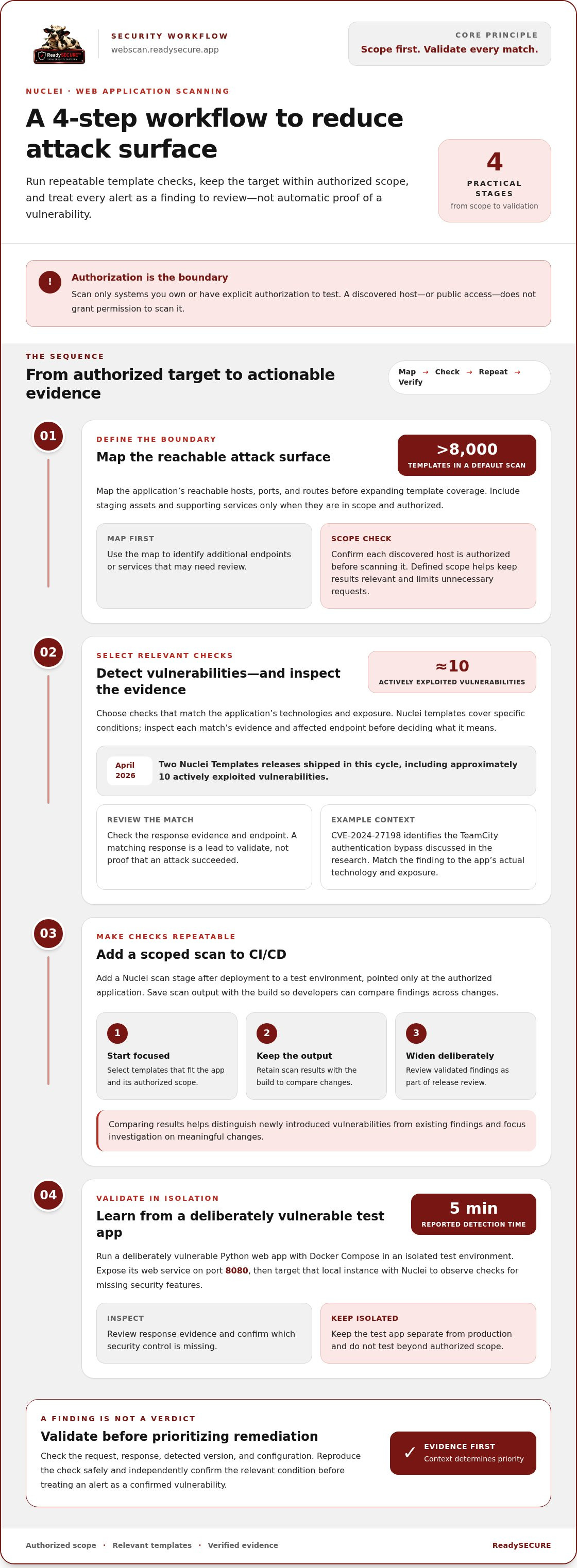
Map the application’s reachable hosts, ports, and routes before expanding template coverage. Include staging assets and supporting services only when they’re within your authorized scope. A default Nuclei scan can execute more than 8000 templates against a target, so a defined scope helps keep results relevant and limits unnecessary requests.
Use findings to identify additional endpoints or services that need review. A discovered host is not permission to scan it: confirm it is within your authorized target scope first.
-
Detect Vulnerabilities and Exploited CVEs
Run checks for known vulnerabilities, then inspect each match’s evidence and affected endpoint. Nuclei’s templates cover specific conditions, so a result is a lead to validate, not proof that an attack succeeded. Two Nuclei Templates releases shipped in the April 2026 cycle, including approximately 10 actively exploited vulnerabilities.
Prioritize relevant CVE checks alongside exposed-file and configuration tests. For context, CVE-2024-27198 identifies the TeamCity authentication bypass discussed in the research. Match findings to the application’s actual technology and exposure before assigning remediation priority.
-
Add Nuclei Scans to CI/CD
Add a Nuclei scan stage after deployment to a test environment, and point it only at the authorized application. In CI/CD, save scan output with the build so developers can compare findings across changes. To use Nuclei in a pipeline, run a scoped scan, retain its results, and include validated findings in release review.
Start with focused templates that match the app, then widen coverage deliberately. This helps teams distinguish newly introduced vulnerabilities from existing findings and investigate meaningful changes without blocking releases on unreviewed alerts.
-
Run a Vulnerable Python App in Docker Compose
Start a deliberately vulnerable Python web app with Docker Compose in an isolated test environment, then expose its web service on port 8080. Target that local test instance with Nuclei to observe how template checks identify missing security features. The tutorial reports detecting those gaps in 5 minutes.
Keep the test app separate from production while learning how findings appear. Review response evidence, confirm which security control is missing, and do not attempt testing beyond your authorized scope.
Nuclei as an open-source, template-based vulnerability scanner
Use Nuclei to run repeatable security checks against a target you control and are authorized to have tested. Its open-source engine matches responses against community-written templates rather than relying on a single fixed test. An automated Nuclei scan for web apps applies selected checks to reachable application endpoints and reports responses that match template conditions.
-
Understand Nuclei’s Scanning Engine
Start by treating Nuclei as an engine that executes checks, while templates define what each check looks for. The library contains more than 12K templates, covering web applications and other services. Templates can test HTTP and non-HTTP protocols, including TCP, SSH, DNS, and SSL.
Set a precise target before scanning. A default scan can execute more than 8000 templates against a target, so broad coverage can create a large result set. Nuclei supports over 6 protocols as well as code protocols. Choose checks that fit the application’s exposed technologies and authorized scope.
Scanning does not grant permission. It has to be something you are authorized to have tested. Scan only systems you own or have explicit authorization to test, and keep each target within that permission’s scope. Public access does not mean you have authorization.
-
Use YAML and DSL Templates
Inspect a template’s YAML structure before running it. YAML describes the request, matching conditions, and extracted data; DSL expressions can add logic for evaluating response details. This lets a template check a specific security condition rather than merely report that an endpoint responded.
Use community-written templates as reusable checks, but read their requests and matchers first. For example, one template can reuse a GET request across five template models targeting a connection page. Another example makes 2 requests to check for CVE-2022-22965, known as Spring4Shell. Such a check identifies conditions associated with the vulnerability; it doesn’t establish that remote command execution is possible in every deployment.
Review what a template sends before using it against a hosted application. Nuclei templates can also send raw data to TCP endpoints and parse responses. Select protocol and template tags deliberately, and limit the scan to services you intend and are authorized to assess. For an automated Nuclei scan for web apps, choose templates that match the target’s technologies and authorized test scope.
-
Verify Nuclei Findings
Validate each result against the response evidence and affected endpoint. Nuclei’s accuracy depends on whether a template’s conditions match the application’s actual behavior. Check the request, response, detected version, and configuration before treating an alert as a confirmed vulnerability.
How accurate are Nuclei scan results, and how can you verify findings? Results depend on template quality and target responses. Reproduce the check safely, inspect its evidence, and independently confirm the relevant condition. A matching response may indicate exposure, but context determines whether the issue is exploitable.
Use a controlled test target when learning template behavior. The Nuclei project has more than 31,000 GitHub stars and more than 900 contributors, but community activity doesn’t replace review. Pin the templates used for repeat scans, inspect updates before production use, and compare findings against the application’s real configuration.
Exposed files and misconfigurations
Scan authorized application endpoints for files, configuration gaps, and reachable management systems. Treat each match as evidence to inspect, not as a confirmed incident.
-
Identify Exposed Files and Systems
Start by running relevant Nuclei templates against the application’s known endpoints. Check for backup archives, environment files, directory listings, debug pages, and exposed administration panels. These may reveal source code, configuration details, or entry points that should remain restricted. Include only systems and routes within your authorized scope.
For Azure-hosted applications, assess whether a server-side request could reach the Azure Instance Metadata Service endpoint. A finding related to metadata access deserves careful review because instance information or credentials may be exposed if application controls fail. Validate the response with safe, authorized tests, and avoid attempting to retrieve sensitive data.
Review the endpoint and evidence in each result. A panel’s presence alone does not prove access is unrestricted; check whether authentication and access controls work as intended. Nuclei templates can support repeatable checks, while scheduled scanning can help identify changes. Keep the test scope limited to systems you are authorized to assess.
-
Interpret and Remediate Findings
Read each finding’s template name, matched endpoint, and response evidence before assigning severity. To interpret Nuclei output and remediate common findings, first confirm that the response demonstrates the reported condition. Then address its underlying cause: remove unintended files, disable directory listings, restrict administrative panels, or correct access controls.
For suspected Azure metadata exposure, review whether application requests can reach the metadata endpoint, then apply platform and application controls to prevent unnecessary access. A template match is not proof that credentials were exposed. Record the affected component, evidence, and corrective action, then rerun the relevant check to validate the change.
Distinguish confirmed exposure from an informational response. A public debug page, for example, may disclose configuration details, while a login-protected panel may be reachable but appropriately restricted. Prioritize findings by the sensitivity of exposed data, external reachability, and potential impact. After remediation, compare the new scan output with the original: a resolved finding should no longer meet the template’s detection conditions.
Use repeat scans to catch regressions after configuration or deployment changes. Nuclei Template-Based Scanning provides repeatable checks for selected exposures, but human review is still needed to interpret application context and confirm remediation.
Scan timeout, retries, and request-rate configuration
Tune Nuclei’s request settings to balance useful coverage with application load. Slow responses, network delays, and strict rate limits call for different adjustments.
What are the risks of running automated Nuclei scans against production apps? High concurrency can affect response times, and some templates may trigger application behavior. Limit scope and request rates, and use non-production systems for checks that could change data.
- Set request concurrency to match the target’s capacity. Nuclei’s default HTTP probing concurrency is 50, while default headless-template concurrency is 10. These settings control parallel work, not the total number of requests. Reduce concurrency for a sensitive production server, then monitor its response times and error logs as the scan runs.
Use a lower request-rate limit when the application shares resources with customer traffic. Avoid increasing concurrency to compensate for slow responses; that can add load without resolving the underlying latency. If you need to route scan traffic through dedicated mobile or high-speed connections to evaluate application behavior cleanly, specialized proxy providers like Proxied supply the network infrastructure required for consistent throughput.
- Choose a timeout that reflects the application’s normal response behavior. A short timeout can miss slow endpoints; a long timeout can leave stalled requests occupying scan resources. Set retries carefully: retrying transient network failures can improve coverage, while repeated requests to an unstable endpoint can increase pressure on the server.
For a specific target, change one setting at a time and compare results. This makes it easier to tell whether a timeout, retry, or concurrency adjustment changed the findings.
- Control redirect handling and test authentication deliberately. When redirect following is enabled for HTTP templates, Nuclei follows up to 10 redirects by default. Review the destination chain to ensure requests remain within the intended scope. If the scan requires authentication, provide only the credentials and headers needed for the authorized test.
Protect authentication headers in command history, CI logs, and saved output. Use a dedicated test account where possible, and never send credentials to endpoints outside the intended application.
- Take particular care with checks for server-side request forgery in Azure-hosted applications. A template that tests whether an application can reach Azure instance metadata could trigger server-side requests to internal destinations. Isolate the test, use a safe validation method, and avoid retrieving sensitive metadata or credentials.
Production scans can generate load, record sensitive response content, or trigger state-changing requests. Review template behavior before running a scan, exclude checks that could modify data, and schedule scans when the application team can monitor errors and latency. Request settings can help reduce risk, but scope and template selection remain essential.
Dynamic Application Security Testing (DAST)
Use DAST to test a running application by assessing its responses to crafted requests. Nuclei templates can provide targeted checks, while other scanning engines may cover different behaviors.
- Define what you need DAST to detect before choosing a scan. A running web application can reveal issues through its responses, including behavior that source-code review alone may not expose. Nuclei can run almost 2,500 security tests against applications from the command line, depending on the templates selected and target scope.
Start with an authorized test environment when requests might change application state. For example, use a test account and non-production records to assess login flows, input handling, and access controls. Keep the target and scan purpose clear so results can be tied to the right application behavior.
- Choose checks that match the application’s reachable features. Nuclei templates can detect specific response patterns, known vulnerability conditions, and exposed configuration, but they do not automatically exercise every user journey or business workflow. A template may identify a vulnerable response from one endpoint, while a separate test is needed to assess authorization across multiple accounts.
Review the requests each template sends and the response conditions it matches. Record the endpoint, evidence, and affected application component. This helps distinguish a template match from a verified security issue and identify where additional testing is needed.
- Combine scanning engines when each adds distinct coverage. Complementary engines can broaden vulnerability coverage, provided their capabilities do not significantly overlap. For example, Nuclei templates can check defined exposure patterns, while ZAP Active/Passive Scanning can add application-focused checks against a running target.
Compare findings by endpoint and issue type before adding another engine. If two tools detect the same issue from the same response, the second result may add little value. If one identifies a separate weakness, preserve its evidence and assign it for review rather than treating the number of tools as a measure of coverage.
- Turn DAST results into a repeatable review process. Keep the scan scope, selected templates, application version, and output together for each run. After a code or configuration change, compare new results with the previous run and validate whether the application’s response changed as expected.
Use findings to guide remediation, then retest the affected endpoint. If you need a structured web vulnerability scan for an application you control, run an authorized web app scan as a next step.
ReadySECURE: ReadySECURE Free Scan
ReadySECURE Free Scan is a practical next step when you want a vulnerability scan of a website, API, or internet-facing host you control. Submit the domain and provide written authorization before scanning. ReadySECURE runs Nuclei alongside other scanning engines and provides a prioritized report with discovered issues, severity, and remediation guidance. Each result includes a signed authorization record.
Use the findings to decide which exposures need validation and remediation. For ongoing scanning, ReadySECURE Paid Plans add scheduling, history, and trend analysis. ReadySECURE also offers TestSSL Inspection and ZAP Active/Passive Scanning for additional security checks. Scans support vulnerability discovery, but findings still need review in the context of your application.
To start an authorized scan, visit ReadySECURE.
Make the next scan part of your security routine
An automated Nuclei scan for web apps is most useful when results lead to clear ownership and follow-through. Set a regular review point, assign responsibility for investigating findings, and record decisions alongside application changes. ReadySECURE’s risk register, status tracking, and aging information help teams follow findings over time; ongoing scheduled scanning requires a paid plan.
Before each run, confirm the target remains within your authorized scope and that the chosen checks fit the application’s current purpose. Afterward, document what changed and what still needs attention. This makes future reviews more useful and helps teams focus effort where it matters.
ReadySECURE can support your next authorized web application scan. Contact ReadySECURE about web app scanning to take the next step.
A consistent, evidence-led process supports informed security decisions as your applications evolve.
Frequently Asked Questions
What is Nuclei?
Nuclei is an open-source vulnerability scanning engine that runs checks defined in templates. Each template describes requests and matching conditions, helping the scanner identify a particular exposure or vulnerability. Templates use YAML and can include DSL logic to evaluate responses. The engine supports web checks and protocols such as TCP, SSH, DNS, and SSL, allowing repeatable tests across different services you are authorized to have tested.
How current are the templates?
Template coverage changes as contributors add checks and update existing ones. Two Nuclei Templates releases shipped in the April 2026 cycle, including approximately 10 actively exploited vulnerabilities. That release information indicates recent additions, but it doesn’t establish that every relevant issue has a template. For a time-sensitive exposure, identify the affected technology and CVE, then confirm that your local template set includes a matching check.
What is Nuclei and how does it scan web applications?
Nuclei sends requests described by selected templates to an authorized application, then evaluates the responses against each template’s conditions. A match produces a finding tied to the relevant check and endpoint. Nuclei can run almost 2,500 security tests against applications from the command line, depending on the selected coverage. Treat findings as leads: compare the evidence with the application’s actual version, configuration, and behavior.
How do I install and run Nuclei for a web app scan?
Install Nuclei with Go version 1.24.2 or later, then use the Go installation command for the Nuclei command-line package. Set an environment variable named TARGET to your authorized application address, and run nuclei -u "$TARGET" -o results.txt. Review the saved output and confirm each match against the affected endpoint. Scan only applications you own or have permission to test.
What Nuclei templates are available for web application security testing?
Templates cover CVEs, exposed panels, misconfigurations, cloud services, and other detectable conditions. The library includes more than 12K templates, though the relevant subset depends on the application and selected tags. In one example, the cloud tag loads 42 templates, while the cve tag is associated with 2456 templates. Inspect template requests and matchers before scanning a live target.
How do I update Nuclei and its templates?
Update the Nuclei engine and its template library separately, since template and engine releases are distinct. Use nuclei -update for the engine and nuclei -update-templates for templates. In a repeatable workflow, record the versions used for each scan and review template changes before applying them to production checks. This helps explain differences between findings across runs.
What scan options help balance coverage, speed, and server load?
Adjust concurrency, request rate, timeout, and retries to fit the target’s response capacity. Nuclei’s default HTTP probing concurrency is 50, and its default headless-template concurrency is 10. Use lower settings when server load is a concern, then increase coverage gradually while observing application responses. The default maximum errors before skipping a host is 30, so repeated target failures can affect scan completeness.


