
What can a TestSSL result tell you about a certificate, and what can it not tell you about the site behind it? A testssl certificate inspection service provides evidence about certificate details and TLS configuration, but a reassuring certificate alone doesn’t establish that an entire website is secure. Knowing the difference helps you decide which findings need attention and what to investigate next.
This guide explains what TestSSL can reveal, how to interpret its findings, and when to look beyond TLS. It also distinguishes certificate validation from a broader TLS configuration review, so you don’t mistake one result for a complete security verdict.
At ReadySECURE, TestSSL is one part of an authorized assessment, not a standalone guarantee. You provide written authorization for a target you control, and each result includes a signed authorization record, prioritized findings, severity details, and remediation guidance. Read on to understand what the inspection can establish, how to choose next steps, and how documented consent keeps the scan within scope.
Key Takeaways
- A testssl certificate inspection service examines the TLS configuration visible at a specific endpoint. Results may differ if a scan reaches a different host or configuration.
- Choose an online check, local tool, or authorized service based on your technical skills, scan scope, and reporting needs.
- Review scanner labels alongside the supporting evidence and your business context before deciding how urgently to act.
- Turn findings into a process: verify the target, assess severity, assign an owner, and retest after changes.
- Use certificate and TLS findings as one part of a broader security review, not as proof that an application has no vulnerabilities.
What does a TestSSL certificate inspection service actually check?
A certificate inspection reviews the digital certificate a server presents when a client connects. It can show whether the certificate appears valid for the requested domain and reveal selected parts of the server’s TLS configuration. A testssl certificate inspection service can identify useful signals, but it isn’t a complete security assessment of the website, its applications, or its wider infrastructure.
HTTPS means a connection uses encryption, but that alone doesn’t prove every setting is secure. Certificate and connection checks answer related but distinct questions: does the server present an appropriate certificate, and what TLS settings does it offer to establish the encrypted connection?
What information can a certificate inspection reveal?
A certificate inspection can show who issued a certificate, when it becomes valid, when it expires, and which hostnames it covers. The issuer is the certificate authority that signed it. Validity dates show the period during which the certificate is intended to be accepted, while hostname coverage identifies the domain names it applies to.
That coverage may include Subject Alternative Names (SANs), which list additional domain names associated with the certificate. For example, a certificate might cover both example.com and www.example.com. When a browser connects, it checks whether the hostname in the address bar matches a name on the presented certificate. If it doesn’t, the browser may warn that the connection can’t be trusted.
A scan captures what the responding endpoint presents at the time of inspection. It can reveal a mismatch or an approaching expiration, but it can’t guarantee that the certificate will remain valid, that every user reaches the same server, or that the site is secure in other respects. Hosting changes, certificate renewals, and configuration updates can all affect what a later scan observes.
How is certificate inspection different from a broader TLS test?
Certificate checks focus on identity and validity. A broader TLS test examines connection settings beyond the certificate, such as the protocol versions and cipher suites the server offers. Protocol versions define how the client and server communicate; cipher suites describe cryptographic options they may use to protect the connection. The exact checks and reported details depend on the tool and scan.
TLS is the current name of the protocol family. “SSL” remains common in product and testing terminology, but SSL is the legacy predecessor, not a modern alternative to TLS. The Transport Layer Security (TLS) overview explains the protocol’s purpose and evolution.
These checks provide evidence about a server’s TLS configuration, not a verdict on the whole website. A certificate can match the domain while a separate connection setting still needs review. Likewise, a satisfactory TLS result doesn’t establish that the application, accounts, or underlying host are free of security issues. Treat each finding as a lead to evaluate, not proof of complete security.
How does TestSSL inspect a website’s certificate and TLS configuration?
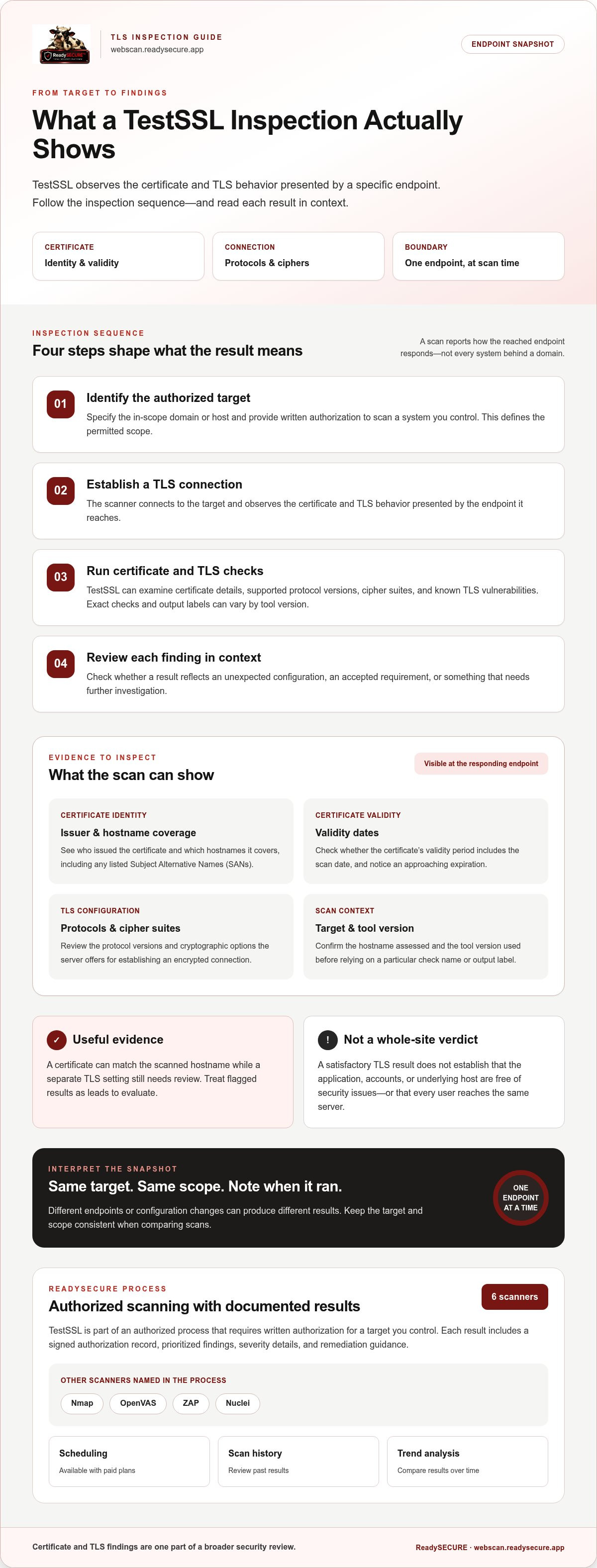
A TestSSL inspection follows a simple sequence, but each step affects what the results mean. The scan shows how a particular endpoint responds at that moment. It doesn’t automatically describe every server, environment, or application associated with a domain.
- Identify the authorized target. Specify the domain or other in-scope host and provide written authorization to scan a system you control. This sets the permitted scope.
- Establish a TLS connection. The scanner connects to the target and observes the certificate and TLS behavior presented by the endpoint it reaches.
- Run the checks. TestSSL examines TLS information, including certificate details, protocol support, cipher suites, and known TLS vulnerabilities. Exact output labels and checks can vary by tool version, so interpret them in light of the version used for the scan.
- Review the findings. Assess each result in context. Decide whether it reflects an unexpected configuration, an accepted requirement, or an issue that needs investigation.
ReadySECURE includes TestSSL among six industry-standard scanners in its authorized scanning process. Other scanners include Nmap, OpenVAS, ZAP, and Nuclei. Each scan requires written authorization for a target you control, and each result includes a signed authorization record. The report prioritizes findings and provides severity details and remediation guidance. Paid plans add scheduling, scan history, and trend analysis, helping teams compare results over time.
Which certificate and TLS details should readers look for?
Start by checking whether the certificate covers the hostname scanned, whether its validity dates include the scan date, and who issued it. Then review protocol and cipher findings to understand the connection options the endpoint offers. A flagged configuration may deserve attention, but it isn’t by itself evidence that someone breached the site. Confirm the target and tool version before relying on a specific test name or output label.
Results can differ if a scan reaches a different endpoint. A domain may route traffic to different servers, or its configuration may change between scans. For a useful comparison, keep the target and scope consistent, and note when each scan ran. If a result looks unexpected, verify the hostname assessed and whether it matches the system you intended to test.
What can an automated inspection not determine on its own?
An external TLS scan sees the behavior exposed to its connection. It can’t establish every internal security control or show how the application behaves across all users, accounts, and workflows. Review its results against the target’s intended configuration and business requirements. A scanner observation is evidence to assess, not confirmation of an exploitable weakness.
Use the report to guide investigation and decide what to check next. A scan doesn’t make configuration changes or resolve findings. For a documented assessment of a domain you control, you can start an authorized scan and review its prioritized results.
TestSSL service, SSL Labs, or a local tool: which approach fits?
The right option depends on the question you need answered. A standalone online checker can give you a quick view of a public endpoint. A local tool gives technically capable users more control over how they run TLS tests. An authorized scanning service can place TestSSL findings alongside results from other scanners and provide a prioritized report. No approach is a universal winner, and none proves that a website is completely secure.
Here’s how the workflows differ:
| Approach | Operation | Scope and report context | Authorization |
|---|---|---|---|
| Online checker, such as a web-based scanner | Submit a publicly reachable endpoint through a web interface. | Useful for a focused TLS view; the result may not address other types of exposure. | Use only for a target you’re authorized to assess. |
| Local TestSSL tool | Install or run the command-line tool and interpret its output. | Offers direct control over testing, but users must understand the tool’s options and findings. | The operator is responsible for keeping tests within authorized scope. |
| ReadySECURE authorized scan | Provide written authorization for a target you control. | TestSSL runs as one of six scanners, with prioritized findings and remediation guidance in the report. | Written authorization is required, and a signed record is attached to each result. |
When is a standalone online checker sufficient?
A one-off checker can answer a narrow question, such as whether a public website presents a certificate for the expected hostname or how its visible TLS configuration looks at the time of testing. It’s a practical starting point if you need a focused view and can interpret the result. But a TLS check won’t answer broader questions about other exposed services or application vulnerabilities. One scan also shouldn’t be mistaken for continuous monitoring.
When does a broader authorized scan add context?
Use a broader scan when you need more than a TLS snapshot. Different scanners look for different types of external findings, so combining their results can help clarify what needs attention across an authorized target. ReadySECURE’s report prioritizes discovered issues and provides remediation guidance, but scanning doesn’t guarantee complete coverage or fix findings. For help comparing workflows and reporting needs, see this automated vulnerability scanning guide.
A testssl certificate inspection service is a good fit when you need TestSSL’s focused TLS checks within a documented, authorized process. If you have the technical skills and need direct control, a local tool may suit your workflow. If you only need a quick look at a public endpoint, a standalone checker may be enough. Match the method to your scope, expertise, and reporting needs, and keep every scan within the permission you’ve been given.
How should you interpret and act on TestSSL inspection findings?
A scanner finding is a prompt for review, not an instruction to make a change without checking the evidence. Confirm which endpoint was tested, what the scanner observed, and whether that behavior conflicts with your organization’s requirements. A setting may be intentional for compatibility, for example, while an expired or mismatched certificate can interfere with trusted connections.
Use a consistent review sequence so findings lead to a decision:
- Confirm the target. Compare the hostname and endpoint in the result with the system you intended to assess. A finding for the wrong host won’t guide the right fix.
- Understand the evidence. Read the observed certificate or TLS behavior, the scan timestamp, and any explanation attached to the finding. Distinguish a confirmed observation from a scanner’s interpretation of its significance.
- Assess severity in context. Consider the effect on users, the service’s purpose, and your documented configuration requirements. Don’t assume every flagged setting carries equal risk.
- Assign an owner. Give the finding to the technical team responsible for that endpoint, with enough evidence to investigate it.
- Retest after action. Once an approved change is made, run an authorized follow-up check and compare the new evidence with the original result.
How do you prioritize certificate and TLS findings?
Start with an expired certificate or hostname mismatch, because either can prevent clients from establishing a trusted connection to the intended site. Next, compare protocol and cipher observations with your organization’s current TLS requirements and compatibility needs. A warning about an older option deserves investigation, but the label alone doesn’t tell you whether that option is enabled for users, needed by a supported system, or prohibited by policy. Prioritize based on evidence and impact, not an assumed score.
What should happen after a finding is reviewed?
Record the affected endpoint, relevant scan evidence, review decision, and technical owner. If a configuration change is warranted, plan it through your organization’s normal change-control process. The scan identifies and reports observations; it doesn’t change the server or confirm that a later configuration is correct. Retesting is a separate validation step. Compare the endpoint and specific evidence with the original result, then document whether the finding remains, has changed, or needs further investigation.
A testssl certificate inspection service is most useful when its findings become traceable work: evidence, a decision, an owner, an approved action, and verification. For more context on reviewing scan output, consult this vulnerability scan report guide. Ready to assess a target you control? Start an authorized scan and use the prioritized results to plan your next review.
How ReadySECURE delivers an authorized TestSSL certificate inspection
ReadySECURE’s testssl certificate inspection service starts with scope and consent, not an open-ended scan. Submit a domain or other target you control and provide written authorization before scanning. This authorization-first process covers websites, APIs, and internet-facing hosts within your control. It defines what the scan may assess and creates a documented record for the result.
What happens after you authorize a target?
- Submit the target. Identify the website, API, or internet-facing host you control and intend to assess. Clear scope helps direct the scan to the correct system.
- Provide written authorization. Scanning proceeds only after you authorize the target. ReadySECURE attaches a signed authorization record to each result.
- Run the assessment. The platform uses six industry-standard scanners, including TestSSL, to examine the authorized target. TestSSL contributes focused TLS findings alongside observations from the other scanners.
- Review the report. The report prioritizes discovered issues, shows severity, and provides remediation guidance so your team can decide what to investigate and address.
The report supports decisions; it doesn’t make configuration changes or guarantee that every security issue has been found. Your technical team remains responsible for reviewing findings, deciding on appropriate changes, and validating them. For a practical overview of what a free website security scan can help you review, consider how its findings fit into your organization’s next steps.
When is one scan enough, and when is scheduled scanning useful?
One scan provides a point-in-time view of one authorized target. ReadySECURE offers one free scan for one target, which can help you review current findings and decide what deserves attention. It represents the target’s observable configuration during that scan, not a continuing view of future changes.
Paid plans add scheduling, scan history, and trend analysis. Scheduling supports repeat assessments, while history and trends help teams compare findings over time and see whether changes coincide with new or resolved observations. These records can make follow-up reviews more structured, but they don’t replace your own risk assessment or confirm that a system is secure between scans.
Before starting, confirm that the target is under your control and that you can provide written authorization. Then use the report as an organized input to your review process, with clear ownership for follow-up. Ready to assess one authorized target? Start your free scan.
Make the next scan part of a clear security process
Treat each authorized scan as a point of comparison. Record who owns the target, what action a finding requires, and what evidence will show whether a later change worked. This gives your team a practical basis for reviewing the endpoint again when its configuration changes.
ReadySECURE brings TestSSL together with five other industry-standard scanners, then presents prioritized findings with severity details and remediation guidance. Each result includes a signed authorization record alongside its findings. The testssl certificate inspection service is one focused input to that process, not a substitute for your team’s decisions or follow-up checks.
Start with a target you control and written authorization. Start an authorized ReadySECURE Free Scan to get a point-in-time view of one target and plan your next review. Clear scope and an assigned follow-up owner turn inspection into a more disciplined security habit.
Frequently Asked Questions
What does a TestSSL certificate inspection check?
A TestSSL inspection checks certificate information and aspects of the server’s TLS configuration. Certificate checks can show whether the presented certificate is valid for the requested hostname and within its validity dates. Broader TLS checks can examine offered protocol versions and cipher suites. For example, a certificate may match a domain even if a separate connection setting needs review. Exact checks and output labels depend on the tool version, target, and scan.
Is TestSSL the same as an SSL certificate checker?
Not exactly. A basic certificate checker focuses on details such as issuer, expiration, and hostname coverage, while TestSSL can also examine wider TLS settings, including protocol and cipher support. The word “SSL” remains common in checker names, but modern encrypted connections use TLS, SSL’s successor. When comparing results, check whether a tool assesses only certificate identity or also reports on the server’s connection configuration.
Can a TestSSL inspection prove that a website is secure?
No. A TestSSL result is a point-in-time view of the TLS behavior visible to the scanner at the endpoint it reached. It can’t establish that every application feature, server, internal control, or user workflow is secure. For example, a sound TLS configuration doesn’t rule out an authentication flaw in the website. Use inspection evidence to guide follow-up questions, not as a guarantee that the whole site is safe.
How do I run a TestSSL inspection legally?
Only scan systems you control or have explicit written authorization to test. Permission should cover the specific target, such as the domain or host you intend to assess, rather than assuming that access to a related website includes permission. ReadySECURE requires written authorization before scanning a customer-controlled target and attaches a signed authorization record to each result. Keep the target within the approved scope, especially when a domain routes to multiple systems.
What should I do if a certificate inspection reports an expired or mismatched certificate?
First verify the hostname in the finding and compare it with the certificate evidence and scan time. Then give the result to the administrator responsible for that endpoint. They can investigate whether the certificate needs renewal or whether the server is presenting a certificate for a different hostname. Plan any correction through normal change control, then run an authorized follow-up check to see whether the observed mismatch or expiration has changed.
Does ReadySECURE use TestSSL by itself?
No. ReadySECURE uses TestSSL as one component of its authorized scanning process, alongside five other industry-standard scanners. This brings together different types of findings rather than relying on a TLS-only result. Discovered issues are prioritized, with severity details and remediation guidance to help direct review. The report supports investigation and planning; it doesn’t automatically change the target’s configuration or establish that every weakness has been found.
Is one TestSSL scan enough, or should TLS be checked regularly?
One scan provides a snapshot, which may suit a one-time review of a specific configuration. A later certificate renewal, hosting change, or TLS update can alter what an endpoint presents, so teams with ongoing monitoring needs may want repeat checks. There isn’t one schedule that fits every system. ReadySECURE paid plans add scheduling, scan history, and trend analysis, helping teams compare results over time and choose a review cadence that fits their environment.


