

Can OpenVAS scan a website and tell you whether its web application is secure? It can assess exposed hosts and services, but that is not the same as testing every page, API, or application workflow. Understanding this difference is central to using openvas scanning for websites effectively.
OpenVAS can help identify known vulnerabilities and configuration issues on internet-facing systems. It cannot reliably uncover every flaw in custom application logic, so interpret its results within the limits of the scan’s scope. Before you start, consider what the scan can detect, how you will review its findings, and whether the target is authorized.
This guide explains what OpenVAS can reveal, where host scanning ends and web application testing begins, and how to prepare an authorized scan. You’ll also learn how OpenVAS fits into a broader scanning workflow and how to prioritize findings. Scan only systems you control and have written authorization to test.
Key Takeaways
- OpenVAS scanning for websites can identify known issues on exposed hosts and services, but it doesn’t establish that an entire web application is secure.
- Separate network and service checks from application-layer testing to understand what each scan can reveal.
- Before scanning, secure written authorization and define the exact domain or asset in scope. Exclude unrelated third-party systems.
- Use findings as a starting point: review severity and remediation guidance, then prioritize what to address.
- ReadySECURE uses OpenVAS alongside five other scanners and attaches a signed authorization record to each result.
What Does OpenVAS Scanning for Websites Actually Do?
OpenVAS is a vulnerability scanner that checks network-accessible systems and services for known security issues. For a website, it can examine the internet-facing host, identify reachable services, and test them against available vulnerability checks. The OpenVAS Wikipedia page describes its place within the wider Greenbone Vulnerability Management framework. This is one reason findings depend on more than the scanner’s name: target, access, and scan configuration all matter.
In practice, openvas scanning for websites may reveal an outdated service, a known vulnerability associated with exposed software, or a configuration concern. It does not automatically examine every feature visitors can use. The target definition, scan configuration, and services reachable from the scanner all affect what gets assessed and reported.
What OpenVAS checks on a website’s internet-facing host
A website depends on a host and the services that respond over the network. Depending on what is exposed and how the scan is configured, OpenVAS may identify those services and check for known vulnerabilities or weaknesses. For example, a finding might concern a vulnerable version of a service that supports the site, rather than a flaw in a particular page or checkout process.
Scans can be unauthenticated or authenticated. An unauthenticated scan checks what is visible without logging in. An authenticated scan uses approved credentials to examine areas that require access. Deeper visibility depends on the scan setup and permissions. Either way, the scanner can assess only the target and services reachable from its scanning environment.
What a vulnerability scan can and cannot establish
A vulnerability scan runs configured checks and reports possible issues for review. Penetration testing is broader: it can involve a tester validating weaknesses and exploring how they might combine to affect a system. A scan can support a security assessment, but it is not a substitute for manual validation or a complete test of application behavior.
This distinction matters for custom web applications. A scanner may detect a known issue in an exposed component, but miss business logic flaws, such as an order workflow that allows an unintended action. It also cannot prove that no vulnerabilities exist. Treat each result as evidence to assess, not a final verdict. Confirm that the affected asset is in scope, review the finding’s severity and context, and decide what investigation or remediation is appropriate.
Scanner findings describe issues detected within the defined target, accessible services, and configured checks. They do not establish the security of components or behaviors the scan did not assess. This scope-based interpretation helps teams distinguish an actionable host finding from a question that needs a different type of testing.
How OpenVAS Scanning Works Across Website and Network Layers
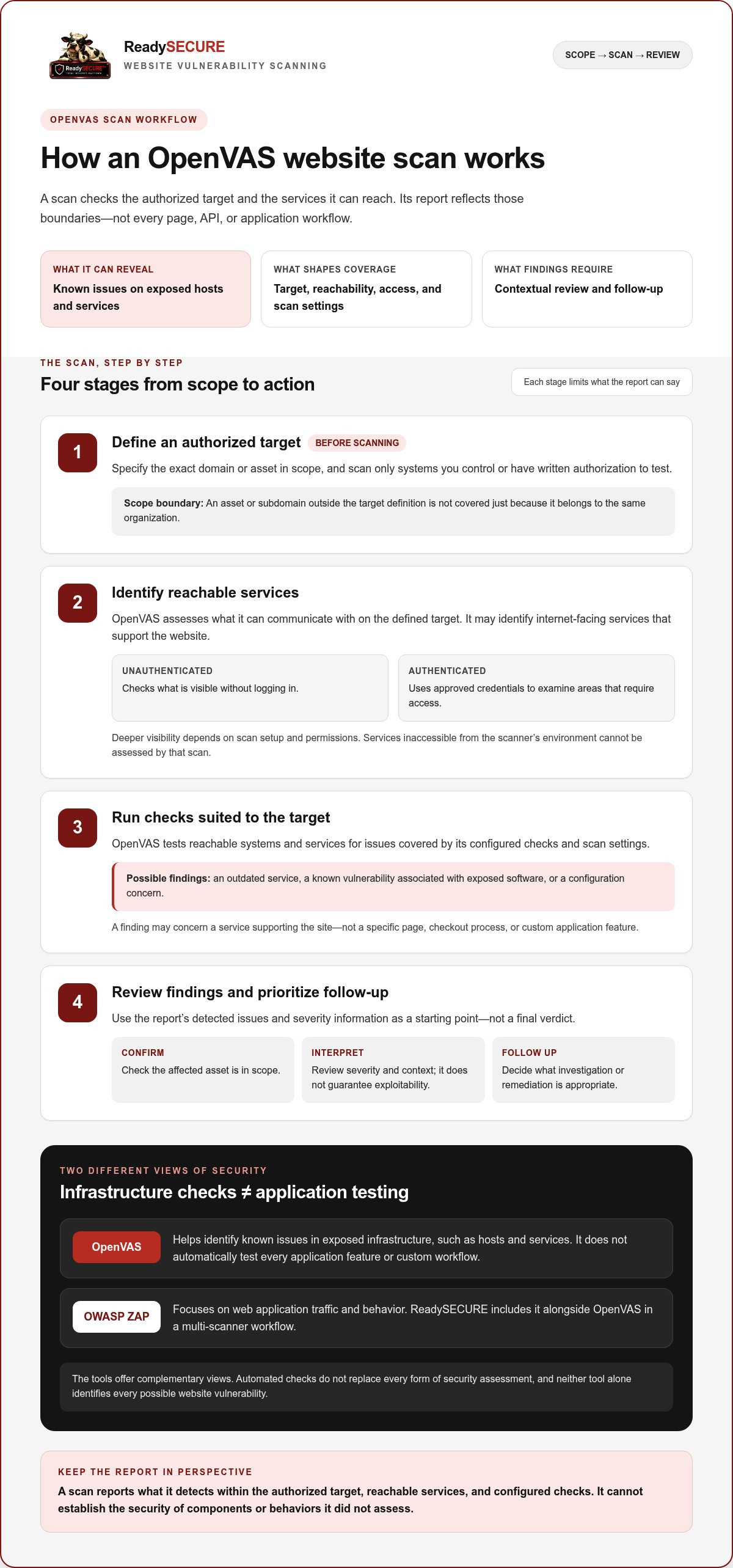
A scan starts with a defined target, identifies the services that respond, then runs checks suited to what it can reach. The report reflects that process, not every part of the website. A server might expose a service with a known vulnerability even when the site’s pages load normally. In contrast, a network scan may not explore how an account, shopping cart, or API behaves.
- Define the target. The scan begins with a specific, authorized domain or asset.
- Identify reachable services. The scanner assesses what it can communicate with on that target.
- Run configured checks. OpenVAS tests reachable systems and services for issues covered by its checks and scan settings.
- Review reported findings. The report records detected issues and relevant severity information for follow-up.
Scope determines what a report can show: findings are limited by the authorized target, network reachability, exposed services, scan configuration, and the checks the scanner runs. A subdomain or service left outside the target definition will not be covered simply because it belongs to the same organization. Inaccessible services cannot be assessed by that scan either.
OpenVAS checks versus web application testing
Infrastructure checks focus on the host and services supporting a site. Application testing examines how the site behaves, such as whether it handles inputs safely or an account workflow exposes data. These are related but distinct layers. ReadySECURE includes OpenVAS in a multi-scanner workflow that also uses OWASP ZAP for active or passive web application scanning. Neither tool alone identifies every possible website vulnerability.
Think of them as different views. OpenVAS can help identify known issues in exposed infrastructure, while ZAP focuses on web application traffic and behavior. Findings from either scanner need to be interpreted in context. The tools complement each other, but automated checks do not replace every form of security assessment.
How scan configuration and findings affect results
Reachability and configuration shape what OpenVAS tests. A service that does not respond from the scanner’s vantage point may not appear in its findings. Scan settings also determine which checks run, so two scans of the same domain can provide different coverage. Before interpreting results, confirm which asset was scanned and what the configuration included.
Severity helps teams decide what to review first, but it does not guarantee that an issue can be exploited in the target’s specific context. Consider the affected service, its exposure, and potential impact, then validate and prioritize remediation. A detailed scan report guide can help explain report fields and turn findings into follow-up actions.
ReadySECURE brings multiple scanning layers together in an authorized workflow. You can scan an authorized website to assess a target you control.
Is OpenVAS Enough to Scan a Website?
No single scanner establishes that a website is completely secure. OpenVAS can reveal useful information about exposed hosts and network services, but it does not cover every application behavior, encryption setting, or port in the same way. The useful question is whether the checks match the risk you want to assess. Combining scanners can broaden visibility, but cannot guarantee that every issue will be detected.
Which website risks may need different scanning approaches?
Each scan layer answers a different question. A port scan can show which network entry points are reachable, but does not explain whether an application handles user input safely. Web application scanning examines application traffic or behavior, while TLS inspection focuses on a site’s encrypted connection. Template-based checks look for issues covered by their selected test templates.
| Scan layer or tool | What it helps assess | Important limit |
|---|---|---|
| OpenVAS | Known vulnerabilities on exposed hosts and services | Doesn’t establish application-wide security |
| Nmap | Reachable ports and services | Port visibility alone doesn’t verify application behavior |
| OWASP ZAP | Web application checks, including active or passive scanning | Automated checks don’t cover every custom workflow |
| TestSSL | TLS configuration | Doesn’t assess unrelated application or host risks |
| Nuclei | Checks based on selected templates | Results depend on the templates and target in scope |
These tools have distinct roles, so their results are not interchangeable. Nmap may identify a reachable service, while OpenVAS can check exposed services for known vulnerabilities. ZAP, TestSSL, and Nuclei assess other parts of the environment. Combining tools can reduce blind spots, but no combination guarantees detection of every weakness.
How to judge whether scan coverage fits your goal
Start by defining the question you need answered. If you are concerned about host exposure, include the internet-facing host and relevant services in scope. If you need to assess application behavior, include web application checks. If your concern is the encrypted connection, include TLS inspection. A broader review may need more than one layer.
Next, separate what the report detected from what still needs review. Severity helps prioritize findings, but it does not prove that an issue is exploitable in your environment. Check the affected asset and context, and treat application logic issues or ambiguous results as candidates for expert review or manual testing. A scan result is evidence about configured checks, not a certification or proof of complete security. For detailed tool-selection advice, consult a dedicated vulnerability scanning tools guide.
How to Prepare for an Authorized OpenVAS Website Scan
A safe scan starts before the scanner runs. For openvas scanning for websites, written authorization and a clearly defined target are essential. Entering a domain does not grant permission to assess every system connected to it. Use these steps to set clear boundaries and make findings easier to act on.
- Obtain written authorization. Confirm that you control the target and have written permission to scan it. Keep a record identifying the authorized asset and the person or organization granting permission.
- Specify the exact target. Record the domain or asset to be assessed, including the precise hostname or address where relevant. Do not assume authorization for one domain also covers its subdomains, hosting provider, CDN, or other adjacent third-party systems.
- Set and record the scope. List what is included and excluded. Note the intended scan timing and a responsible contact who can respond to questions about the target or findings.
- Run the scan only within that scope. Check the target details before starting. If ownership or authorization for an asset is unclear, leave it out until you have written permission.
- Review findings before deciding on remediation. Assess each issue in context, then prioritize investigation and follow-up based on its severity, affected asset, and remediation guidance.
Confirm ownership, written authorization, and scan scope
Authorization should cover the specific assets being tested, not just a broad business relationship or a domain name entered into a scan form. A website may depend on systems controlled by other parties. Exclude those assets unless your written authorization covers them. Documenting the boundary in advance helps prevent unintended testing and gives everyone a shared reference for interpreting the results.
Review and prioritize the scan report
Do not treat a severity label as a complete decision. Read it alongside the issue description and affected asset, then use the remediation guidance to plan investigation and follow-up. A reported issue may need validation in its actual environment. The scan result alone does not determine impact or prove exploitability. A guide to interpreting an external vulnerability scan report can help you assess findings and organize next steps.
ReadySECURE scans require a domain and written authorization, and each result includes a signed authorization record. Start an authorized website scan for a target within your scope.
How ReadySECURE Uses OpenVAS in an Authorized Website Scan
ReadySECURE uses OpenVAS as part of a broader scanning workflow, rather than treating one scanner as a complete security assessment. The process is limited to a target the user controls and has written authorization to scan. Findings represent results from that authorized target and the checks performed, not a guarantee that every risk has been found.
What the ReadySECURE scan includes
To begin, users submit a domain and provide written authorization. ReadySECURE runs six industry-standard scanners against the authorized target, including OpenVAS, Nmap, ZAP, TestSSL, and Nuclei. Each provides a different scanning perspective, helping assess more than one type of internet-facing risk.
OpenVAS contributes network vulnerability checks. Nmap scans ports, ZAP performs active or passive web application scanning, TestSSL inspects TLS, and Nuclei runs template-based checks. These tools can surface different findings, but no automated scan can promise to detect every vulnerability or replace review of results in context.
The report is designed to help turn findings into a practical review. It prioritizes discovered issues, includes severity information and remediation guidance, and attaches a signed authorization record to each result. That record documents the authorization associated with the scan. Review findings against the target and scope, then use the guidance to identify what needs investigation and which remediation steps to prioritize.
Choose a one-time scan or ongoing visibility
If you want a single assessment, ReadySECURE’s free scan covers one scan of one target. Review the findings, consider their severity and affected assets, and use the remediation guidance to plan follow-up.
For continued visibility, paid plans add scheduling, scan history, and trend analysis. These features help track findings across scans over time, making it easier to review changes in the observed security posture. A recurring scan still represents a defined set of checks at a point in time, so interpret trends alongside changes to the target, scope, and systems being assessed.
In either case, start with an asset you control and written authorization to scan it. Keep the domain and scope precise, then review and prioritize the report before making remediation decisions. This provides a path from openvas scanning for websites to actionable next steps while keeping the limits of automated scanning in view.
Ready to assess an authorized target? Start an authorized website scan.
Turn Findings Into Your Next Security Decision
A scan is most useful when it leads to a clear next step. For each finding, confirm the affected asset, assign appropriate follow-up, and check that planned changes address the issue. If the scan does not cover a concern, define that question separately rather than assuming a clean report answers it.
ReadySECURE brings six industry-standard scanners, including OpenVAS, Nmap, ZAP, TestSSL, and Nuclei, into an authorized workflow. Its report prioritizes findings, provides severity and remediation guidance, and attaches a signed authorization record to each result. Use those details to decide what to investigate and address first, without mistaking scanner results for proof of complete security.
Keep the target within your control and written authorization, then use the results to build a focused security work plan. Start an authorized ReadySECURE scan to turn assessment into informed action.
Frequently Asked Questions
Can OpenVAS scan a website?
Yes. OpenVAS can scan a website’s reachable internet-facing host and services for known vulnerabilities, provided the target is in scope and accessible to the scanner. For example, a scan may identify a known issue associated with a service supporting the site. Results depend on the specified target and what the scanner can reach. A domain name alone does not mean every related asset is included.
What vulnerabilities can OpenVAS find on a website?
OpenVAS can identify known vulnerabilities and certain weaknesses on exposed systems and services, such as outdated software, misconfigurations, or weak passwords when its checks can detect them. A reported issue relates to the asset and conditions assessed, not necessarily every page or feature on the site. Review the finding’s evidence and affected component before deciding whether it applies to your environment.
Is OpenVAS a web application scanner?
OpenVAS is primarily a network vulnerability scanner, not a complete test of web application behavior. It may assess exposed services that support a website, but that differs from checking how forms, accounts, or application workflows behave. A flaw in how a site processes a user’s request, for example, may need application-layer testing. Interpret scan results according to the checks performed.
Do I need written permission to scan my website with OpenVAS?
Yes. Scan only targets you control and have written authorization to assess. A domain may rely on hosting, CDN, or other systems managed by third parties, so permission for your website does not automatically cover those assets. Tie authorization to the specific domain or asset being scanned, and exclude anything outside the approved scope.
Can OpenVAS scan a website without login credentials?
Yes. An unauthenticated scan checks what is visible to the scanner without logging in. It can provide an external view, but it will not see checks that require access to the host. Authenticated scanning can provide deeper visibility when credentials and scan configuration allow it. Whether credentials are used depends on the assessment; an OpenVAS scan does not always require them.
How often should I run an OpenVAS scan on my website?
There is no single schedule that suits every website. Consider scanning after significant infrastructure or software changes, when new services become exposed, and periodically according to your security needs. Keep the target and scan settings consistent when comparing results over time. Otherwise, a difference may reflect changed coverage rather than a change in risk. Use scheduling when regular checks are part of your process.
Is one OpenVAS scan enough to secure a website?
No. A scan captures findings from a particular target and configuration at a point in time. It can help identify issues, but it cannot prove that a site has no weaknesses or assess every application behavior. A clean result, for example, does not establish that a custom account workflow handles access correctly. Treat one scan as a useful assessment input, then decide whether other checks or review are needed.
What should I do after an OpenVAS scan finds a vulnerability?
Start by checking the affected asset and reading the finding’s description, evidence, severity, and remediation guidance. Confirm whether the reported software or configuration is present and relevant to that system. Then prioritize investigation and remediation based on the finding’s context and potential impact. After making changes, a follow-up scan can help determine whether the issue is still detected. Retain the result to document your review.


