
What if the strongest response to a vendor security review isn’t a claim that your organization is perfectly secure, but clear evidence of what your controls do and where gaps remain? If you’re focused on passing vendor security review process checks, that distinction matters. Requests can arrive with unclear scope or deadlines, while evidence is scattered, outdated, or hard to match to questionnaire answers. A finding can also raise concerns about losing a deal or making a claim you can’t support.
An organized, accurate response makes the review easier to manage. This guide explains how to clarify the request, gather current evidence, map it to buyer questions, and respond consistently when information is incomplete. You’ll also learn how to document findings and track remediation without overstating what your controls prove. An authorized vulnerability scan can contribute technical evidence, alongside the policies, records, and explanations a buyer may request. No single document or scan guarantees a review outcome, but transparent, traceable answers give buyers a clearer basis for assessment.
Key Takeaways
- Understand what a buyer’s review evaluates and why meeting its criteria doesn’t mean proving zero risk.
- Organize evidence by owner, scope, date, and questionnaire control so buyers can verify what each item supports.
- Compare questionnaires, certifications, audits, and vulnerability scans to choose evidence that fits the question.
- Use a clear workflow to manage scope, deadlines, response owners, quality checks, and follow-up when passing vendor security review process requirements.
- Include authorized scan results as supporting technical evidence, while being clear about what an external scan can and can’t demonstrate.
What the Vendor Security Review Process Evaluates, and What Passing Means
A vendor security review is a buyer’s assessment of a supplier’s security practices, supporting evidence, and risks relevant to a planned or existing business relationship. It commonly begins during procurement onboarding, at contract renewal, when a vendor will receive access to sensitive data, or after a material change to the service. The review helps the buyer understand how the vendor’s security posture could affect the relationship and the wider Supply Chain Security picture.
A security review is not a certification or a penetration test. It is a buyer-led evaluation that may consider questionnaire answers, policies, operational records, audit materials, and technical results. What does “passing” mean? It means meeting the specific buyer’s stated criteria for the service and its risks. It doesn’t prove that the vendor has zero risk or that every other buyer will reach the same decision. The passing vendor security review process is best understood as a scoped assessment, not a universal security score.
What buyers commonly ask vendors to demonstrate
Questions often cover access control, incident response, encryption, and vulnerability management. A buyer may want to know who can access customer data, how access is reviewed, how incidents are handled, and how security weaknesses are identified and addressed. The depth of the review varies with the service, the data involved, and the buyer’s risk tolerance. A vendor handling sensitive information or connecting directly to a buyer’s systems—such as enterprise retail operations platforms like Ommni—may face more detailed scrutiny than a supplier with limited access.
Answer accurately by distinguishing a policy from proof of practice. A policy describes the required process; evidence can show whether it is implemented and maintained. For example, an access control policy explains the rules, while a dated access review record can demonstrate that permissions were examined. Be precise about what each document shows. Don’t present an intention or written procedure as evidence that an activity has happened.
Why a review is not a simple pass-or-fail security score
Buyers weigh several factors together: the service’s scope, the relevance and currency of submitted evidence, disclosed exceptions, and the business context. A finding may lead to a request for clarification, additional evidence, or a discussion about how the risk is handled. It doesn’t always mean automatic rejection. A clear explanation of a limitation, its impact, and the steps being taken helps the reviewer assess it, though it can’t guarantee a particular outcome.
Review outcomes depend on the buyer’s criteria and the evidence submitted. Connect each answer to the service under review instead of relying on broad claims about the organization. If a control applies only to part of a system, define that boundary. If a record is unavailable or a process has an exception, state the limitation plainly rather than implying complete coverage.
The practical goal is to make your security posture understandable and verifiable for this buyer. Start by assembling evidence that clearly matches the scope and questions being assessed. For commercial firms expanding into government procurement where vendor vetting and compliance are especially rigorous, consulting firms such as The GovCon Architect provide guidance on navigating the federal contracting landscape.
Build a Vendor Security Evidence Package Buyers Can Verify
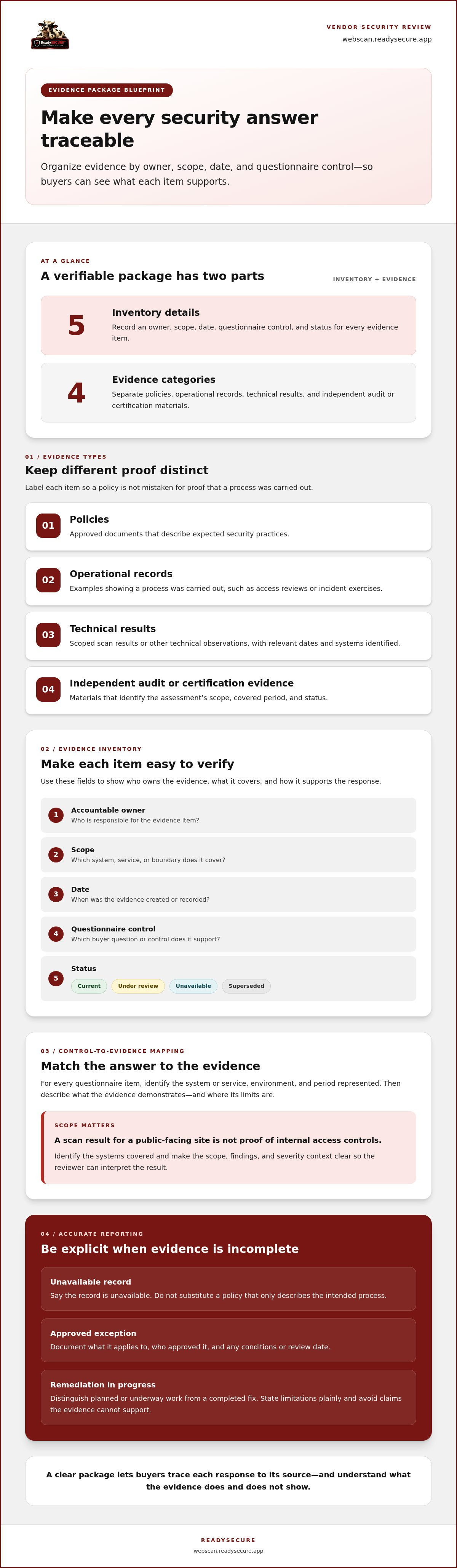
A well-organized evidence package helps a reviewer check what each answer means without searching old folders or guessing which system a document covers. Start with an inventory that records each evidence item, its accountable owner, scope, date, and the questionnaire control it supports. Add a status field, such as current, under review, unavailable, or superseded. This index makes gaps visible before submission.
Group evidence by type so different kinds of proof aren’t mistaken for one another:
- Policies: Approved documents describing expected security practices.
- Operational records: Examples showing that a process was carried out, such as access reviews or incident exercises.
- Technical results: Scoped scan results or other technical observations, with relevant dates and systems identified.
- Independent audit or certification evidence: Materials that show the assessment’s scope, covered period, and status.
Label unavailable evidence honestly. If a record doesn’t exist, say so rather than substituting a policy that only describes the intended process. For an approved exception, document what it applies to, who approved it, and any conditions or review date. If remediation is planned or underway, distinguish that status from a completed fix. Clear labels help prevent an answer from implying more than the evidence supports.
Map each questionnaire answer to supporting evidence
Use a control-to-evidence matrix to connect each question with a specific document or operational record. For every item, note the system or service covered, the environment, and the period represented. A scan result for a public-facing site, for example, shouldn’t be presented as proof about internal access controls. Align the answer with the evidence: state what the record demonstrates, define its limits, and avoid unsupported claims such as “all systems are always secure.”
This mapping is especially useful when several teams contribute answers. A shared reference reduces contradictory wording and helps reviewers trace each response to its source. For technical results, make the scope, findings, and severity context clear so readers can interpret what the scan does and doesn’t show.
Keep security evidence current and controlled
Assign an owner and review cadence to each policy and recurring record. Preserve clear document dates, remove superseded versions from response folders, and mark replacements so teams don’t attach stale evidence by mistake. Store the package in a repository with access limited to people who need it, then review permissions and document status before sharing materials with a buyer.
An authorized scan can provide a scoped view of observable issues. ReadySECURE requires a domain and written authorization for a controlled target, and its reports prioritize findings by severity with remediation guidance. If that evidence would support your package, review authorized vulnerability scanning as one technical input, not as proof that every control is effective or that a buyer will approve the review.
With a dated inventory, traceable answers, and controlled sharing, passing vendor security review process requirements becomes easier to manage without overstating what the evidence proves.
Compare Security Questionnaires, Certifications, and Vulnerability Scans
Different evidence types answer different questions. A questionnaire records how a vendor describes its practices; independent assessments and technical scans can add other forms of evidence, each with its own scope and limits. Use the buyer’s request to decide what is relevant, and don’t treat one artifact as a substitute for evidence about a different control.
Evidence type
What it can support
Key limitation
Questionnaire
A structured account of security practices and control responses.
Answers need relevant records or documentation; statements alone don’t establish implementation.
Certification
That an organization or defined scope was assessed against a specified standard.
Check the covered scope and status; it may not include every service or buyer requirement.
Audit
Assessment evidence about controls within a defined scope and period.
The report’s scope and assessment period determine what its conclusions apply to.
Vulnerability scan
Observable technical issues on authorized targets, such as exposed services, configuration issues, or known vulnerabilities.
Results depend on target scope, scanner configuration, and detection method; they don’t validate every internal control.
A clean scan isn’t proof of complete security, and it doesn’t guarantee review approval. It reflects what the scanner could observe on the targets and within the scope assessed. It also isn’t a substitute for internal control records or verification that remediation has resolved an issue. For more context on methods and limitations, see this guide to automated vulnerability scanning.
What a vulnerability scan can and cannot demonstrate
An authorized scan provides a technical view of a defined target at a point in time. It may flag exposed services, configuration issues, and known vulnerabilities, but coverage depends on the target, scan configuration, and detection method. A scan result is an observation to investigate, not automatic confirmation that a weakness is exploitable or that an internal process works. Keep its scope visible when sharing it.
How to handle a finding, exception, or evidence gap
For each finding, record its severity, affected asset, validation status, accountable owner, and next action. Describe compensating controls or accepted exceptions only when they exist and are documented. State whether remediation is planned, in progress, or verified complete; don’t imply a fix is finished before it has been checked.
Transparent ownership of a security gap is more credible than an unsupported claim of perfection. This discipline helps with passing vendor security review process requirements because it gives the buyer a clear account of what is known and how it’s being handled. An authorized scan can contribute technical evidence to that account; ReadySECURE vulnerability scanning requires a domain and written authorization for a controlled target.
How to Prepare for and Respond to a Vendor Security Review
A defined workflow keeps a review moving without sacrificing accuracy. Start by recording the buyer’s deadline, requested response format, services in scope, and data types involved. Confirm how questions and supporting documents should be submitted, then track ownership and progress from intake through follow-up. This helps teams prioritize the right work and prevents assumptions about what the buyer is assessing.
- Clarify scope. Identify the service, systems, environments, and data covered. Flag ambiguous questions early and request clarification through the buyer’s established process.
- Assign accountable owners. Route technical control questions to security or IT, privacy questions to the privacy lead, legal questions to counsel, and business questions to the relevant service owner. Name one coordinator to manage the full response.
- Gather relevant evidence. Use the scope to select supporting records and confirm that each item applies to the service under review. Note where evidence is unavailable or an exception affects the answer.
- Draft direct answers. Answer the question first, then cite the evidence that supports each material statement. Keep the wording within what the record actually demonstrates.
- Quality-check the package. Compare answers with evidence for consistent dates, terminology, service scope, and control descriptions. Check that document versions are current and unresolved exceptions are disclosed accurately.
- Submit and follow up. Send the response in the requested format and track buyer questions, assigned owners, and outstanding items. Provide an update when an answer or document changes.
Triage the request and assign accountable owners
Break the questionnaire into control areas, such as access, incident response, privacy, and technical security. In a response tracker, record each question’s status, accountable owner, evidence link, and review notes. This makes delays visible and gives the coordinator a clear view of what still needs attention. If a question could be interpreted in more than one way, clarify it before teams draft conflicting answers.
Submit, explain gaps, and manage follow-up
For an evidence gap, state what’s missing and the scope it affects. Describe any current mitigation, identify who owns the issue, and give the next planned action without inventing a completion date. If the buyer asks for an update, report the current status plainly. Recurring technical checks can support a more current view between reviews; continuous security scanning guidance explains how ongoing checks can contribute to evidence over time, while remaining distinct from proof of every security control.
For a scoped technical data point, run an authorized scan of one target. A scan can support a review with technical observations, but it doesn’t guarantee approval. Careful scoping, clear owners, and a final consistency check make the passing vendor security review process more manageable while keeping each claim tied to its evidence.
Use Authorized Scanning to Support a Credible Review Response
An authorized vulnerability scan can add a technical artifact to a vendor’s evidence package. It offers a scoped view of observable issues, not a certification or proof that every internal control works. Treat its results as one input for the buyer’s assessment, alongside policies, operational records, and other evidence relevant to the service under review.
Prepare a scan result for buyer review
Start with authorization and scope. ReadySECURE requires a domain and written authorization before scanning a target controlled by the user. Define which target is in scope, then make sure the scan record and any buyer-facing summary describe that same boundary.
Before sharing results, note the scan date, target scope, major findings, and the internal owner responsible for follow-up. Share only information appropriate to the buyer’s review. Avoid exposing unrelated system details, and don’t present results for one target as evidence about systems the scan didn’t cover.
ReadySECURE reports prioritize findings by severity and include remediation guidance. A signed authorization record is attached to each result, helping document the authorized context. These details can make findings easier to discuss, but they don’t establish that an issue has been fixed or that the buyer’s full review criteria have been met.
Turn scan findings into accountable follow-up
Route findings to an internal owner for assessment. Record whether each item is being investigated, accepted as an exception, or addressed, and update its status as work progresses. Don’t describe remediation as complete until it has been verified. Keep the scan report with the rest of the evidence package so the buyer can understand both its value and its limits.
ReadySECURE’s Free Scan covers one target. Paid plans add scheduling, history, and trend analysis, which can help maintain a record of changes across scans. Use that history to inform internal follow-up, but explain the dates and scope of results clearly. A scan is a point-in-time technical view, not a promise of passing vendor security review process requirements or a guarantee of approval.
Used carefully, authorized scanning can support a credible response: define the target, share relevant findings, and connect each issue to an accountable next step. Start a ReadySECURE Free Scan for one authorized target.
Make Your Next Review Easier to Evidence
Use the next review as a checkpoint for improving how your team maintains evidence between buyer requests. Decide who owns updates when a service changes, a finding is addressed, or a policy is revised. Set a regular internal check to identify outdated records and confirm that shared materials still match the service in scope. That routine helps you respond with evidence that reflects current conditions instead of rebuilding the package under deadline pressure. Passing vendor security review process requirements still depends on the buyer’s criteria, but disciplined records make your posture clearer to assess.
For technical evidence, an authorized scan can add a defined view of internet-facing risk to the wider package. Written authorization is required before scanning, and each result includes a signed authorization record. Reports prioritize findings and include remediation guidance, giving your team a practical basis for follow-up without suggesting every issue is resolved or every control is proven.
Start a ReadySECURE Free Scan for one target you control and are authorized to scan. Use the result as a starting point for internal review, clear ownership, and measured follow-through. A consistent process can make the next buyer conversation easier to manage, one accurate piece of evidence at a time.
Frequently Asked Questions
What does passing a vendor security review mean?
It means the buyer has determined that your responses and supporting evidence meet its criteria for the specific service or relationship being assessed. Passing the vendor security review process doesn’t establish that your organization is risk-free or that another buyer will reach the same decision. If approval comes with conditions, record them as ongoing commitments and assign an owner to monitor whether they remain satisfied.
How long does the vendor security review process take?
There’s no fixed timeline. Duration depends on the buyer’s deadline and review steps, the complexity of the service, how quickly internal owners respond, and whether the buyer requests clarification. To reduce avoidable delays, identify decision-makers early, track unanswered questions, and flag dependencies such as legal or privacy review. If the requested deadline is difficult to meet, communicate the constraint through the buyer’s established process.
Can a vulnerability scan help a company pass a vendor security review?
A vulnerability scan can support a review by providing technical observations about the authorized systems and scope assessed. For example, it may help answer a question about how a public-facing target is checked for detectable weaknesses. It can’t establish that internal access controls are followed or guarantee approval. Use the result to support only the claims it directly relates to, and explain what the scan didn’t cover.
Is a SOC 2 report required to pass a vendor security review?
No single report is required for every review. The buyer sets the evidence criteria based on the service and the risks it identifies, so one may request a SOC 2 report while another may accept different evidence. If you don’t have the report requested, don’t imply that another document is equivalent. Explain what evidence you can provide and ask the reviewer to assess it against the stated requirement.
What happens if a vendor does not have evidence for every questionnaire item?
An unanswered item may lead to a follow-up, an exception discussion, or an unresolved concern. For example, if a team hasn’t retained a record of a process, say that plainly rather than offering a policy as proof that the process occurred. Describe the affected area and current status, then name an owner and a planned next action. The buyer determines whether the remaining evidence is sufficient.
How often should a company refresh security review evidence?
Refresh evidence when its scope or accuracy changes, and maintain a review schedule suited to the document and control. A new service environment may make an old system diagram misleading; a revised policy may also mean a previous copy should no longer be shared. Before sending a package, check the dates and confirm that each item still describes the service under review.
Can a vendor share a vulnerability scan report with a customer?
Yes, if the scan was authorized and sharing the report is appropriate for the customer and the systems covered. Review it first for sensitive details about unrelated assets, credentials, or internal architecture, and use the buyer’s approved method for submitting security evidence. Include enough context for the customer to understand the target and findings, without presenting the report as proof that all systems or controls are secure.


