

An open port is an exposure clue, not proof that a web server is vulnerable. When you use nmap port scanning for web servers, a reachable service tells you what may be listening, but not whether it can be exploited.
Before scanning, define which host and ports are in scope, and confirm you have permission to assess them. Then choose a scan that answers a specific question, such as whether HTTP or HTTPS is reachable. A measured approach helps you identify exposed web services without turning a basic check into an unnecessarily broad probe.
This guide explains how to scan authorized hosts, recognize common web-related ports such as 80 and 443, and interpret open, closed, and filtered states alongside service-detection results. It also explains what Nmap’s findings cannot establish: a port scan maps network exposure, but doesn’t confirm a vulnerability or replace broader application-security testing. You’ll learn when a vulnerability scan can add useful context and how to decide what to investigate next.
Key Takeaways
- For nmap port scanning for web servers, define the authorized target and select ports that match the services you need to check.
- Use a restrained Nmap command to identify reachable web services, then treat service labels as clues rather than a confirmed inventory.
- Distinguish open, closed, and filtered results to understand what the scan can establish about network reachability.
- Keep port discovery separate from vulnerability confirmation. Nmap doesn’t test every application route, input, or authentication flow.
- Record scan details, validate and prioritize findings, and track remediation and retesting. Use broader scanning when you need more context.
What Nmap Port Scanning Reveals About a Web Server
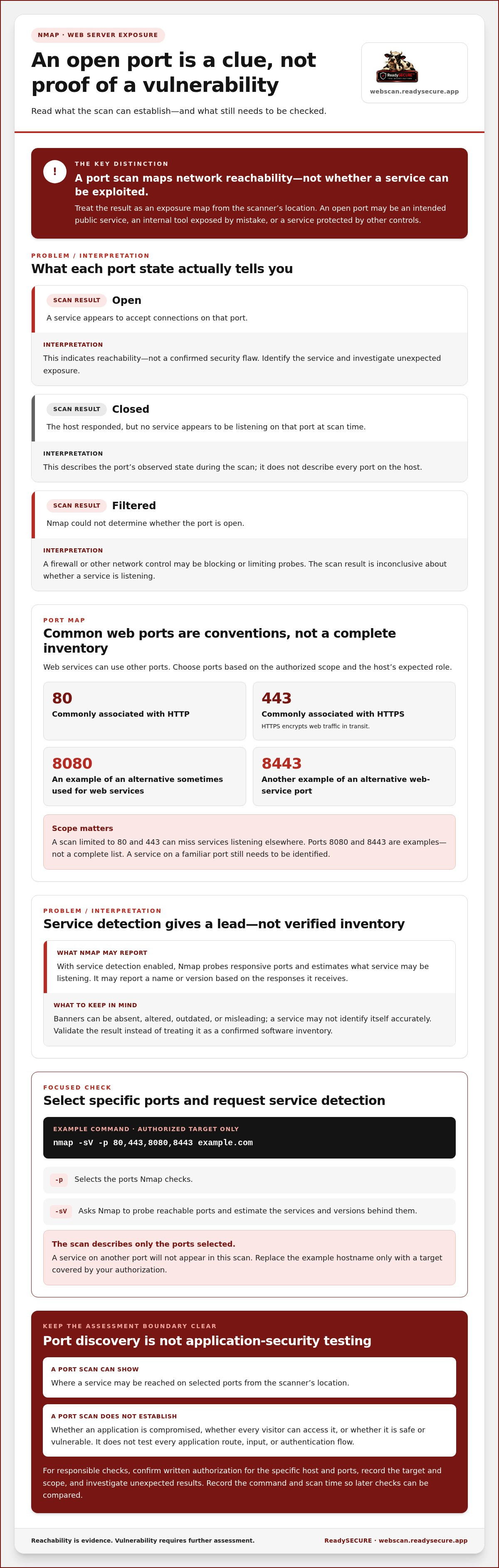
A port scan checks whether network services respond on selected ports of an authorized host. For nmap port scanning for web servers, think of the result as an exposure map: it shows which network doors appear reachable from the scanner’s location, not what someone could necessarily do after reaching them.
A reachable port needs context. It may be an intended public web service, an internal tool exposed by mistake, or a service protected by additional controls. The scan alone can’t establish whether the service is vulnerable, whether an application is compromised, or whether every visitor can access it. Use Nmap to identify possible exposure, then investigate any unexpected results.
What do ports 80, 443, and alternative web ports mean?
TCP port 80 is commonly associated with HTTP, while TCP port 443 is commonly associated with HTTPS, which encrypts web traffic in transit. These are conventions, not requirements. Administrators can configure web services to listen on other ports, and a service found on a familiar port still needs to be identified.
Ports 8080 and 8443 are examples of alternatives sometimes used for web services. They aren’t a complete list. Depending on its configuration, a server may use another port for a website, API, development service, or management interface. A scan limited to 80 and 443 can miss services listening elsewhere. Choose ports based on the authorized scope and the host’s expected role.
What does Nmap identify during a port scan?
Nmap reports port states that describe what it could determine during the scan. The Nmap Wikipedia page provides a broader overview of the tool’s role in discovering hosts, services, and open ports. For an individual result, distinguish these three states:
- Open: A service appears to accept connections on that port. This indicates reachability, not a confirmed security flaw.
- Closed: The host responded, but no service appears to be listening on that port at scan time.
- Filtered: Nmap couldn’t determine whether the port is open because a firewall or other network control may be blocking or limiting its probes.
With service detection enabled, Nmap probes responsive ports and estimates what service may be listening. It may report a name or version based on the responses it receives. Treat the result as a lead to validate, not a verified software inventory. Banners can be absent, altered, outdated, or misleading, and a service may not identify itself accurately.
Port scan: A check of network reachability on selected ports. Web-application security assessment: An evaluation of application behavior, such as routes, inputs, and authentication flows, for security issues. These are different assessment outcomes. A port scan can show where a service may be reached, but it doesn’t test the application’s full functionality or prove that the service is safe or vulnerable.
How Nmap Finds Web Services on an Authorized Server
Before running Nmap, confirm you have written authorization for the specific system and ports you plan to assess. Record the exact hostname or IP address in scope. A domain may resolve to several addresses or to infrastructure managed by another party, so don’t assume every host associated with a name is covered by your permission.
For a focused check, select a defined port list and request service detection:
nmap -sV -p 80,443,8080,8443 example.com
Replace example.com only with an authorized target. The -p option selects the ports Nmap checks. The -sV option asks Nmap to probe reachable ports and estimate the services and versions behind them. This is a starting point, not a guarantee that every web service uses those ports. A service on another port won’t appear in this scan.
How to run a focused Nmap scan
First, confirm that the hostname resolves to the intended host. Compare the resolved address with the target recorded in your authorization and scope. If it points somewhere unexpected, pause and clarify the target before sending probes.
Choose ports relevant to the server’s expected role rather than assuming a short list is exhaustive. If you know an application uses a nonstandard port, include it only when that port is within scope. A focused scan keeps the check specific, but its results describe only the ports you selected.
For repeatable checks, record the exact command, target, scan time, and authorization scope. This creates a baseline for later comparisons and helps you identify whether a changed result reflects a server update, a scope change, or different scan settings.
How to keep scan scope responsible
Scan only systems you own or have explicit permission to assess. Written authorization should clearly define the permitted target and scope. For more context, see this guide to scanning a domain for vulnerabilities legally.
Keep the command limited to checks you understand. Don’t add aggressive timing options or scripts simply to make a scan broader. Additional probes can affect systems or trigger monitoring, and they may exceed the agreed scope. For a live service, coordinate the scan with its owner and follow the authorized testing plan.
When a focused port check isn’t enough, ReadySECURE’s authorized vulnerability scan combines Nmap with other scanners and provides prioritized findings with remediation guidance. This adds context to exposed-port results without treating a port scan as a complete application assessment.
How to Interpret Nmap Web-Server Scan Results
A scan result is evidence about what Nmap could observe from a particular network location at a particular time. Interpret it against the server’s intended role and the scan’s scope. An unexpected service may need investigation, but a label or state alone doesn’t establish that the service is misconfigured or exploitable.
Open ports show reachable services, not confirmed exploitable flaws. Treat the output as a starting point for validation, not a vulnerability verdict.
Open, closed, and filtered: what is the difference?
These states describe Nmap’s observation of the scanned port. Their practical meaning depends on the target’s configuration and the network path between the scanner and server.
| State | Practical meaning | What to consider |
|---|---|---|
| Open | A service is accepting connections on the port. | Check whether the service is expected and should be reachable from this network. |
| Closed | The host responds, but no listening service is detected on that port. | This is not evidence that the host is unreachable. It indicates no service was accepting the checked connection. |
| Filtered | Network controls prevent Nmap from getting a definitive response. | A firewall or other filtering may affect what the scan can observe. |
A filtered result doesn’t prove that a service is absent. It means the scan couldn’t determine the port’s state through the available network path. If the distinction matters, compare results from an authorized scanning location and review relevant firewall rules or network logs.
What can service detection tell you, and what can it miss?
The -sV option asks Nmap to probe open ports and identify the service, sometimes estimating its version. That estimate can guide follow-up checks, but it isn’t a verified inventory. A proxy may answer instead of the application server, banners may be hidden or changed, and filtering or configuration can alter the response.
Validate important labels against the server’s actual configuration, installed software records, and relevant logs. If Nmap suggests an unexpected service or version, confirm whether it’s genuinely present before assigning risk or planning a change.
For nmap port scanning for web servers, investigate findings in context and prioritize possible unnecessary exposure. Start with services that weren’t expected, software that may be unsupported, and interfaces reachable externally when they’re intended only for internal use. Confirm ownership and purpose using the system’s configuration and service owner.
- Confirm exposure: Check that the reported host and port match the authorized target and scan scope.
- Check business need: Determine whether the service is required and which users or networks should reach it.
- Validate identification: Compare Nmap’s service or version estimate with configuration and logs.
- Set follow-up priority: Focus first on unexpected or unnecessary external access, then document the evidence and next action.
An intentionally public port may be appropriate, while a less prominent service can still warrant attention if it exposes an interface that shouldn’t be internet-accessible. Use the scan to guide your review, and add broader vulnerability assessment when you need evidence beyond network reachability and service identification.
What Nmap Cannot Prove About a Web Server
A port scan shows which selected network ports appear reachable from the scanner’s location. It doesn’t test every application route, input, or authentication flow. A scan may reveal a path to a web service, but it can’t establish whether a login process is secure, how the application handles unexpected input, or whether a particular weakness is exploitable.
Keep three assessment outcomes distinct: network reachability indicates whether a port responds; service identification estimates what may be listening; and vulnerability confirmation requires evidence that a security weakness exists. One result doesn’t automatically establish the next. For a wider view of testing options and scope, see these web application security assessment approaches.
Why an open port is not automatically a vulnerability
An exposed service may be intentionally public and appropriately protected. A web server must accept connections for visitors to use it, and an open port doesn’t show that its software is outdated or that its controls can be bypassed. Don’t label a result exploitable without supporting evidence.
Instead, investigate the service’s purpose and intended audience. Review whether external access is required, which access controls apply, how the service is configured, and whether its software is supported and patched. An unexpected service or unnecessary public interface may deserve prompt review, but confirm the configuration before deciding what action to take.
When should you add broader security checks?
Choose the next assessment based on the question you need to answer. If you’re concerned about application behavior, input handling, or authentication, use web-application testing designed to examine those areas. If you need to look for known weaknesses across exposed services and applications, add vulnerability scanning. In either case, interpret findings in light of the scan’s scope.
Port scans can also produce false negatives. A limited port list won’t reveal a service outside that list. Firewalls or other network filtering may hide responses, and services can behave differently depending on the scan’s source or their configuration. A quiet result doesn’t prove that no other exposure exists. Compare the scan scope with the services the host is expected to run, and use relevant configuration and logs to investigate gaps.
Broader checks can connect exposure findings to application and service risks. This overview of automated vulnerability scanning guidance can help frame what a scanner set should assess. ReadySECURE’s authorized scanning service combines Nmap with other scanners and provides prioritized findings with remediation guidance. Learn more about ReadySECURE’s authorized vulnerability scan to assess a defined target beyond port reachability alone.
Turn Nmap Findings into an Authorized Security Follow-Up
A port scan becomes useful when it leads to a documented decision. Treat each result as something to verify, assign, and track, rather than automatically labeling it a vulnerability. For nmap port scanning for web servers, repeatable follow-up helps teams distinguish expected services from unnecessary exposure and confirm whether a change worked.
Use this sequence for each authorized assessment:
- Verify authorization: Confirm written permission and the exact host and ports in scope.
- Scan defined ports: Run the agreed scan and preserve the relevant output.
- Validate findings: Check service identity and configuration against the host’s records.
- Prioritize: Consider exposure, business need, access controls, and potential impact.
- Remediate: Have the responsible owner address confirmed issues through the organization’s change process.
- Retest: Scan the relevant ports again to see whether exposure or the finding has changed.
Keep enough detail for someone else to understand the result later: record the target, authorized scope, scan time, command or relevant output, finding owner, and remediation status. Note whether a result is awaiting validation, accepted as expected, assigned for action, or retested. This record helps avoid repeated investigation and gives future scans useful context.
How to prioritize and verify findings
Start by asking whether each exposed service is required and intended to be internet-facing. Then validate Nmap’s service and version estimate against the host’s actual configuration before assigning urgency. An unexpected service may deserve investigation, but don’t treat an uncertain label as confirmed software. Assign a responsible owner, document the decision and action, and retest after changes to verify the result.
How ReadySECURE extends a port-scan view
A port scan addresses network exposure, while broader vulnerability scanning can add context across services and applications. ReadySECURE’s authorized scan assesses customer-controlled websites, APIs, and internet-facing hosts using six industry-standard scanners, including Nmap, OpenVAS, ZAP, TestSSL, and Nuclei. Its prioritized report details discovered issues, their severity, and remediation guidance. Each result includes a signed authorization record.
ReadySECURE Free Scan covers one authorized target. It provides a starting point when you need findings beyond a focused Nmap check, while keeping the scan limited to a defined asset you control. Paid plans add scheduling, history, and trend analysis. Broader results still need review by the people responsible for the systems. Use the report to guide validation and follow-up, not as a substitute for understanding your environment.
Keep authorization and scope clear before any scan, then turn confirmed results into tracked work and retest after remediation. ReadySECURE Free Scan gives you a broader scanner set for one authorized target.
Make Your Next Security Check Count
Let each authorized scan support a clear decision: what needs attention, who owns the next step, and how you’ll confirm progress. Treat nmap port scanning for web servers as part of an ongoing security process, not a one-time verdict. A consistent record of findings and actions helps your team track changes in exposure and keep follow-up accountable.
ReadySECURE’s authorized scan combines six industry-standard scanners, including Nmap, and provides prioritized findings with remediation guidance. Written authorization and a signed authorization record support a clear account of the assessment. ReadySECURE Free Scan covers one authorized target.
Run a free authorized scan of one target and use the results to plan your next security action.
Frequently Asked Questions
What Nmap command can I use to scan web server ports?
For a focused check, use nmap -sV -p 80,443,8080,8443 example.com against a host you own or have explicit permission to scan. The -p option selects the ports to check, while -sV asks Nmap to identify services and estimate versions. Replace example.com only with your authorized hostname or IP. Confirm it resolves to the intended host first. This port list won’t find services on other ports.
Can Nmap tell whether a web server is vulnerable?
No. nmap port scanning for web servers can show reachable ports and provide service or version estimates, but those details don’t confirm a vulnerability. A version label may need verification, and even accurate software identification doesn’t establish how the server is configured or whether a weakness can be exploited. Assessing application behavior, access controls, and configuration requires additional authorized security checks suited to those questions.
Which ports should I scan to find a web server?
Start with TCP port 80 for HTTP and port 443 for HTTPS, the common ports for web traffic. You might also check ports such as 8080 or 8443 if they fit the host’s expected role. This isn’t a complete list: administrators can configure services on other ports. Compare your selection with the authorized scope and known server configuration, and remember that a scan reports only on ports you include.
What does an open port mean in an Nmap scan?
An open port means Nmap received a response indicating a service is listening and reachable along the path from the scanner. A closed port responds but has no service accepting connections, while a filtered port gives no definitive state because network controls may block probes. An open result alone doesn’t show that the service is misconfigured or vulnerable. Check whether the service is expected and who should be able to access it.
Is it safe to run an Nmap scan against a live web server?
It can be appropriate to scan a live server when you own it or have explicit written authorization covering the target and scan scope. Use a defined port list and cautious options, and coordinate with the system owner so results can be interpreted alongside normal activity. Avoid aggressive techniques or scripts unless you understand their effects and they’re permitted. Never scan a third-party host without authorization.
Does Nmap scan the web application as well as its ports?
Nmap port scanning checks network services, but it doesn’t by itself test every web route, input, or authentication flow. For example, discovering a reachable HTTPS service won’t show whether a form handles unexpected input safely or whether access controls work as intended. If those are your concerns, include a broader authorized application-security assessment. Match the testing method to the behavior you need to evaluate.
Why does Nmap show a filtered port?
A filtered state means Nmap couldn’t get a definitive response, often because a firewall or another network control blocks or limits probes. It doesn’t mean the port is closed, and it doesn’t establish that the service is safe. If you’re authorized to investigate, compare the scan’s permitted network path with firewall rules and server configuration. A different result from another location may reflect network controls, not a change to the service.


