

A scan receipt can show that a service was paid for, but it cannot show what was examined or what the scan found. To obtain proof of a security scan for insurance, request the completed report from the scanning service. The insurer’s request determines which details the evidence needs to include.
It’s reasonable to want a clear document you can submit without guessing whether it will answer the insurer’s questions. This article explains what scan evidence can show, what insurers may ask about and when, and why a receipt may not be enough. It also outlines how to obtain a report and authorization record, and how a vulnerability scan can help document the security of systems you control.
Key Takeaways
- Ask the insurer what evidence it expects, since a payment receipt alone may not describe the scan or its findings.
- Use a completed report that identifies the systems assessed and explains the results, rather than relying on an isolated screenshot.
- Make sure the assessment covers the website, API, or internet-facing host relevant to the insurance request.
- Review any reported vulnerabilities and keep clear records of findings and remediation progress.
- A third-party assessment can provide useful documentation when its scope, results, and authorization are clearly recorded.
Which types of insurance policies require proof of a security scan?
There is no single scan certificate required by every insurer for every policy. Cybersecurity evidence may be requested during underwriting or renewal, particularly for businesses that depend on websites, APIs, cloud services, or other internet-facing systems. The relevant policy may be cyber liability or technology errors and omissions coverage. The insurer’s application, evidence request, or renewal conditions specify whether a scan is needed and which systems it should cover.
Other business policies can also raise cybersecurity questions when digital systems affect the insured operation. For example, an insurer may ask a manufacturer seeking property or business interruption coverage about systems that control production. A retailer applying for commercial coverage might be asked about its online store. These are potential underwriting questions, not universal requirements for those policy types. Read the request carefully: it may ask for a vulnerability assessment, broader security documentation, or information about controls rather than a scan report alone.
- Cyber liability: A business may encounter scan-related questions when the insurer assesses exposure to network incidents or data compromise.
- Technology errors and omissions: A software or technology provider may be asked about the systems supporting its services.
- Commercial property or business interruption: A business with digitally dependent operations may face questions about systems that affect its ability to operate.
Personal auto insurance is different. An auto insurance card documents vehicle coverage; it does not document a cybersecurity assessment. Illinois illustrates the distinction: if an initial Illinois insurance verification does not confirm coverage, the vehicle is checked again after 30 days, according to the Illinois Secretary of State. That process concerns vehicle insurance verification, not a scan of a policyholder’s website or network.
Property insurance uses different evidence for coverage. A policy declarations page can provide proof of property coverage to a landlord, home lender, or condo association; a security scan report addresses digital systems. The right document depends on the question being answered. If an insurer requests a scan, identify the policy, business entity, and technology assets named in the request. Then match the assessment scope to those assets, such as a public website, customer API, or internet-facing host. A scan of an unrelated system may not answer the specific underwriting question.
Before submitting documents, distinguish proof-of-coverage records from cybersecurity evidence. The insurer’s written request should identify the assessment and relevant systems. This helps prevent sending a vehicle insurance card or property declarations page when the insurer needs information about digital exposure.
What security scans do insurers accept as proof?
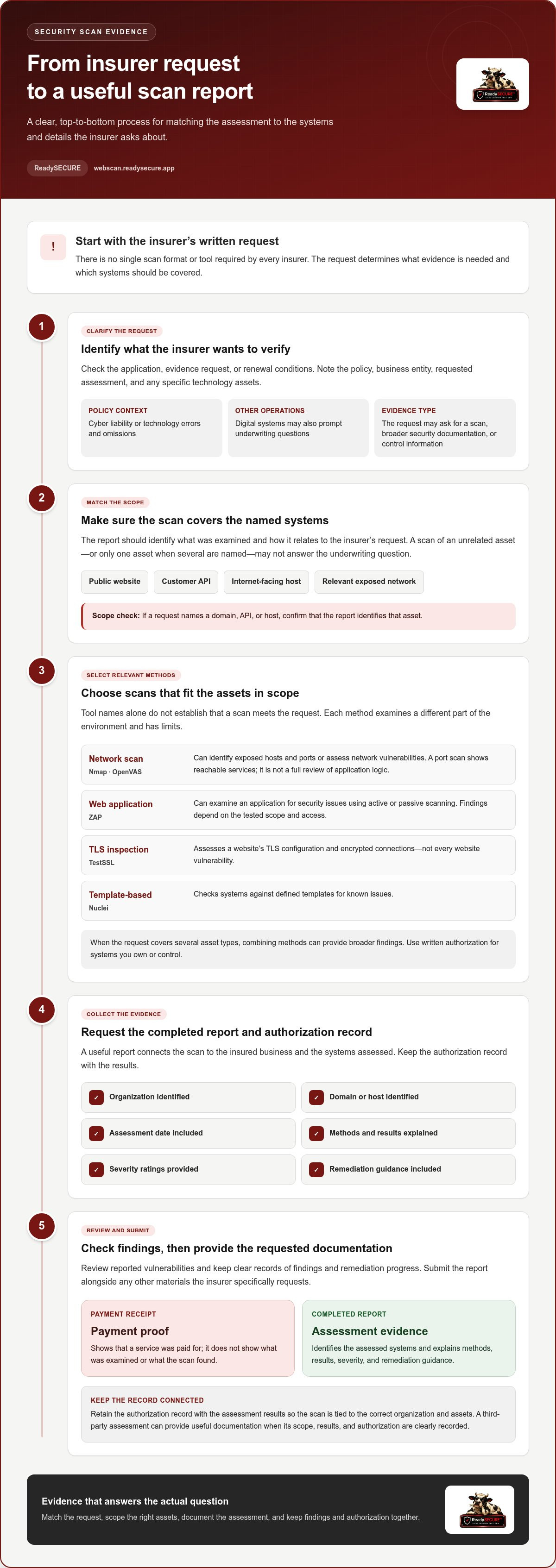
Insurers do not require one universal scan format or tool as proof. Evidence should match the insurer’s request, the policyholder’s systems, and the assessment scope. A scan of a public website, for example, may not address a request covering an internet-facing network or API. The report should identify what was examined and how it relates to the requested systems.
Common automated scans examine different parts of a technical environment. An external network scan identifies exposed hosts and ports. A web application scan looks for weaknesses in a website or application. A TLS inspection examines how a service protects connections. A template-based scan checks for known vulnerability patterns. These approaches can provide useful evidence, but their names alone do not establish that they meet the insurer’s request.
- Network scanning: Nmap can identify ports and services exposed on an authorized host, while OpenVAS can assess network vulnerabilities.
- Application scanning: ZAP can examine a web application for security issues, including through active or passive scanning methods.
- TLS inspection: TestSSL can assess a website’s TLS configuration, which concerns encrypted connections.
- Template-based scanning: Nuclei checks systems against defined templates for known issues.
Each method has limits. A port scan can show which services appear reachable, but it is not a full review of application logic. A TLS inspection focuses on connection security, not every website vulnerability. An application scan may identify weaknesses in pages or interfaces, but results depend on the tested scope and access. When an insurer’s request covers several asset types, combining methods can provide broader findings.
Before submitting a report, compare its scope with the insurer’s wording. If the request names a website, confirm that the report identifies that domain. If it names an API or host, the evidence should identify that asset too. Look for the assessment date, methods, results, severity ratings, and remediation guidance. These details help an underwriter understand what the scan did and did not examine.
Use written authorization for systems you own or control, and retain the authorization record with the assessment results. This connects the scan to the correct organization and assets. For a website or internet-facing host, an authorized vulnerability scan can help document findings in a structured report. Submit the report alongside any additional materials the insurer specifically requests, rather than assuming that a particular scanner name guarantees acceptance.
What should a security scan certificate or report include?
A useful report connects the scan to the insured business and the systems assessed. It should identify the organization, domain or host, and assessment date. If the insurer names an API or website, that asset should appear clearly in the report. A vague statement that “a scan was completed” gives an underwriter little context.
Scope matters because scans examine different technical surfaces. The report should explain whether the assessment covered a website, API, network host, or TLS configuration. It should also identify the methods used, such as network scanning, web application scanning, or TLS inspection. Nmap, OpenVAS, ZAP, and TestSSL illustrate distinct methods, not interchangeable certificates.
- Organization and asset: Name the insured entity and identify each assessed domain, host, or application.
- Date and scope: State when the scan occurred and what systems or services it examined.
- Method: Describe the scan type or tools, such as application scanning or TLS inspection.
- Findings: Summarize detected issues and assign clear severity levels.
- Authorization and follow-up: Include written permission and practical remediation guidance.
Findings should be specific enough to interpret. For example, a report might identify an exposed service on a named host, explain its severity, and state why it matters. It should distinguish detected vulnerabilities from general observations. A severity label without an issue description does not give a reviewer enough information to understand or prioritize the result.
Include remediation guidance alongside each finding when available. This helps the business understand what needs attention and gives the insurer a clearer view of identified risks. If a later scan shows a changed result, retain both reports. Comparing the original finding with the updated assessment can document progress without suggesting that every issue has been resolved.
Authorization matters too. The record should show that the scan was approved for the systems assessed, especially when an external service performed it. Keep the record with the report so the organization, scope, and findings remain connected. A payment receipt identifies a transaction, not the tested assets or security results.
A certificate can serve as a cover page, but the supporting report should provide the substance. Before sending either document, compare its named assets and assessment date with the insurer’s request. Remove unrelated technical details only if doing so does not obscure the scope or material findings. The final package should show what was assessed, what was found, and what action followed.
Can I use a third-party vulnerability assessment as proof of a security scan
Yes. A third-party vulnerability assessment can document a security scan if its report matches the insurer’s request. The provider’s identity alone does not make the evidence complete. A report covering a company’s public website does not describe an API or network host unless those assets were assessed. Match the named systems, assessment scope, and findings to the requested evidence.
Start with the insurer’s wording. A request for an external vulnerability scan differs from one about web application security or encrypted connections. For example, a scan of exposed network ports may help explain reachable services, while an application assessment examines website behavior. A TLS inspection addresses connection configuration. The report should state which kind of assessment was performed.
Review these details before submitting the assessment:
- Ownership and authorization: The assessed domain or host should belong to, or be controlled by, the insured organization. Keep a written authorization record that connects the organization to the approved scan.
- Scope: Compare each named asset in the report with the insurer’s request. A report naming a company website doesn’t automatically cover its customer API.
- Method: Identify whether the assessment used network, application, TLS, or another scanning method. Different methods examine different surfaces.
- Results: Include findings, severity, and remediation guidance. A statement that a scan ran doesn’t explain what it discovered.
Third-party reports can help separate the business from the assessment process. A reviewer can examine the documented method and findings rather than relying only on an internal statement. Still, a third-party label does not show that the assessment was broad enough. A report limited to TestSSL-style TLS checks, for example, should not be presented as a full application vulnerability assessment.
Check the report date and the insured entity’s name as well. If the document identifies an old domain, a different subsidiary, or a system outside the policyholder’s operations, the connection may be unclear. Keep the complete report and its authorization record together. If remediation leads to a new assessment, retain both versions so the insurer can see the original findings and later results.
A receipt or provider invoice can show that a transaction occurred, but it does not describe scan scope or security findings. Submit the technical report as the primary evidence, along with any requested supporting records. Organize the package around the insurer’s named assets and assessment criteria. This helps reviewers see what was examined and which conclusions the report supports.
What happens if I fail to provide proof of a security scan or have unresolved vulnerabilities
If an insurer requests a scan report and you submit none, the underwriter has no evidence about the named systems. The application or renewal review may remain incomplete while the insurer seeks documentation. For example, a business renewing cyber coverage might receive a follow-up request identifying its public website or customer API. A payment receipt cannot answer questions about scan scope, findings, or remediation.
Possible outcomes depend on the policy’s underwriting process and the information requested. The insurer may ask for a suitable report, request more details, or set conditions before completing its review. Missing evidence can affect the timing or terms of an insurance decision. It does not automatically prove that a business has vulnerabilities, but it leaves the specific security question unanswered.
Unresolved findings need a separate response. A scan report identifies detected issues; it does not establish that the organization has fixed them. For example, assess a critical exposed service in light of its business role and the report’s remediation guidance. Record who is responsible for follow-up, the corrective action taken, and any remaining exposure. Clear records help explain an issue without presenting an open finding as resolved.
- Prioritize: Review each finding’s severity and affected asset, then address the issues with the clearest security impact first.
- Document: Keep remediation notes tied to the relevant host, website, or API.
- Reassess: Use a later scan to determine whether the reported issue remains detectable.
- Disclose accurately: Distinguish fixed findings from open items in materials sent to the insurer.
A later assessment can show whether a specific vulnerability remains visible within the tested scope. It cannot prove that every weakness across an organization’s systems has been eliminated. A clean result for one website, for example, says nothing about a separate network host. Keep the original report and reassessment together so the reviewer can follow the finding and its status.
If a scan identifies unresolved issues, don’t alter or omit material findings to make a report appear cleaner. Explain the affected asset, current status, and documented action. If no report exists, arrange an authorized scan of the systems you control, then provide the resulting evidence in response to the insurer’s request. Run an authorized vulnerability scan to document findings on your website or internet-facing host.
Proof of auto insurance is separate: an auto insurer generally provides proof of insurance when a customer buys, renews, or updates a policy. In Illinois, a law enforcement officer may issue a traffic citation if a driver cannot provide evidence of insurance when stopped for a traffic violation or involved in an accident. A driver without a printed auto ID card can show a digital version during a traffic stop.
ReadySECURE: ReadySECURE Free Scan
ReadySECURE Free Scan can help document the security of a website you own or control. Submit the domain with written authorization, which defines the approved assessment scope. The report prioritizes findings, shows their severity, and provides remediation guidance. An authorization record is attached to each result.
If an insurer asks about a specific area, choose an assessment that addresses it. TestSSL Inspection focuses on TLS configuration, while ZAP Active/Passive Scanning assesses web applications. The report can help explain what was examined, but it does not guarantee insurer acceptance or replace other requested evidence.
For an authorized scan of your website, visit webscan.readysecure.app.
Make your next renewal easier to document
Use the insurer’s request to shape a practical recordkeeping process, not just a one-time submission. Keep the assessment report, authorization record, and follow-up notes together. This creates a clear trail for future underwriting discussions and helps your team track which systems have been assessed. The insurer’s requirements determine whether a particular report meets its request.
ReadySECURE offers ReadySECURE Free Scan, ReadySECURE Paid Plans, and TestSSL Inspection to help organizations document security assessments. Proof of a security scan for insurance is most useful when it covers the systems named in the request and gives reviewers a clear basis for understanding the results. Keep the evidence accurate and update it when systems or findings change.
If you’re preparing documentation for an insurer or assessing a website you control, contact ReadySECURE for help. A clear next step can make your security records more useful for the decisions ahead.
Frequently Asked Questions
What does proof of a security scan mean for insurance?
Proof of a security scan for insurance is documentation showing that specified digital assets were assessed. A useful record connects the insured organization to the systems examined and the results. For example, a scan report might identify a business website and describe detected findings. It documents an assessment, not a guarantee that every system is secure or that an insurer will approve coverage.
How do I obtain a security scan report for an insurance application?
Arrange an authorized scan of a website, API, or internet-facing host you control, then retain the report for the application. With ReadySECURE, submit the target and provide written authorization before scanning. The authorization record must include the approving person, the exact text they agreed to, and the date and time of approval. Match the assessed target to the assets named in the insurer’s application.
How recent must a security scan be for insurance coverage?
The required timing depends on the insurer’s application or evidence request; no single scan age fits every underwriting review. Use the report date to show when the assessment occurred, and consider any changes since then. For example, a newly launched customer portal is not covered by an earlier scan of the company’s previous website. Follow the timing criteria in the insurer’s instructions.
Do insurers require security scans for cyber insurance in the United States?
Cyber insurance applications in the United States do not follow one universal scan requirement. An insurer’s questions may depend on the business’s technology, operations, and underwriting process. One application might ask about security controls, while another requests an assessment of internet-facing assets. Read the application and supporting requests to determine whether a scan report is needed, which systems it should cover, and what evidence to submit.
How much does a security scan for insurance cost?
ReadySECURE Free Scan provides one full scan of one authorized target. Paid plans support scheduled scanning and monitoring for multiple targets; the appropriate plan depends on the number of targets and monitoring needs. A business assessing one website has different requirements from an organization scanning multiple targets on a schedule. Use the insurer’s requested scope to guide your choice of assessment.


