

Weekly automated security reports should run at a consistent time, after the reporting period’s data is ready. Choose recipients based on their responsibilities, and tailor each report so technical teams can act on findings while executives can understand risks and priorities. A regular cadence gives everyone a clear review rhythm.
Automation can cut repetitive reporting work, but a scheduled email is useful only when its information is accurate, clear, and relevant. Choose a reporting schedule, set delivery times, select recipients, and check report quality before using the findings to guide IT and executive decisions.
This article explains how automated reporting works, what to include in a useful security update, and how to manage delivery and review. It also shows how vulnerability scanning reports can support the process by making findings easier to prioritize and follow up.
Key Takeaways
- Set a consistent weekly schedule that gives source data time to update before the report is sent.
- Match recipients and report detail to their responsibilities, separating technical findings from executive priorities.
- Build in review and validation so summaries reflect the underlying security data accurately.
- Use clear status, risk, and follow-up information to help decision-makers distinguish urgent issues from routine updates.
- When you need findings about systems you control, ReadySECURE Free Scan can provide a vulnerability report to support security review.
Automated email security report scheduling
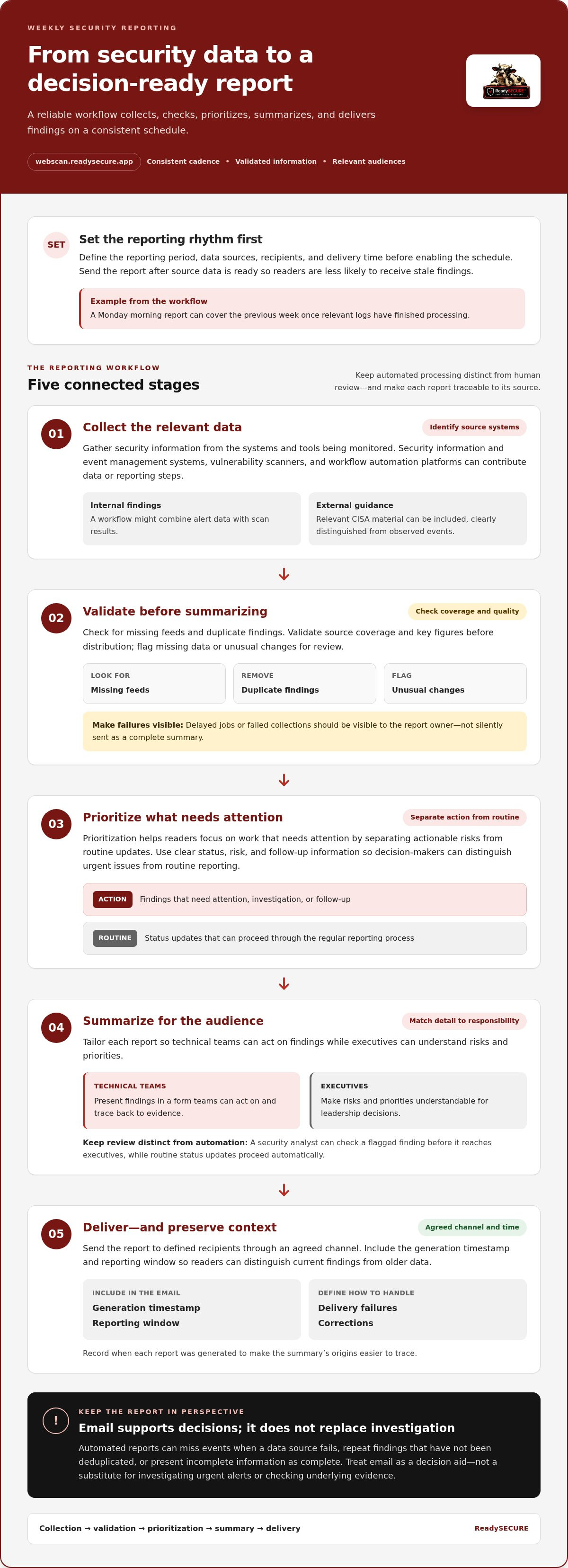
Schedule each weekly report after source data is ready, then deliver it to defined recipients. A dependable workflow connects data collection, validation, summary writing, and delivery.
Scheduled Report Generation and Delivery
Scheduled reporting collects security data at a set time, creates a summary, and sends it through an agreed channel. A weekly cadence gives teams a predictable review point. Scheduling delivery after collection helps avoid stale findings. For example, a Monday morning report can cover the previous week once relevant logs have finished processing.
Before enabling the schedule, define the reporting period, data sources, recipients, and delivery time. Include the generation timestamp and reporting window in the email so readers can distinguish current findings from older data. Make failed collections or delayed jobs visible to the report owner instead of silently sending an incomplete summary.
Scheduled Reporting Workflows
A scheduled workflow moves data through collection, validation, prioritization, summarization, and delivery. Assign an owner or control at each stage: identify source systems during collection, then check for missing feeds and duplicate findings during validation. Prioritization separates actionable risks from routine updates, helping readers focus on work that needs attention.
Keep automated processing distinct from human review. For example, a security analyst can check a flagged finding before it reaches executives, while routine status updates proceed automatically. Define how to handle delivery failures and corrections, and record when each report was generated. These controls make the summary’s origins easier to trace.
Tools for Weekly Security Reporting
Security information and event management systems, vulnerability scanners, and workflow automation platforms can all contribute data or reporting steps. A workflow might combine alert data with scan results, create a summary, and distribute it by email. Choose tools according to the systems being monitored and the decisions recipients need to make.
CISA alerts describe recent, ongoing, or high-impact cyber threats and related mitigations, workarounds, or detection methods. CISA cybersecurity advisories provide detailed threat information, including tactics, techniques, procedures, indicators of compromise, and recommended defensive actions. A workflow can include relevant CISA material alongside internal findings, clearly distinguishing external guidance from observed events.
In the United States, reporting obligations depend on the organization and the requirements that apply to its work. The Centers for Medicare & Medicaid Services (CMS) says CMS ISSOs must meet federal information-security and privacy reporting requirements, including documenting and mitigating weaknesses and reporting incidents and breaches.
Security reporting tools do not have one universal price. Costs depend on factors such as deployment, data volume, integrations, retention, and support, and are provided after a quote request.
Automated reports can miss events when a data source fails, repeat findings that have not been deduplicated, or present incomplete information as a complete picture. Validate source coverage and key figures before distribution, and flag missing data or unusual changes for review. Treat email as a decision aid, not a substitute for investigating urgent alerts or checking underlying evidence.
Automation benefits for IT decision-makers
For IT leaders, reporting automation is valuable when it improves decisions, not simply when it sends emails faster. A survey of 400 IT decision-makers found that 68% first looked to IT processes for greater automation. That focus makes sense: repeatable reporting can help teams compare security information, identify work that needs attention, and explain priorities to leadership.
The same survey found several reasons organizations invest in automation. Cost savings motivated 63% of respondents, while increased customer satisfaction motivated 59%. Increased employee productivity ranked close behind, at 58%. These figures describe reported investment motivations, not guaranteed results. For an IT team, the practical benefit depends on whether automation removes repetitive tasks without reducing the quality of review.
Consider a weekly process where an analyst gathers findings from several sources, formats updates, and prepares a leadership summary. Automating collection and consistent formatting can free time to investigate unusual events or validate high-priority findings. Compare the time saved with the time still needed for data checks, interpretation, and follow-up. This keeps efficiency claims grounded in the work actually done.
Revenue and innovation also appear in the survey’s results: 50% of respondents named top-line revenue growth, and 48% named accelerated innovation as benefits motivating investment. For security leaders, the connection is indirect but useful. A clear report can help teams explain how unresolved vulnerabilities affect planned work, then give leadership evidence for prioritizing resources. Automation supports that discussion; it doesn’t decide which risk the organization should accept.
Only 20% identified leapfrogging competitors as a motivation. That contrast suggests a practical priority: focus first on internal outcomes, such as reliable visibility and staff capacity, rather than competitive claims. IT leaders can assess a reporting workflow by asking whether it brings relevant sources together, reduces avoidable manual formatting, and presents findings in a form decision-makers can use.
Use the survey figures as context, then assess your own process. Compare current reporting effort with the time spent reviewing and acting on findings. Check whether leadership can distinguish urgent issues from routine updates and whether technical teams can trace summaries back to evidence. These measures connect automation to operational value, rather than treating the number of generated reports as success.
For teams evaluating website exposure as part of their security picture, an authorized website vulnerability scan can produce findings for review alongside other IT priorities.
Time savings and accuracy from automated reports
Automation can reduce repetitive report preparation, but saved time matters only if findings remain reliable. Measure the work eliminated and validate the data before decisions depend on the summary.
Time Savings from Automated Reports
Automated reporting software handles repeated collection, formatting, and distribution, giving analysts more time for investigation. Weekly operational reports consume 2-6 hours of analyst time in most organizations. Teams implementing AI automation for weekly reports report an 80-90% reduction in report creation time, though review and analysis still require attention.
Compare individual tasks to understand the impact. Before automation, track time spent gathering data, removing duplicates, writing summaries, and checking results. Then compare those tasks with the new workflow, including time spent correcting its output.
Validating Report Accuracy
Accuracy validation checks each report’s claims against source data and confirms the reporting period. It matters because even a polished summary can contain missing inputs, incorrect figures, or outdated analytics. Before sharing, check data coverage, timestamps, and key totals against the originating systems.
How can you validate the accuracy of automated security reports? Compare important figures with source records, confirm that every expected data feed arrived, and review unusual changes against underlying events. A sudden 300% increase in support tickets should trigger an anomaly flag, not pass into a summary without examination.
Check numerical claims separately from narrative conclusions. A numeric validator can reduce the hallucination rate on numeric values to below 1%. Use it alongside source checks, since correct arithmetic cannot compensate for incomplete or misclassified input. Record corrections so the same error can be identified in later reporting cycles.
Review acceptance as the workflow matures. After eight weeks, the report acceptance rate without edits often exceeds 70%. With a well-tuned prompt and 4-6 weeks of feedback, narrative summaries match what a competent analyst would write 80-85% of the time. Treat those measures as signals for review, not substitutes for checking high-impact findings.
Data timing also affects interpretation. A weekly report that uses the previous day’s data at 8 a.m. can provide more accurate commentary than one using the previous week’s numbers. State the reporting window clearly, so readers understand what the software analyzed and what may fall outside that period.
Executive reporting
Executives need security intelligence that connects technical findings to business impact. A useful weekly report identifies the most important change, its potential consequence, and the decision or follow-up required. Distinguish confirmed findings from interpretation so leadership can act without mistaking a brief summary for the full evidence.
Start with a concise status statement, then explain what changed during the reporting period. For example, “A critical vulnerability affects the customer portal; the team is assessing exposure and assigning remediation.” This names the issue, affected business asset, and next action. Supporting details can give technical readers the severity, owner, due date, and evidence.
Tie status labels to clear criteria. A project that is behind schedule and over budget may still appear green if the report relies on an unchanged status field. Add measurable context beside the label, such as schedule variance, unresolved risks, or blocked work. This helps executives see when a green indicator conflicts with current delivery conditions.
Choose a format that suits the meeting and audience. Consolidating 30 project decks before an executive meeting can obscure shared risks and competing priorities. A single report can group findings by business service, severity, and accountable team, while linking each summary to its evidence. Ten projects may be manageable in PowerPoint, but forty projects are not manageable using PowerPoint reporting.
Use a repeatable structure so leaders can compare reports across weeks. Include a period covered, key changes, unresolved high-priority findings, ownership, and decisions needed. A 400-word summary prompt can request those elements, but the analyst still needs to verify each claim against the underlying record. Consistent sections make changes easier to spot than a new layout each week.
Give reviewers a defined opportunity to correct context before distribution. A 24-hour comment window can let technical owners flag inaccurate status, changed ownership, or missing business impact. Keep edits traceable: record the correction, its evidence, and the person who approved it. This process protects accuracy without turning executive reporting into a lengthy approval chain.
Use executive reports to support decisions, not to display every alert. If leadership must choose between remediation priorities, show the affected service, operational consequence, and dependencies. For example, explain whether fixing one exposed system could reduce risk across several business functions. Keep technical indicators available for follow-up, while making the main summary’s decision and rationale clear.
Report recipients and delivery times
Choose recipients according to the decisions or actions they own. A weekly cadence gives teams a regular opportunity to review collection results and assign follow-up.
Choosing Report Recipients
Recipients are people who need a report to make a decision or complete security work. The same level of detail is not useful to everyone. Send technical findings to the security team, operational actions to system owners, and concise risk summaries to leadership.
Build the recipient list around responsibilities, not just job titles. For example, include the application owner when a finding affects their application. Limit distribution to people with a clear need, and assign someone to maintain the list as responsibilities change.
Setting Delivery Times
Delivery time is when the platform sends a completed report to its recipients. The email should arrive after data collection, but early enough to support review and follow-up.
Choose a consistent weekday and delivery time that fits the reporting period. For example, a Monday report can summarize the previous week after source data has finished updating. If recipients work across time zones, specify the schedule’s time zone and consider when each team can act on findings.
Separate report generation from email delivery. A platform may need time to collect records, reconcile duplicates, and prepare summaries before sending. Schedule delivery only after those steps are complete, and make the covered period visible in the report. This helps recipients understand which activity it includes.
Use separate distribution groups when teams need different levels of detail. Security analysts may need finding descriptions and affected assets, while system owners need assigned actions and status. Executives can receive a focused summary that points to evidence. A single large recipient list can expose details unnecessarily and make follow-up less clear.
Test the schedule with a sample delivery before relying on it. Confirm the recipient list, subject line, time zone, reporting window, and expected summary. Assign someone to review delivery failures and update recipients when responsibilities change. These checks help prevent reports from reaching outdated mailboxes or arriving before collection is complete.
Align delivery rules with urgency. A weekly summary supports routine review, while an urgent finding needs a separate response path rather than waiting for the next scheduled email. Make the distinction clear so recipients know which messages require immediate action.
To add website exposure findings to your security review, scan a website you control and use the results to guide follow-up.
ReadySECURE: ReadySECURE Free Scan
ReadySECURE Free Scan helps website owners review security findings for systems they control. After you submit a domain and provide written authorization, the platform runs vulnerability scanners and delivers a prioritized report detailing discovered issues, their severity, and remediation guidance.
Use the report in your reporting workflow: review findings, confirm priorities, and share relevant details with those responsible for follow-up. For ongoing scanning, ReadySECURE Paid Plans provide scheduling and reporting over time. TestSSL Inspection and ZAP Active/Passive Scanning cover specific website security checks.
If you’re ready to assess a website you control, visit ReadySECURE’s scanning platform.
Make your next report easier to act on
Use the next reporting cycle to identify one improvement, such as clearer ownership or a more useful decision summary. Then assess whether the security data behind your weekly automated security reports gives teams enough evidence to prioritize follow-up.
ReadySECURE Free Scan and ReadySECURE Paid Plans provide vulnerability scanning reports for websites, APIs, and internet-facing hosts you control. TestSSL Inspection supports focused TLS and SSL checks. These findings can add useful evidence to your reporting process, while your team remains responsible for reviewing priorities and deciding what to address.
Contact ReadySECURE to discuss your reporting needs, and take a clear next step toward security updates your teams can use.
Frequently Asked Questions
What are weekly automated security reports?
Weekly automated security reports are recurring summaries of security data generated and distributed on a schedule. They can help teams track changes between reporting periods, such as a newly detected exposure or a finding marked resolved. A useful report identifies its data window and separates observed events from analysis. This context helps readers interpret the update and decide whether to investigate further.
How do I set up automated weekly security reports?
Start by choosing the security data and decisions the report should support. Select relevant sources, define the reporting period, and decide what details each audience needs. Configure the generation and delivery schedule, then run a test cycle. Compare sample findings with their original records, correct missing or misleading fields, and assign an owner to review output when data sources or team responsibilities change.
How can I schedule and distribute weekly security reports securely?
Schedule reports after relevant data collection is complete, using a consistent time zone and reporting window. Limit access to named recipients who need the information for their roles. For sensitive findings, use an access-controlled reporting platform rather than putting extensive technical details in an email body. Protect accounts with multifactor authentication, review access as responsibilities change, and keep records of distribution and corrections.


