

What does a clean security scan actually prove if you can’t show what was tested? A result is useful when its scope, authorization, findings, and follow-up are clear. Learning how to prove website security means building that record, not treating one scan as proof that a site is completely secure.
Different tools check for different issues, and a scan can report only what it was configured to examine. Its findings are useful evidence, but they are not a guarantee or certification.
This article explains how to define an authorized assessment scope, document checks and results, and describe limitations accurately. You’ll also learn how to organize findings by severity and track remediation. An authorized ReadySECURE scan contributes a prioritized report with severity and remediation guidance, along with a signed authorization record. The goal is a clear account of what was checked and what still needs attention.
Key Takeaways
- Build a dated evidence record showing what was checked, within what scope, and what happened next.
- Understand how to prove website security without treating a clean scan as proof that every risk has been found.
- Compare automated scans, manual penetration testing, and internal control evidence by what each can and cannot establish.
- Use written authorization and a defined scope to keep checks focused on websites, APIs, and hosts you control.
- Turn scan findings into follow-up actions by reviewing severity, validating alerts, and tracking remediation.
What Does It Mean to Prove Website Security?
To show that a website has been checked, you need more than a reassuring status or a screenshot that says “no issues found.” Useful evidence lets another person understand what was examined, when the check took place, and how the organization responded to the results. It supports informed assurance, but it cannot establish that every weakness has been found or that the site will remain secure indefinitely.
Website security evidence is a dated, traceable record of authorized checks, their scope and methods, their results, and the follow-up taken. This definition keeps the claim precise: the record shows what was assessed and learned, not a guarantee of complete security. That distinction is central to how to prove website security without overstating what a scan can establish.
Security also extends beyond what a remote tool can observe. External checks can report on exposed services and responses from a website. Internal evidence may be needed to show how access is managed, how updates are handled, or whether backups and incident procedures are maintained. For an overview of the range of threats and countermeasures involved, see Understanding Web Security.
What Counts as Evidence of Website Security?
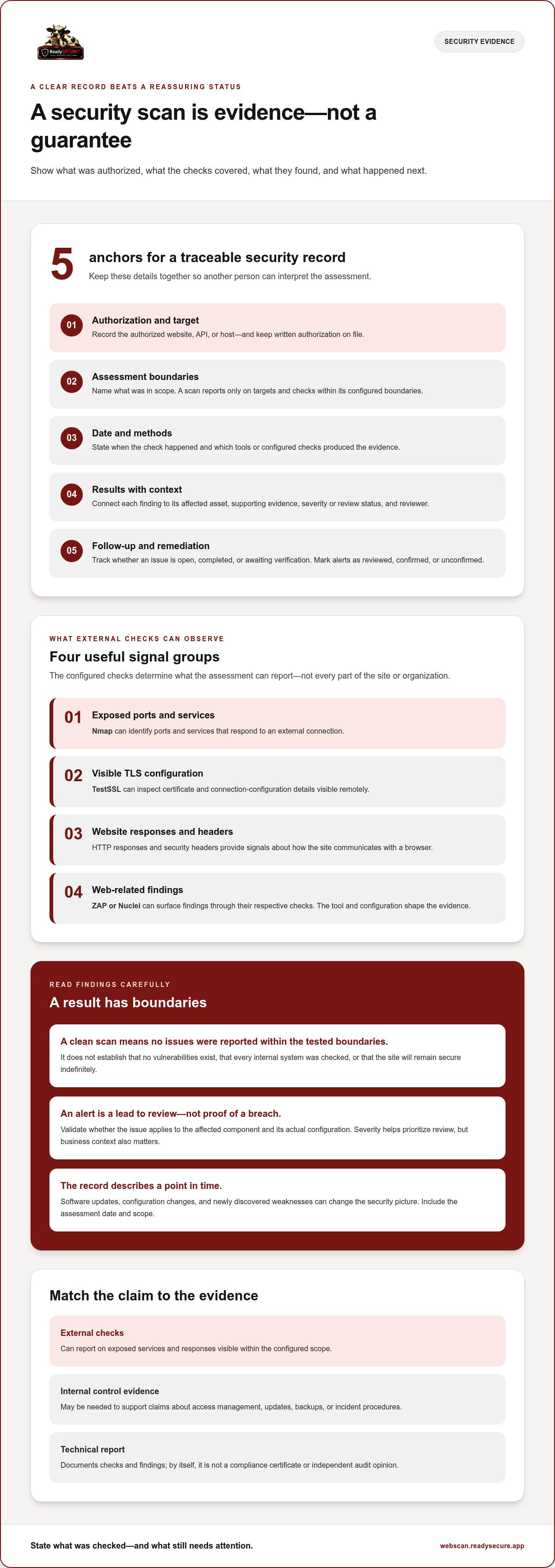
A useful record identifies the authorized target, assessment boundaries, date, and methods used. It connects each finding to a result, notes its severity or review status, and records whether remediation is open, completed, or awaiting verification. This makes the evidence more useful than a collection of unlabelled alerts.
Traceability matters. If a report flags an exposed service, a reader should be able to identify the target and assessment that produced the result, then follow the issue through review and remediation. A technical report documents checks and findings; it is not, by itself, a compliance certificate or an independent audit opinion. Internal records may also be needed to support claims a remote scan cannot assess.
What a Website Security Scan Cannot Prove
A remote scan can observe only what responds within its configured scope. It cannot establish the state of every internal system, confirm every business process, or reveal vulnerabilities beyond the checks used. A clean result means the scan did not report issues within its tested boundaries; it does not mean no vulnerabilities exist.
Results also describe a point in time. A later software update, configuration change, or newly discovered weakness can change the picture. Record the assessment date and scope so stakeholders can interpret the results in context, rather than treating them as a permanent status. Pair external findings with relevant internal control evidence, and state which claims each record supports. That clear boundary helps decision-makers prioritize follow-up.
How Website Security Checks Produce Useful Evidence
External security checks turn observable technical details into findings you can review and act on. They may inspect reachable ports and services, website responses, certificate details, and signals associated with known vulnerabilities. The value is not simply a list of alerts. It is a record of what the checks observed, which checks were configured, and what needs further review.
Scan coverage depends on scope, access, and configured checks. For example, a scan of a public website may not examine an API endpoint that wasn’t included in the target scope. Different tools check different signals. Nmap can identify exposed ports and services, TestSSL can inspect visible TLS configuration, and ZAP or Nuclei can surface web-related findings through their respective checks. The tools used shape the evidence an assessment can provide.
What External Checks Can Observe
An exposed port is a network entry point that responds to an external connection. The service behind it can help explain why it is reachable. A TLS check can examine certificate and connection-configuration details visible during a remote connection. HTTP responses and security headers provide further signals about how a site communicates with a browser. These observations are useful, but they are not a complete review of application logic or internal systems.
Testing guidance and identifiers add context. OWASP resources help teams understand common web application security testing areas, while a CVE identifier points to a publicly documented vulnerability. Neither establishes that a particular issue exists on your site. A tool may match a version or response pattern associated with a known weakness, but the match should be checked against the affected component and its actual configuration.
How to Read Findings Without Overstating Them
A severity rating helps order findings for review, but it is not a complete measure of business impact. An issue’s practical risk depends on factors such as whether the affected service is exposed, what data it handles, and what protections are in place. Treat severity as a prioritization signal, then add your organization’s context.
For each alert, record the affected asset, the evidence supporting the detection, who will review it, and the follow-up status. A finding is not the same as a confirmed breach or successful attack. It may be a lead that needs validation, a configuration concern, or an issue that does not apply to the target. Marking it as reviewed, confirmed, or unconfirmed keeps the report useful without implying more than the scan established.
This is a practical part of how to prove website security: connect each result to a defined check, then document the decision and next step. An authorized ReadySECURE website scan can provide a prioritized report with severity and remediation guidance for a target you control, after written authorization. Use it as one input to your evidence record, then validate relevant findings and track follow-up.
Website Security Evidence: Scans, Audits, and Other Checks Compared
Different assessment methods answer different questions. An external scan can show what selected tools observed on an authorized target at a particular time. Manual penetration testing is a different, hands-on method, while internal records can show how controls are operated. Matching the method to the assurance question makes the evidence more useful.
| Method | Scope | Typical output | Useful evidence | What it cannot establish |
|---|---|---|---|---|
| Automated external scanning | Defined, internet-facing targets | Detected services, vulnerability signals, prioritized findings | What configured checks observed and when | That every weakness was found or that the site is secure |
| Manual penetration testing | Agreed systems and test objectives | Tester observations and validated findings | How testing explored selected risks and paths | That untested systems or risks are free of issues |
| Internal control evidence | Organizational processes and systems | Access reviews, change records, or control documentation | How selected controls are recorded and managed | That external systems have no vulnerabilities |
When an Automated Vulnerability Scan Is Useful
A scan is useful for identifying visible weaknesses on a defined target you control and have authorized for testing. Its dated results can establish a baseline, help prioritize reported issues, and support comparison with later checks. That baseline records what the configured tools observed, not a complete inventory of risk. Coverage depends on target scope, scanner configuration, and what is externally visible.
ReadySECURE provides authorized vulnerability scanning, not manual penetration testing or managed remediation. Its report can help organize discovered issues by severity and remediation guidance, while follow-up decisions remain part of the wider security process.
When Other Evidence Adds Context
Manual penetration testing is a distinct method that uses hands-on testing against agreed objectives; it should not be inferred from an automated scan report. Internal evidence answers different questions. For example, access-review records can show that account permissions were reviewed, while change records can document approved configuration updates. Neither replaces an external assessment.
Choose evidence based on the question stakeholders need answered. If they need to know what was observable from the internet, a scoped scan may help. If they need to understand how access or changes are controlled, relevant internal records matter. A broader evidence set improves understanding, but no combination guarantees zero risk. To prove website security credibly, document each method, its boundaries, its results, and the actions that followed.
How to Document Website Security Checks Step by Step
A consistent record makes assessment results easier to interpret, compare, and act on. Limit the process to websites, APIs, and internet-facing hosts you control and have authorized in writing. Use this workflow to connect permission, scope, findings, and follow-up in one evidence trail.
- Confirm authorization. Before scanning, document that you own or have written permission to assess the target. Keep the authorization with the assessment record so readers can see that the check was approved.
- Define the exact scope. List the domain, API, or host included, and note any exclusions. Don’t extend checks to a third-party service or system just because it is connected to your website. If the scope changes, record the change and confirm authorization covers it.
- Record the assessment details. Capture the date, method, target scope, and relevant configuration details. Identify the report or result set so each finding can be traced to the check that produced it.
- Review each finding. Record the reported issue, affected asset, severity, and remediation guidance. Treat automated alerts as findings to assess, not automatic confirmation of a breach or successful attack.
- Assign follow-up. Give each finding an owner and a clear status, such as open, reviewed, or addressed. Add brief notes explaining decisions, including why an alert was closed or why remediation is still pending.
- Preserve the next assessment. Keep later results alongside the original record. Compare the findings and document changes, but describe them as evidence of what the later check observed, not proof that all risk has been eliminated.
A useful assessment record names the authorized target, scope, date, method, findings, severity, owner, and remediation status. Keep these fields together, or link them through a consistent assessment identifier. That way, a stakeholder can move from a summary finding to its source result and follow the decision or action taken.
For example, if a check reports a potentially vulnerable service on an included host, identify that host and the assessment date, preserve the reported severity and guidance, name the person responsible for review, and show whether the finding remains open or has been addressed. Don’t silently remove a finding after a configuration change. Record the action, then use a later check to document what it observed.
This is how to prove website security responsibly: show the boundaries and history of your checks, then make accurate claims about the evidence. ReadySECURE requires domain submission and written authorization, and attaches a signed authorization record to each result. To create a documented result for a target you control, start an authorized website scan.
How ReadySECURE Supports an Authorized Website Security Record
A documented scan is useful when its results connect to an authorized target, a clear assessment scope, and practical follow-up. ReadySECURE supports that record for websites, APIs, and internet-facing hosts you control. Submit the domain and provide written authorization before scanning begins. The resulting report is one input to security evidence, not a certification or proof that a site has no vulnerabilities.
What the ReadySECURE Scan Record Includes
A signed authorization record is attached to each result, linking permission to the assessment. Reports prioritize discovered issues and include severity and remediation guidance, helping you decide what needs review and organize follow-up. The scanning platform includes Nmap, OpenVAS, ZAP, TestSSL, and Nuclei. These checks can surface useful findings, but results still reflect the tested scope and configured checks.
Use the report alongside your own review: identify which results need validation, assign an owner, and record remediation status. This preserves the distinction between what a scanner detected and what your team has confirmed or addressed. It also gives stakeholders a clearer basis for understanding the assessment without implying that external scanning covers internal controls or every possible risk.
Choose a Scan Cadence That Fits Your Evidence Needs
The free option covers one target and one scan, which can provide a starting record for that asset. ReadySECURE Paid Plans add scheduling, scan history, and trend analysis. These features can help maintain a sequence of results over time, so teams can compare findings and document changes. A later scan remains a point-in-time view, not proof that all risk has been removed.
Before you scan, decide what evidence you need and which assets fall within your authorization. If you’re planning an initial check, use the free website security scan guide to understand how the free scan fits into a documented assessment. For a broader decision about boundaries and methods, review web application security assessment approaches.
A sound evidence record connects authorization, target, date, findings, and follow-up. ReadySECURE helps document the scan and organize discovered issues, while your assessment notes should explain what was in scope and how findings were reviewed. To add an authorized scan to your evidence process, submit a target you control and provide written authorization.
Make Your Next Security Check Easier to Act On
Turn evidence into a repeatable practice: choose a controlled target, get authorization in writing, and plan how to review findings and track follow-up. This gives stakeholders a clearer view of progress without suggesting that any single assessment removes every risk.
If you’re deciding how to prove website security, start with a documented check that has clear boundaries. ReadySECURE requires written authorization before scanning and attaches a signed authorization record to each result. Its prioritized findings include severity and remediation guidance, giving you a practical basis for review and follow-up.
Start an authorized ReadySECURE free scan for a target you control. Use the result as one part of your evidence record, then keep building a clear account of what was checked and what comes next. A measured, documented approach supports better-informed security decisions.
Frequently Asked Questions
Can a vulnerability scan prove that my website is secure?
No. A vulnerability scan can’t prove that your website is secure in every respect. It records signals returned by the assets and checks included at that time. A clean result means those checks didn’t detect an issue; a finding may still need confirmation. For example, evidence about a public login page won’t show whether staff access is reviewed. Combine records that address the specific assurance question.
What evidence should a website security report include?
For anyone documenting how to prove website security, a report should identify the authorized target, assessment date, scope, methods, findings, severity, limitations, and follow-up status. These details help a reader understand whether a result applies to the system they care about and what remains unresolved. For example, note if a subdomain was excluded. A report records an assessment; it is not a universal certificate or proof of compliance.
Is a free website security scan enough for an audit?
Not automatically. Whether a free scan is enough depends on the audit’s scope, criteria, and evidence requirements. It may document selected checks visible from outside, but it doesn’t automatically satisfy an audit or show how internal controls operate. Identify the auditor’s question, such as whether a public service was checked, then map each requested item to supporting evidence and clearly label any gaps in scan coverage.
How often should I scan my website for vulnerabilities?
There isn’t one suitable schedule for every website. Consider how often the site changes, how exposed it is, and how your organization manages risk. A scan before and after a significant change can help document what the checks observed at each point, while scheduled scans can reveal recurring or newly reported findings. A routine schedule doesn’t replace reviewing important changes as they happen.
Do I need permission to scan a website for vulnerabilities?
Yes. Scan only websites and systems you own or are explicitly authorized to test. Record permission before starting, and make sure it identifies the domain or other assets covered. A site being publicly reachable doesn’t authorize testing it; shared hosting, third-party services, and linked systems may have different owners. Keep the scan within the written scope, and obtain separate permission before including assets that aren’t covered.
What does a clean website security scan mean?
A clean result means the configured checks didn’t detect findings within the scan’s scope and capabilities. It doesn’t show that the site has no vulnerabilities. For example, a scan may not reach a restricted area or examine application logic that requires a different method. Preserve the date and scope with the result, and avoid describing it as “secure” without explaining what was checked.
What is the difference between a vulnerability scan and a penetration test?
A vulnerability scan uses automated checks to identify potential issues within a defined scope. A penetration test is a separate assessment that uses hands-on testing techniques to examine selected risks and paths. One method doesn’t automatically replace the other. Choose based on the assurance question: a scan can help identify visible signals, while a penetration test addresses questions requiring deeper, interactive testing. Don’t assume an automated scan includes manual testing.


