

What if the most concerning result in a web server scan isn’t a confirmed vulnerability at all? An open port or an exposed service can signal risk, but it needs context and evidence before you decide what to fix. When identifying web server vulnerabilities, that distinction matters: automated tools can reveal useful clues, but their findings may be incomplete or need verification.
A clear starting point helps you separate meaningful issues from noise. This guide explains what to inspect across externally visible server components and settings, how to assess scan findings responsibly, and how to prioritize practical remediation. You’ll also learn why an authorized external scan is one useful input to a broader security process, not proof that a system is secure or a complete security assessment. The goal is to turn results into informed next steps, not simply a longer list of alerts.
Key Takeaways
- When identifying web server vulnerabilities, inspect exposed services, software versions, configuration, TLS, and application-facing behavior.
- Use scan results as signals to investigate: Nmap, OpenVAS, ZAP, TestSSL, and Nuclei each surface different observations.
- Prioritize findings by validating evidence, assessing exposure and potential impact, then assigning an owner and remediation plan.
- Authorized external scanning can support a broader security process. ReadySECURE attaches a signed authorization record to each result and provides prioritized findings with severity and remediation guidance.
- ReadySECURE Paid Plans add scheduled scanning, history, and trend analysis to help track changes over time.
What Does Identifying Web Server Vulnerabilities Actually Mean?
A web server vulnerability is a weakness that could compromise the confidentiality, integrity, or availability of a system or its data. It may involve server software, a configuration choice, or a component exposed through the website. The key is the weakness and its potential impact, not simply whether a tool reports something unusual.
That distinction matters when identifying web server vulnerabilities. An open port shows that a service is reachable. A software banner may reveal what the server claims to be running. A security warning may flag a condition worth investigating. None of these alone proves that an exploitable vulnerability exists. A banner can be incomplete or inaccurate, and a warning may describe exposure without showing that the weakness can be used to cause harm.
External visibility still matters. A service reachable from the internet gives an untrusted party an opportunity to interact with it. The more services and components exposed, the more there is to review. For a foundation on how servers handle requests and responses, see understanding web servers. The practical question is which reachable conditions create meaningful risk, and what evidence supports that conclusion.
Which systems and components are in scope?
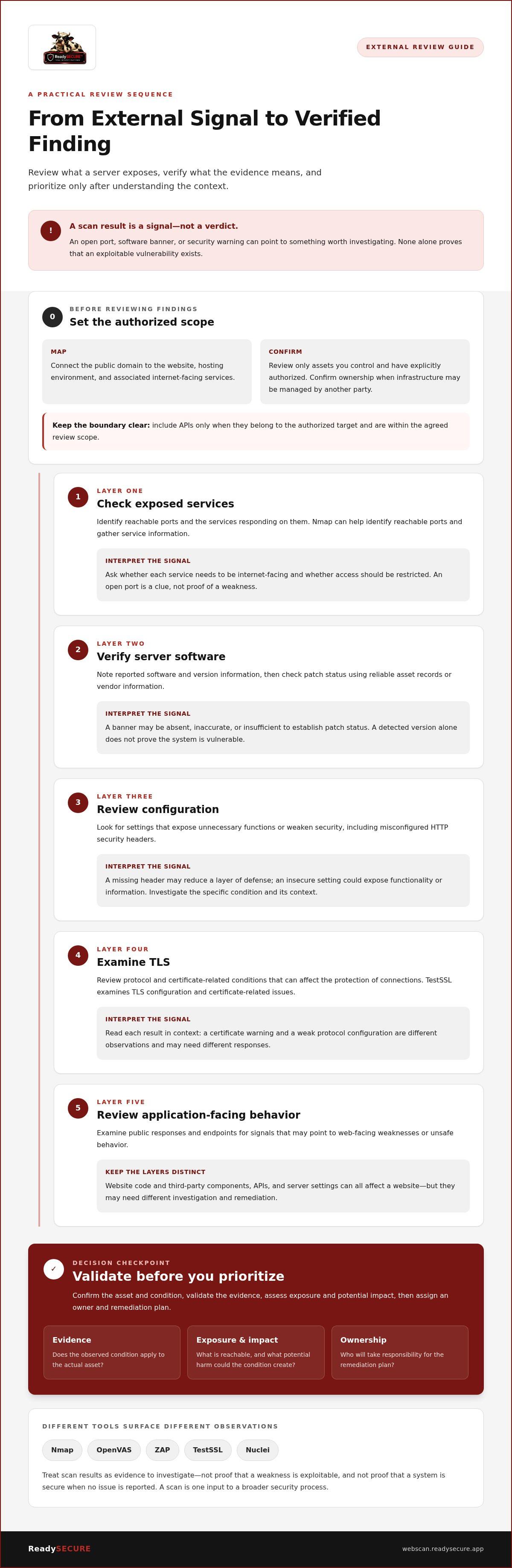
Start by mapping the public domain to the systems that serve it: the website, its hosting environment, and associated internet-facing services. Keep the review within assets you control and have explicitly authorized. A domain can point to infrastructure managed by another party, so confirm ownership and scope before testing it.
Separate the layers under review:
- Server software and configuration: the web server and settings that govern its behavior.
- Website code and third-party components: application logic and dependencies delivered through the site.
- APIs: include them only when they belong to the authorized target and are within the agreed review scope.
This separation helps direct findings to the right team. A server setting and a flaw in application code may both affect a website, but they call for different investigation and remediation.
What can a vulnerability scan establish?
A scan records conditions its checks can observe, such as a reachable service, a reported software version, or a configuration signal. That evidence can guide follow-up, but it doesn’t automatically confirm exploitability or reveal every weakness. A detected version is not proof that the system is vulnerable: patch status, configuration, and the specific affected conditions may change the assessment.
A scan identifies evidence, not certainty. Treat each result as a reason to verify the relevant asset and condition, then assess likely impact. A clean report also has limits: it describes what the checks observed within their scope and at that point in time. It cannot establish that the entire system is secure or replace a broader security assessment.
Which Web Server Weaknesses Can You Identify from the Outside?
A focused external review looks beyond application code. It checks what the server exposes, how it identifies itself, how it handles encrypted connections, and what its public responses reveal. These observations help build a picture of risk, but each needs interpretation within the target’s configuration and intended use.
Organize the review into five layers:
- Exposed services: Identify reachable ports and the services responding on them. An open port is a clue, not proof of a weakness.
- Server software: Note reported software and version information, then verify patch status through reliable asset records or vendor information.
- Configuration: Look for settings that expose unnecessary functions or weaken security, including misconfigured HTTP security headers.
- TLS: Examine protocol and certificate-related conditions that can affect the protection of connections.
- Application-facing behavior: Review public responses and endpoints for signals that may point to web-facing weaknesses or unsafe behavior.
This layered approach keeps identifying web server vulnerabilities grounded in observable evidence. NIST publishes broader security resources that can help teams frame reviews alongside operational context and internal standards; its NIST cybersecurity guidelines are a useful reference point.
How do exposed ports and service versions reveal risk?
On an authorized target, Nmap can identify reachable ports and gather service information. For each result, ask whether the service needs to be internet-facing and whether access should be restricted. An administration service, for example, may be legitimate but still deserve tighter network access than a public website.
A service banner can help identify what appears to be running, but it may be absent, inaccurate, or insufficient to establish patch status. Confirm the software and version against asset records and vendor information before treating the observation as a vulnerability.
What do TLS and web configuration checks uncover?
TestSSL examines TLS configuration and certificate-related issues. Its findings can identify connection settings that warrant review, but read them in context: a certificate warning and a weak protocol configuration are different observations and may require different responses.
Check HTTP security headers and server settings separately. A missing header may reduce a layer of defense, while an insecure setting could expose functionality or information; neither automatically proves that an attacker can exploit the site. Outdated components also need verification, since a version signal alone doesn’t establish that a vulnerable condition exists.
ZAP and Nuclei can surface web-facing findings through their respective scanning approaches, but their results are leads to assess, not a certification that the server is secure. For an external scan to support this review, use an authorized ReadySECURE scan only for a website, API, or internet-facing host you control and have authorized in writing.
How Do You Compare Scan Findings with Reliable Evidence?
A scan result is a starting point for investigation, not a verdict. Record what the tool observed, look for independent evidence, note what remains uncertain, and choose a proportionate next step. This evidence-led method makes identifying web server vulnerabilities more reliable without treating every alert as a confirmed weakness.
Each scanner observes different parts of the target. Nmap reports reachable ports and service information; OpenVAS can identify network-level vulnerability signals; ZAP examines web application behavior; TestSSL checks TLS configuration and certificate-related conditions; and Nuclei tests for matches against templates. Their results can complement one another, but overlap alone doesn’t confirm a finding. Compare observations with asset records, configuration details, and relevant vendor or vulnerability information.
| Scanner signal | Corroborating evidence | Uncertainty | Next action |
|---|---|---|---|
| Nmap reports a service and version | Compare with asset inventory and package records | A banner may be missing, inaccurate, or insufficient to show patch status | Confirm the software and whether the service needs public access |
| OpenVAS flags a possible software vulnerability | Check the affected product, version, and configuration against vendor details | Detection may rely on version or network-visible signals | Verify applicability on the host before planning a fix |
| ZAP reports an application behavior | Review the request, response, and affected endpoint | Some behaviors depend on authentication or application state | Reproduce safely in scope and assess the impact |
| TestSSL or Nuclei reports a match | Review the TLS configuration or template evidence and target response | A warning or template match may lack context | Confirm the condition and determine whether remediation is needed |
How should you validate a possible CVE match?
A CVE record describes a publicly disclosed vulnerability and its affected conditions. Compare the record’s product, version range, configuration, and exposure details with evidence from the target. A version string that appears to match is not enough if the software identity or patch state is uncertain. Check reliable host or package records where available, then determine whether the documented conditions apply. A CVE listing alone does not prove that a particular server is vulnerable.
Independent confirmation and system context reduce misclassification. For application-facing issues, the OWASP Top Ten can help frame common risk categories, but it doesn’t establish that a specific target has a particular flaw.
Where do automated checks fall short?
Coverage depends on what is in scope, what the scanner can see, its configuration, and the method it uses. A public, unauthenticated check may not observe behavior available only after login. Business logic and authenticated workflows can also require separate assessment. Template-based results need interpretation too; the Nuclei template scanning guide explains how template matches provide targeted detection signals, not a complete security assessment.
How Should You Prioritize and Remediate Web Server Findings?
A useful finding should lead to a decision, an owner, and a documented next step. Use a consistent triage sequence so urgent exposure is handled promptly and lower-priority work doesn’t disappear from view. The process also makes the reasoning behind remediation clear to technical teams and stakeholders.
For each finding, work through these steps:
- Confirm the asset. Verify the affected host, service, or application belongs to your environment and is within the review scope.
- Validate the evidence. Check the scanner output against system records, configuration, or other reliable evidence. Resolve mismatches before treating the alert as confirmed.
- Assess exposure. Determine whether the affected service is internet-facing, what data or functions it can reach, and whether access is already restricted by compensating controls.
- Assign an owner. Route the finding to the team responsible for that server, application, or configuration. Include the evidence and the reason for its priority.
- Plan remediation. Choose an action that addresses the confirmed condition, set a target for review, and record any operational dependency or accepted residual risk.
Where evidence supports it, remediation may mean patching affected software, disabling an unnecessary public service, restricting access, or correcting an insecure configuration. Match the fix to the verified cause. Avoid changing unrelated settings simply to clear an alert, since that can introduce disruption without resolving the underlying issue.
How do severity and real-world risk differ?
Severity describes the potential impact of a vulnerability under defined conditions. It’s a useful signal, not a complete measure of risk to your organization. A reachable service tied to sensitive data or a critical business function may need faster attention than a similar issue on a tightly restricted system. Consider compensating controls, but document how they reduce exposure and any limits they leave.
Set priority by weighing evidence, exposure, and potential impact together.
What should happen after a fix?
Retest the affected condition using a method suited to the original evidence. Compare the new result with the original finding, and record what changed, who owns the fix, and whether exposure remains. If the issue can’t yet be addressed, document the reason, existing controls, and a review point rather than treating it as closed.
One retest confirms only the condition it checks; it doesn’t establish that every weakness has been found or resolved. A repeatable review helps teams spot changes and revisit outstanding work. For ongoing review context, see this continuous security scanning strategy.
ReadySECURE reports prioritize findings with severity and remediation guidance. An authorized external scan can add structured evidence to your review for a target you control and have authorized in writing.
How Can ReadySECURE Help Identify Authorized Server Vulnerabilities?
ReadySECURE gives teams a structured way to gather external evidence for websites, APIs, and internet-facing hosts they control. The workflow starts with a target in scope and written authorization. Once authorization is provided, the platform runs its scanners, and the findings help guide investigation and remediation. This makes scanning a practical input to identifying web server vulnerabilities, while keeping permission and scope explicit.
The platform uses six industry-standard scanners, including Nmap, OpenVAS, ZAP, TestSSL, and Nuclei. Together, their observations support different parts of an external review, including reachable services, network-level signals, web-facing behavior, TLS conditions, and template-based matches. No one tool, or combination of automated tools, proves that a system is secure or substitutes for a complete security assessment.
What does the scan provide?
Results are organized into a prioritized report with severity and remediation guidance. Each result also includes a signed authorization record, helping preserve the link between the finding and the authorized assessment. Treat the report as a working queue: investigate the evidence, decide which findings apply, and assign appropriate fixes. For more detail on the free scan and its role, see the ReadySECURE free website security scan guide.
One free scan covers one authorized target. ReadySECURE Paid Plans add scheduled scanning, history, and trend analysis, which can help teams review changes over time and track whether previously identified issues remain. These capabilities support a repeatable process; they don’t guarantee that every vulnerability will be detected or resolved.
How do you take the next step responsibly?
First, select a website, API, or internet-facing host you control. Confirm that the target belongs within your intended scope, then provide written authorization before scanning begins. Don’t include systems belonging to another organization or assets you’re not authorized to assess. Clear scope helps keep the results relevant and the process accountable.
After the scan, review the report alongside your own asset and configuration information. Use the findings to plan validation and remediation, then retest relevant conditions as part of your broader security process. A scan is a useful snapshot of observed conditions, not a guarantee of complete security.
To begin, start an authorized ReadySECURE Free Scan for one target you control and have authorized in writing.
Make Your Next Security Review Evidence-Led
Identifying web server vulnerabilities is most useful when it leads to a clear decision: verify the evidence, address meaningful exposure, and check whether the change worked. Keep that cycle in your routine rather than treating any single review as the final word. As systems and configurations change, a consistent process helps your team notice new concerns and keep unresolved risks visible.
Your next step can be practical and controlled. Select a website, API, or internet-facing host you own, define the target clearly, and provide written authorization before scanning. ReadySECURE’s authorized scan uses six industry-standard scanners, including Nmap, OpenVAS, ZAP, TestSSL, and Nuclei. Findings are prioritized with severity and remediation guidance, and each result includes a signed authorization record. Use those results to inform your security work, not as proof that every risk has been found or removed.
Ready to put the process into practice? Start an authorized ReadySECURE Free Scan for a target you control. A careful, evidence-led review is a solid next step toward more confident security decisions.
Frequently Asked Questions
How can I identify vulnerabilities on my web server?
Start by identifying the internet-facing hosts and services you own, then review their software, configurations, TLS settings, and public-facing behavior. Use authorized scanning to gather observations, and compare them with asset records, vendor advisories, and configuration evidence. When identifying web server vulnerabilities, keep a record of the target, scan scope, result, and follow-up decision. This makes it easier to investigate a finding and track whether action is still needed.
Can a vulnerability scan confirm that my web server is secure?
No. A scan can report conditions its checks observed within a defined scope and at a particular time, but it can’t prove that no vulnerabilities exist. For example, an external scan may not see behavior that requires an account or access to internal systems. Treat a clean result as one useful observation, not a security guarantee. Combine scanning with configuration reviews, patch management, and checks suited to your applications and environment.
What is the difference between an open port and a web server vulnerability?
An open port means a service is reachable through that network entry point. A vulnerability is a weakness that could be used to affect a system or its data. A public HTTPS port, for example, may be expected for a website; its presence alone doesn’t show a flaw. Review what service responds, whether it needs public access, and whether its software and configuration create a verified security concern.
How do I know whether a CVE applies to my server?
Compare the CVE record’s affected product and version range with evidence about the software actually running on your server. Then check any stated configuration or exposure conditions. A banner can misidentify software, and vendors may backport fixes without changing the version string in an obvious way. Use package records, vendor advisories, and configuration details where available. A matching CVE number or version clue is a prompt to investigate, not confirmation by itself.
Can scanning a live web server disrupt its operation?
It can, depending on the checks, target, configuration, and available resources. Some requests may increase load, trigger monitoring alerts, or interact unexpectedly with an application. Before testing a live system, define the authorized scope, understand the scanning method, and coordinate with the people responsible for operations. Consider a lower-risk environment or an agreed maintenance window when appropriate, and monitor the service during testing. Don’t scan systems without written authorization.
How often should I scan an internet-facing web server?
Set a cadence that reflects how often the system changes and how exposed or important it is. A new deployment, software update, configuration change, or newly exposed service may justify a scan sooner than the regular schedule. Also review unresolved findings rather than relying only on fresh results. ReadySECURE Paid Plans support scheduled scanning, history, and trend analysis, which can help teams establish a repeatable review process.
What should I do if a vulnerability scan finds a critical issue?
First, confirm the affected asset and inspect the evidence rather than assuming the alert is accurate. If the condition is verified, assess whether it’s reachable and what data or functions could be affected. Alert the responsible technical owner, then follow your organization’s process to reduce exposure and apply an appropriate fix. Retest the condition afterward and document remaining risk. If there are signs of active compromise, follow your incident response procedures.


